Key differences
The central difference is analysis depth versus analysis plus intervention. Both products reconstruct eligible browser sessions, aggregate interactions, build funnels, analyze forms, and collect feedback. Their strongest operating loops are different.
Mouseflow emphasis
Rank and investigate
Conversion signal to segment, friction score, comparison heatmap, journey or funnel, representative replay, prioritized change, and verification.
Lucky Orange emphasis
Observe and intervene
Page or funnel signal to dynamic heatmap or recording, then survey, announcement, proactive chat, or a current-visitor conversation.
Shared evidence
Behavior is not intent
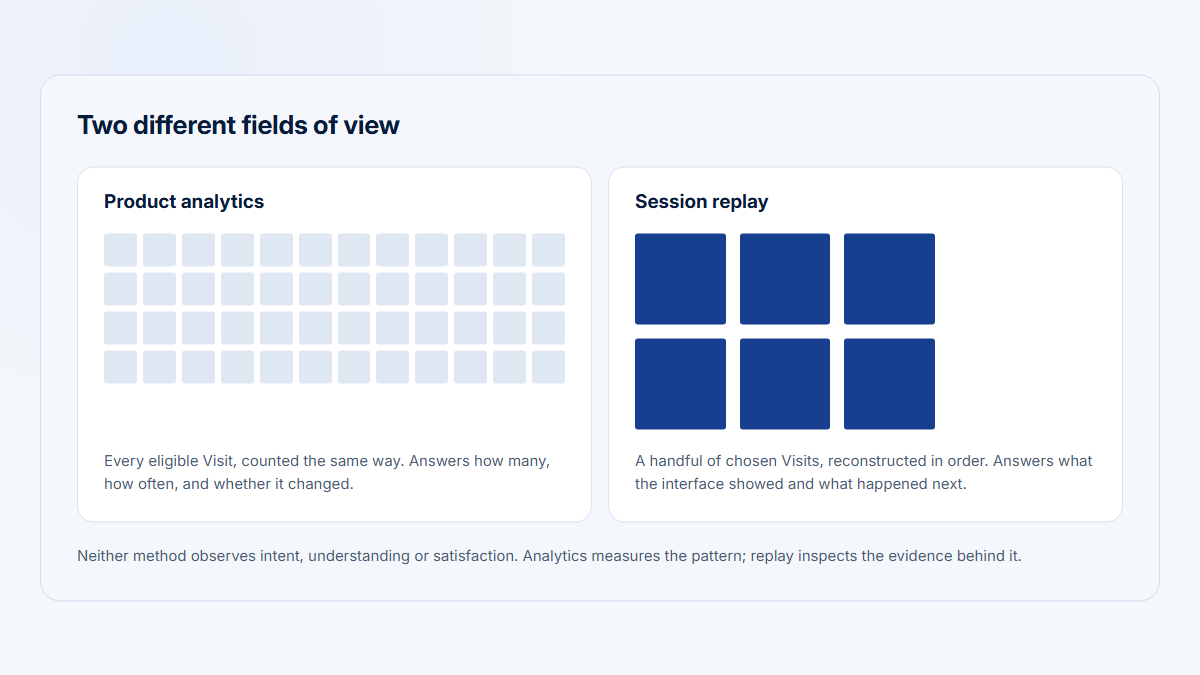
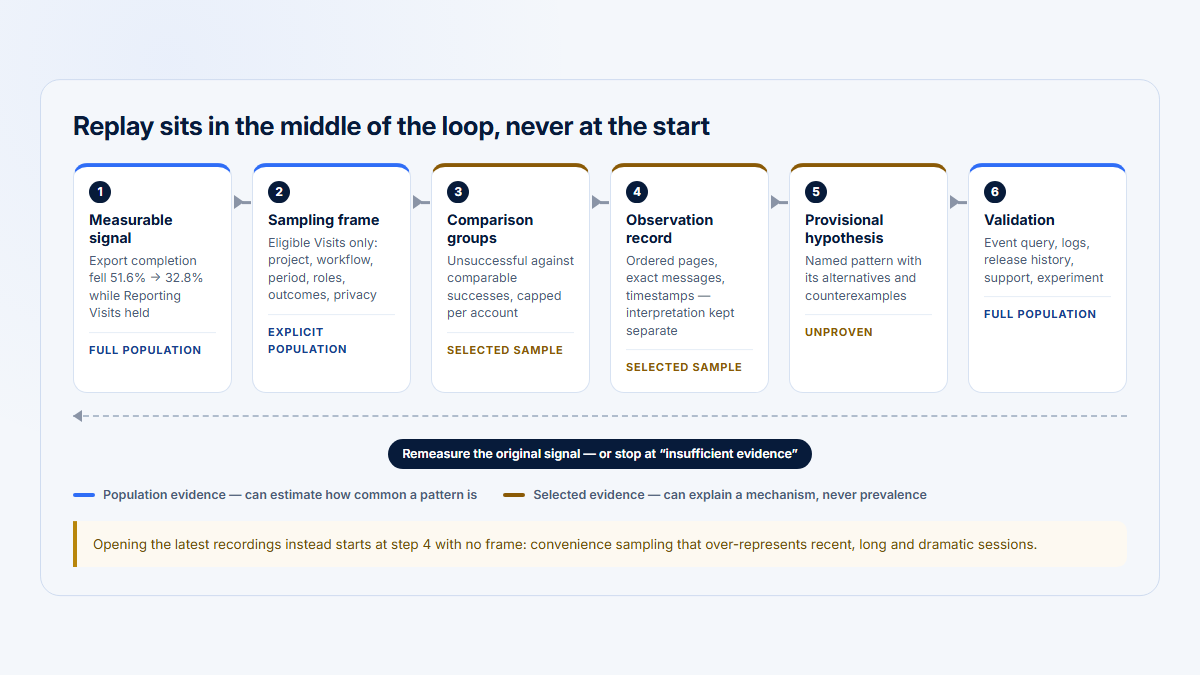
Replay, heatmaps, rage clicks, and abandonment reveal captured actions. They do not establish intent, prevalence, business impact, or causality by themselves.
Behavior analytics means aggregated and session-level evidence about captured website interactions. Conversion rate optimization is the process of finding, testing, and validating changes against a defined conversion metric. A tool can support CRO without being the canonical conversion system.
One conversion investigation, two ways to narrow it
Shared start
Mouseflow branch — observe and rank
Lucky Orange branch — ask and assist
Both end here
The branches reflect a real difference in temperament: one ranks observed friction for you, the other adds a way to ask the visitor directly. Both are worthless without the shared start and the final verification.
Decision by scenario
Start with the operating question and the person who must act. A checklist of overlapping features is less useful than testing whether the product completes the team's recurring decision loop.
| Scenario | Better fit | Reason and caveat |
|---|---|---|
| Recurring CRO and UX research | Mouseflow | Friction ranking, heatmap comparisons, replay collaboration, and higher-tier journeys create a structured investigation loop. |
| Ecommerce with live assistance | Lucky Orange | Dynamic heatmaps, Live Visitor View, chat, surveys, and announcements sit in one paid toolkit. |
| Detailed lead-form diagnosis | Mouseflow, narrowly | Premium adds submit-failure and replay workflows; validate the actual embedded form and plan before deciding. |
| Small site needing an all-in-one toolkit | Depends | Mouseflow has a lower displayed entry number and more sessions; Lucky Orange may replace separate communication tools. Currencies differ. |
| Read API or AI-assistant workflow | Mouseflow | Premium documents REST and MCP. Confirm API volume, retired MCP tier wording, and the exact contract. |
| Shopify-focused marketing team | Lucky Orange | Ecommerce events and live communication fit the role; Shopify billing cannot use Keep Me Tracking, and checkout capture depends on Shopify constraints. |
Worked example: mobile conversion falls after a redesign
Assume traffic is stable, but mobile checkout and demo-form completion decline after a release. Use GA4 or the commerce system as the conversion source of truth, then use either behavior tool to investigate the same eligible mobile sessions during the same post-release window.
| Step | Mouseflow route | Lucky Orange route |
|---|---|---|
| 1. Confirm | Build checkout and form funnels after confirming the metric elsewhere. | Use Conversion Funnels after confirming the metric elsewhere. |
| 2. Segment | Save mobile, browser, campaign, and landing-page filters. | Segment by device, source or UTM, browser, and page. |
| 3. Inspect paths | Use Enterprise Journeys or funnel exits. | Use funnels and Page Insights. |
| 4. Find friction | Rank rage clicks, dead clicks, click errors, and high-friction pages. | Filter frustrated sessions and use Discovery if entitled. |
| 5. Analyze fields | On Premium+, compare drop-off, conversion, and submit failures. | Compare field abandonment, time, attempts, order, and device. |
| 6. Review evidence | Sample successful and failed recordings. | Open recordings from funnels, forms, segments, or Discovery. |
| 7. Ask | On Advanced+, target a mobile and campaign survey. | Target a survey or exit-intent question. |
| 8. Contact | Observe live; use a separate visitor-chat product. | Open Live Visitor View and send a contextual chat invitation. |
| 9. Prioritize | Combine prevalence, conversion effect, and replay evidence. | Combine funnel or form prevalence, AI evidence, and feedback. |
| 10. Verify | Repeat saved segments and comparisons, then check conversion. | Repeat segments, funnels, heatmaps, and forms, then check conversion. |
Replay, heatmaps, journeys, and friction diagnosis
Mouseflow has the broader documented diagnosis surface; Lucky Orange emphasizes fast access to dynamic website evidence. Neither product's marketing claims establish better replay fidelity, coverage, or performance in a controlled test.
| Investigation task | Mouseflow | Lucky Orange |
|---|---|---|
| Narrow recordings | Page, referrer, campaign, geography, device, browser, duration, friction, tags, and variables | Source, device, funnel step, frustration signal, saved segments, and visitor context |
| Collaborate | Timestamp comments, tags, watched state, stars, and share links | Profiles, notes, team roles, recordings, and communication context |
| Page-level maps | Click, scroll, geo; paid tiers progressively add attention, movement, friction, and interactive maps | Click, scroll, and move maps |
| Dynamic UI | Interactive maps for menus, tabs, and other stateful elements | Explicit support for popups, dropdowns, sliders, carousels, React, AJAX, and SPAs |
| Compare maps | Click and scroll comparisons on paid plans; advanced types on Advanced+; interactive maps cannot use Compare Mode | No equivalent general heatmap comparison workflow was found in reviewed public documentation |
| Map journeys | Enterprise Journey Analytics maps paths around a focus page and grouped pages | No separately documented aggregate journey mapper found; use funnels, Page Insights, segments, and recordings |
| Rank friction | Proprietary score, seven event types, Friction Insights, and ranked pages or elements | Frustration filters, rage-click or stall triggers, and Discovery-led prioritization |
| Live observation | Live session viewing without visitor-facing chat | Live Visitor View with contextual chat |
Mouseflow documents click error, click rage, dead click, 404, bounce or backtrack, speed browsing, and custom friction. Its friction model helps prioritize investigation, but a proprietary score is not a root-cause finding.
Lucky Orange's dynamic heatmap documentation is especially explicit about modern interface states. Absence of a public comparison feature does not prove one cannot be produced through another workflow or future release.
Recording coverage and plan caps
Mouseflow records 100% of eligible sessions by default. Its controls allow Advanced to reduce the rate to 75%, Premium to 50%, and Enterprise to a custom rate. Lowering it also reduces how often Mouseflow surveys can appear because they use the same tracking script.
Lucky Orange markets unsampled coverage, but consent, blockers, bots, browser support, and the plan cap still shape what is available. Without Keep Me Tracking, tracking and communication pause at the cap. New paid accounts default that auto-upgrade mechanism on, but Shopify-billed accounts cannot use it.
Forms, surveys, and live visitor contact
Lucky Orange wins when communication is part of the conversion workflow. Mouseflow can connect forms, surveys, friction, and replay on qualifying tiers. Lucky Orange combines form evidence with surveys, announcements, live chat, and current-visitor context across paid plans.
| Need | Mouseflow | Lucky Orange |
|---|---|---|
| Form diagnosis | Premium+ Drop-off, conversion, submit failures, replay, and export | Paid plans Field abandonment, time, attempts, order, device, and replay |
| Survey creation | Advanced+ Six question types, NPS, branching, branding, and behavior or friction triggers | Paid plans Page, source, device, segment, event, scroll, and exit targeting |
| Survey allowance | No numeric survey or response limit appears on the current public pricing table | Unlimited survey and announcement creation; do not interpret this as unlimited responses or exports |
| Announcements | Not native | Included Targeted on-site messages |
| Live chat | Not native Product support chat is not visitor chat | Included Proactive invites with session context |
| Live visitor view | Observe an active session | Observe and start a chat; remote-control co-browsing was not verified |
Lucky Orange's communication suite is the clearest product-level difference. It turns a behavioral signal into a question or conversation, but live intervention also needs staffing, escalation rules, consent, and a support handoff.
AI, data access, privacy, and administration
Mouseflow has the clearer public read-access path; neither AI assistant has enough public evidence for an accuracy comparison. Mina and Discovery can narrow evidence, but the linked recordings, heatmaps, funnels, and forms remain the material to validate.
| Area | Mouseflow | Lucky Orange |
|---|---|---|
| AI status | Mina is beta and included for paying customers during beta | Discovery is included in trial; current vendor pages conflict on paid-plan add-on status |
| AI evidence | Natural-language filtering and investigation that leads to underlying sessions | Answers and Quick Actions linked to heatmaps, funnels, forms, and recordings |
| Published AI limits | No public usage quota or unsupported-question matrix found | No public usage quota found; verify entitlement and price in Plan & Billing |
| AI data statement | States Customer Data is not used to train public or third-party AI models | Terms allow de-identified Usage Data compiled from Customer Data for AI training and product development; OpenAI is a listed subprocessor |
| Read access | Premium+ REST API and MCP; current pricing should override the MCP page's retired Growth wording | Public browser and Node ingestion libraries; no comparable public analytics-query API or MCP found |
| Exports | Workflow and entitlement vary; replay CSV or download is Premium+ | Several CSV exports exist; no public bulk replay-download workflow found |
| Capture privacy | Sensitive fields and IPs excluded by default, visual masking, consent integration, configurable exclusions | Keystrokes masked and IPs hashed by default; optional pre-transmission text scrambling |
| Data region | EU- or US-region residency is assigned largely by customer geography; confirm the requested region | Production data normally uses US Central unless a custom plan or other term applies |
| Team controls | Unlimited users; permissions and multi-organization controls vary by plan | Unlimited members with Owner, Admin, Creator, and Member permissions |
The Mina AI page makes a specific training-data statement. Lucky Orange's current terms contain an affirmative de-identified Usage Data provision. That does not prove raw Customer Data trains public models; it does require procurement review.
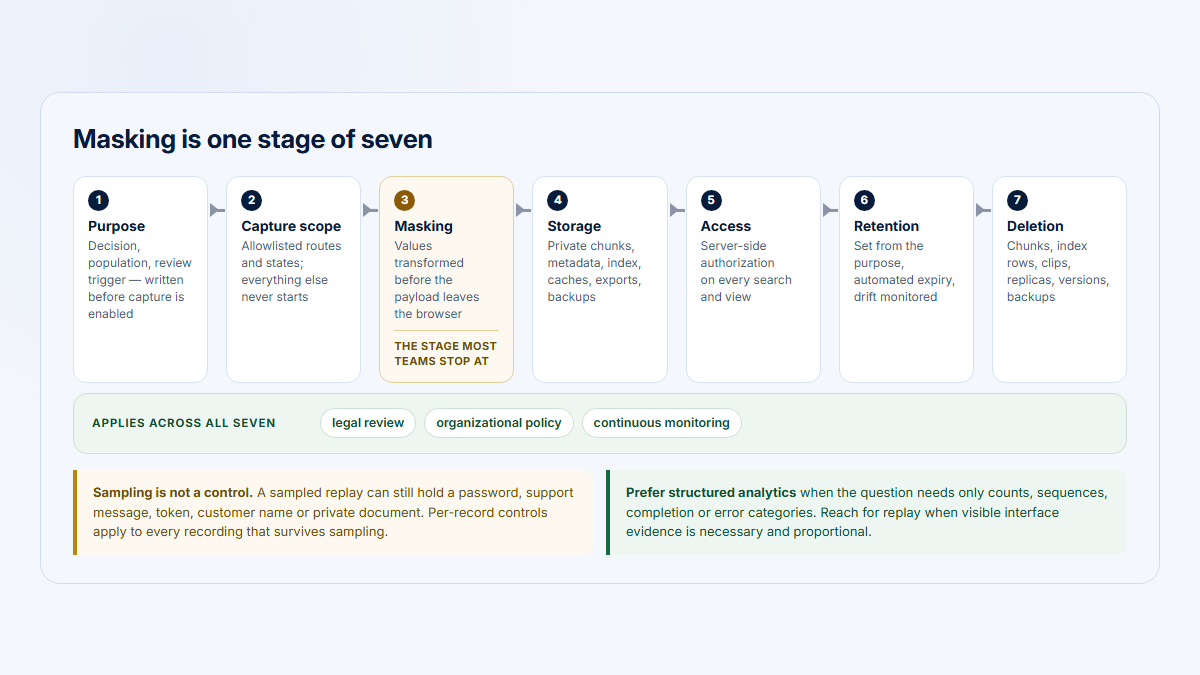
Mouseflow documents EU and US storage regions. Lucky Orange documents keystroke masking, text scrambling, and ordinary US processing. In both products, the customer remains responsible for consent, excluded routes, selectors, DOM text, identity fields, and access policy.
Pricing and customer ratings
The entry prices are not like-for-like. Mouseflow Essential lists more sessions but excludes several capabilities that drive this verdict. Lucky Orange Build includes its core analytics and communication toolkit, while storage, extra sites, and Discovery may add cost.
Annual entry
Mouseflow Essential
25/month
One project and one funnel. Surveys and advanced heatmaps start at Advanced; Forms, export, REST, and MCP at Premium; Journeys at Enterprise.
Annual entry
Lucky Orange Build
$32/month
Core paid features are listed across plans. Extra sites are $5, longer storage costs more, and Discovery's paid packaging needs confirmation.
G2 snapshot
Mouseflow reviews
G2 snapshot
Lucky Orange reviews
G2 populations, collection methods, incentives, company sizes, and use cases differ. Mouseflow's visible count was stable at recheck; Lucky Orange counts varied across G2 surfaces, so this page does not publish an unstable count. Ratings are context, not controlled product tests.
Full plan tables and cost cautions
Mouseflow's page displays bare 25/109/319 numbers, while its embedded structured data declares EUR. Its terms allow EUR or USD. Confirm checkout currency, tax, renewal, and local pricing.
| Plan | Price/month | Sessions | Projects | Funnels | Retention |
|---|---|---|---|---|---|
| Free | 0 | 500 | 1 | 1 | 1 month |
| Essential | 25 | 5,000 | 1 | 1 | 3 months |
| Advanced | 109 | 25,000 | 2 | 5 | 6 months |
| Premium | 319 | 100,000 | 5 | 10 | 12 months |
| Enterprise | Custom | Custom | Custom | Custom | Custom |
Mouseflow's 14-day trial documents 2,000 sessions, five projects, ten funnels, one month of retention, and premium feature access.
| Plan | Price/month | Sessions | Base storage |
|---|---|---|---|
| Build | $32 | 3,500 | 60 days |
| Grow | $72 | 10,000 | 60 days |
| Expand | $199 | 50,000+ | 60 days |
| Scale | $839 | 300,000+ | 60 days |
| Enterprise | Custom | 700,000+ | Contract |
Lucky Orange's public pricing offers a seven-day trial. An older official help article still documents a manually selected free plan with 100 sessions, one site, and 30-day storage, but the current pricing cards omit it. Verify availability during signup.
Which should you choose?
Choose the operating loop, then buy the plan that completes it. Mouseflow is the stronger fit when ranking friction, comparing behavioral evidence, collaborating on replay, and connecting higher-tier data workflows justify the packaging. Lucky Orange is stronger when observation must lead to feedback, messaging, or live help.
| Choose | When it is the stronger fit | Validate before signing |
|---|---|---|
| Mouseflow | Structured CRO diagnosis, friction ranking, heatmap comparisons, replay collaboration, and read-access workflows | The exact Advanced, Premium, or Enterprise entitlement; recording rate; API limits; requested data region |
| Lucky Orange | Marketing or ecommerce analysis plus surveys, announcements, live view, and contextual chat | Discovery price, dynamic-state fidelity, form coverage, storage, Keep Me Tracking, and Shopify constraints |
| Run both briefly | A migration, disputed replay fidelity, or uncertain dynamic UI makes documentation insufficient | Match consent, exclusions, UTMs, identity, eligible sessions, conversion definitions, and the same representative window |
Assume historical recordings remain in the former platform unless an import is confirmed. Temporary coexistence can reduce migration risk. Permanent duplication usually adds consent, governance, cost, and conflicting evidence without creating a better decision.
Where Hymetry fits
Hymetry is not a replacement for either website CRO platform. Mouseflow and Lucky Orange primarily explain anonymous or identified website behavior. Hymetry is account-centric product intelligence for authenticated B2B SaaS, connecting Companies, Users, product areas, grouped Pages, adoption measures, and inspectable Visits.
Company question
Which accounts adopted?
Measure the commercial customer as a Company, then inspect the users and product areas contributing to its adoption signal.
Distribution question
Is use broad or fragile?
Separate company adoption from user penetration and identify whether one champion hides weak participation across the account.
Evidence question
Which Visits explain the signal?
Start from an account or user pattern, then inspect relevant session evidence instead of browsing random recordings.
Hymetry should not be presented as a substitute when the buyer needs marketing-site heatmaps, campaign segmentation, advanced form analytics, surveys, announcements, live chat, current-visitor assistance, mature CRO AI, or a broad ecommerce integration ecosystem.
Its limitations are also material: Hymetry is newer, has a smaller ecosystem and fewer integrations, narrower public-site analytics, no equivalent live-chat proposition, less mature CRO tooling, and no mature independent review score.
FAQ, methodology, and sources
Is Mouseflow better than Lucky Orange?
Mouseflow is better for structured investigation, friction ranking, heatmap comparison, replay collaboration, and higher-tier data workflows. Lucky Orange is better when surveys, announcements, live visitor observation, and live chat are part of the same operational loop. The purchased tier can reverse a feature-level verdict.
Which has better session recordings?
No replay-fidelity test was performed. Mouseflow documents richer playback and collaboration controls. Lucky Orange connects recordings more directly to current visitor activity and chat. Test representative routes, dynamic states, masked content, mobile browsers, and successful and failed sessions in both.
Which has stronger heatmaps?
Mouseflow has more documented map types and broader comparison controls, with several types gated by plan. Lucky Orange emphasizes dynamic elements, device and campaign segmentation, and SPA or ecommerce interfaces. The stronger product depends on whether comparison depth or live dynamic-state coverage matters more.
Which is better for forms and visitor communication?
Mouseflow Premium offers a structured form workflow with submit-failure evidence and replay. Lucky Orange provides detailed form evidence across paid plans and is the clear choice when the team also needs surveys, announcements, proactive invitations, and live visitor chat.
How do Mina AI and Discovery AI differ?
Mina is a Mouseflow beta layer that narrows investigations to underlying sessions and is included for paying customers during beta. Discovery connects answers to Lucky Orange evidence such as heatmaps, funnels, forms, and recordings. Lucky Orange's current pages conflict on paid packaging; neither assistant was accuracy-tested.
Which is cheaper for a small website?
The advertised annual entry numbers are 25 per month for Mouseflow Essential in EUR structured data and $32 per month for Lucky Orange Build. They include different sessions, retention, and capabilities. Normalize currency, tax, feature gates, storage, extra sites, communication-tool replacement, and overage behavior before calling either cheaper.
Can either replace Google Analytics?
Not completely for most teams. Keep GA4, ecommerce reporting, or another analytics system as the canonical source for acquisition, traffic, and conversion trends. Use Mouseflow or Lucky Orange to investigate behavioral patterns, collect qualitative evidence, and develop testable CRO hypotheses.
Where does Hymetry fit?
Hymetry fits authenticated B2B SaaS when the central questions concern company adoption, eligible-user penetration, champion concentration, momentum, and the Visits behind those patterns. It complements website behavior analytics; it does not replace public-site heatmaps, advanced forms, surveys, announcements, or live chat.
Methodology, disclosure, and evidence limits
Research began from the supplied comparison brief verified August 14, 2026. Pricing, packaging, product, help, legal, developer, and review pages were rechecked August 15, 2026. Material conflicts were disclosed instead of silently reconciled.
Official product pages establish documented capabilities, not comparative quality. Vendor-authored competitor pages were treated as advocacy. G2 supplied directional ratings and themes; its reviewer populations are uncontrolled and Lucky Orange counts varied across G2 surfaces.
No authenticated product test, replay-fidelity benchmark, performance test, AI-quality test, support test, or contract review occurred. Absence claims mean no comparable public capability was found in the reviewed materials, not that a private, beta, negotiated, or future capability cannot exist.
Sources
Mouseflow official product and pricing sources
- Mouseflow plans, feature gates, sessions, projects, funnels, and retention
- Mouseflow Session Replay
- Mouseflow website heatmaps
- Mouseflow heatmap comparison modes and limits
- Mouseflow Friction Score and event taxonomy
- Mouseflow Journey Analytics
- Mouseflow Form Analytics
- Mouseflow feedback surveys
- Mouseflow built-in filters
- Mouseflow recording-rate controls
- Mouseflow monthly recording limits
Mouseflow AI, API, and privacy sources
- Mouseflow Mina AI status and data statement
- Mouseflow MCP page with retired Growth-tier wording
- Mouseflow REST API documentation
- Mouseflow terms, currency, and AI provisions
- Mouseflow privacy overview and regional storage
- Mouseflow data security and storage regions
- Mouseflow subprocessors and default regional storage
Lucky Orange official product and pricing sources
- Lucky Orange paid pricing, storage, sites, and feature matrix
- Lucky Orange Session Recordings
- Lucky Orange Dynamic Heatmaps
- Lucky Orange analytics, Page Insights, and forms
- Lucky Orange chat, surveys, and announcements
- Lucky Orange Discovery AI
- Lucky Orange competitor page with conflicting Discovery packaging language
- Lucky Orange funnel setup
- Lucky Orange Keep Me Tracking mechanism
- Lucky Orange legacy free-plan help article
- Lucky Orange data retention FAQ
- Lucky Orange roles and permissions
Lucky Orange developer, export, AI, and privacy sources
- Lucky Orange browser library
- Lucky Orange Node library
- Lucky Orange documented data exports
- Lucky Orange terms and AI Usage Data provisions
- Lucky Orange subprocessors
- Lucky Orange security and default processing region
- Lucky Orange pre-transmission text scrambling
- Lucky Orange PII collection guidance
Customer ratings and Hymetry context
- Mouseflow product reviews on G2
- Lucky Orange product reviews on G2
- Hymetry Pages
- Hymetry Companies
- Hymetry Users
- Hymetry Visits
- Hymetry open-source repository
G2 ratings and visible surfaces were checked August 15, 2026. The supplied canonical product context and current Hymetry product pages define Hymetry terminology, positioning, capabilities, and limitations.