The three main session-replay recording models
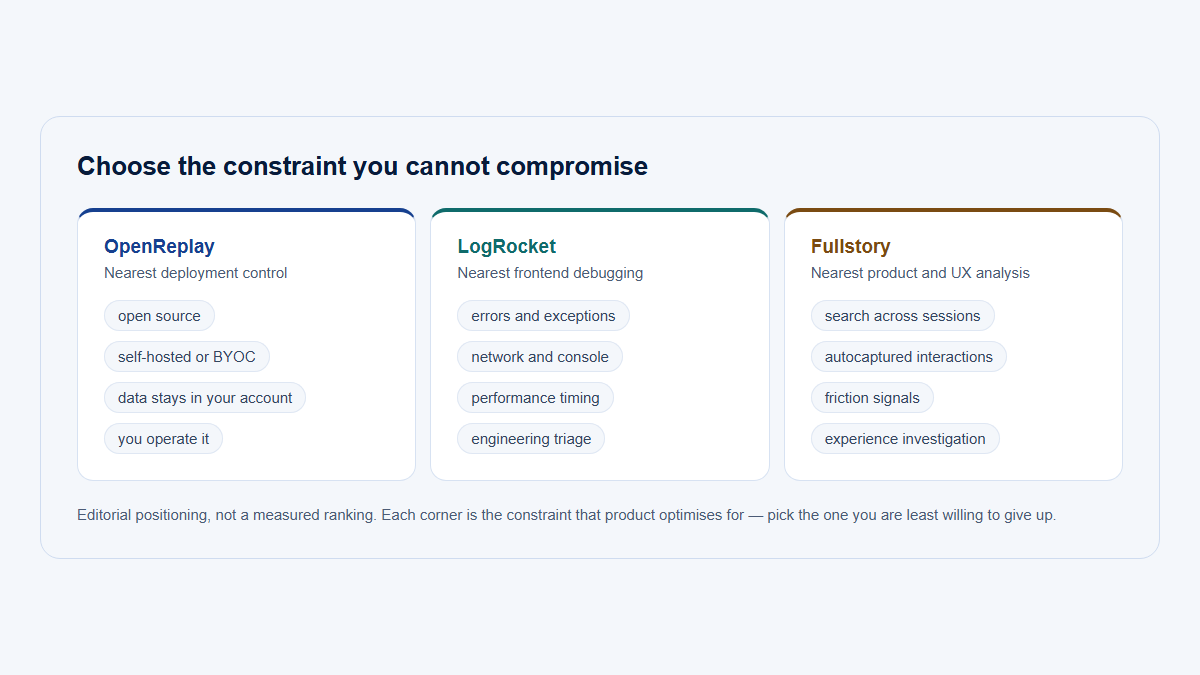
There is no single implementation shared by every replay product. “Session replay” can describe several recording models with different tradeoffs.
DOM and event reconstruction
A DOM-based recorder captures an initial representation of the document and then records selected changes and interactions. The player rebuilds the document and applies those records in timestamp order.
This is the model people often mean by session replay DOM recording. The stored data can include serialized elements, text nodes, attributes, style information, mutation records, input changes, scroll positions, pointer coordinates, clicks, viewport dimensions, and custom metadata.
The main advantages are structure and efficiency. Text and elements remain identifiable rather than becoming only pixels. A product may be able to associate an interaction with a selector, page, element, or analytics event. Masking can also be applied to specific inputs, elements, selectors, or text regions.
The limitation is that the player is reconstructing a page. It is not playing back an exact stream of original pixels. Anything the recorder missed, filtered, sampled, or could not access may be absent or reproduced differently.
Image or frame capture
An image-based approach stores screenshots, visual frames, or an encoded display stream at intervals.
Because it records rendered pixels, it may preserve visual states that DOM observation alone cannot reproduce, including some canvas or graphics output. However, the result is less structurally searchable. Text is no longer inherently text unless a separate OCR or metadata layer is added. Element-level masking and interaction analysis also require different techniques.
Image or frame capture usually creates different storage, bandwidth, and privacy tradeoffs. A high frame rate can increase fidelity and cost. A low frame rate can miss brief states. Pixel capture may also include sensitive content unless masking or exclusion is applied before or during capture.
Hybrid capture
A hybrid system combines structural DOM and event capture with one or more additional layers, such as:
- periodic screenshots;
- canvas frames or drawing commands;
- WebGL-specific capture;
- media-state events;
- network metadata;
- console logs;
- JavaScript errors;
- performance spans;
- custom analytics events.
Hybrid capture can improve diagnostic depth, but it also expands implementation complexity, bandwidth, storage, privacy scope, and the number of ways a replay can become incomplete.
No recording model is universally best. The right choice depends on the product being recorded, the questions the team needs to answer, the privacy rules in force, and the cost of storing and replaying the evidence.
| Consideration | DOM and event reconstruction | Image or frame capture | Hybrid approach |
|---|---|---|---|
| Stored representation | Structured page snapshot plus timestamped changes and events | Screenshots, image frames, or encoded media | Structured replay plus selected visual or diagnostic layers |
| Visual fidelity | Often strong for ordinary HTML interfaces, but reconstruction can diverge | Preserves captured pixels, subject to frame rate, compression, and selected surface | Can improve difficult areas while retaining structure |
| Text and element searchability | Technically possible when unmasked structure is stored and the product supports indexing | Not inherent; usually requires OCR or separate metadata | Structural portions may remain searchable |
| Storage and bandwidth | Often lower than continuous visual frames, but depends on event volume | Often higher as frame rate and resolution increase | Potentially highest if several layers are retained |
| Privacy controls | Can target selectors, element types, attributes, text, and inputs | Often relies on pixel regions, capture exclusions, or visual redaction | Must coordinate privacy rules across every layer |
| Replay performance | Depends on document size, mutation volume, assets, and player behavior | Depends on media decoding and frame delivery | Depends on all enabled layers |
| Diagnostic context | Strong for element and event sequences | Strong for visible pixels | Can combine visual, structural, network, and error evidence |
| Main risk | Mistaking a reconstruction for an exact original | Mistaking sampled or compressed frames for complete activity | Collecting more data than the investigation requires |
How DOM reconstruction works
A DOM-reconstruction replay usually follows a sequence like this.
1. The recorder starts
A script initializes in the page and attaches the observers and event listeners selected by the implementation.
The start point matters. A recorder that starts after a component has already rendered may need a full snapshot to establish the current state. A recorder that starts late, fails during initialization, or is blocked on part of the page can begin with incomplete evidence.
2. It captures metadata and an initial page snapshot
The recorder creates a serializable representation of the page. Depending on the implementation, this may include:
- document structure;
- elements and their hierarchy;
- attributes;
- text nodes;
- comments or other node types;
- input and control state that is not represented by HTML alone;
- inline styles;
- stylesheet rules or references;
- viewport dimensions;
- URL or route metadata;
- scroll position;
- recorder and session identifiers.
A serialized snapshot is not the same thing as saving the original JavaScript application. In DOM-based replay, the player commonly rebuilds the resulting page state rather than rerunning the application’s original scripts.
3. It observes DOM mutations
Web applications continually add, remove, and modify nodes. A MutationObserver can report changes to the document tree, attributes, and text content.
A replay recorder can convert those mutation records into incremental events such as:
- node added;
- node removed;
- text changed;
- class or attribute changed;
- inline style changed;
- component subtree replaced.
Mutation records describe what changed in the document. They do not automatically explain which business action caused the change or what happened on the server.
4. It captures selected interactions and viewport changes
The recorder may attach listeners for interactions and state changes such as:
- mouse or pointer movement;
- clicks;
- touch events;
- input changes;
- focus and blur;
- scrolling;
- window resize;
- viewport changes;
- media interaction;
- page visibility;
- History API navigation;
- custom application events.
High-frequency signals are often sampled or throttled. Recording every pointer coordinate or scroll event can create unnecessary data volume without materially improving the investigation.
5. It timestamps the events
Each stored event receives timing information so the player can reproduce the sequence.
Timing is central to how session replay works. Without ordering and elapsed time, the player would know that changes happened but not when to apply them. Even with timestamps, clock differences, batching, background-tab throttling, dropped events, and player scheduling can affect playback.
6. It sends event batches to storage
An integration may buffer events and transmit them in batches rather than making a network request for every interaction.
Batching improves efficiency, but it introduces failure cases. A tab can close before the last batch is transmitted. A request can be blocked or rejected. A recorder may apply size limits, sampling, compression, or retention rules. A partial recording can therefore end abruptly or lack an earlier event needed to interpret a later mutation.
7. The player reconstructs the page and replays events in order
The replay player rebuilds the initial snapshot inside a controlled environment and then applies the incremental records according to their timestamps.
It may also add presentation features that were not part of the original page, such as:
- a visible cursor;
- click indicators;
- a timeline;
- inactivity skipping;
- speed controls;
- event markers;
- warnings for missing nodes or assets.
Those features make review easier, but they are part of the replay interface—not evidence that the user saw the same overlay during the original visit.
rrweb as one concrete implementation
rrweb is an open-source example of DOM and event reconstruction. It should not be treated as a specification for all replay products.
Its current documentation describes a full serialized snapshot followed by incremental snapshots for DOM mutations and selected interactions. Its design documentation also explains that scripts are not simply rerun during replay; the recorder captures the resulting page changes and the player reconstructs them, by default, in a sandboxed iframe.
rrweb’s configuration demonstrates why capture claims must remain implementation-specific:
- password inputs are masked by default;
- elements can be blocked, input events ignored, and text or input content masked through documented classes, selectors, and options;
- mouse-movement, mouse-interaction, and scroll sampling can reduce event volume;
- canvas recording is disabled by default;
- font collection is disabled by default;
- cross-origin iframe recording is disabled by default and requires rrweb to be injected into the child frame;
- console capture is available through a separate plugin;
- when using the core
@rrweb/recordAPI, the integrating application decides how emitted events are stored and transmitted.
Those are rrweb behaviors and defaults, not universal rules for every session-replay system—and not automatic claims about Hymetry’s current configuration.
What session replay may capture
The answer to “what does session replay capture?” depends on the recorder, enabled options, browser, page architecture, privacy configuration, and whether optional diagnostic layers are installed.
The table below describes common patterns, not guarantees.
| Data category | Commonly captured? | Why it is useful | Important limitation | Privacy consideration |
|---|---|---|---|---|
| Initial DOM state | Common in DOM-based replay | Establishes the page structure from which playback starts | May start late, exclude blocked elements, or miss inaccessible frames | Visible text, attributes, and rendered account data may be sensitive |
| DOM mutations | Common in DOM-based replay | Reconstructs components appearing, disappearing, or changing | A missing earlier node can make later mutations impossible to apply correctly | New error messages, confirmation text, or dynamically rendered data can expose sensitive values |
| Text content | Often, unless masked or excluded | Makes labels, validation messages, and visible state understandable | Text may be stale, replaced, unavailable, or intentionally transformed | Ordinary page text can contain names, email addresses, tokens, support details, or customer data |
| Form input values | Implementation- and configuration-dependent | Shows corrections, selections, and workflow progression | Some recorders store only changes, some store values, and some omit the event | Inputs are a high-risk channel and should not be assumed safe because they are not password fields |
| Masked inputs | Common privacy option | Preserves evidence that typing occurred without storing the original value | The number or timing of mask characters may still reveal limited information, depending on implementation | Masking must be tested; it does not protect copies of the value rendered elsewhere |
| Clicks | Common | Shows selected controls and navigation attempts | A click does not prove the intended target, expected result, or emotional state | Clicked text, element identifiers, and surrounding content may expose context |
| Pointer or mouse movement | Often captured, usually sampled | Helps locate the cursor and approximate interaction paths | Sampling can create jumps; pointer location does not prove gaze or attention | Coordinates can reveal interaction with sensitive page areas |
| Touch interaction | Often captured where supported | Shows taps and some mobile interaction sequences | Multi-touch gestures and browser-native gestures may not replay faithfully | Touch targets can expose the same page context as clicks |
| Scrolling | Common, often throttled | Shows movement through long pages and which region was in view | Scroll events do not prove content was read | Visible sections can still contain sensitive content |
| Viewport size | Common metadata | Helps reconstruct responsive layout | Browser chrome, zoom, device-pixel ratio, and display scaling may still affect appearance | Usually lower sensitivity, but it contributes to device fingerprinting when combined with other metadata |
| Window resize | Often captured | Reproduces layout changes and responsive transitions | A player may scale rather than reproduce every original rendering condition | Can expose device or workspace patterns when combined with other signals |
| Route changes | Often captured by replay products, but only when instrumented | Explains navigation in single-page applications without full reloads | DOM mutations alone do not create a structured page-view model | URLs can contain identifiers, search terms, tokens, or customer data |
| Page visibility | Optional | Distinguishes visible-page time from some background-tab periods | Visibility does not prove attention while the page is visible | Useful for minimization because it can prevent overinterpreting background time |
| Focus and blur | Optional | Adds context for page or control transitions | Window focus is not the same as page visibility or human attention | Focused fields may indicate where sensitive data was entered |
| CSS styles | Common in some form | Helps reconstruct layout, visibility, and component appearance | A recorder may store style attributes, rules, or references rather than a complete computed-style snapshot | CSS selectors and generated content can contain identifiers or application details |
| Stylesheet references and external assets | Commonly referenced; sometimes inlined or collected | Preserves fonts, images, and page presentation | Assets may later move, expire, require authorization, or change | Asset URLs and authorization mechanisms can expose internal structure |
| Console messages | Optional, often plugin-based | Helps connect visible behavior to application warnings and errors | Not inherent to visual replay; logging may be truncated or filtered | Logs frequently contain identifiers, objects, tokens, request details, or user data |
| JavaScript errors and stack traces | Optional | Helps identify a frontend failure near the observed interaction | A captured error does not necessarily explain the visible problem | Stack traces can expose source paths, data values, and implementation details |
| Network URL, method, status, and duration | Optional | Helps connect a click to a failed or slow request | A replay without this layer may still show the resulting UI but not the request | URLs, query strings, headers, and endpoint names can be sensitive |
| Request or response bodies | Usually opt-in or vendor-specific | Can expose validation failures and backend responses | Bodies can be large, encrypted, streamed, inaccessible, or intentionally excluded | This is one of the highest-risk capture categories and requires explicit filtering |
| GraphQL operation details | Vendor- or plugin-specific | Can identify an operation name, variables, result, and duration | Not inherent to GraphQL, the browser, rrweb, or replay generally | Variables and results may contain extensive customer or credential data |
| Performance data | Optional | Adds navigation, resource, rendering, long-task, or timing context | Performance metrics do not automatically identify the user-visible cause | Resource names and spans can expose infrastructure or tenant context |
| Custom analytics events | Integration-defined | Adds business meaning such as “integration test started” or “workspace switched” | An event name or property is only as reliable as its instrumentation | Event properties must be filtered independently of visual masking |
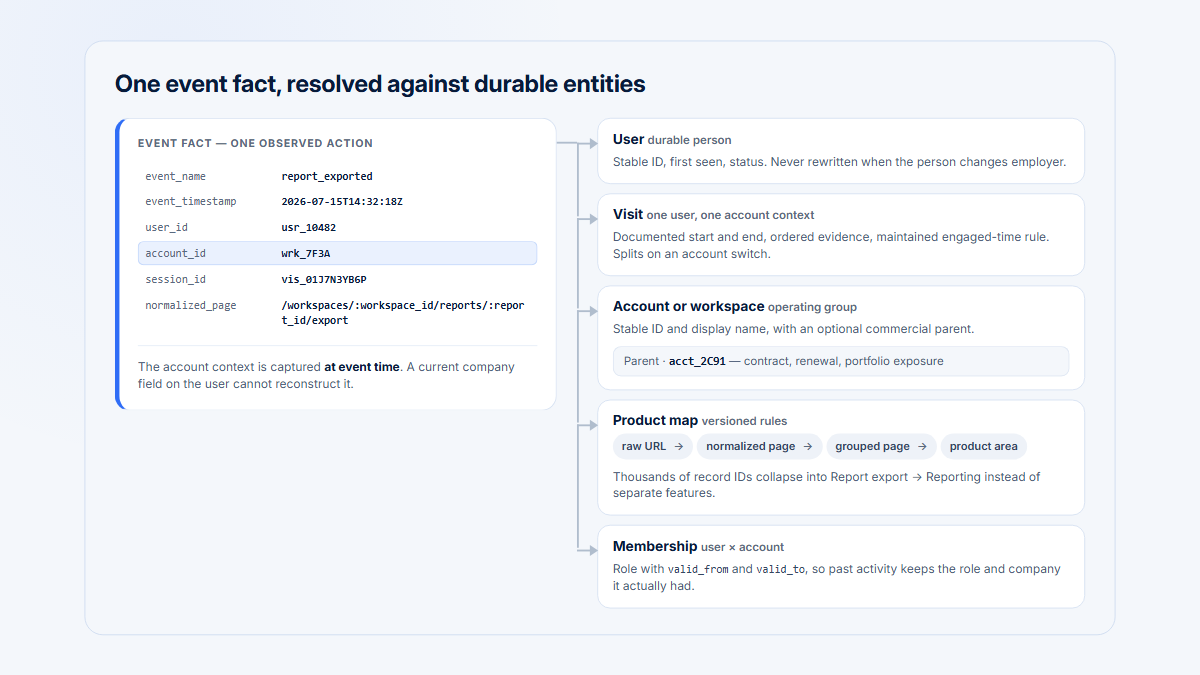
| User and company identifiers | Integration-defined | Connects the Visit to the correct B2B actor and account | Stale identity, shared devices, impersonation, or account switching can misattribute activity | Identity data should be limited to what the investigation actually requires |
“Commonly captured” should never be read as “captured by every product.” A team evaluating session recording should verify the actual emitted data, stored payload, privacy transformations, and player output in its own configuration.
What replay normally does not reveal
A browser replay can show an observable sequence inside the recorded surface. It does not automatically provide every surrounding fact needed to explain that sequence.
It does not reveal the user’s internal state
Replay does not directly capture:
- thoughts;
- motivation;
- intention;
- attention;
- emotional state;
- satisfaction;
- confidence;
- expectations;
- the reason a user paused, moved the cursor, switched direction, or clicked repeatedly.
A pause may reflect confusion, careful reading, interruption, a phone call, a conversation with a colleague, or work in another tab. Cursor movement may correlate with interaction, but it is not eye tracking. Repeated clicks may indicate a broken control, impatience, deliberate repetition, or a task that legitimately requires several actions.
These patterns can generate research questions. They should not be presented as psychological facts.
It does not capture the complete computer environment
A page-level DOM recorder normally does not capture:
- the operating-system desktop;
- another desktop application;
- a native application window;
- browser chrome;
- the address bar;
- browser-extension interfaces;
- native browser menus;
- a password-manager overlay;
- a system notification;
- a file-selection dialog;
- another browser tab unless that tab is separately instrumented;
- another browser window unless that window is separately instrumented.
A separate Screen Capture API or desktop-recording implementation can capture a user-selected screen, window, or tab as media. That is a different capture model with different permissions, privacy risks, and stored data.
It does not capture complete backend truth
A frontend replay does not automatically contain:
- the complete server state;
- database state;
- a definitive backend root cause;
- every network request or response;
- internal service logs;
- queue state;
- feature-flag evaluation history;
- permission calculations;
- external system state;
- the final business outcome.
The page may display “Connection failed,” but the replay alone may not show whether the cause was an expired credential, a permission mismatch, a rate limit, a server defect, or an upstream outage.
It does not prove prevalence
One replay describes one observed sequence under one configuration.
It does not establish:
- how many users encountered the same issue;
- whether the behavior is typical;
- whether a customer segment is disproportionately affected;
- whether successful users followed a different path;
- whether the issue changed conversion, adoption, retention, or support volume.
That requires structured analytics, deduplicated counts, segmentation, comparison groups, and enough observations to evaluate prevalence. See B2B Product Analytics for the distinction between individual evidence and population-level measurement.
It is not necessarily a true camera-style video
A DOM replay may look like a video because the player has a timeline and moving cursor. The stored representation, however, can be a series of serialized browser-state changes rather than encoded visual frames.
This distinction explains both its strengths and its limitations. A DOM replay can preserve structure and element context without storing a full pixel stream, but the player must successfully reconstruct the page.
Canvas, WebGL, media, iframes, and other difficult elements
Ordinary HTML interfaces are often a good fit for DOM reconstruction. Other browser features need explicit support and testing.
Canvas
A <canvas> element exposes a bitmap drawing surface. Its pixels are not represented as child DOM nodes.
If an application draws a chart, signature, whiteboard, diagram, game, or document preview onto a canvas, a MutationObserver watching the DOM will not receive one mutation record for every changed pixel. The canvas element may remain structurally unchanged while its visual content changes completely.
Replay implementations can address this in several ways:
- record drawing commands;
- sample canvas images;
- save periodic frames;
- capture application-specific state;
- omit or block the canvas;
- display only the canvas dimensions as a placeholder.
Each option has different fidelity, storage, performance, security, and privacy implications.
rrweb’s current guide makes canvas capture an explicit option rather than a default. Its canvas recipe documents specialized capture and replay behavior. That is a concrete example of special handling, not evidence that all replay systems behave the same way.
WebGL
WebGL renders graphics into a canvas through a graphics API and GPU-backed state. Complex 2D or 3D scenes can depend on shaders, textures, buffers, timing, external assets, and application logic that ordinary DOM mutation capture does not preserve.
Specialized WebGL capture can be expensive. A recorder may need to capture commands, state changes, frames, or application-specific data. Even then, browser, driver, GPU, timing, and player differences may affect reproduction.
Products containing CAD views, data visualizations, maps, 3D configurators, design tools, or games should test representative workflows rather than assuming replay fidelity.
Video and audio
A recorder may capture the surrounding media element and selected state changes such as play, pause, seek, volume, or current time. That does not guarantee that the original video frame or audio output will be reproduced identically.
Playback can differ when:
- the media URL expires;
- authorization is no longer valid;
- adaptive streaming selects a different rendition;
- the asset has changed;
- digital-rights controls restrict access;
- autoplay behavior differs;
- the player implementation changed;
- media bytes were never stored with the replay.
Capturing actual media content is a separate and potentially expensive decision with substantial privacy and licensing implications.
Cross-origin iframes
An iframe has its own nested browsing context and document. The browser’s same-origin policy restricts how a parent document can inspect a frame loaded from another origin.
A recorder running only in the parent page may therefore see the iframe element’s position and size without being able to observe the internal DOM or interactions.
Some systems support cross-origin frames by integrating a recorder in the child frame and coordinating events across frame boundaries. That requires cooperation from the embedded content, appropriate messaging, compatible versions, and careful privacy configuration.
rrweb’s current guide documents cross-origin iframe recording as disabled by default and says rrweb must be injected into each child iframe for that option to work. Do not generalize this exact mechanism to every replay product.
Same-origin iframes
Same-origin frames are more accessible to page scripts, but capture still depends on recorder behavior.
The implementation must:
- discover the frame;
- attach observers at the correct time;
- capture its initial document;
- handle frame navigation;
- preserve coordinate and timing relationships;
- apply masking rules inside the frame;
- rebuild the frame during replay.
A same-origin iframe is therefore potentially capturable, not automatically captured by every implementation.
Shadow DOM
Web Components can place internal structure inside a shadow root. Open and closed roots expose different access patterns, and recorder support varies.
Reliable capture may require explicit support for:
- shadow-root discovery;
- nodes created after initialization;
- nested shadow roots;
- slot assignment;
- adopted or constructable stylesheets;
- open versus closed mode;
- framework-specific rendering behavior.
A component library can appear ordinary to the user while presenting a separate tree to the recorder. Test critical components directly.
Rich-text editors
Rich-text editors often combine contenteditable, custom selection models, nested nodes, hidden inputs, browser selection state, virtualized blocks, and application-specific document models.
A replay may show text and DOM changes without preserving every cursor, selection, composition, undo, clipboard, or editor-state detail. Rich editors can also contain especially sensitive text, so privacy rules must address more than conventional <input> elements.
Third-party widgets
Chat widgets, payment forms, scheduling tools, support panels, authentication components, maps, and embedded editors may be:
- cross-origin;
- dynamically replaced;
- implemented with Shadow DOM;
- rendered in canvas;
- governed by separate data-processing terms;
- excluded by content-security or privacy rules.
The host application should not promise replay fidelity for a third-party component without testing the exact integration.
Native browser controls
Some controls use browser- or operating-system-managed interfaces that do not exist as ordinary page DOM. Examples can include:
- file pickers;
- permission prompts;
- password-manager interfaces;
- browser autofill menus;
- some date or color pickers;
- context menus;
- print dialogs.
The page may record the control before and after the native interaction without recording the native interface itself.
CSS animations and transitions
A reconstructed page may contain the correct elements but display an animation differently.
Differences can come from:
- a timer starting at a different moment;
- CSS rules loading late;
- the player pausing or accelerating playback;
- browser animation scheduling;
- missing classes or intermediate mutations;
- reduced-motion settings;
- the original application’s JavaScript not being rerun.
The final visual state may be more reliable than every intermediate animation frame.
Fonts and external assets
Fonts, stylesheets, icons, images, and other assets can change or become unavailable after recording.
A player may render differently because:
- a font request fails;
- a signed asset URL expires;
- an image is replaced;
- a stylesheet now contains different rules;
- a CDN is inaccessible;
- authorization is missing;
- the recorder stored a reference rather than the asset itself.
Asset collection can improve fidelity, but it increases storage and privacy scope. It can also raise licensing and security questions.
Single-page applications
A single-page application can change routes and interface state without performing a full document navigation.
The History API allows an application to update session history using operations such as pushState() and replaceState(), then respond to history traversal through popstate. Meanwhile, client-side frameworks can replace components, load data, open modals, and change workspace context inside the same document.
A replay may capture parts of this sequence through several separate mechanisms:
- History API instrumentation records a route transition;
- DOM mutations show components appearing and disappearing;
- custom events describe a virtual page view or workflow step;
- network diagnostics show client-side data loading, when that optional layer is enabled;
- clicks and input changes show interaction with modals and drawers;
- identity metadata records an account or workspace switch, when the integration updates it correctly.
These layers should not be conflated.
The visual replay may show the right interface sequence while the structured analytics still lacks a useful page model. A product analytics system needs explicit route normalization and meaningful grouping so dynamic paths become stable grouped pages and product areas.
For example:
/workspace/827/projects/128/settings/integrations
might be normalized and grouped as:
Integration settings
inside the product area:
Administration
The replay explains what happened inside one Visit. The grouped page provides a stable analytical unit across users, companies, and time periods.
Modals, drawers, and state without URL changes
Not every meaningful state has a route.
A configuration drawer, confirmation modal, inline editor, expanded table row, or account switcher may change only the DOM or application state. Replay can still show the visible transition if the relevant mutations and events were recorded, but route-based analytics alone may not classify it.
Custom analytics events can add that missing business meaning, provided their instrumentation and properties are correct.
Account and workspace switching
B2B products commonly let one person access several workspaces, organizations, or customer accounts.
A replay may visually show the switch, but the surrounding analytics must also update account context. Otherwise, later interactions can remain attributed to the previous company.
A trustworthy Visit model should make actor, company, workspace, project, tab, and time context explicit enough to prevent a visually plausible but analytically misleading sequence.
Why a replay may not look exactly like the original visit
Session replay accuracy is not binary. A replay can be useful while still containing visible differences or missing evidence.
Missing or incomplete event data
A replay can break when:
- the recorder starts late;
- an initial snapshot is incomplete;
- an event batch is dropped;
- the page closes before buffered events are transmitted;
- a network request carrying replay events fails;
- sampling removes a high-frequency signal;
- the recorder reaches a size or event limit;
- mutations arrive in an unexpected order;
- the player receives a mutation for a node it cannot find.
The result may be a sudden jump, frozen component, missing click, incorrect scroll position, or recording that ends without a clear final action.
Missing assets or changed presentation
Visual differences can result from:
- unavailable images or stylesheets;
- expired asset URLs;
- changed external CSS;
- fonts loading differently;
- current assets replacing the versions used during recording;
- responsive layout differences;
- browser-version differences;
- device-pixel-ratio or zoom differences.
A page that is structurally correct can still look noticeably different.
Unsupported or partially supported elements
Canvas, WebGL, media, third-party widgets, Shadow DOM, native browser controls, and cross-origin iframes can appear blank, static, delayed, or incomplete when the recorder lacks appropriate support.
Timing and ordering differences
Playback depends on timestamps and the player’s scheduling.
Differences can arise from:
- clock or timestamp problems;
- background-tab throttling;
- timer precision;
- event batching;
- requestAnimationFrame scheduling;
- accelerated replay;
- skipped inactive periods;
- CSS animation timing;
- race conditions in the original application;
- delayed asset loading.
The player can reproduce the stored order without perfectly recreating the original rendering between every event.
Version and compatibility changes
A recording can outlive the exact recorder, serializer, asset, or player version that created it.
Potential problems include:
- player-version incompatibility;
- serialization-format changes;
- browser behavior changes;
- recorder bugs;
- player bugs;
- application updates between recording and playback;
- third-party component updates;
- privacy-rule changes.
Long retention periods make compatibility testing especially important.
Intentional masking and blocking
A masked or blocked replay is supposed to differ from the original page.
A field replaced with mask characters, an element shown as a rectangle, or a route excluded from capture represents a deliberate privacy boundary. That difference should not be “fixed” by trying to reconstruct the original content later.
The responsible conclusion is not that replay is unreliable. It is that replay is reconstructed evidence with known boundaries, not perfect forensic video.
Multiple tabs and windows
Several tabs make session reconstruction substantially harder.
Each browser tab normally contains its own document, event loop, visibility state, navigation history, and recorder instance. Several tabs may nevertheless share cookies, authentication, local storage, or an application-generated session identifier.
This creates questions that a replay implementation must answer:
- Does each tab create a separate recording?
- Are events from several tabs merged into one session?
- Is there a stable tab or window identifier?
- How are timestamps ordered across tabs?
- Does the Visit timeline show when one tab became hidden?
- Can two tabs use different accounts at the same time?
- What happens when the same application is open in several windows?
- Does background activity count toward duration or engaged time?
- Is an account switch in one tab reflected in another?
- Can a shared session identifier accidentally combine unrelated sequences?
Implementations differ.
A merged timeline without tab context can create an impossible-looking sequence: Page A changes to Page B even though those pages were open simultaneously in different tabs. A recording can also appear inactive while the user is working in another tab or application.
For B2B products, a Visit may need tab, window, actor, company, workspace, and account-switch context to avoid misleading attribution. When that context is unavailable, the finding should state the limitation.
Input capture, masking, blocking, and omission
A recorder can handle an input in several ways:
Capture the entered value. The replay can show the exact value or resulting control state.
Capture only the change event or interaction. The system records that editing occurred without necessarily retaining the full value.
Mask the value. The recorder replaces characters or text with a transformed representation.
Block the entire element. The player displays a placeholder rather than the original element and its contents.
Omit the event or element. The replay contains no direct evidence of that interaction.
These choices affect both privacy and interpretation. A blocked form may protect its contents but make it impossible to determine which validation state preceded an error. A mask may preserve typing rhythm and field usage while intentionally removing the value.
Password-field defaults are not enough
Masking input[type="password"] is necessary, but it does not protect every sensitive channel.
Secrets and personal data can also appear in:
- ordinary text inputs;
- search boxes;
- email fields;
- rich-text editors;
- custom form components;
- rendered confirmation screens;
- success messages;
- validation errors;
- query strings and URLs;
- data attributes;
- page titles;
- console messages;
- custom analytics properties;
- network headers;
- request bodies;
- response bodies;
- GraphQL variables and results.
A password can be masked during entry and then rendered as visible text in a confirmation component. A token can be absent from the page but present in a network payload. Visual masking does not automatically sanitize optional console, analytics, or network layers.
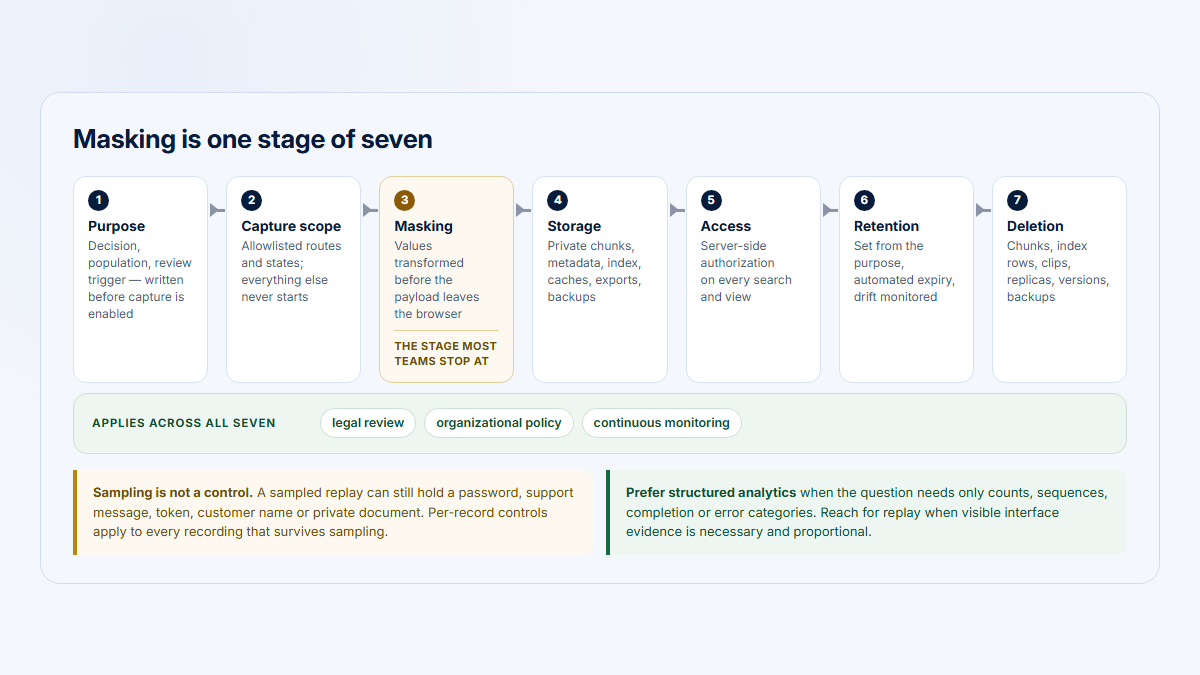
Use the Session Replay Privacy Checklist to define and test controls across every capture channel.
Network, console, error, and performance data are separate layers
Visual replay and application diagnostics answer related but different questions.
The replay might show:
- a button click;
- a loading state;
- an error message;
- a retry.
An optional network layer might add:
- request URL;
- HTTP method;
- status code;
- duration;
- selected headers;
- selected request or response data;
- GraphQL operation name;
- sanitized variables;
- correlation identifiers.
An optional console or error layer might add:
- console messages;
- warnings;
- uncaught exceptions;
- rejected promises;
- stack traces;
- source locations.
An optional performance layer might add:
- navigation timing;
- resource timing;
- long tasks;
- spans;
- rendering delays;
- application-specific measurements.
These layers can help distinguish a visible symptom from a technical failure. They also carry substantial privacy and security risk.
A request body can contain credentials. A response can contain customer records. Headers can contain authorization data. A GraphQL result can expose an entire object graph. A console statement can accidentally log the same value that the interface correctly masks.
Collection should therefore be explicit, minimized, filtered, and tested. It should never be inferred from the mere existence of a replay player.
rrweb’s console functionality, for example, is documented as a plugin rather than an inherent part of the core visual recording. OpenReplay documents GraphQL capture through a separate plugin. Sentry documents additional network detail as configurable and privacy-sensitive. These are vendor- and implementation-specific examples.
Do not describe those optional layers as Hymetry functionality unless the current Hymetry implementation or maintained documentation confirms them.
Replay timing is not the same as engaged time
Replay events contain timestamps, so a player can reconstruct sequence and elapsed time. That does not make the full player duration a reliable measure of active engagement.
A fifteen-minute recording might include:
- active interaction;
- reading;
- waiting for a request;
- a background tab;
- an interruption;
- an idle page left open;
- time after the last captured event;
- inactivity skipped by the player.
Relevant context can include pointer, keyboard, scroll, click, visibility, focus, page-change, and application events. An engaged-time model can use those signals and an inactivity threshold to estimate observed active product time.
Even then:
- elapsed time is not active time;
- visible time is not guaranteed attention;
- inactivity thresholds are analytical choices;
- the last active interval has an uncertain endpoint;
- browser background state matters;
- missing events can shorten or lengthen an estimate;
- player duration can be transformed by inactivity skipping or replay speed.
Treat engaged time as an evidence-based behavioral metric, not proof that the user was attentive for every counted second. Hymetry’s Visits page shows how timing is presented alongside path and event context.
Session replay versus screen recording
“Is session replay a video?” is best answered by comparing the stored representations.
| Dimension | DOM and event replay | Image, frame, or screen recording |
|---|---|---|
| Stored representation | Serialized page state plus timestamped changes and interactions | Screenshots, visual frames, or an encoded media stream |
| Visual fidelity | Reconstructed and therefore dependent on recorder coverage, assets, and player behavior | Preserves the captured pixels, subject to frame rate, resolution, compression, and selected capture surface |
| Text searchability | Text may remain structurally available when unmasked, though indexing is product-dependent | Not inherent; OCR or separate metadata is required |
| Element-level analysis | Can associate events with nodes, selectors, attributes, or application metadata | Requires coordinate analysis, computer vision, or separately recorded element data |
| Storage requirements | Often efficient for conventional application UIs, but high mutation volume can still be large | Usually increases with resolution, frame rate, duration, and audio |
| Bandwidth | Event batches can be compact and compressible | Continuous or frequent frames can require substantially more data |
| Privacy controls | Can target selectors, fields, text, attributes, routes, and event properties | Often relies on capture-surface choice, region masking, blur, or pixel redaction |
| Responsive reconstruction | Can rebuild the recorded layout and viewport, but should not be treated as a fresh responsive render | Frames have fixed captured pixels and dimensions |
| Browser chrome | Normally absent from page-level DOM replay | May be present only if the selected capture surface includes it |
| External applications | Not captured by a browser-page recorder | May be captured only when the user selects a screen or application window that includes them |
| Canvas and WebGL | Require explicit support beyond ordinary DOM changes | Visible pixels can be captured, subject to frame sampling and capture permissions |
| Network diagnostics | Separate optional layer | Separate optional layer |
| Typical use | Product-behavior reconstruction, element context, replay tied to analytics | Visual documentation, support reproduction, usability testing, screen sharing, or environments where pixels matter most |
| Main limitation | The reconstruction can diverge from the original | Pixels do not inherently preserve document structure or business meaning |
A hybrid implementation can combine the two. The important point is to document what is actually stored rather than assume every player with a timeline is backed by literal video.
Illustrative B2B example: configuring an integration across two workspaces
The following example is fictional. It demonstrates how to separate replay evidence from interpretation.
Maya is an operations administrator at the fictional company Atlas Ridge. She can access two customer workspaces in a B2B platform.
During one Visit, she:
- opens the Integration settings grouped page;
- selects a CRM integration;
- enters configuration details;
- clicks Test connection;
- receives a visible connection error;
- opens the workspace switcher;
- changes to a second workspace;
- returns to the integration settings;
- opens a help drawer;
- closes the drawer and retries the connection.
What the replay may show
Depending on the implementation and privacy configuration, the replay may show:
- the route changes into integration settings;
- the grouped sequence of pages or product areas;
- focus moving between fields;
- masked characters indicating that input occurred;
- the Test connection click;
- the loading state;
- the rendered error message;
- the workspace switcher opening;
- the visible change from one workspace to another;
- the help drawer opening and closing;
- repeated navigation;
- the interval before the retry;
- the second button click;
- the final visible page state.
That is useful session evidence. It establishes an observable sequence.
What the replay does not establish
The same replay does not establish:
- why Maya switched workspaces;
- whether she believed the first workspace was misconfigured;
- whether the entered credential was valid;
- whether a password manager supplied part of the value;
- whether the password-manager popup appeared;
- what documentation she read in another browser tab;
- whether a colleague instructed her to retry;
- whether the first error came from the browser, application server, CRM, permission model, rate limit, or network;
- whether the retry succeeded at the backend after the recording ended;
- whether she was confused, frustrated, or simply following a known process;
- whether any other user experienced the same problem.
A responsible finding would say:
It would not say:
Additional evidence needed
| Evidence | Question it can help answer | Remaining limitation |
|---|---|---|
Structured events such as integration_test_started and integration_test_result |
How many tests occurred, in which workspace, and with what result category? | Event instrumentation must be correct and properties must be sanitized |
| Backend error logs with a correlation ID | Which service or permission check produced the failure? | Logs may still show only one part of a distributed failure |
| Account and workspace data | Was the integration available and correctly configured for each workspace? | Current account state may differ from state at recording time |
| Permission and identity audit data | Did Maya have the required role when she tested the connection? | A valid role does not prove the external credential was valid |
| Support context | Did Maya report the issue or receive prior instructions? | Absence of a support ticket does not mean there was no problem |
| Successful comparison Visits | Do successful users follow a different path or avoid the workspace switch? | A small comparison set may not be representative |
| Aggregate analytics | How prevalent are failed tests and retries by plan, lifecycle stage, or account segment? | Counts identify a pattern but not its cause |
| User research | What did Maya expect, and why did she choose each step? | Retrospective accounts can be incomplete and should be compared with observed behavior |
This combination is stronger than either replay or aggregate metrics alone:
- structured data establishes prevalence;
- logs investigate technical cause;
- company and user context establish who was affected;
- replay shows the observable sequence;
- research investigates expectation, motivation, and meaning.
How to interpret session replay responsibly
Use the following framework when turning a recording into a product, UX, or customer finding.
1. Verify what the implementation records
Review the recorder configuration, emitted event types, optional plugins, storage pipeline, and known browser limitations. Do not infer capture from the player interface.
2. Check whether masking changed the evidence
Identify blocked routes, masked fields, hidden elements, excluded text, ignored events, and sanitized metadata. A blank region may be an intentional control rather than a recorder failure.
3. Confirm user, company, account, and workspace context
Check whether identity was current throughout the Visit, especially after account switching, impersonation, login, logout, or role changes.
4. Review structured route and event data
Use page grouping, custom events, error categories, and account context to establish the sequence independently of the visual player where possible.
5. Separate observation from interpretation
Write the observable fact first.
- Observation: “The user clicked Test connection twice after a visible error.”
- Interpretation: “The first result may not have provided enough guidance.”
Do not silently turn the interpretation into fact.
6. Identify missing evidence
State whether network data, console output, server logs, another tab, native dialogs, masked input, canvas content, or user intent is unavailable.
7. Compare successful and unsuccessful Visits
Look for differences in entry route, account state, role, page sequence, field interaction, error state, and retry behavior.
8. Validate prevalence quantitatively
Measure how many users and companies encountered the pattern. Segment by relevant B2B context such as plan, company size, lifecycle stage, role, region, or integration state.
9. Avoid intent and attention claims
Use language such as “the sequence suggests,” “is consistent with,” or “is worth investigating.” Do not write that replay proves confusion, frustration, satisfaction, or purchase intent.
10. Document replay limitations in the finding
A useful report states both what the Visit shows and what it cannot establish. This makes the conclusion easier to verify and less likely to be repeated as certainty.
For a broader research workflow, see Hymetry’s UX research use case. For the quantitative boundary, see B2B Product Analytics.
Common misconceptions about session replay
| Misconception | More accurate interpretation |
|---|---|
| Session replay is always literal video | Many browser replay systems reconstruct the page from a snapshot, later changes, interactions, and timing. Image-based and hybrid systems also exist. |
| It records the entire computer screen | A page-level recorder normally captures the instrumented browser document, not the desktop, browser chrome, native dialogs, or external applications. |
| It automatically captures every network request | Network capture is a separate, optional, and implementation-specific diagnostic layer. |
| It always shows exactly what the user saw | Assets, canvas, WebGL, media, iframes, fonts, browser differences, dropped events, masking, and player behavior can change the result. |
| Cursor position proves attention | A pointer coordinate shows where the pointer was recorded, not where the user looked or what they understood. |
| A pause proves confusion | A pause can have many causes, including reading, interruption, another tab, background activity, or waiting. |
| Repeated clicks prove frustration | Repeated clicks are an observed pattern. Their cause and emotional meaning require additional evidence. |
| Masking visible text protects every data channel | The same value can appear in URLs, network data, analytics properties, logs, rendered messages, or another unmasked element. |
| One replay represents all users | One Visit is individual evidence. Prevalence requires aggregate measurement and segmentation. |
| Replay shows the server-side root cause | It may show the visible symptom. Logs, traces, request data, and backend state are usually needed for root cause. |
| Replay duration equals engaged time | Player duration can include idle, background, waiting, and uncertain final intervals. |
| A self-hosted recorder captures less sensitive data by default | Self-hosting changes deployment and data custody. Capture scope still depends on configuration, code, masking, filtering, and operational practice. |
| A replay with missing content is useless | Missing content may reflect a known limitation or intentional privacy boundary. The remaining sequence can still be valuable when interpreted correctly. |
| More captured data always creates a better replay | Additional data can improve diagnosis, but it also increases privacy exposure, storage, bandwidth, and review complexity. |
How Hymetry connects Visits to product and account context
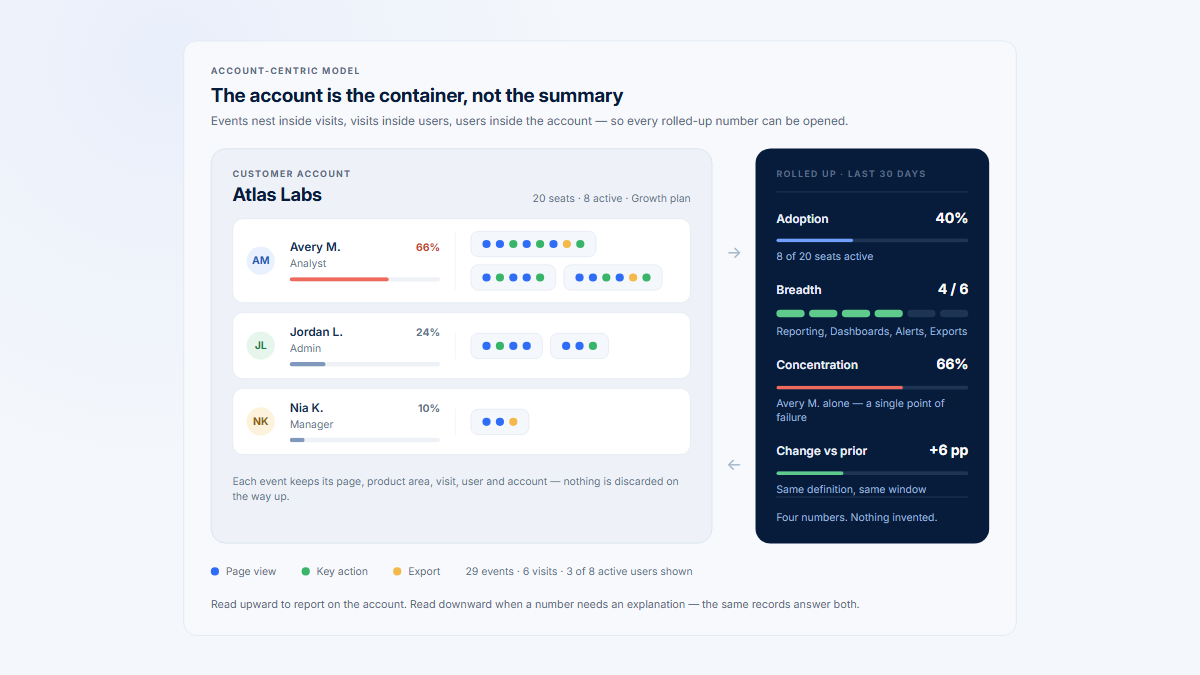
Hymetry is account-centric product intelligence for B2B SaaS. Its purpose is not to place every recording in an isolated replay library. It connects session evidence to the product structure, company, and person behind a broader signal.
A practical investigation path is:
Product signal → Company → User → Visit
Pages identify where the signal exists
Hymetry organizes normalized URLs into grouped pages and product areas. A team can begin with a workflow that shows unusual adoption, engagement, interaction, or movement instead of selecting a random recording.
For example, a team might start with the Integration settings grouped page inside Administration.
Companies identify which accounts are affected
The same product signal can be narrowed to customer companies. This matters in B2B SaaS because one active user does not prove broad account adoption, and a global average can hide differences between plans, lifecycle stages, industries, or account sizes.
Users identify the people behind the account pattern
User context shows who drove the activity, who stopped returning, who used a narrow set of workflows, or whose behavior changed relative to prior periods.
A user label or trend remains behavioral evidence. It should not be turned into a claim about motivation or psychology.
Visits provide the session-level evidence
A replayable Hymetry Visit combines a canonical rrweb recording with page chronology and temporal identity context from linked analytics events. A page visit is different: it is a contiguous run of analytics events on one classified, normalized page within that session. User and company identities appear only when the integration supplies them, and the active-time display is derived from capped gaps between analytics observations—not a measure of attention.
The Visit can help a reviewer inspect:
- which product areas and grouped pages appeared;
- how the session moved between them;
- which selected interactions and visible state were captured;
- which visible state followed an action;
- how the sequence relates to the page, available company or user context, or analytical signal that led to the investigation.
A Visit remains reconstructed behavioral evidence. It does not reveal intent, prove attention, guarantee perfect visual fidelity, or establish that the sequence is representative.
Hymetry supports selective capture controls: a project can run analytics without recording; tracked markup can use rrweb’s block, ignore, and mask classes; and enabled server-side text rules can mask matching values on supported event fields before persistent storage.
These controls are configuration-dependent and do not blanket-mask general DOM text, raw URLs or titles, or analytics identity traits. They reduce exposure but do not replace data minimization, implementation testing, or legal and compliance review. Review the current Privacy Controls overview and the deployed implementation before enabling capture.
The current Hymetry implementation evidence reviewed for this guide does not establish network, console, request-body, response-body, GraphQL, canvas, WebGL, iframe, or performance capture. Treat those as separate, absent layers unless the documentation and code for the deployed edition explicitly confirm them.
See the session evidence behind a product signal
Start with a page, company, or user signal, then open a Visit to inspect its ordered path and replay evidence in context. The demo action opens the Visits list so you can choose a relevant session.
Learn more about Visits, or see how the UX research use case connects observed behavior to better research questions.
Frequently asked questions
Is session replay a video?
Not always. A common DOM-based architecture stores an initial page snapshot plus timestamped DOM changes and interactions, then reconstructs the sequence in a player. Other systems store screenshots or visual frames, and hybrid systems combine several approaches.
What does a DOM-based session replay record?
It may record document structure, attributes, text, style information, DOM mutations, scroll position, viewport changes, clicks, pointer or touch interaction, input changes, route changes, and timestamps. The exact event set depends on the implementation, browser, sampling, privacy rules, and enabled options.
Does session replay record passwords?
A recorder may mask password fields by default, but that is not enough to protect all secrets. Sensitive values can also appear in ordinary text inputs, rich editors, rendered messages, URLs, analytics properties, console logs, and network payloads. Verify the complete capture pipeline rather than relying on one input type.
Can session replay capture another browser tab?
Only when the other tab is separately recorded or an implementation explicitly coordinates several tabs. Page-level recorders do not automatically observe the DOM of unrelated tabs. Even when several tabs share a session identifier, the player needs tab and visibility context to create a trustworthy sequence.
Does replay capture network requests and console errors?
Not inherently. Network details, console messages, JavaScript errors, stack traces, and performance measurements are commonly implemented as separate optional layers or plugins. Their privacy rules must be configured independently of visual masking.
Why can a replay look different from the original page?
Common causes include missing event batches, changed or unavailable assets, font differences, unsupported canvas or WebGL content, iframe restrictions, masking, browser-version differences, responsive layout changes, player incompatibility, timing problems, and application updates between recording and playback.
Can a replay prove that a user was confused?
No. It can show observable patterns such as pauses, repeated navigation, corrections, or retries. Those patterns may justify further investigation, but they do not directly reveal attention, motivation, emotion, or intent.
Does rrweb capture canvas and cross-origin iframes automatically?
Its current guide documents canvas capture and cross-origin iframe recording as explicit options rather than defaults. Cross-origin recording also requires rrweb to be present in the child iframe. Those details describe rrweb, not every replay implementation and not necessarily Hymetry’s current tracker configuration.
Is self-hosted session replay automatically more private?
No. Self-hosting can give a team greater control over deployment, storage, retention, and data custody. The amount and sensitivity of captured data still depend on tracker configuration, masking, exclusions, optional plugins, access controls, retention, and operational practice.
How should a team use replay evidence?
Verify the implementation, confirm identity and masking context, distinguish observation from interpretation, compare successful and unsuccessful Visits, and measure prevalence with structured analytics. Document the evidence that is missing as well as the behavior that is visible.
Sources
rrweb architecture and implementation
- rrweb, “Guide”
https://github.com/rrweb-io/rrweb/blob/main/guide.md - rrweb, “Serialization Design”
https://github.com/rrweb-io/rrweb/blob/main/docs/serialization.md - rrweb, “Incremental Snapshots Design”
https://github.com/rrweb-io/rrweb/blob/main/docs/observer.md - rrweb, “Replay Design”
https://github.com/rrweb-io/rrweb/blob/main/docs/replay.md - rrweb, “Sandbox Design”
https://github.com/rrweb-io/rrweb/blob/main/docs/sandbox.md - rrweb, “Canvas Recording Recipe”
https://github.com/rrweb-io/rrweb/blob/main/docs/recipes/canvas.md - rrweb, “Console Recorder and Replayer”
https://github.com/rrweb-io/rrweb/blob/main/docs/recipes/console.md - rrweb, “Storage Optimization Recipe”
https://github.com/rrweb-io/rrweb/blob/main/docs/recipes/optimize-storage.md
Browser and web-platform behavior
- WHATWG, “DOM Standard: MutationObserver”
https://dom.spec.whatwg.org/#interface-mutationobserver - WHATWG, “HTML Standard: The canvas element”
https://html.spec.whatwg.org/multipage/canvas.html#the-canvas-element - MDN Web Docs, “Working with the History API”
https://developer.mozilla.org/en-US/docs/Web/API/History_API/Working_with_the_History_API - MDN Web Docs, “Page Visibility API”
https://developer.mozilla.org/en-US/docs/Web/API/Page_Visibility_API - MDN Web Docs, “Same-origin policy”
https://developer.mozilla.org/en-US/docs/Web/Security/Defenses/Same-origin_policy - MDN Web Docs, “The iframe element”
https://developer.mozilla.org/en-US/docs/Web/HTML/Reference/Elements/iframe - MDN Web Docs, “ShadowRoot”
https://developer.mozilla.org/en-US/docs/Web/API/ShadowRoot - Khronos, “WebGL 1.0 Specification”
https://registry.khronos.org/webgl/specs/latest/1.0/ - W3C, “Screen Capture”
https://www.w3.org/TR/screen-capture/ - W3C, “MediaStream Recording”
https://www.w3.org/TR/mediastream-recording/ - W3C, “Beacon”
https://www.w3.org/TR/beacon/
Examples of optional vendor-specific diagnostics
- Sentry, “Session Replay Configuration”
https://docs.sentry.io/platforms/javascript/session-replay/configuration/ - Sentry, “Session Replay Privacy”
https://docs.sentry.io/platforms/javascript/session-replay/privacy/ - OpenReplay, “GraphQL Plugin”
https://docs.openreplay.com/en/plugins/graphql/
Hymetry product context
- Hymetry, “Visits”
https://www.hymetry.com/product/visits/ - Hymetry, “Privacy Controls”
https://www.hymetry.com/product/privacy-controls/ - Hymetry, open-source tracker recording configuration
https://github.com/Hymetry/Hymetry/blob/main/frontend/tracker_script/src/recording.js - Hymetry, open-source rrweb text filter
https://github.com/Hymetry/Hymetry/blob/main/apps/tracker/rrweb_text_filter.py