Menu
Session evidence and privacy

Microsoft Clarity vs Hotjar vs Fullstory: Free Replay, Website Research, or Product Experience Analytics?

Compare Microsoft Clarity, Hotjar, and Fullstory across session replay, heatmaps, surveys, product analytics, privacy controls, pricing, ratings, and suitable team workflows.

Comparison snapshot: verified 6 August 2026.

Choose Microsoft Clarity if

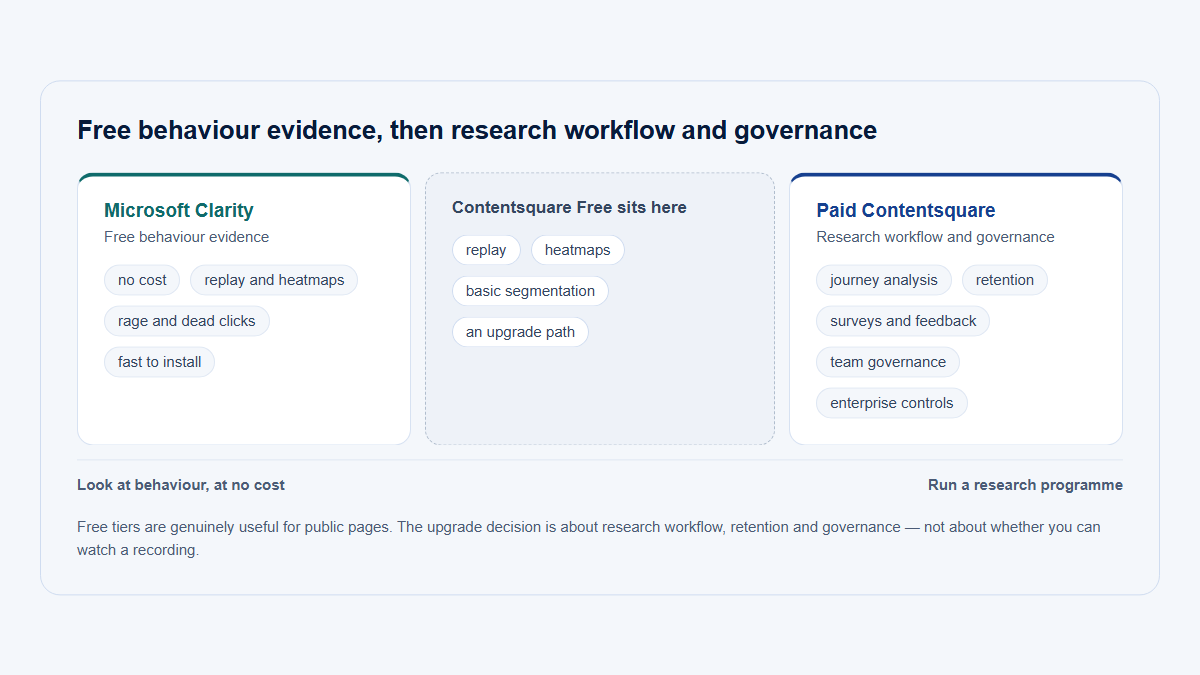
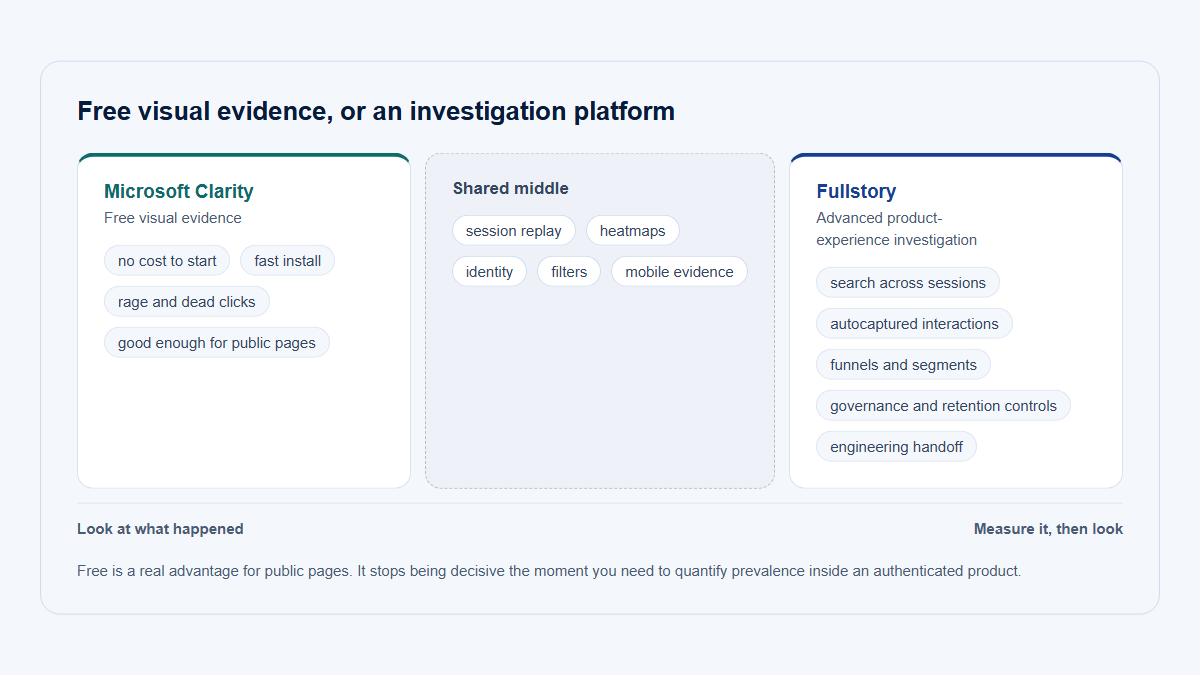
Choose Microsoft Clarity when the first requirement is free session recordings and heatmaps for a marketing site, ecommerce site, signup funnel, or early product investigation. It is especially attractive when a team wants broad aggregate collection without a traffic-priced paid tier, can work within its replay-availability and retention rules, and does not need built-in surveys, interview recruitment, mature product analytics, or enterprise-grade investigation workflows.

Clarity is the best free session replay starting point in this comparison, but “free” does not remove the work of consent configuration, masking, route exclusions, identity design, quality assurance, and interpretation.

Choose Hotjar if

Choose Hotjar—implemented for new buyers through the current Contentsquare suite—when website research should connect recordings, heatmaps, funnels, surveys, and feedback widgets. It is the strongest fit when a marketing, conversion, ecommerce, UX research, or content team needs to observe a pattern and ask affected visitors a direct question in the same research workflow.

Treat the current purchase as a set of Contentsquare products and plans, not as the historical Hotjar Observe/Ask/Engage structure. Experience Analytics, Voice of Customer, and Product Analytics have distinct limits and commercial boundaries. (support.contentsquare.com)

Choose Fullstory if

Choose Fullstory when an authenticated website or SaaS application needs mature session evidence connected to behavioral analysis. Its strongest use case is not merely watching recordings: it is selecting recordings from funnels, journeys, saved segments, user properties, frustration signals, or a reported problem, then inspecting interface state, console messages, network activity, and page-performance evidence.

Fullstory is usually the strongest option here for product, UX, customer-support, and engineering collaboration. Its trade-offs are custom paid packaging, implementation depth, privacy configuration, and the need for a separate account model when B2B company-level adoption is the primary question.

Choose another category if

Choose another category—or combine one of these products with another tool—when the primary requirement is:

  • deep event analytics, retention, cohorts, or experimentation;
  • feature flags and controlled experiments;
  • account-centric B2B product analytics;
  • frontend error monitoring, traces, or application performance management;
  • a specialized mobile-first replay platform;
  • marketing attribution, channel reporting, or advertising measurement.

GA4, Mixpanel, Amplitude, PostHog, an observability platform, a feature-management platform, or an account-centric product-intelligence product may be the actual primary system. Our product analytics tools comparison covers the broader category. Replay can then supply supporting session evidence.

Editorial decision triangle positioning Microsoft Clarity nearest free visual behavior, Hotjar and Contentsquare nearest website research and direct feedback, and Fullstory nearest advanced product and UX investigation.
The products overlap in replay and heatmaps, but their strongest workflows begin in different corners. Editorial positioning model—not a calculated score.

Evidence level

This comparison is based on official product demonstrations and documentation, official pricing and privacy materials, G2 review pages, and a selection of independent reviews. No hands-on deployment or comparative test was performed for this article.

Table 1: At-a-glance verdict

Table 1: At-a-glance verdict
Criterion Microsoft Clarity Hotjar / Contentsquare Fullstory
Primary category Free visual behavioral analytics Website experience analytics, Voice of Customer, and separate product analytics Digital experience and behavioral product analytics
Best fit Free website or mobile replay and heatmaps Website research that connects behavior to direct feedback Authenticated-product, UX, support, and technical investigation
Typical team Marketing, ecommerce, small product, founder Conversion, marketing, ecommerce, UX research Product, UX, support, engineering, enterprise digital teams
Primary unit of analysis Session, page, visitor, event Page/zone, session, visitor, journey; account analytics in a separate Product Analytics tier User, event, session, segment, funnel, journey
Session replay Yes, web and supported mobile SDKs Yes; replay capture is sampled or quota-based by plan Yes; quota-based, with deeper search and technical evidence
Heatmaps Click, scroll, area, conversion, and time-exposure “attention” maps Page and zone heatmaps, scroll/exposure analysis, journey context Click, scroll, conversion, and element-level analysis
Scroll maps Yes Yes Yes
Click maps Yes Yes Yes
Funnels Yes, lighter-weight Smart Events/funnel workflow Included in Experience Analytics; current Free includes funnels Mature funnel analysis linked to replay
Journeys Limited compared with the other two Journey Analysis from Growth in the verified packaging Mature journeys, paths, sequences, and segments
Behavioral segments Filters, Smart Events, custom tags Segments and filters; precision and retroactive features vary by plan Strong behavioral segments and search
Product analytics Directional, not a complete product-analytics system Separate Product Analytics product for deeper cross-session analysis A central part of the platform
Surveys No native survey product Yes, through Voice of Customer; basic allowance included in Free Yes, through the paid Guides and Surveys add-on
Feedback widgets No Yes In-app surveys and guides, but not the same website-feedback workflow as Voice of Customer
Interview recruitment No Not available to new customers in the verified packaging; retained for eligible legacy paying customers No native interview-recruitment product
Company or account filters Company ID can be passed as a custom tag, but there is no first-class account-adoption model Custom user/company attributes; first-class Account Analytics is in separate Product Analytics Pro packaging Company ID can be passed as a user property and used in segments; account adoption usually needs additional modeling
Console and network evidence Basic JavaScript-error and performance evidence; no Fullstory-style network waterfall Basic errors/performance in current Free; deeper Experience Monitoring at higher packaging Strongest here: console, network waterfall, requests/responses where permitted, and page performance
Errors and performance Basic Basic to advanced by product and plan Detailed investigation context, but not a replacement for full observability
Mobile support Supported SDKs and free mobile replay/heatmaps Mobile Experience Analytics availability and pricing must be verified for the target SDK and plan Paid Mobile add-on; supported native and cross-platform SDKs vary
Privacy controls Strict, Balanced, and Relaxed masking; selector controls and route hygiene still required Suppression, masking, exclusions, user-data tools, and plan-dependent governance Private by Default, Exclude/Mask/Unmask rules, URL/network privacy configuration
Data export Limited aggregate Data Export API APIs, response export, data feeds, and warehouse options vary by product and plan APIs and warehouse/export options depend on entitlement
Self-hosting No No No
Free option Free forever; no paid tier Free plan with Experience Analytics and basic Voice of Customer allowances; Product Analytics Free is sales-led FullstoryFree: 30,000 sessions/month, 10 seats, and one-year replay/product-analytics retention
Paid pricing model No paid plan Experience Analytics Growth from $49/month annually; Voice of Customer Growth from $99/month annually; higher tiers and Product Analytics use custom pricing Business, Advanced, and Enterprise use custom pricing; Mobile, Guides and Surveys, StoryAI, and other capabilities can be add-ons
Customer rating 4.5/5 · about 55 G2 reviews 4.3/5 · 340+ G2 reviews 4.5/5 · 1,050+ G2 reviews
Main strength A credible zero-software-price route to replay and heatmaps The most direct website behavior-to-feedback workflow The deepest authenticated-product investigation workflow
Main limitation No native surveys and less structured analytical, account, and technical depth Current packaging is fragmented across products, plans, and legacy/current account models Cost, configuration, learning curve, and no ready-made account-adoption model

The table deliberately uses Hotjar / Contentsquare rather than pretending the historical Hotjar product boundary remains unchanged. Hotjar Ltd. Malta merged into the Contentsquare Group on July 1, 2025. New customers use the current Contentsquare platform and product suite, while legacy insights.hotjar.com accounts and documentation can still exist. (support.contentsquare.com)

Microsoft Clarity’s aggregate analytics are not presented as traffic-sampled, but individual recordings are not guaranteed for every session. Microsoft documents a maximum of 100,000 recorded sessions per project per day. FullstoryFree currently has a monthly capture quota rather than a traffic-priced paid upgrade path. (Microsoft Learn)

Why Microsoft Clarity, Hotjar, and Fullstory are compared

All three products can help a team move from an aggregate symptom to observable session evidence. A drop in signup conversion, a page with repeated clicks, or a workflow with unusual abandonment can lead to a recording that shows the rendered interface, navigation sequence, interactions, pauses, and errors captured during one session.

That overlap makes the products appear interchangeable in searches for a Microsoft Clarity alternative, Hotjar alternative, Fullstory alternative, best heatmap tool, or best session recording tool. They are not interchangeable because each starts from a different center of gravity:

  • Microsoft Clarity starts with free visual behavior.
  • Hotjar/Contentsquare starts with website-experience research and direct feedback.
  • Fullstory starts with searchable digital experience evidence connected to product and technical analysis.

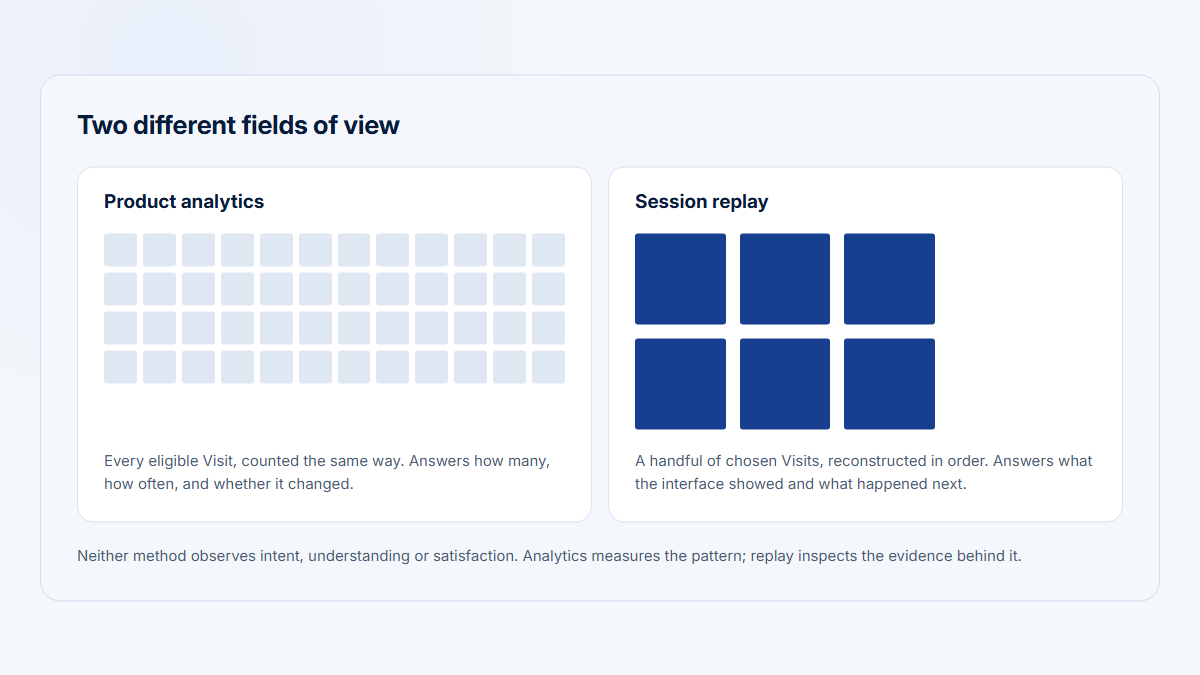
A recording remains one observed case. It can show that an interaction occurred and help reproduce a problem. It cannot, by itself, establish how prevalent the problem is, why the user acted that way, whether the user was satisfied, or whether the same issue affects several customer companies. Those questions require structured measurement, segmentation, direct research, or account-level analysis.

Different primary users and workflows

Microsoft Clarity: inspect first without a software bill

A small marketing or product team can install Clarity, collect page-level analytics, create heatmaps, identify rage clicks or other signals, and open relevant recordings. The workflow is accessible because there is no paid feature ladder to evaluate.

The constraint appears later. When the team needs a native survey, a durable research repository, complex account segmentation, cross-session retention analysis, or detailed technical evidence, Clarity becomes a source of session evidence rather than the complete analytical workflow.

Hotjar/Contentsquare: observe, ask, and compare

The strongest Hotjar-style workflow is:

  1. Find a page, funnel step, segment, or observed behavior.
  2. inspect recordings and heatmaps;
  3. target a survey or feedback widget;
  4. compare responses with the underlying session evidence;
  5. decide whether the pattern warrants a usability test, interview, experiment, or measured product change.

That is why Hotjar remains a useful search label even though the current commercial system is Contentsquare. The Voice of Customer product supplies the direct-feedback layer that Clarity lacks. Experience Analytics supplies replay, heatmaps, funnels, journeys, error signals, and page/zone analysis. Product Analytics is a separate product for deeper cross-session work. (Contentsquare)

Fullstory: search, segment, reproduce, and validate

Fullstory is strongest when the recording is part of a broader investigation. A product analyst can define an unsuccessful funnel segment, a support agent can search for a known user, and an engineer can inspect console and network evidence around the same interaction.

This makes Fullstory particularly suitable as session replay for SaaS and complex authenticated products. It also means a team receives more value when it has consistent identity data, meaningful event/property definitions, privacy rules, and enough analytical maturity to use the platform’s search and segmentation.

Five evidence layers from metric to segment, replay, direct feedback, and structured validation, showing that each platform naturally covers a different combination and that account-level validation often requires another system.
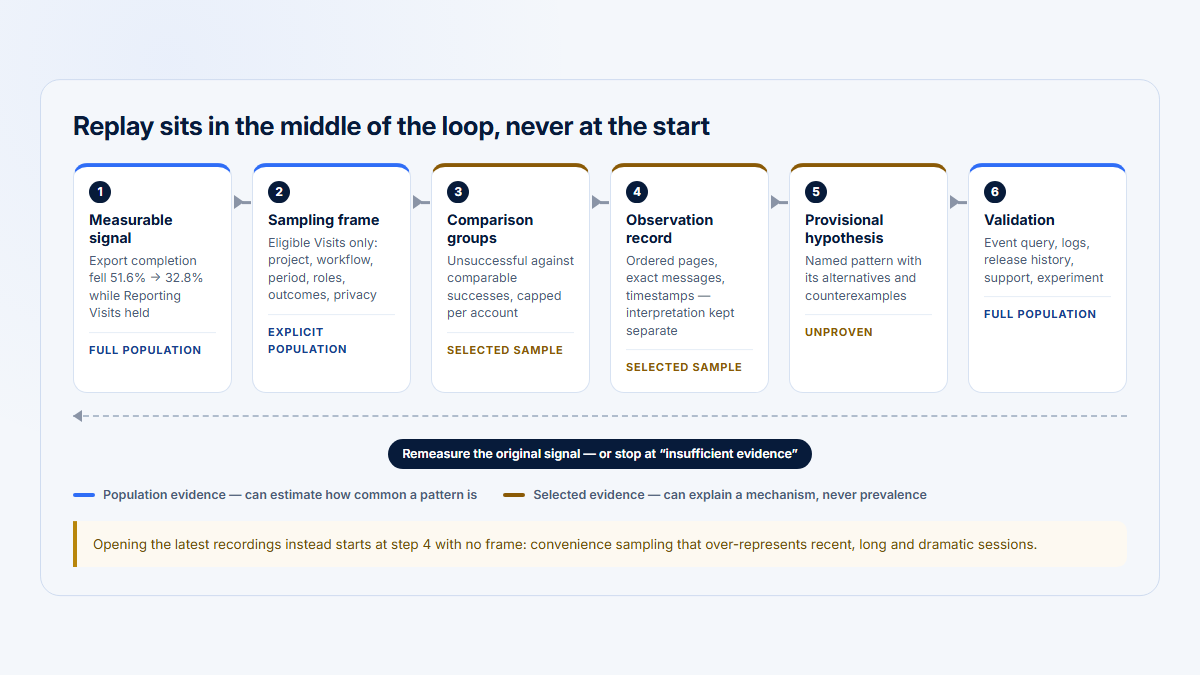
Replay is one evidence layer. A reliable conclusion also needs a defined population and an appropriate validation method.

What each product captures—and what replay actually represents

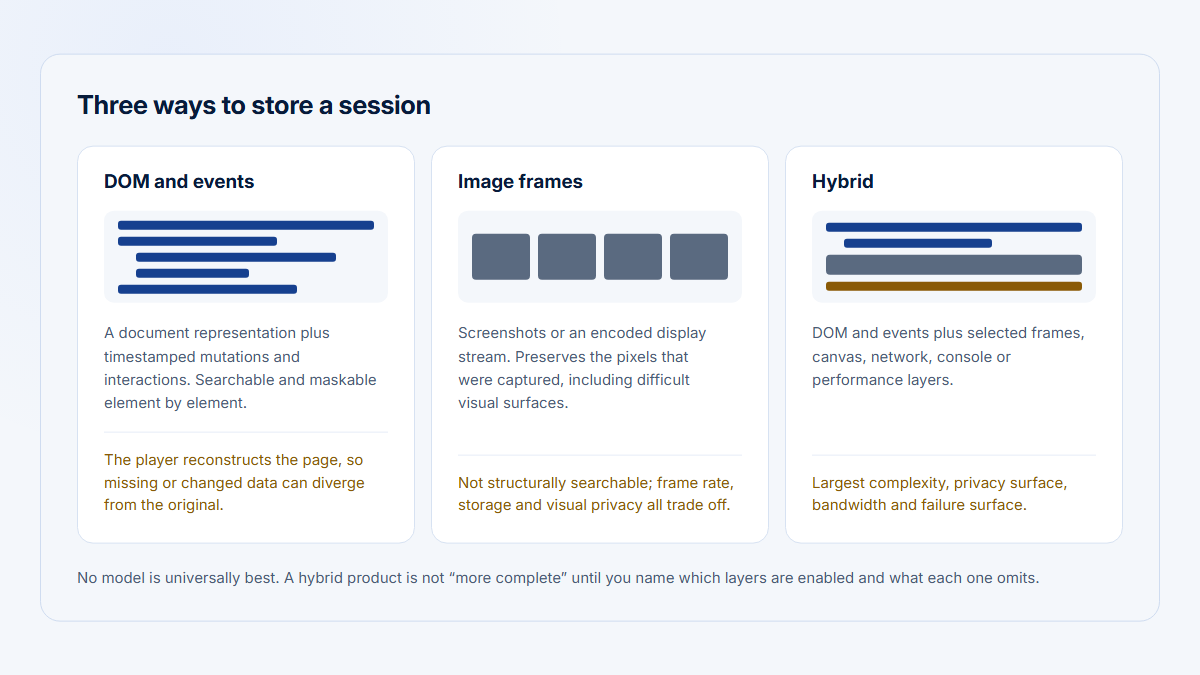
For web applications, these products generally reconstruct a session from captured DOM changes, interaction events, page state, and related metadata. A replay is therefore not a conventional screen-recording video. Fidelity depends on what the capture script can access, what privacy rules remove, how the application renders content, and whether the replay engine supports the relevant framework, canvas, iframe, or browser behavior.

This distinction matters:

  • A replay can show that the Export control was clicked several times.
  • It may show that a visible loading state did not appear.
  • Fullstory may additionally show a failed request or console error if those data were captured and permitted.
  • None of those observations proves that the user was confused or impatient.
  • A survey, interview, support conversation, experiment, or broader behavioral analysis is still needed to validate the interpretation.

Read what session replay captures and session replay versus product analytics for the underlying distinction between direct session evidence and structured measurement.

Session replay depth and fidelity

Table 2: Session replay and heatmaps

Table 2: Session replay and heatmaps
Capability Microsoft Clarity Hotjar / Contentsquare Fullstory
DOM-based web replay Yes; reconstructs HTML/DOM rather than storing a conventional video Yes; reconstructed session replay Yes; DOM/CSS and event reconstruction
Sampling Aggregate analytics are presented as all-session collection; replay availability is separately limited and not guaranteed for every session Analytics collection is 100% in the verified matrix; replay capture is sampled or quota-limited by plan Capture is governed by the monthly session quota and contract; Free pauses after its limit
Recording limits Up to 100,000 recorded sessions per project per day; availability can be lower than aggregate sessions Free captures 5%, max 10,000; Growth capture varies around a 20,000-session threshold; Pro/Enterprise can reach 100% Free captures 30,000 sessions/month; paid quotas are custom
Replay retention Full playback for 30 days; after that Microsoft keeps 1% of recordings or 10 recordings per day, whichever is higher, for up to nine months; favorites can remain up to nine months One month Free; two months Growth; two to 24 months Pro; three to 24 months Enterprise in the verified pricing matrix One year on FullstoryFree; paid retention is contractual/custom
SPA navigation Generally supported; define meaningful URLs, Smart Events, and custom tags where browser-state changes are not self-explanatory Supported, but artificial pageviews, page groups, mappings, or custom variables may be needed Strong SPA support, with event, element, URL, and property-based analysis
Canvas or WebGL Canvas content is not captured; do not assume WebGL fidelity Current public documentation reviewed for this article did not make every Canvas/WebGL boundary clear; test the target implementation Limited Canvas capture is available in eligible paid use; WebGL is not fully replayed
Iframes Third-party cross-origin content is not captured as normal page content; same-origin behavior and heatmap coverage are limited Iframe support depends on origin, tag installation, and configuration; verify with the target site Customer-controlled iframe content can be captured; cross-domain content requires the necessary script access and control
Mobile apps Android, iOS, Flutter, React Native, Cordova/Ionic, and other documented SDK paths Mobile Experience Analytics exists; verify the target SDK, region, capture allowance, and plan Mobile is a paid add-on; verify current support for iOS, Android, Flutter, and the target framework
Multiple tabs No Fullstory-style tab stitching was found in the reviewed official documentation Not clearly documented in the current public materials reviewed; verify Yes, Fullstory documents tabbed-browsing reconstruction
User and session search Filters, custom user IDs, custom tags, events, and signals Filters, segments, user attributes, replay criteria, and plan-specific precision analysis Strong OmniSearch, properties, segments, events, elements, and funnel-to-replay selection
Account or company metadata A company ID can be passed as a custom tag; it remains a tagging convention rather than an account model Custom attributes can carry company context; Product Analytics Pro adds Account Analytics A company ID and related data can be passed as user properties and segmented; account rollups require deliberate modeling
Frustration signals Rage clicks, dead clicks, excessive scrolling, quick backs, and related signals Rage or repeated interaction signals, errors, performance, and zone behavior; exact signals vary by current product Frustration signals, errors, element behavior, and custom segments
Successful versus unsuccessful segments Funnels, Smart Events, filters, and tags can divide sessions directionally Funnels and segments can compare completion/drop-off; precision and journey depth vary by plan Strong funnels, segments, paths, sequences, and direct replay drill-down
Page heatmaps Yes Yes Yes
Aggregated heatmaps Single-page and grouped-page views; up to the documented pageview limit Page groups, zones, segments, and impact context Element-based maps that can be filtered by behavioral context
Masking Strict, Balanced, and Relaxed levels plus selector rules; form inputs remain protected Suppression, masking, and page/element rules; verify current product and whether the rule is prospective Private by Default masks text unless it is explicitly allowed; Exclude/Mask/Unmask controls
Excluded routes Configure capture and URL/route exclusions; also remove sensitive values before they enter URLs Page and data-suppression rules; do not rely on a visual mask to clean sensitive URLs Capture, URL, element, network, and privacy rules can exclude sensitive content
Replay sharing Shareable links and project access Sharing, favorites, comments, and collaboration vary by product and plan Share links, notes, segments, and collaborative investigation
Annotation and collaboration Labels, favorites, notes, and lighter project collaboration Comments, saved segments, survey/replay connection, and team workflows Notes, shares, segments, dashboards on eligible plans, and cross-functional investigation

Microsoft documents 30-day full replay availability followed by a retained sample for up to nine months, while Clarity heatmap/click data can remain for nine months. Its heatmap system includes click, scroll, area, conversion, and “attention” views, but the latter reflects time exposure rather than verified human attention. (Microsoft Learn)

The current Contentsquare matrix separates 100% analytics collection from replay capture: Free captures 5% up to 10,000 replays; Growth applies a plan-specific capture rule; and Pro/Enterprise can capture up to 100%. Replay and analytical retention also differ. (Contentsquare)

Fullstory documents DOM reconstruction, tabbed browsing, controlled iframe capture, DevTools evidence, and plan limitations. FullstoryFree currently includes one year of replay and product-analytics retention but excludes mobile, dashboards, configurable form privacy, Go Live, Streams, and StoryAI. (help.fullstory.com)

Heatmaps and page-level research

Microsoft Clarity has the strongest zero-price heatmap proposition

Clarity is difficult to beat when “best heatmap tool” means useful click and scroll evidence at no software price. It supports several map types, grouping, device filters, and direct navigation from a map to related recordings.

Its limitations matter on dynamic interfaces. A heatmap is an aggregation over matched pages and states. Menus, modals, personalization, responsive layouts, SPA states, canvas-rendered content, and changing DOM structures can make an apparent hotspot ambiguous. Scroll maps also have documented limitations for some nested scrolling containers.

Hotjar/Contentsquare has the strongest website-research context

Experience Analytics treats a page less as a static screenshot and more as a collection of zones, journeys, segments, and business-impact questions. That is useful for ecommerce and conversion work where the team wants to compare variants, examine a page group, quantify drop-off, and then ask for feedback.

The distinction is commercial as well as analytical. Basic replay, heatmaps, funnels, errors, performance, and surveys exist in the current Free offer. Zone-based heatmaps, Journey Analysis, impact quantification, extended history, and more advanced features begin in Growth or higher tiers. (Contentsquare)

Fullstory heatmaps are strongest when the segment matters more than the page

Fullstory’s value is less about producing a standalone marketing heatmap and more about asking, “How did this element behave for this measured population?” An element map becomes more useful when it can be filtered to users who failed a funnel, encountered an error, belonged to a saved segment, or had a particular property.

That makes Fullstory compelling for product analysis. It does not automatically make Fullstory the best website-research tool for a team whose next step is an on-page survey rather than deeper behavioral segmentation.

Microsoft Clarity vs Hotjar - Optimiza Tu Web Gratis y Mejora Conversiones Cyberclick • Marketing Digital · December 16, 2025 · Independent comparison Microsoft Clarity and Hotjar website-research workflows. Product packaging and pricing can change; use the linked official sources for current commercial details. No sponsorship or affiliate disclosure was present in the public description during the August 6, 2026 check. Cyberclick is a marketing agency, so treat this as an independent agency comparison rather than neutral vendor documentation. The video was playable in an embed at verification.

Surveys, feedback, and user interviews

A recording is observed behavior without the participant’s explanation. A survey is self-reported feedback without the full behavioral context. A moderated usability test or interview adds a research conversation but may not represent the full measured population. Mature research uses these methods together rather than treating replay as a replacement for direct contact.

Table 3: Research and feedback

Table 3: Research and feedback
Research capability Microsoft Clarity Hotjar / Contentsquare Fullstory
Surveys No native survey product Yes, through Voice of Customer; basic surveys are present in the current Free package Yes, through the paid Guides and Surveys add-on
Feedback widgets No Yes, including website feedback widgets In-app guides and surveys; not equivalent to a broad Hotjar-style feedback-management workflow
NPS or equivalent No native NPS NPS and other survey types NPS and other survey types through Guides and Surveys
Interview recruitment No Unavailable to new customers in the verified packaging; eligible legacy paying customers can retain Interviews No native participant-recruitment product
Qualitative note-taking Session notes/labels, but no research repository Survey responses, AI-assisted categorization on eligible plans, replay links, and integrations Session notes plus survey responses; not a complete research repository
Session annotation Labels, favorites, and notes Comments/favorites and saved research context Notes, shares, segments, and investigation context
Saved segments Filters/tags; lighter than a product-analytics segment system Yes; depth varies by Experience Analytics/Product Analytics plan Yes; a core strength
Funnel-to-replay workflow Available, but lighter Yes Yes; particularly mature
Research collaboration Basic project collaboration Strong website-research workflow across analytics, replay, and Voice of Customer Strong product/UX/support/engineering investigation
Product-analytics integrations Use shared identity, GA4 integration, custom tags, or external links Current integrations include analytics, experimentation, and feedback destinations; exact availability varies by product and plan APIs, integrations, warehouse options, and shared identifiers vary by plan
Issue-tracker workflow Share replay links manually Integrations and collaboration options vary; verify the target issue tracker Replay sharing and issue workflows are available, but verify current entitlement and target system
Customer-feedback management Not native Strongest of the three through Voice of Customer Surveys can collect responses, but this is not a full customer-feedback management suite

Current Contentsquare Voice of Customer Free includes up to 100 monthly survey and feedback responses and three active surveys or widgets. Growth starts at 500 monthly responses and adds advanced targeting, branding, analysis, and integrations. The official pricing page lists response export and automated lookup/deletion in Pro. (Contentsquare)

Although current Contentsquare marketing can refer broadly to usability testing, its help documentation says Interviews and User Tests are not available to new customers. Existing eligible paying customers can retain access. This is an important boundary: do not purchase the current suite assuming the historical Hotjar recruitment offering is included. (support.contentsquare.com)

Fullstory launched Guides and Surveys as an add-on in 2026. It can target in-app messages, guides, checklists, banners, and surveys using user properties, segments, and behavior. Fullstory now markets Surveys and NPS on mobile, but buyers should confirm the exact SDK, content type, and Monthly Targeted User entitlement before treating it as a cross-platform Voice of Customer system. (fullstory.com; help.fullstory.com)

Fullstory Guides and Surveys Fullstory · February 18, 2026 · Official walkthrough Fullstory demonstrates behavior-targeted Guides and Surveys. This is a vendor-produced demonstration of an add-on, not an independent review. Vendor-produced official product demonstration; no independent or affiliate relationship is implied.

Funnels, journeys, and structured product analysis

The point of a funnel is not merely to produce another path to recordings. It defines the population:

  • who entered the workflow;
  • which step they reached;
  • which event represented success;
  • where they exited;
  • whether the result differs by device, release, user type, plan, company, or cohort.

Clarity can support a directional funnel using Smart Events, URLs, custom events, tags, and recordings. That is often sufficient for a simple signup, checkout, or page-level sequence. It is less suitable when the team needs a reusable product taxonomy, cross-session retention, complex behavioral cohorts, account rollups, or rigorous event-based analysis.

Experience Analytics includes funnels in the current Free packaging and adds Journey Analysis in Growth. Contentsquare Product Analytics is the deeper cross-session product-analysis product, with separate limits, history, and pricing. At the verified date, its pricing page said Product Analytics would remain a separate application for the next few months. (Contentsquare)

Fullstory makes funnels, segments, paths, sequences, properties, and replay drill-down part of one investigation model. It is the strongest of these three when a product team needs to establish the measured population before reviewing sessions.

A structured product-analytics system is still useful alongside any replay tool when the main questions involve:

  • activation and retention over several sessions;
  • stable event definitions;
  • cohort comparison;
  • experiment exposure;
  • account-level adoption;
  • warehouse modeling;
  • long-term trends beyond replay retention;
  • a trusted metric layer used outside the replay product.

Account and company context

Authenticated B2B SaaS introduces a unit that conventional website analytics often underemphasizes: the customer company.

Suppose one company has ten users. A single champion completes 90 reports while the other nine users never open Reporting. User-level activity looks healthy. Company-level adoption is narrow and concentrated. That distinction cannot be recovered reliably from a random recording list.

Microsoft Clarity

Clarity can receive a known user ID and custom tags. A company ID, plan, role, or lifecycle state can therefore become a searchable tag. That helps locate recordings but does not create a first-class account model with adoption breadth, user distribution, champion concentration, or a company portfolio.

Hotjar/Contentsquare

Experience Analytics can receive user attributes and company-related values for filtering and targeting. For deeper account analysis, the current Product Analytics Pro packaging explicitly lists Account Analytics. Because Product Analytics is commercially and operationally distinct, verify whether the intended account workflow spans one app or requires movement between products. (Contentsquare)

Fullstory

Fullstory can receive a company ID and other custom user properties. Teams can build segments by those properties and search the sessions of users in an account. The platform does not automatically become an account-adoption product: the team must still define company membership, account-level measures, adoption breadth, and multi-user rollups in Fullstory, a warehouse, or a companion system.

Frontend debugging and technical evidence

Repeated clicks can come from many situations: network latency, a hidden validation error, an unresponsive control, a double-click habit, accessibility technology, a duplicated event listener, or simple repetition. A replay provides visual timing but may not identify which mechanism occurred.

Microsoft Clarity

Clarity can expose JavaScript errors, performance information, and recordings around a problem. That is useful for triage. Its Data Export API is intentionally limited: Microsoft documents ten requests per project per day, a lookback of one to three days, at most three dimensions, up to 1,000 rows, and no pagination. It is not a raw behavioral export or observability pipeline. (Microsoft Learn)

Hotjar/Contentsquare

The current Free offer includes error and performance monitoring. Higher Experience Analytics packaging adds deeper Experience Monitoring, error summaries, data feeds, and enterprise support. Confirm exactly which console, request, response, and diagnostic data are exposed by the selected product and plan rather than assuming every Contentsquare tier reproduces Fullstory DevTools. (Contentsquare)

Fullstory

Fullstory is strongest in this comparison for technical session context. Its DevTools can display console output, a network waterfall, page-performance evidence, and permitted request/response information. Initial requests can be incomplete, and sensitive headers or bodies require deliberate allowlisting and privacy rules. (help.fullstory.com)

None of the three replaces error monitoring, application logs, distributed traces, backend metrics, release tracking, or an APM platform. Use replay to reproduce and contextualize a frontend experience; use observability to diagnose the system.

Mobile support

Mobile should not be reduced to a check mark. Evaluate:

  • supported native and cross-platform SDKs;
  • screen and component fidelity;
  • rendering frameworks;
  • gestures and navigation;
  • masking behavior;
  • offline or interrupted sessions;
  • app performance impact;
  • crash/error correlation;
  • capture quotas;
  • replay retention;
  • whether mobile is included or an add-on.

Microsoft documents mobile SDK paths for Android, iOS, Flutter, React Native, Cordova/Ionic, Jetpack Compose, and related frameworks. That makes Clarity a credible free mobile-replay starting point, subject to implementation testing and the same privacy and recording-availability concerns as web. (Microsoft Learn)

Contentsquare offers Mobile Experience Analytics, but availability, SDK support, capture volume, data region, and pricing can vary. Treat it as a product-selection exercise rather than assuming a website Growth subscription includes the required mobile implementation.

Fullstory offers mobile through an add-on and supports several native and cross-platform SDKs. Flutter basic capture and replay are generally available; current documentation requires Flutter 3.32 or newer and describes privacy-first wireframe replay, with limits for watched elements, simultaneous Flutter views, and Flutter Web. A mature mobile team may prefer Fullstory’s analytical and technical depth, but the correct comparison is the contracted mobile package—not FullstoryFree, which excludes mobile. (help.fullstory.com)

Privacy, masking, access, and retention

Privacy controls determine what the tool should collect. Consent and legal governance determine whether and under what conditions it may collect it. Masking is not a universal compliance label, and a vendor’s feature list cannot decide whether a particular implementation satisfies a team’s legal obligations.

Before launch, use a session-replay privacy checklist and test every sensitive route, role, form, error state, URL, query parameter, iframe, network field, and mobile screen.

Table 4: Privacy, access, and data controls

Table 4: Privacy, access, and data controls
Control Microsoft Clarity Hotjar / Contentsquare Fullstory
Masking Strict, Balanced, or Relaxed masking plus selector controls; inputs and dropdowns remain protected Suppression and masking rules for content and elements; confirm the current product’s behavior Private by Default masks text unless it is explicitly allowed; Mask and Unmask rules
Blocking/exclusion Selectors, capture controls, and route exclusions Element suppression, page exclusions, capture targeting, and current-platform privacy rules Exclude rules for elements, pages, URLs, data, and eligible capture
Excluded pages Supported through configuration; verify SPAs and route changes Supported; rules can be product- and platform-specific Supported through capture/privacy configuration
URL handling Do not place secrets or personal data in paths, fragments, or query parameters; masking page content is not URL hygiene Suppress or normalize sensitive URL values before collection where supported Configure URL privacy rules and avoid sensitive identifiers in URLs
Data residency Stored using Microsoft Azure; review Clarity’s DPA and transfer terms. No customer-selectable regional control was confirmed in the cited public material Region and residency depend on product, account, contract, and selected deployment; verify the DPA NA1 and EU1 environments are documented; the region is account-specific and cannot simply be migrated
Replay retention 30 days of full playback; after that 1% or 10 recordings/day, whichever is higher, can remain up to nine months; favorites can remain up to nine months One to 24 months depending on plan and purchased extension One year on Free; paid retention is custom
User deletion Microsoft’s FAQ says an individual user cannot be deleted independently; deleting the project removes project data User lookup/deletion tooling and API availability vary by current product and plan User deletion is available through documented UI/API processes; segment deletion can require support
Project/account deletion Delete the Clarity project Current deletion behavior depends on account platform; legacy Free/Growth documentation includes a waiting period Account data is scheduled for deletion after cancellation under the documented process; early deletion can be requested
Access controls Basic project roles; no public SAML/audit-log feature was confirmed for Clarity Viewer/Analyst/Expert/Admin-style permissions in current Free/Growth documentation; advanced custom permissions in Product Analytics Enterprise Role-based access; plan-dependent SAML SSO and role mapping
SSO Not documented as a standard Clarity feature SAML 2.0 SSO is listed for Pro and Enterprise; verify the selected product and contract SAML SSO is documented for Enterprise
Audit logs No customer audit-log capability confirmed Product Analytics Enterprise lists audit logs; verify other products and plans Settings Audit Trail API is documented
Support access Microsoft and authorized service personnel operate the service under the published terms; no customer-facing support-access toggle was confirmed Confirm support-access controls, subprocessors, and contractual process for the selected product Confirm the contracted support-access and security process
Regional controls No customer-selectable region confirmed in the researched public docs Product, plan, and contract dependent NA1/EU1 selected at account creation; no in-place region migration
Data export Limited aggregate API Survey export, APIs, data feeds, and Data Connect depend on product/plan APIs and warehouse/export products depend on entitlement

Clarity’s Balanced setting is the default. Strict, Balanced, and Relaxed affect visible text capture, while input and dropdown content remains masked even under Relaxed. Microsoft also says Clarity supports Global Privacy Control but does not honor the older Do Not Track signal. (Microsoft Learn)

Contentsquare’s July 2026 release notes describe centralized masking settings with a global mode, page exceptions, and rule testing on all plans. A separate suppression article applies specifically to legacy insights.hotjar.com accounts, so it should not be treated as documentation for every current-platform implementation. Treat all masking rules as prospective technical controls: test before production, and do not assume a newly added rule retroactively cleans historical sessions. (support.contentsquare.com; legacy guidance)

Fullstory’s Private by Default model begins by masking text and requires explicit decisions about what to allow. Network capture, headers, request bodies, URLs, and custom properties need separate scrutiny. Fullstory documents NA1 and EU1 residency, with a new account required to change regions. (help.fullstory.com)

Implementation and maintenance

Microsoft Clarity

Clarity is usually the lowest-friction implementation: add a website tag or a supported mobile SDK, configure masking and exclusions, and begin reviewing aggregate signals and recordings.

The installation is only the first step. A useful implementation still needs:

  • consent and regional behavior;
  • meaningful project boundaries;
  • URL normalization;
  • named Smart Events or custom events;
  • user and company tags where appropriate;
  • sensitive-page exclusions;
  • verification across authenticated roles;
  • periodic replay-quality checks.

Hotjar/Contentsquare

A new implementation should begin with the current Contentsquare tag and product architecture, not a legacy Hotjar tutorial. Define which product owns each question:

  • Experience Analytics for replay, heatmaps, funnels, journeys, zones, and experience monitoring;
  • Voice of Customer for surveys and feedback;
  • Product Analytics for deeper cross-session product behavior and Account Analytics.

A migration from insights.hotjar.com may require a new platform/tag, rebuilt segments or surveys, and a deliberate historical-data plan. Do not assume a rename moves every old configuration or recording into the new platform.

Fullstory

Fullstory can capture considerable behavioral detail automatically, but value depends on configuration. A serious deployment typically requires:

  • Private by Default allowlisting;
  • identity and company properties;
  • event or element naming;
  • route and framework validation;
  • network and header privacy rules;
  • mobile SDK evaluation where relevant;
  • role and SSO setup;
  • quota and retention monitoring;
  • taxonomy governance so several teams search consistently.

The platform is powerful partly because it exposes more analytical and technical context. That creates a larger surface to govern.

Worked B2B SaaS scenario

Illustrative scenario—not customer evidence

The following company, behavior, and results are fictional. They demonstrate the investigation differences among the products.

A B2B SaaS company has:

  • a public marketing website;
  • a signup funnel;
  • an authenticated application;
  • several users at each customer company;
  • an onboarding workflow;
  • a Reporting workflow;
  • stable traffic to Reporting;
  • a recent decline in completed reports;
  • several sessions with repeated clicks on Export;
  • a need to ask affected users for feedback;
  • a need to determine whether the problem affects several companies or only one.

The team knows page traffic is stable. That does not tell it whether report completion declined because of a product defect, a changed user population, an instrumentation error, a permission issue, slower exports, confusing validation, or one large customer’s unusual activity.

Repeated Export clicks are also ambiguous. They could be retries after a slow response, a missing loading state, double-click behavior, keyboard or assistive-technology interaction, an inaccessible error message, or a habitual action that produced the intended result.

The investigation therefore has five layers:

  1. Metric: Did report completion genuinely decline?
  2. Affected segment: Which users, plans, releases, devices, and companies are involved?
  3. Selected replay: What happened in representative successful and unsuccessful sessions?
  4. Direct feedback: What do affected users report?
  5. Structured validation: Does the proposed explanation hold across the relevant population?

Investigating with Microsoft Clarity

Pages and sessions it can help investigate

Install Clarity across the public site, signup funnel, and authenticated application, provided the privacy model permits each surface. Separate projects may be useful when access, audience, or capture rules differ.

Define or verify events for:

  • Reporting opened;
  • Export clicked;
  • Export request initiated;
  • Export succeeded;
  • Export failed;
  • report completed.

Without a success event, the team can observe clicks and navigation but cannot reliably distinguish a successful export from an unsuccessful one.

How sessions are selected

Create a funnel or filter for users who reached Reporting and clicked Export without the success event. Combine it with signals such as JavaScript errors, rage clicks, device type, browser, and release-related custom tags.

Then compare:

  • sessions with a successful export;
  • sessions with repeated Export clicks and no success;
  • sessions with one click and a long delay;
  • sessions with a visible error;
  • sessions from before and after the reported decline.

This is more defensible than opening the most visually dramatic recording.

Account or company context

Pass the authenticated user ID and a non-sensitive customer-company identifier as custom tags. The team can then search or filter sessions by that identifier.

The limitation is structural: a company tag does not automatically answer how many companies were affected, whether adoption is concentrated in one customer, how many users inside each account encountered the problem, or whether the decline came from one unusually active account. Those rollups require a warehouse, product-analytics system, or account-centric product-intelligence system.

Funnels and journeys

A simple Reporting-to-Export funnel can identify a directional drop. Smart Events and URL/event filters can compare successful and unsuccessful sessions.

Clarity is less suitable for long-running cross-session journeys, company-level adoption, retained cohorts, or a complex taxonomy spanning several product areas.

Surveys and feedback

Clarity has no native survey or feedback widget. The team must use a separate survey, product-feedback, support, or research tool. Shared user, session, event, or company identifiers should connect the response back to the relevant evidence where privacy rules permit.

What Clarity can and cannot establish

Clarity can help show that repeated clicks occurred in several recorded sessions and may reveal visible interface or error behavior. Aggregate events can estimate how often the defined pattern occurred.

It cannot establish why users clicked repeatedly, whether every relevant session was available as a recording, or whether the issue is distributed across companies without additional account-level analysis.

Investigating with Hotjar/Contentsquare

Pages and sessions it can help investigate

Use Experience Analytics across the public site, signup funnel, and authenticated Reporting workflow. Use page groups or mappings so dynamic report URLs belong to a stable Reporting concept.

Define the same success and failure events. Use zone analysis around Export and compare page, journey, error, and conversion behavior.

How sessions are selected

Build a funnel from Reporting opened to report completed. Compare drop-off sessions with successful sessions. Filter by:

  • Export interactions;
  • repeated button interactions;
  • error or performance signals;
  • browser and device;
  • user attributes;
  • release or experiment identifiers;
  • company identifier, where supplied.

Journey Analysis can reveal where users go before and after Reporting. Replay supplies the detailed case.

Account or company context

Experience Analytics can carry user and company attributes for filtering and survey targeting. That is useful for choosing sessions from a known customer.

First-class account analysis belongs to the separate Product Analytics Pro packaging in the verified price matrix. A team buying only Experience Analytics and Voice of Customer should not assume it has a complete company-adoption portfolio.

Funnels and journeys

This is stronger than Clarity for structured website journey analysis. Current Free includes funnels, while Growth adds Journey Analysis, zone-based heatmaps, extended history, and impact quantification.

Contentsquare Product Analytics can provide deeper cross-session analysis and, at Pro, Account Analytics. Confirm how identity, sessions, and project data connect across the current applications.

Surveys and feedback

This is the strongest workflow difference. Voice of Customer can target a survey or feedback widget to:

  • users on Reporting;
  • users with a particular role or plan;
  • users who reached an event or segment;
  • users who gave a low rating;
  • affected users whose responses should be connected to replay.

A concise question might ask what happened after Export was selected, followed by an optional open-text explanation. Avoid a leading question such as “Why was Export broken?”

Interview recruitment and User Tests should not be treated as part of the new-customer purchase unless current documentation has changed; they were unavailable to new customers at the research date.

What Hotjar/Contentsquare can and cannot establish

Experience Analytics and Voice of Customer can connect observed website behavior with self-reported feedback better than the other two standard configurations.

They cannot guarantee that sampled replay includes every affected session. A survey response is not automatically representative. Account-level prevalence still depends on Product Analytics Account Analytics or an external account model.

Investigating with Fullstory

Pages and sessions it can help investigate

Instrument the public website, signup flow, and authenticated application where the deployment and privacy rules justify the scope. Identify users and pass a stable company identifier as a user property.

Define Reporting and Export semantics through events, elements, URLs, or properties. Create a reliable success signal and capture permitted error/technical context.

How sessions are selected

Create a funnel from Reporting opened to report completed. Build segments for:

  • success;
  • Export clicked without success;
  • repeated Export interaction;
  • JavaScript error;
  • failed or slow network request;
  • affected app version;
  • specific company, role, or plan;
  • mobile versus desktop;
  • first Reporting use versus experienced user.

Drill from the failed step directly into representative recordings. Compare several successful and unsuccessful sessions rather than selecting only the most dramatic one.

Account or company context

A company ID and relevant account attributes can be attached to user profiles and used in searches or segments. That makes it possible to find all recorded users from a company.

It still requires explicit modeling to answer company-level questions. A product analyst or warehouse model may need to calculate:

  • number of affected companies;
  • affected-user distribution per company;
  • share of active companies with failed completion;
  • concentration in one account;
  • adoption of Reporting across the rest of each account;
  • whether one user produced most Export attempts.

Funnels and journeys

Fullstory is the strongest of the three for connecting a measured behavioral population to replay. Funnels, saved segments, paths, properties, sequences, errors, and technical evidence can be investigated in one platform.

For long-term retention, company portfolios, financial/account attributes, or shared executive metrics, a warehouse or dedicated product/account analytics system remains useful.

Surveys and feedback

The Guides and Surveys add-on can target an in-app question to a behavioral segment or user-property population. It can collect NPS and other survey responses and connect them with in-product context.

It is not a participant-recruitment system or a complete qualitative research repository. Verify whether the intended web or mobile surface is supported by the contracted add-on.

What Fullstory can and cannot establish

Fullstory can supply the strongest combined behavioral and technical evidence here. A replay plus a failed request may support a reproducible defect hypothesis.

It cannot prove that the defect caused the entire aggregate decline without structured comparison. It also cannot infer the user’s intent or satisfaction from repeated clicks. Account-level prevalence needs an explicit company model.

Comparing the three investigation levels

Comparing the three investigation levels
Investigation level Microsoft Clarity Hotjar / Contentsquare Fullstory Additional need
Public marketing site Excellent free starting point for heatmaps and replay Strongest when behavior must lead to survey/feedback Capable, but often more platform than a small marketing team needs GA4 or another attribution/traffic system
Authenticated product Useful starting evidence, especially with custom events and tags Strong website/product research with feedback; deeper analytics may span products Strongest session-to-product-to-technical investigation Stable identity, events, release data, and observability
Account-level B2B investigation Company tag can locate sessions but is not an account model Attributes help; first-class Account Analytics is in Product Analytics Pro Company properties help; account adoption needs modeling Warehouse, dedicated account analytics, or account-centric product intelligence
Three parallel workflows for a public marketing site, an authenticated product, and account-level B2B analysis, moving respectively from page metrics to visitor research, product funnels to technical replay, and product-area adoption to companies, users, and visits.
The same company may need a website-research workflow, a product-replay workflow, and a separate account-level analytical model.

The defensible conclusion in the scenario

  • Choose Clarity when the team needs a free first investigation and can add a separate survey and structured analytics.
  • Choose Hotjar/Contentsquare when the central workflow is website observation plus direct feedback.
  • Choose Fullstory when the authenticated product requires mature segmentation and technical session evidence.
  • Add an account-centric analytical layer when the key decision is whether the decline affects one company or several.

No replay product can establish a psychological cause. The team should form a hypothesis, quantify the affected population, ask users, inspect technical evidence, and validate the proposed fix.

Pricing and total cost

Pricing below is a snapshot, not a permanent promise. “Custom pricing” is used wherever the vendor did not publish a dependable entry amount.

Current pricing table

Current pricing table
Product Free plan or allowance Entry paid model Monthly traffic or session unit Retention by plan Survey or feedback packaging Mobile packaging Enterprise pricing Notable add-ons or adjacent products Official pricing Verified
Microsoft Clarity Free forever; no paid tier; all published features included. Aggregate analytics have no traffic-priced cap, but replay availability is limited to up to 100,000 sessions/project/day and is not guaranteed for every session None No paid monthly traffic unit Full replay 30 days; after that 1% or 10 recordings/day, whichever is higher, up to nine months; favorites up to nine months; heatmap/click data up to nine months No native survey or feedback product Supported SDKs are part of the free product No separate enterprise plan None as a paid Clarity module https://clarity.microsoft.com/pricing August 6, 2026
Hotjar / Contentsquare Current Free: 200,000 monthly analytics sessions, one project, 5% replay capture up to 10,000; replays, heatmaps, funnels, basic error/performance; Voice of Customer allowance up to 100 monthly responses and three active surveys/widgets Experience Analytics Growth from $49/month billed annually; Voice of Customer Growth from $99/month billed annually Analytics sessions, captured replay sessions, and Voice of Customer responses are separate commercial units Experience Analytics history: one month Free, 13 months paid. Replay: one month Free, two months Growth, two–24 months Pro, three–24 months Enterprise. Voice of Customer response access/history varies by tier Voice of Customer Free/Growth/Pro; Growth starts at 500 monthly responses; Pro adds API/export and automation Mobile Experience Analytics is plan/contract dependent; verify SDK and quota Pro and Enterprise: Custom pricing Product Analytics; Experience Monitoring; Sense Analyst; Data Feeds/Data Connect; mobile; additional projects or retention https://contentsquare.com/pricing/ August 6, 2026
Fullstory FullstoryFree: 30,000 sessions/month, 10 seats, 5,000 server-side events/month, one year of replay and product-analytics retention Business, Advanced, and Enterprise: Custom pricing Captured sessions and server-side events; paid quotas are contractual One year Free; paid retention is Custom pricing/contract dependent Guides and Surveys is an add-on for eligible paid plans Mobile is an add-on; not included in FullstoryFree Custom pricing Mobile, Guides and Surveys, StoryAI, Advantage, Multi-Org Management, Anywhere/warehouse offerings https://www.fullstory.com/plans/ August 6, 2026

Microsoft currently describes Clarity as free forever, with no paid upgrade path or traffic-priced plan. “No traffic limits” should not be rewritten as “every individual recording is retained”: recording availability and replay retention are separate. (Microsoft Clarity)

Contentsquare’s pricing page says Experience Analytics Growth starts at $49/month billed annually and Voice of Customer Growth at $99/month billed annually. Pro, Enterprise, and all Product Analytics tiers use sales-led pricing. The page advertised a 20% annual discount and an additional 10% discount on the lower plan when two paid Growth products are selected at verification; recheck both at purchase. The same page was internally inconsistent about Product Analytics history, showing six/12 months for Free/Growth in product cards but seven/13 months in its comparison table, so confirm retention in the order form or contract. (Contentsquare)

FullstoryFree includes 30,000 sessions, ten seats, 5,000 server-side events, and one year of replay and product-analytics retention. Its published limitations exclude mobile, dashboards, configurable form privacy, Go Live, Streams, and StoryAI. (help.fullstory.com)

Teams evaluating FullstoryFree should also read the current free-plan contractual terms. Fullstory’s help documentation says paid customers retain ownership under the paid terms, while the free-plan agreement provides Fullstory specified rights to anonymized, non-personally identifiable data for research, product improvement, AI training, insights, and aggregate uses. Treat this as a contract-review point, not an accusation or a substitute for legal advice. (help.fullstory.com)

What drives total cost

The license price is only one component. Total cost can be driven by:

  • recorded sessions rather than total page traffic;
  • replay capture percentage;
  • analytical and replay retention;
  • survey and feedback response volume;
  • projects or environments;
  • user seats, where limited;
  • advanced segmentation;
  • mobile sessions;
  • server-side events;
  • data export or warehouse access;
  • SSO, audit logs, and granular permissions;
  • implementation and taxonomy work;
  • privacy review and masking QA;
  • consent-management changes;
  • performance monitoring;
  • training and recurring research time.

A zero-dollar software plan still has privacy, implementation, governance, and analytical costs. A paid platform can be economical when it shortens high-value investigations, but only if the team uses its additional depth.

Customer ratings and recurring review themes

G2 is used as the common customer-rating source so that three unrelated review platforms are not combined into a misleading ranking. Counts are approximate snapshots and can change daily.

Microsoft Clarity

Microsoft Clarity on G2

4.5/5 · about 55 reviews G2 · snapshot checked August 6, 2026

Commonly praised:

  • easy installation and accessibility;
  • substantial value from free recordings and heatmaps;
  • a simple route from page signals to recordings.

Commonly criticized:

  • filtering and reporting are lighter than mature paid products;
  • replay availability or fidelity can be inconsistent in some implementations;
  • limited customization and structured analytical depth.

Best-supported conclusion:

Clarity offers unusually strong practical value for a free product, especially for teams beginning with website behavior.

What the review sample cannot establish:

It cannot establish capture completeness for a particular application, legal suitability, analytical accuracy, or whether Clarity is sufficient for a complex product team. (G2)

Hotjar by Contentsquare

Hotjar by Contentsquare on G2

4.3/5 · 340+ reviews G2 · snapshot checked August 6, 2026

Commonly praised:

  • approachable heatmaps and recordings;
  • fast visual understanding for marketing, conversion, and UX work;
  • useful feedback and survey workflows.

Commonly criticized:

  • recording limits or missing sessions;
  • cost and allowances as traffic or research volume grows;
  • confusion created by changing packaging and product boundaries.

Best-supported conclusion:

Hotjar’s continuing strength is an understandable website-research workflow, especially when direct feedback is part of the same investigation.

What the review sample cannot establish:

Historical reviews may describe retired Hotjar packaging, and reviews cannot establish whether the current Contentsquare combination is correctly priced or configured for a specific organization. (G2)

Fullstory

Fullstory on G2

4.5/5 · 1,050+ reviews G2 · snapshot checked August 6, 2026

Commonly praised:

  • powerful session search and replay;
  • the connection between product behavior and individual sessions;
  • technical investigation context;
  • usefulness across product, UX, support, and engineering.

Commonly criticized:

  • learning curve and platform complexity;
  • pricing or difficulty predicting cost at scale;
  • the effort needed to configure privacy, events, and a consistent analytical workflow.

Best-supported conclusion:

Fullstory’s review evidence most strongly supports its value as a mature investigation platform rather than a simple recording library.

What the review sample cannot establish:

Reviews do not reveal a buyer’s custom price, capture contract, return on investment, privacy suitability, or whether its account model fits a B2B product. (G2)

Why rating alone should not decide

Clarity and Fullstory had the same rounded G2 score in the checked snapshot despite very different products and review volumes. Hotjar’s rating includes experiences accumulated across product and packaging eras.

The meaningful decision is therefore not “Which number is highest?” It is “Which workflow, evidence depth, research method, governance model, and cost structure match the team’s questions?”

Using these products with GA4, Mixpanel, Amplitude, or PostHog

Replay and structured analytics can coexist productively when each has a defined role.

With GA4

Use GA4 for acquisition, channel performance, campaign attribution, landing-page traffic, and standard web outcomes. Use Clarity, Contentsquare, or Fullstory to inspect the sessions behind a measured web segment.

A practical connection passes a safe shared identifier or places a replay URL in an allowed downstream workflow. Do not send personal data merely to make the integration convenient.

With Mixpanel or Amplitude

Use Mixpanel or Amplitude for stable events, funnels, cohorts, retention, lifecycle analysis, and experiment populations. Use replay to inspect selected successful and unsuccessful users.

The two systems may report different counts because of identity merging, session boundaries, time zones, bot filtering, consent, sampling, ingestion failures, or event definitions. Reconcile definitions before treating the discrepancy as a defect.

With PostHog

PostHog overlaps with product analytics, replay, feature flags, and experimentation. A team already using those capabilities should identify a specific gap before adding another capture script. Fullstory may add investigation and technical depth; Contentsquare may add website research and feedback; Clarity may provide a simple free second perspective.

Avoid collecting the same sensitive data several times without a reason.

Integration principles

  • Align user and company identity.
  • Define shared success events.
  • Keep URL and feature names consistent.
  • Store replay links where the workflow needs them.
  • Document session-boundary differences.
  • Compare consented populations.
  • Audit performance overhead.
  • Test masking separately in every platform.
  • Do not mistake a recording’s presence for an event’s prevalence.

Migration considerations

Session replays are generally not portable. A migration should preserve definitions and evidence links, not assume historical recordings can be imported into the next vendor.

Microsoft Clarity to a paid platform

  • Export the available aggregate data needed for a baseline.
  • Document Smart Events, filters, custom tags, identity conventions, and privacy rules.
  • Rebuild successful/failure definitions in the new platform.
  • Run both systems in parallel for a limited validation period where privacy and performance permit.
  • Expect historical replay to remain in Clarity until its retention expires.

Legacy Hotjar to the current Contentsquare platform

  • Confirm whether the account uses insights.hotjar.com or the current Contentsquare platform.
  • Do not assume the current platform uses the same tag, project model, plan, limits, or historical store.
  • Export survey responses and other permitted historical data.
  • Rebuild surveys, feedback widgets, page groups, events, segments, suppression rules, integrations, and user attributes.
  • Revalidate capture and privacy before removing the legacy tag.
  • Confirm how billing, retention, and account ownership change.

Current documentation says new customers no longer receive Contentsquare through insights.hotjar.com; that documentation remains for legacy platform users. (support.contentsquare.com)

Contentsquare to Fullstory

  • Map page groups, zones, events, user attributes, and company identifiers to Fullstory’s event/property model.
  • Decide whether Voice of Customer remains as a separate research tool or whether the Fullstory add-on covers the required survey workflow.
  • Rebuild masking, URL, network, and capture rules.
  • Validate funnel counts and replay selection in parallel.
  • Expect existing recordings and heatmaps to remain in Contentsquare.

Fullstory to another platform

  • Export structured data where the contract permits.
  • Preserve event names, element definitions, user/company properties, segments, and privacy rules.
  • Decide how console/network evidence will be replaced.
  • Review the free or paid contractual treatment of historical data.
  • Expect replay history to remain non-portable.

Any migration

Do not begin with the script swap. Begin with:

  1. the questions the current system answers;
  2. the population and identity model;
  3. success/failure event definitions;
  4. account and user properties;
  5. privacy rules and consent;
  6. required retention;
  7. exports and integrations;
  8. a parallel validation plan;
  9. removal and deletion procedures.

Table 5: Decision by scenario

Table 5: Decision by scenario
Scenario Best starting choice Likely companion tool Reason Important limitation
Small marketing site needing free heatmaps Microsoft Clarity GA4 or another traffic/attribution tool Strong free click, scroll, page, and replay evidence No native survey; replay availability and dynamic-page fidelity still need validation
Ecommerce conversion team Hotjar/Contentsquare GA4, ecommerce analytics, experimentation platform Strong heatmaps, zones, funnels, journey analysis, and direct feedback Pricing spans Experience Analytics and Voice of Customer; replay sampling and traffic allowances matter
B2B SaaS product designer Fullstory Product analytics and account-centric analytics Strong authenticated-product segments, funnel-to-replay, and technical context Company properties are not automatically a first-class account-adoption model
UX researcher selecting sessions from a measured signal Fullstory for authenticated products; Hotjar/Contentsquare for website research Structured product analytics and a research repository Both can select recordings from a defined population; Contentsquare adds the stronger feedback workflow Replay does not establish prevalence or replace usability testing/interviews
Customer-support team investigating one user report Fullstory Help desk plus error monitoring/APM Known-user search, replay, console, and network evidence Retention, privacy rules, and network capture can limit the available evidence
Product team already using Mixpanel or Amplitude Clarity for economical replay, or Fullstory when deeper investigation is justified Existing Mixpanel or Amplitude implementation Keep the trusted funnel/cohort layer and add session evidence Identity, event, and session counts will not align automatically
Engineering team needing console and network diagnostics Fullstory Sentry, logs, traces, and APM Deepest technical replay context in this comparison Still not a complete observability platform
Enterprise with strict access controls Fullstory Enterprise or Contentsquare Enterprise, depending on workflow Identity provider, consent platform, security review SSO, role, audit, residency, support, and export needs require a contracted enterprise evaluation Do not infer suitability from a feature checklist; verify DPA, region, subprocessors, retention, and support access
Mobile-app team Fullstory or Contentsquare for mature paid analysis; Clarity for a free pilot Mobile analytics, crash reporting, and performance monitoring All have a mobile path, but analytical depth and commercial packaging differ SDK/framework fidelity and quotas must be tested on the actual app
Customer-success team needing company-level usage An account-centric product-analytics or product-intelligence system A replay product chosen for the required session depth The primary unit is the customer company and its user distribution A replay list and company-ID filter do not create an account-adoption model
Startup with no research budget Microsoft Clarity GA4, free product analytics, or an appropriately evaluated PostHog deployment The strongest no-software-price starting point Zero software price is not zero implementation, consent, privacy, or analytical cost

Final recommendation by team type

Marketing and content teams

Start with Microsoft Clarity when free website analytics with heatmaps and recordings are sufficient. Move to Hotjar/Contentsquare when the team needs targeted surveys, feedback widgets, stronger page/zone research, or more structured journey analysis.

Ecommerce and conversion teams

Hotjar/Contentsquare is usually the best starting choice because the website-research and Voice of Customer workflows are central. Fullstory becomes more attractive when the investigation routinely crosses into authenticated accounts, technical errors, and complex behavioral segments.

Product and UX teams

Use Fullstory when the product is authenticated and the team needs mature behavioral selection before replay. Use Contentsquare when the main research surface is a website and direct feedback is essential. Clarity remains valuable for an inexpensive first pass or an additional visual evidence source.

Support and engineering teams

Fullstory is the strongest of the three for one-user reproduction and technical context. Pair it with the help desk, logs, error monitoring, and APM rather than expecting replay to diagnose the entire system.

Mobile teams

Use Clarity to evaluate a genuinely free mobile starting point. Evaluate contracted Fullstory Mobile or Contentsquare Mobile Experience Analytics when mature segmentation, support workflows, technical context, governance, or higher-scale capture justifies the cost.

B2B product and customer-success teams

Choose replay according to the required visual and technical depth, then add first-class company analytics if the business question is account adoption, multi-user distribution, champion concentration, or which companies are affected.

Where Hymetry fits

Hymetry becomes relevant when the primary question is not merely “What happened in this session?” but:

  • Which customer companies adopted a product area?
  • Which users inside those companies contributed to that adoption?
  • Is usage broad or concentrated in one champion?
  • Which Visits explain an account-level change?
  • Does a workflow decline affect one company or a meaningful group of companies?

Hymetry is account-centric product intelligence for B2B SaaS. Its model connects product areas and grouped pages with Companies, Users, account adoption, user distribution, and Visits. Aggregate analytics identify the signal; company and user context identify who is affected; Visits provide session evidence for the cases worth reviewing.

That can complement the products in this comparison:

  • With Microsoft Clarity, Clarity can provide zero-price website heatmaps while Hymetry supplies a B2B account model for identified product use.
  • With Hotjar/Contentsquare, Voice of Customer can handle website surveys and feedback while Hymetry focuses on company adoption and the users behind it.
  • With Fullstory, Fullstory can provide mature technical and behavioral replay while Hymetry supplies an account-centric route from product-area adoption to the relevant Companies, Users, and Visits.

Hymetry may complement or replace part of a replay-selection workflow when account context is central. It does not replace:

  • Hotjar/Contentsquare’s website-survey and feedback workflow;
  • Fullstory’s broader mature digital-experience platform;
  • Microsoft Clarity’s zero-cost website heatmap proposition;
  • detailed engineering observability;
  • marketing attribution.

Current limitations should remain visible: Hymetry is a newer product with a smaller ecosystem, fewer integrations, no mature independent review score, and narrower research and feedback tooling than the established platforms in this comparison.

Explore Hymetry Visits, Companies, Users, and the guide to product usage by company.

Frequently asked questions

Is Microsoft Clarity better than Hotjar?

Clarity is better when the priority is free recordings and heatmaps with no paid traffic tier. Hotjar/Contentsquare is better when the research workflow requires targeted surveys, feedback widgets, journey analysis, page/zone research, or more structured website collaboration. The better choice depends on whether free visual evidence or integrated website research is the main requirement.

Is Fullstory better than Hotjar?

Fullstory is usually better for an authenticated product that needs mature behavioral segments, funnel-to-replay analysis, known-user investigation, console evidence, and network diagnostics. Hotjar/Contentsquare is usually better for website research that must connect heatmaps and recordings to surveys and feedback. Neither is universally better.

Is Microsoft Clarity a Fullstory alternative?

Clarity can be a Fullstory alternative for basic heatmaps, recordings, filters, and directional web or mobile investigation. It is not a feature-equivalent replacement for Fullstory’s product analytics, multi-tab reconstruction, mature search, technical DevTools, enterprise controls, or paid mobile/product workflows.

Which product is genuinely free?

Microsoft Clarity is the clearest genuinely free product in this comparison: Microsoft publishes no paid tier or traffic-priced upgrade path. Contentsquare and Fullstory also have free plans, but their capture, retention, project, response, feature, or seat allowances create upgrade boundaries.

Which has the strongest heatmaps?

Clarity has the strongest free heatmap proposition. Hotjar/Contentsquare has the strongest website-research context around heatmaps, zones, journeys, feedback, and impact. Fullstory is strongest when an element map must be filtered by a complex product-behavior segment.

Which has surveys and feedback?

Hotjar/Contentsquare has the most complete native website survey and feedback workflow through Voice of Customer. Fullstory offers Guides and Surveys as a paid add-on. Microsoft Clarity has no native survey or feedback product.

Which is best for an authenticated SaaS application?

Fullstory is usually the strongest starting choice for an authenticated SaaS application because it connects replay with users, properties, events, segments, funnels, journeys, console output, and network evidence. Add a dedicated account model when the SaaS product is sold to companies with several users.

Which is best for a marketing website?

Clarity is the best starting choice when the requirement is free heatmaps and recordings. Hotjar/Contentsquare is the stronger paid research choice when the website team needs surveys, feedback, journey analysis, and richer page/zone research.

Which is best for UX research?

Hotjar/Contentsquare is strongest for website UX research that combines observed behavior with direct feedback. Fullstory is strongest for product UX research that begins with measured behavioral segments and authenticated sessions. Neither replaces moderated usability testing, interviews, or a research repository.

Can these products replace product analytics?

Not automatically. Clarity is a lighter behavioral analytics product. Contentsquare sells Product Analytics separately from Experience Analytics and Voice of Customer. Fullstory includes substantial behavioral product analytics, but teams may still need a warehouse or dedicated platform for trusted event models, long-term retention, experimentation, financial data, or account rollups.

Which supports account-level B2B analysis?

Contentsquare Product Analytics Pro explicitly lists Account Analytics. Clarity can filter by a supplied company tag, and Fullstory can segment by supplied company properties. A dedicated account-centric model such as Hymetry becomes relevant when the team needs company adoption, adoption breadth, user distribution, and the Visits behind an account signal.

Can replay reveal why a user struggled?

Replay can reveal observable behavior and help form a hypothesis. It cannot directly reveal intent, attention, emotion, satisfaction, or psychological cause. Validate the hypothesis with error data, structured analysis, direct feedback, usability testing, interviews, or an experiment.

Which is best for mobile apps?

Clarity is the strongest free mobile starting point. Fullstory or Contentsquare may be stronger for mature, paid mobile investigation, depending on the SDK, framework, capture quota, technical evidence, governance, and plan. Test the actual app before committing.

Where does Hymetry fit?

Hymetry fits when a B2B SaaS team needs to connect product areas, Companies, Users, account adoption, user distribution, and Visits. It complements replay when the key question is which customer accounts are affected and which sessions explain the account-level signal.

Disclosure

Hymetry publishes this comparison and is mentioned only where account-centric B2B product analytics and session evidence are relevant. Product capabilities, prices, ratings, packaging, ownership, and videos are verified against linked sources and may change after publication.

Methodology

This comparison was researched and verified on August 6, 2026.

Evidence was evaluated in this order:

  1. official pricing and plan pages;
  2. official product and feature documentation;
  3. official privacy, masking, deletion, retention, access, and implementation documentation;
  4. G2 as the common customer-rating source;
  5. recent independent reviews and comparisons;
  6. current official walkthrough videos.

Evidence levels used in this article:

  • Hands-on: Not used. No comparative deployment or product test was performed.
  • Official demonstration and documentation: Used for workflows demonstrated in vendor materials and official videos.
  • Documentation and independent reviews: Used for product boundaries, customer themes, and usability observations.

A reasonable selection of recent positive and critical G2 reviews was sampled for recurring themes. The review discussion is qualitative, not a statistical sentiment analysis. Historical reviews can describe older product versions or Hotjar packaging. During the final publication check, G2’s direct review pages presented an automated-access verification screen, so review counts are rounded snapshots cross-checked against recent indexed G2 pages rather than certified live totals.

Unknown or contract-dependent capabilities are labeled rather than inferred. “Supported” does not mean every framework or implementation has equal fidelity. Privacy controls are described as technical controls, not as binary legal-compliance judgments.

The fictional B2B scenario is illustrative and does not represent a Hymetry customer, benchmark, or measured result.

Sources

Microsoft Clarity official sources

Hotjar and Contentsquare official sources

Fullstory official sources

Common customer-rating sources

Hymetry source

About Hymetry

Hymetry is account-centric product intelligence for B2B SaaS. It helps teams understand how customer companies and the users inside them adopt and use their product.