Menu
Session evidence and privacy

OpenReplay vs LogRocket vs Fullstory: Self-Hosting, Developer Debugging, or Product Experience?

Compare OpenReplay, LogRocket, and Fullstory across session replay, developer tools, frontend errors, product analytics, self-hosting, privacy, pricing, ratings, and operational cost.

Choose OpenReplay if

Choose OpenReplay when the ability to inspect source, run the platform on infrastructure you control, or use a managed dedicated deployment matters more than minimizing operational responsibility. It combines web replay with console and network evidence, JavaScript errors, source maps, application-state plugins, performance information, product analytics, and interactive co-browsing.

Its main qualification is operational: the free software license does not operate ingestion, storage, indexes, upgrades, security patches, retention, backups, or incident response for you. Also verify feature-by-feature plan boundaries. For example, current OpenReplay documentation describes canvas and WebGL snapshot capture as a Dedicated Cloud capability, even though many other replay features are available in the open-source product. (GitHub)

Choose LogRocket if

Choose LogRocket when a frontend engineer should be able to move directly from an error, failed API call, GraphQL failure, rage click, or performance problem to the affected replay. Its strongest proposition is not replay alone; it is the combination of replay with console logs, network requests and payloads, stack traces, source maps, Redux state, releases, performance evidence, alerting, and issue workflows.

LogRocket also includes funnels, heatmaps, path analysis, dashboards, segmentation, and mobile support, so it is not merely an error tracker. Its product-analysis layer is useful, but its center of gravity remains technical diagnosis. Current public pricing is based on captured sessions, with seats, retention, and add-ons affecting the final amount. (LogRocket)

Choose Fullstory if

Choose Fullstory when product managers, designers, UX researchers, analysts, and support teams need a mature behavioral-analysis environment around replay. Fullstory connects replay to heatmaps, funnels, Journeys, page-flow analysis, metrics, retention analysis, segmentation, dashboards, notes, search, alerts, and data activation.

Its Dev Tools can still show console messages, errors, network requests, request and response data when safely allowlisted, and page-speed information. However, Fullstory is less centered on source maps, release-aware error diagnosis, framework state, and engineering issue management than LogRocket. Paid pricing is custom, mobile is an add-on, and self-hosting is not publicly documented; verify with Fullstory. (fullstory.com)

Choose another product if

Choose another category, or a complementary product, when the central requirement is:

  • Free website heatmaps: evaluate FullstoryFree within its limits or a dedicated free website-heatmap product.
  • Mobile-only replay: compare dedicated mobile-experience products before paying for a broad web platform.
  • In-app onboarding: evaluate Fullstory’s paid Guides and Surveys add-on when behavior-linked guidance is enough; use a dedicated product-adoption platform when tours, checklists, nudges, and announcements are the primary system.
  • Deep event analytics: use an event-analytics platform when flexible cohorts, retention models, experimentation, and warehouse analysis matter more than replay.
  • Account-centric B2B adoption: use an account-centric product-intelligence product such as Hymetry when the starting question is which company or product area is adopting, declining, or concentrating usage.
  • Marketing attribution: use dedicated web analytics, attribution, customer-data, or marketing measurement tooling.

Replay is evidence about what was rendered and which instrumented events occurred. It is not a substitute for every analytical model, and it does not prove a user’s intent.

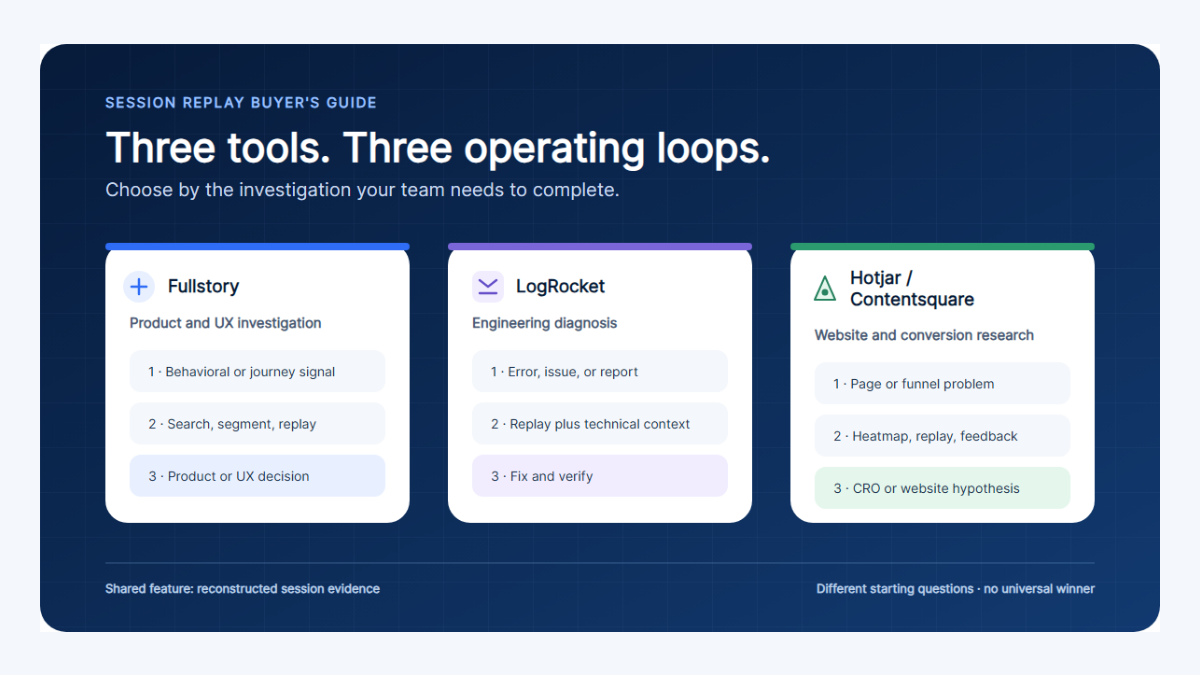
A triangle with infrastructure control, developer diagnosis, and product and UX analysis at its corners. OpenReplay sits closest to infrastructure control, LogRocket closest to developer diagnosis, and Fullstory closest to product and UX analysis.
The products overlap, but their centers of gravity differ. OpenReplay emphasizes deployment choice, LogRocket emphasizes technical diagnosis, and Fullstory emphasizes behavioral and experience analysis.

At-a-glance comparison

Legend: Yes means current first-party documentation supports the capability. Conditional means optional, platform-specific, plan-dependent, configurable, or narrower than the row implies. Not documented means a current public first-party workflow was not located and should be verified during procurement.

At-a-glance
Capability OpenReplay LogRocket Fullstory
Primary category Open-source and self-hostable session replay, developer tools, product analytics Frontend observability, session replay, error monitoring, UX analytics Behavioral and digital-experience analytics with session replay
Best fit Teams prioritizing source availability, self-hosting, infrastructure control, or interactive support Engineering teams reproducing and prioritizing frontend failures Product, UX, research, analytics, and cross-functional experience teams
Primary team Engineering, platform, support; also product and design Frontend engineering, product, support Product, UX, research, analytics, support
Session replay Yes Yes Yes
Heatmaps Yes for web Yes Yes
Product analytics Yes; web coverage is broader than current mobile coverage Yes Yes; broadest product and behavioral workflow of the three
Funnels Yes for web; not currently supported for mobile projects Yes Yes
Journeys Yes for web; not currently supported for mobile projects Path analysis rather than a separately named Journeys object Yes
User and session search Yes, including Omnisearch, filters, metadata, and segments Yes, with extensive technical and behavioral filters Yes, with OmniSearch, segments, pages, users, and events
Account context Custom metadata; not an account-first B2B model User traits/custom metadata; not an account-first B2B model Custom user properties; not an account-first B2B model
Console logs Yes Yes Yes
Network requests Yes Yes Yes
Request or response bodies Conditional; enable payload capture and sanitize before collection Yes, subject to privacy configuration, permissions, and product limits Conditional; explicit network enablement and allowlisting required
JavaScript errors Yes Yes Yes
Stack traces Yes Yes Yes for uncaught exceptions and captured errors
Source maps Yes Yes No first-class source-map upload workflow located in current public docs
Performance CPU, memory, frame rate, network and page context Frontend performance, timings, Core Web Vitals and session context Page-speed metrics, slowest pages and network timings
Issue detection Heuristics, errors, performance monitors and alerts Strong issue detection and grouping; Issues (2026 Beta) is explicitly beta Friction signals, error analysis, alerts and plan-dependent StoryAI opportunities
Mobile support iOS, Android and React Native SDK documentation explicitly labels each SDK beta; no mobile Trends, Funnels or Journeys yet iOS, Android, React Native and Flutter, with feature differences by SDK Native iOS/Android plus React Native and Flutter support; Flutter is generally available; paid Mobile add-on
Canvas or WebGL Conditional; current canvas/WebGL docs say Dedicated Cloud only and use image snapshots Not clearly documented in current public replay docs; verify Limited Canvas support; WebGL excluded in current capture documentation
Iframes Same-domain and configurable cross-domain capture Partial; cross-site and initialization limitations apply Customer-owned iframe capture; cross-origin and ownership constraints apply
Multiple tabs Yes Yes, with explicit tab-following and tab-lock controls Yes
Co-browsing Yes; interactive support workflow Live near-real-time view; interactive remote control not documented Co-Browsing is listed; Go Live provides near-real-time web viewing, but remote control was not established in the reviewed docs
Privacy controls DOM/input masking, payload sanitizers, mobile masking; canvas contents cannot be sanitized DOM/input exclusion and network sanitization controls Private-by-default and configurable masking/exclusion modes; network allowlisting
Self-hosting Yes: free open-source plus commercial Enterprise Yes: commercial Enterprise self-hosted option Not publicly documented; verify with vendor
Cloud option Serverless and fully managed Dedicated/BYOC options Managed SaaS Managed cloud
Free option Free open-source edition; infrastructure is not free Fourteen-day free trial shown; no permanent free plan on the current official pricing page Permanent FullstoryFree: 30,000 monthly sessions, 10 seats and one-year replay/analytics retention
Pricing model Self-hosted infrastructure cost; Dedicated from $199/month billed hourly; Serverless usage-based; Enterprise custom Captured sessions plus seats, retention and add-ons; calculator example from $176/month at 25,000 monthly sessions FullstoryFree plus custom paid pricing; Mobile and Guides and Surveys may be add-ons
Customer rating Not rated; no meaningful G2 sample located 4.6/5 · approximately 2,400 reviews 4.5/5 · approximately 1,050 reviews
Main strength Open-source deployment and infrastructure choice without giving up developer context Best integration of replay with frontend debugging evidence and issue workflow Broadest mature product, UX and behavioral-analysis workflow
Main limitation Operational burden and several plan/platform differences Cost can scale with captured sessions, seats, retention and add-ons Opaque paid pricing and less engineering-specific diagnosis than LogRocket
The 10 Best Session Replay Tools UXCam: Product Analytics · March 5, 2026 · 4:23 · Vendor-produced multi-product overview A short visual overview of the broader session-replay category and several compared tools. Disclosure: UXCam is a competing session-replay vendor. This is vendor perspective, not neutral evidence, and it does not determine this comparison’s conclusion.

The table reflects current first-party pricing, replay, mobile, capture, and debugging documentation. OpenReplay’s mobile page explicitly states that trends, funnels, and journeys are not yet supported for mobile projects. Fullstory documents DOM/event reconstruction, multi-tab capture, customer-owned iframes, limited Canvas, and no WebGL. LogRocket documents multi-tab replay, live viewing, technical event filters, and an Issues product currently undergoing a 2026 beta transition. (openreplay.com)

Why these products are compared

All three products can answer a question such as, “What happened in this user session?” The differences become clearer when the next question is considered.

OpenReplay asks: Where should the replay system run, who controls its infrastructure, and how much can the team inspect or modify?

LogRocket asks: What technical evidence will let an engineer reproduce, group, prioritize, and fix this frontend problem?

Fullstory asks: How does an observed session relate to broader behavior, friction, conversion, journeys, and experience patterns?

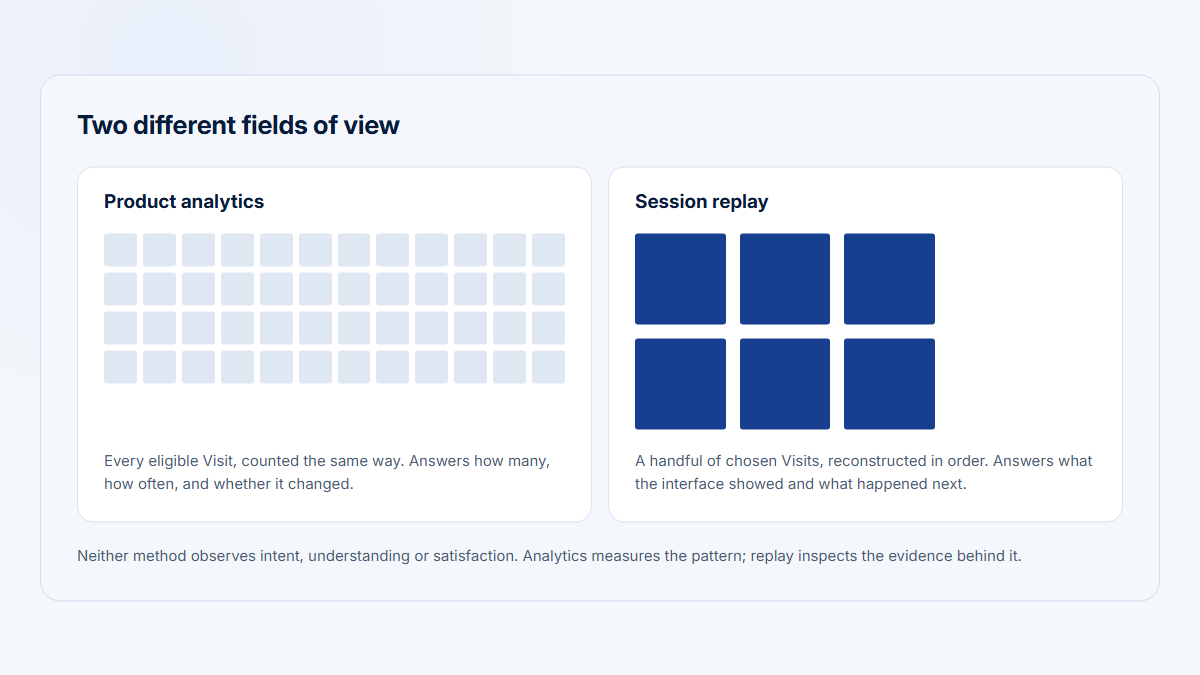
That distinction matters because replay, frontend observability, and structured product analytics overlap without being identical. A session can show a user clicking Export three times, but only structured events can reliably calculate the export success rate across every company and browser. A funnel can show that success declined, but it may not contain the console error or failed payload needed to fix it. A self-hosted recorder can keep infrastructure under the customer’s control, but it does not automatically implement sound retention, access, deletion, or incident-response policies.

For a wider category explanation, see session replay versus product analytics and what session replay captures.

Who each product is primarily built for

OpenReplay’s primary buyer

OpenReplay is most distinctive for engineering and platform teams that care about deployment choice. The free edition can be self-hosted, Dedicated instances can be managed by OpenReplay in a separate environment, and Enterprise adds a commercial self-hosted path with governance and support.

Product, design, research, and support teams can also use its funnels, Journeys, heatmaps, segments, replay highlights, and co-browsing. The qualification is that the organization may become an operator of a replay-data platform, not merely a consumer of a SaaS dashboard.

LogRocket’s primary buyer

LogRocket’s natural champion is a frontend engineering leader who wants a production incident to arrive with visual reproduction, logs, failed requests, stack traces, release context, performance, user traits, and affected sessions. Product and UX teams can use the same data for paths, funnels, heatmaps, dashboards, surveys, and session analysis.

This creates a useful shared language between support, product, and engineering: a ticket can contain the replay, while the engineer can inspect the technical evidence at the relevant timestamp.

Fullstory’s primary buyer

Fullstory’s strongest buyer is a product or digital-experience organization that wants replay embedded in a mature behavioral-analysis workflow. Designers can review sessions and heatmaps; product managers can build funnels and Journeys; analysts can segment users, create metrics, and export data; support can inspect a reported session; engineers can open Console and Network views.

Fullstory’s breadth can reduce the need to switch tools during qualitative and quantitative experience research. It does not eliminate the need for specialized observability or warehouse analytics where those are central.

How session replay works at a high level

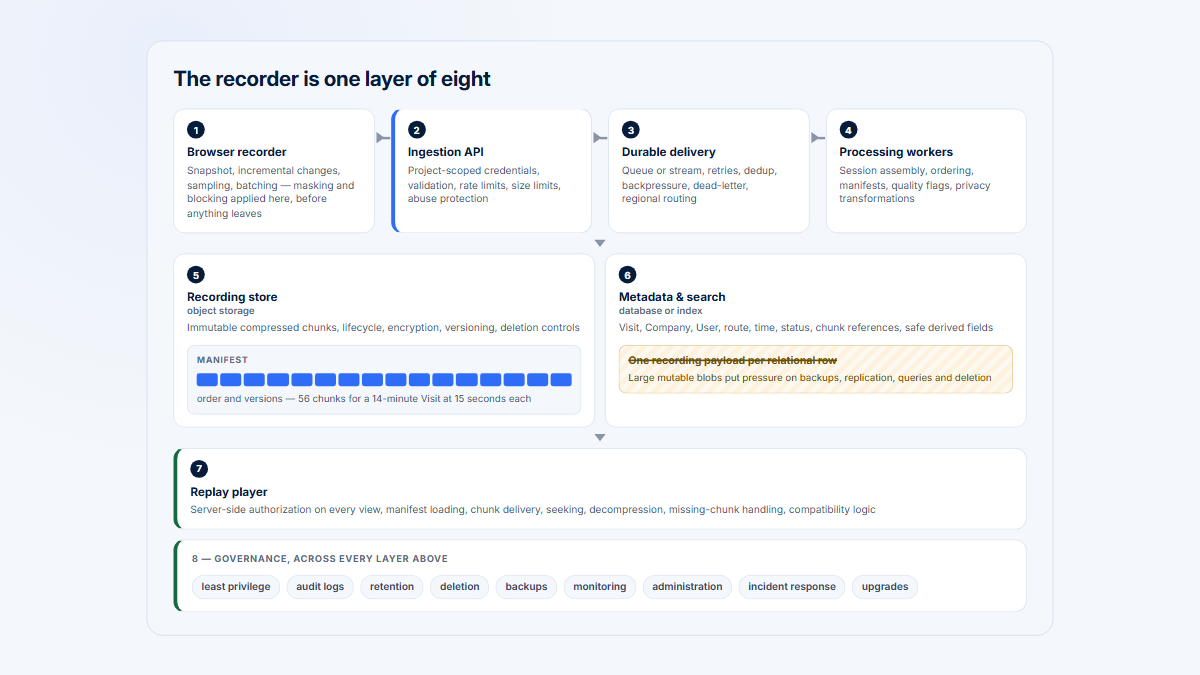
For browser applications, these products generally do not upload a conventional screen-recording video. A JavaScript recorder observes the document structure, mutations, navigation, input changes, clicks, scrolling, viewport changes, and selected technical events. The backend stores replay events, assets, and searchable metadata. A player later reconstructs the experience.

The conceptual flow is:

Browser recorder
→ Ingestion
→ Queue or stream
→ Replay-event storage
→ Searchable metadata index
→ Replay player
→ Access controls

This architecture has two important implications.

First, replay fidelity depends on more than the recorder. Stylesheets, fonts, images, iframes, Canvas, WebGL, browser behavior, privacy rules, CSP configuration, SDK ordering, network access, and player compatibility all affect reconstruction.

Second, a “session” contains different data classes. Visual reconstruction events, console output, network metadata, payloads, custom events, user traits, performance metrics, and indexed analytical events may have different collection rules, permissions, storage costs, and retention.

OpenReplay publishes unusually detailed self-hosted architecture documentation. Its current administrative documentation describes an HTTP ingestion service, Redis or Enterprise Kafka streaming, temporary NFS storage, object storage, cached assets, Postgres and Enterprise ClickHouse data services, APIs, alerts, integrations, and replay-serving components. That visibility is valuable, but each visible component is also something a self-hosting team must operate. (docs.openreplay.com)

Replay fidelity and limitations

No replay tool should be treated as an infallible record of a person’s screen or intentions.

A reconstructed replay can differ from the original experience when:

  • a CSS file, font, image, or internal asset cannot be fetched;
  • a browser extension or blocked script changes the original page;
  • the recorder starts after an important event;
  • an SPA transition is represented differently from a traditional page load;
  • cross-origin iframe policy prevents full capture;
  • privacy masking intentionally removes content;
  • a Canvas or WebGL surface is unsupported or sampled at a low frame rate;
  • the user changes tabs, windows, devices, or identities in a way the implementation does not stitch correctly;
  • capture is sampled or conditional;
  • a session falls outside retention;
  • an SDK regression or unsupported browser behavior affects collection.

OpenReplay can capture Canvas and WebGL as snapshots when the relevant Dedicated capability is enabled, but its documentation warns that canvas content cannot be sanitized and that frame rate and quality affect bandwidth and storage. Fullstory documents limited Canvas support and excludes WebGL from general web capture. A current first-party LogRocket Canvas/WebGL support statement was not located, so this comparison does not guess. (docs.openreplay.com)

Replay can support a hypothesis such as, “the user repeatedly clicked because the UI did not visibly respond.” It cannot prove frustration, confusion, or intent without corroborating evidence. Even a rage-click detector identifies a behavioral pattern, not a mental state.

Developer diagnostics

Developer diagnostics
Diagnostic capability OpenReplay LogRocket Fullstory
Console capture Yes Yes Yes
Network metadata Yes Yes Yes
Request headers Yes, configurable Yes, subject to capture and permissions Safe headers by default; custom rules available
Request or response bodies Optional capturePayload; sanitizer required Yes; sanitize sensitive fields and restrict access Explicit allowlisting required; nothing sensitive should be allowlisted broadly
GraphQL Apollo/Relay plugins and network evidence First-class GraphQL request search and issue evidence Visible as network traffic where captured; no separate first-class GraphQL workflow located
JavaScript errors Yes Yes Yes
Stack traces Yes Yes Yes for captured/uncaught exceptions
Source maps Yes Yes Not publicly documented as a first-class upload/release workflow
Performance timings CPU, memory, frame rate, network and other session context Frontend performance, web vitals, page and request timing Page-speed milestones, slowest-page analysis and request timings
Frontend framework state Plugins for Redux, Vuex, MobX, NgRx, Pinia, Zustand and others; verify current plugin list Redux state/actions and supported SDK context No comparable first-class framework-state timeline located
Release tracking revID and source-map workflows Release identification and source maps Can be represented through events/properties; no comparable first-class workflow located
Issue grouping Errors and heuristics; less central than LogRocket’s Issues model Yes; Signals and Issues, with the 2026 implementation currently in beta documentation Error/friction analysis and StoryAI opportunities; not the same engineering issue-management model
Alerting Performance monitors and email, Slack, in-app or webhook notifications Alerts and issue workflows Metric and segment alerts; plan-dependent AI opportunity detection
Issue-tracker integrations GitHub, Jira and other integrations Jira, GitHub and sharing integrations Integrations and share workflows; verify exact plan and destination
Session-to-error navigation Yes Yes Yes
Important plan qualifications Canvas/WebGL currently documented for Dedicated; advanced governance is Enterprise-oriented AI, RBAC, audit, export and self-hosting vary by plan; Issues (2026 Beta) is beta Mobile, StoryAI, advanced governance and data activation vary by plan/add-on

OpenReplay’s SDK exposes optional payload capture with an explicit warning to sanitize data. LogRocket’s replay interface links logs, errors, requests, tabs, user details, releases, performance information, sharing, and integrations. Fullstory’s Dev Tools expose Console, Network, request timing, and page-speed information, while request and response bodies require privacy allowlisting. (docs.openreplay.com)

Why LogRocket has the clearest developer-debugging advantage

LogRocket puts technical evidence at the center of the replay workflow. Issues (2026 Beta) launches with one Error Signal type that consolidates JavaScript exceptions, network errors, mobile crashes, error states, dead clicks, rage clicks, and frustrating network requests. Related Signals are grouped into Issues, which carry priority, status, assignee, AI analysis, linked tickets, and coding-agent actions.

That makes LogRocket especially suitable when the operational unit is not “a replay to watch” but “a production problem to diagnose and move toward resolution.” The qualification is that the 2026 Issues workflow is explicitly marked beta and may change. (LogRocket)

Where OpenReplay is competitive

OpenReplay can be a strong developer tool when the team wants replay plus console, network payloads, application state, source maps, CPU, memory, frame rate, error tracking, external observability integrations, and infrastructure control. Its documentation also describes converting session events into end-to-end tests.

The trade-off is not simply fewer features. The team must distinguish open-source functionality, Dedicated-only functionality, Serverless-only AI features, and Enterprise governance. Procurement should verify the exact edition rather than treating “OpenReplay” as one undifferentiated package.

Where Fullstory’s Dev Tools fit

Fullstory’s Dev Tools are sufficient for many support and product-led investigations. A team can inspect a user’s console error, identify a failed API call, inspect allowlisted data, and compare performance across affected sessions.

Fullstory becomes less direct when the desired workflow is source-map upload, release-aware grouping, framework-state playback, and issue assignment. That is a difference in emphasis, not evidence that Fullstory cannot help an engineer.

Debugging Made Easy with OpenReplay - Start it Up Wednesday GitHub · June 15, 2023 · 1:03:18 · Founder-led technical demonstration A walkthrough of how OpenReplay connects a replay to developer evidence. The live event took place June 14; the YouTube upload date is June 15. Disclosure: OpenReplay’s founder demonstrates the product. It shows an intended workflow and is not an independent benchmark.

Product and UX analysis

Product and UX analysis
Product or UX capability OpenReplay LogRocket Fullstory
Funnels Yes for web Yes Yes
Paths Journeys/path analysis for web Yes, named Path Analysis Page Flow and Journeys
Journeys Yes for web Paths provide journey exploration; no equivalent separately named object located Yes; core differentiator
Heatmaps Yes Clickmaps, heatmaps and rage-click maps Heatmaps, click maps, scroll maps and page insights
Behavioral segments Yes Yes Yes
Annotations Replay highlights and saved moments Cropped replay clips and shared links; a research-note workflow is less central Session notes and shared observations
Collaboration Sharing, highlights, dashboards and integrations Sharing, clips, dashboards and issue integrations Notes, spaces, templates, dashboards, sharing and alerts
Saved views Segments, dashboards and analytical cards Personal/team dashboards and saved segments Segments, spaces, dashboards, metrics and Journeys
Replay search Yes Yes Yes; OmniSearch is a major strength
Account and user metadata Custom user and session metadata User traits and custom metadata Custom user properties and server-side properties
Successful-versus-failed comparison Possible with explicit success/failure events and segments Strong when events, funnels, issues and replays are combined Strong native workflow across segments, funnels, metrics and Journeys
Research workflow Capable replay-led workflow, but a smaller research ecosystem Best when UX evidence should remain close to engineering context Broadest dedicated UX and product-research workflow
Product-analytics integration Native web analytics plus integrations/API Native analytics plus replay drill-down and export options Native behavioral analytics plus Anywhere/warehouse and activation options
Customer-support workflow Interactive co-browsing plus replay and DevTools Live replay, technical evidence, sharing and integrations Go Live, replay, notes, search and support-oriented workflows

OpenReplay’s current releases and documentation describe Trends, Funnels, Journeys, Heatmaps, dashboards, filters, comparison periods, and replay drill-down for web projects. LogRocket includes funnels, path analysis, dashboards, heatmaps and filters tied closely to replays. Fullstory’s plan comparison includes Journeys, page flow, funnels, metrics, retention, segmentation, conversion analysis, notes, alerts and data activation. (docs.openreplay.com)

Why Fullstory has the clearest product and UX advantage

Fullstory is the strongest choice when research should begin with a behavioral population and then drill into replay. A product manager can define a segment, compare conversion, inspect the Journeys around a page or event, and open the sessions contributing to the pattern. A researcher can save notes and share evidence without turning the workflow into an engineering incident.

Its advantage is maturity and breadth rather than the claim that every individual feature is unique. OpenReplay and LogRocket both have funnels, paths or Journeys, heatmaps, search, and replay drill-down. Fullstory’s differentiation is how many of those capabilities are assembled into one cross-functional experience-analysis system.

For a practical review workflow, see how to review session replays and the UX research use case.

Account and user context

All three products can associate a replay with an identified user and custom attributes. A B2B SaaS team can usually send values such as:

  • user_id
  • account_id
  • company_name
  • plan
  • role
  • workspace_id
  • region
  • release
  • feature_flag
  • customer_tier

That does not automatically produce an account-centric analytical model.

A first-class account model should make it easy to answer:

  • Which companies adopted Reporting?
  • Which company’s usage declined?
  • Is one user responsible for most activity in an account?
  • Which roles use a feature?
  • Did usage expand from one champion to a broader team?
  • Which account-level signals should customer success review?
  • Which Visit contains evidence relevant to the account-level change?

With a replay platform, the team can encode company context as user traits or custom events. It still needs disciplined identity management and structured events. If a user switches accounts within one browser session, simply overwriting account_id can make earlier activity appear to belong to the later account. Emit an explicit account_switched event and attach the effective account ID to every business-critical event.

For the broader account-level model, see product usage by company, Companies, and Users.

Mobile support

All three vendors now describe mobile replay, but the support surfaces differ.

OpenReplay supports iOS, Android, and React Native. Its mobile product page describes replay, console logs, crash information, API calls, performance controls, privacy masking, custom events, user identification, cloud, and self-hosting. It also states that Trends, Funnels, and Journeys are not yet supported for mobile projects. The current iOS, Android, and React Native SDK documentation explicitly labels each SDK beta, so the whole mobile offering should not be described as generally mature. (openreplay.com)

LogRocket documents iOS, Android, React Native, and Flutter support. Replay, logs, requests, crashes, identity, filtering, performance and product-analysis support vary by platform. Do not compress the mobile feature matrix into a blanket “everything works everywhere” claim.

Fullstory supports native mobile applications and currently offers Mobile as a paid add-on. Current product and release documentation describes Flutter as generally available; verify the exact iOS, Android, React Native, and Flutter SDK matrix during evaluation. Go Live is explicitly web-only, so a mobile support team should not assume the same live workflow is available in native sessions. (fullstory.com)

A team building only a mobile app should compare these options against dedicated mobile-experience tools. The breadth of the web product can add cost and complexity without improving the primary mobile workflow.

Self-hosting architecture and operational ownership

OpenReplay is the only product in this comparison with a free, source-available, open-source self-hosted edition. LogRocket offers a proprietary commercial self-hosted deployment on Enterprise. Fullstory self-hosting is not publicly documented and should be verified with the vendor.

That distinction is important, but “self-hosted” still describes several different commercial and operational arrangements:

  • customer installs and operates free software;
  • vendor supplies proprietary software for the customer’s Kubernetes or cloud environment;
  • vendor manages a dedicated instance in the vendor’s cloud;
  • vendor manages software in the customer’s cloud account;
  • vendor operates a multi-tenant SaaS service.

These arrangements differ in source rights, network boundaries, storage ownership, patch responsibility, support access, telemetry, backups, disaster recovery, and incident response.

A replay data flow from browser recorder through ingestion, queue, storage, metadata index, replay player, and access controls, with managed and self-hosted responsibility boundaries.
Self-hosting changes the responsibility boundary; it does not remove the recorder, storage, index, access, privacy, or incident-response work.

OpenReplay’s current license is mixed, not a one-line label

The OpenReplay monorepo uses multiple licenses. Its root license states that:

  • content under ee/ is governed by the separate Enterprise license;
  • third-party components retain their original licenses;
  • some directories use MIT;
  • content outside those exceptions defaults to GNU AGPL version 3.

The accurate description is a mixed-license monorepo whose default community license is AGPLv3, with MIT components and separately licensed Enterprise code, not a repository in which every file is AGPL. Procurement and legal teams should inspect the exact directories they plan to deploy or modify. (OpenReplay root license; OpenReplay Enterprise license)

Deployment, privacy, and operations
Operational area OpenReplay LogRocket Fullstory
Managed cloud Serverless and Dedicated SaaS Managed cloud
Self-hosting Free open-source and commercial Enterprise Commercial Enterprise Not publicly documented; verify with vendor
Source availability Public monorepo with mixed licenses No public open-source core No public open-source core
License Default AGPLv3 outside MIT, third-party and Enterprise exceptions Commercial/proprietary Commercial/proprietary
Infrastructure ownership Customer for self-host; vendor or customer cloud for Dedicated/BYOC Vendor for SaaS; customer infrastructure for self-hosted Enterprise Vendor-managed
Storage ownership Customer for self-host; deployment-specific for Dedicated/BYOC Vendor for SaaS; customer environment for self-host Vendor-managed GCP storage
Database Postgres; Enterprise documentation also names ClickHouse Vendor-managed/proprietary implementation; self-host details are contractual Vendor-managed/proprietary implementation
Queue or stream Redis; Kafka in Enterprise documentation Vendor-managed/proprietary; verify self-host architecture Vendor-managed/proprietary
Upgrades Customer for open-source self-host; vendor for managed Dedicated; shared process for Enterprise Vendor for SaaS; contractual process for self-hosted Enterprise Vendor
Backups Customer for self-host; Dedicated currently lists backups as “2 Days” (verify scope and cadence); Enterprise custom Vendor for SaaS; customer/vendor contract for self-host Vendor
Security patches Customer for self-hosted components and surrounding infrastructure Vendor for SaaS; shared/customer responsibility when self-hosted Vendor
Retention Self-managed on open source; custom on Dedicated and Enterprise Plan/configuration dependent; Extended Retention is available as a Pro and Enterprise feature FullstoryFree one year; paid retention configurable by contract
Deletion Customer policy, cleanup and product/API tooling on self-host; verify current workflow Admin-controlled privacy/deletion workflows; verify contract and API User/session deletion and APIs; retained data expires permanently
Access control Basic/customer-operated on self-host; advanced roles plan-dependent RBAC is plan-dependent Role-based access is plan-dependent
SSO Dedicated/Enterprise options; SAML and SCIM emphasized for Enterprise SSO listed; exact protocol and provisioning terms must be verified SAML SSO and SCIM are plan-dependent
Audit logs Enterprise-oriented Pro and Enterprise Audit Trails API and plan-dependent governance
Data residency Customer-selected on self-host; Dedicated currently advertises 50 regions United States for SaaS account and session data; customer-controlled for self-hosted Enterprise US default and EU option; accounts cannot currently migrate between regions
Incident response Customer for open-source self-host; vendor/customer boundary for managed and Enterprise Vendor for SaaS; shared/customer boundary for self-host Vendor, with customer responsible for app-side privacy and integration incidents

OpenReplay’s pricing and administration documentation expose the clearest infrastructure boundaries. LogRocket’s current pricing page explicitly lists self-hosting on Enterprise but does not publish the same internal component map. Fullstory documents GCP hosting, a US default region, an EU option, and no migration path between data centers. (openreplay.com)

What self-hosting makes the customer responsible for

Operating OpenReplay—or another self-hosted replay platform—can require responsibility for:

  • ingestion availability;
  • queue or stream health;
  • temporary and object storage;
  • metadata indexes;
  • replay-player compatibility;
  • cached assets;
  • TLS and network exposure;
  • identity and access control;
  • SSO integration;
  • backups and restore tests;
  • disk-capacity planning;
  • monitoring and alerts;
  • retention jobs;
  • user and session deletion;
  • secret management;
  • dependency and OS security patches;
  • product upgrades and migrations;
  • SDK compatibility;
  • on-call response;
  • incident investigation;
  • privacy requests;
  • vendor/community escalation.

A free software license removes a license invoice for the community code. It does not remove those responsibilities.

Use this formula without inserting universal dollar estimates:

Annual replay TCO =
infrastructure
+ storage
+ monitoring
+ security
+ engineering maintenance
+ privacy operations
+ on-call and incident response

The actual total depends on session volume, replay size, retention, redundancy, region, Canvas capture, mobile data, queue throughput, backup policy, staffing, and the organization’s security obligations.

See the complete self-hosted session replay guide.

Privacy and masking

The most important privacy decision happens before the first session is recorded: define what the product is allowed to collect.

A responsible implementation should inventory:

  • forms and input fields;
  • authentication screens;
  • payment information;
  • health or financial information;
  • private messages;
  • uploaded documents;
  • API bodies;
  • authorization and cookie headers;
  • query parameters;
  • URL paths containing identifiers;
  • DOM text that may contain personal data;
  • mobile screens and views;
  • Canvas and WebGL content;
  • custom events and metadata;
  • internal or employee applications;
  • support-agent access.

OpenReplay

OpenReplay provides DOM/input privacy controls, network sanitizers, and mobile masking. Its network payload option explicitly warns implementers to sanitize before enabling capture. Its Canvas documentation says Canvas contents cannot be sanitized, which should be treated as a material limitation for applications that render sensitive data into Canvas. (docs.openreplay.com)

LogRocket

LogRocket supports DOM and input exclusion and requires implementers to sanitize network data and custom properties. Network bodies can create a larger privacy surface than visual replay alone. Access to payloads should be limited separately from general replay access where the plan supports granular permissions.

Fullstory

Fullstory provides capture, masking and exclusion modes, consent controls, and network allowlisting. Safe headers can be collected while sensitive headers such as authorization and cookies are blocked. Request and response bodies are not a reason to allowlist an entire API indiscriminately; specific safe fields should be selected. (help.fullstory.com)

Use the session replay privacy checklist as the implementation companion.

Why self-hosting does not guarantee privacy

Self-hosting can change where data is stored and who operates the infrastructure. It does not guarantee that:

  • sensitive data was masked before transmission;
  • network bodies are safe;
  • employees have least-privilege access;
  • backups follow deletion;
  • retention jobs run;
  • production support access is controlled;
  • logs and monitoring avoid duplicating sensitive content;
  • incident response is effective;
  • the legal basis for recording is valid;
  • consent and opt-out are implemented;
  • the deployment satisfies a particular regulation.

Privacy is a collection, access, retention, deletion, governance, and legal-design problem—not a hosting checkbox.

Access, retention, deletion, and data export

Access to replay should be treated as access to production evidence, not as ordinary marketing-dashboard access.

Recommended controls include:

  • role-based access;
  • separate permission for request or response bodies;
  • SSO and lifecycle provisioning;
  • session-view audit logging;
  • environment separation;
  • restricted exports;
  • short default retention;
  • documented deletion workflows;
  • monitored administrative actions;
  • regular access review;
  • incident escalation.

OpenReplay gives self-hosting teams maximum control but also makes them responsible for enforcing those controls. Dedicated and Enterprise plans add managed operations and governance capabilities.

OpenReplay’s self-hosted cleanup documentation defaults replay-file expiration to 180 days, while PostgreSQL session metadata remains until it is separately configured or cleaned. Treat both as operational defaults to review and test, not as a managed retention guarantee. (OpenReplay storage cleanup documentation)

LogRocket currently places RBAC and audit logging in higher plans and lists Streaming Data Export and self-hosting on Enterprise. Extended Session Retention is a Pro and Enterprise SaaS feature: sessions played for more than one second are retained for up to 12 months, capped at 5% of the monthly session quota. Teams must still verify the ordinary retention configured for unwatched sessions rather than assuming one universal period. (LogRocket Extended Session Retention)

FullstoryFree currently includes one year of replay and product-analytics retention. Paid retention is configurable. Fullstory also documents deletion APIs, audit trails, data export/warehouse products, and separate US and EU regions. The current FullstoryFree FAQ describes different rights around anonymized non-PII than paid plans; legal and privacy teams should review the current Free terms rather than treating Free as contractually identical to paid. (help.fullstory.com)

Reliability, SPA handling, tabs, iframes, Canvas, and WebGL

Modern SaaS applications make replay harder than a static marketing site.

Single-page applications

All three products are designed for SPAs, but implementation still matters. Initialize the SDK early enough, preserve identity across client-side routes, send releases and custom events consistently, and test replay after framework or routing upgrades.

Multiple tabs

All three products document or advertise tabbed capture. LogRocket offers explicit follow-user and lock-to-tab controls. Tab support helps reconstruct a workflow, but it does not replace business events. If a user opens three reports in three tabs, each export request still needs a report ID, account ID, and outcome event to support prevalence analysis. (LogRocket)

Iframes

OpenReplay provides same-domain and cross-domain configuration. Fullstory captures customer-owned iframes. LogRocket documents iframe and cross-site caveats. In every case, test:

  • same-origin iframe capture;
  • cross-origin consent and script installation;
  • authentication state;
  • nested frames;
  • embedded third-party tools;
  • privacy rules;
  • replay navigation.

Do not promise coverage of an iframe the customer does not own or instrument.

Canvas and WebGL

OpenReplay’s current Dedicated documentation supports recorded Canvas and WebGL through image snapshots. Snapshot quality and frames per second affect fidelity, bandwidth, and storage; WebGL requires preserveDrawingBuffer, and Canvas contents cannot be sanitized. This recorded-session feature is separate from Live Assist’s peer-to-peer Canvas co-browsing while an agent watches. Fullstory documents limited paid Canvas support and no WebGL capture. LogRocket’s current public documentation did not provide a sufficiently clear statement to mark support. (OpenReplay Canvas and WebGL documentation)

Reliability acceptance test

Before rollout, create a test matrix covering:

  • supported browsers;
  • desktop and mobile viewport sizes;
  • SPA route changes;
  • hard reloads;
  • tabs and windows;
  • same- and cross-domain iframes;
  • masked forms;
  • failed fetch and XHR requests;
  • GraphQL failures;
  • Canvas/WebGL if applicable;
  • slow pages;
  • offline/reconnect behavior;
  • release changes;
  • source maps;
  • content-security policy;
  • ad/tracking blockers;
  • session sampling;
  • retention and deletion.

A replay platform should pass the team’s actual application matrix, not merely a generic product demo.

Implementation effort

Managed SaaS implementation

A managed implementation still requires more than adding one script:

  1. Complete privacy and legal review.
  2. Install the web or mobile SDK.
  3. Configure consent and capture start/stop behavior.
  4. Mask or exclude sensitive content.
  5. Sanitize network requests.
  6. Identify users.
  7. Attach company/account metadata where relevant.
  8. Send custom business events.
  9. Configure environments and releases.
  10. Upload or verify source maps where supported.
  11. Define capture, conditional recording, or sampling.
  12. Configure access, SSO, roles, alerts and integrations.
  13. Validate replay fidelity.
  14. Test deletion and retention.
  15. Train each team on when replay is and is not sufficient evidence.

Self-hosted implementation

Self-hosting adds:

  • capacity planning;
  • cloud or Kubernetes provisioning;
  • DNS and TLS;
  • object-storage setup;
  • database and queue operations;
  • backups;
  • observability;
  • upgrades;
  • scaling;
  • disaster recovery;
  • security patching;
  • internal support ownership.

A startup with no infrastructure team should not choose self-hosting merely because the software license is free. OpenReplay Dedicated, LogRocket SaaS, or Fullstory may have a lower practical operating burden.

Pricing and total cost

Pricing should be compared on the same unit. These products do not expose one identical billable metric.

Current pricing comparison

Current pricing comparison
Pricing area OpenReplay LogRocket Fullstory
Free plan or community edition Free open-source self-hosted edition No permanent free plan displayed on the current official page; 14-day trial FullstoryFree
Cloud entry model Dedicated from $199/month; Serverless usage-based Calculator example starts at $176/month for 25,000 captured web + mobile sessions Permanent free plan; paid Business, Advanced and Enterprise are custom
Billing unit Dedicated VM billed hourly at $0.276/hour for the displayed starting configuration; Serverless by recorded usage Captured sessions; seats, retention and add-ons change final price Session allowance and negotiated package; add-ons and services
Recorded sessions Open-source limited by customer infrastructure; Dedicated says no per-user or recording limit but is capacity-bound Pay for captured sessions; conditional recording is offered Free includes 30,000 sessions/month; paid quotas are contractual
Retention Self-managed; Dedicated and Enterprise custom Quote/configuration dependent; Extended Retention is available on Pro and Enterprise for selected watched sessions Free: one year replay and analytics; paid configurable
Seats OpenReplay advertises no user limits on Dedicated Price depends partly on seats; Enterprise lists unlimited seats Free: 10 seats; paid contractual
Mobile Supported, with platform and analytics qualifications Included in combined web + mobile session meter Paid Mobile add-on; not included in FullstoryFree
Diagnostics Replay and DevTools across editions; verify edition-specific functionality such as Canvas Core includes replay, errors, logs, network, performance and analytics Dev Tools included; advanced analytics and AI vary by plan
Enterprise model Custom, self-hosted at scale, governance and support Custom, including self-hosted and Streaming Data Export Custom Enterprise plus optional Mobile, Guides and Surveys, Anywhere, StoryAI and services
Self-hosted infrastructure responsibility Customer for open-source/Enterprise self-host Customer/vendor responsibility matrix under Enterprise contract Not publicly documented; verify with vendor
Official pricing link https://openreplay.com/pricing/ https://logrocket.com/pricing https://www.fullstory.com/plans/
Research verification August 6, 2026 August 6, 2026 August 6, 2026

OpenReplay’s current pricing page describes three deployment paths: self-hosting, fully managed Dedicated, and usage-based Serverless. The displayed Dedicated starting configuration is $199 per month, billed hourly, with a seven-day trial. LogRocket’s current calculator is set to 25,000 monthly web and mobile sessions and displays “Starting at $176/month”; the page says seats, retention and add-ons affect final pricing. Fullstory’s current Free plan includes 30,000 monthly sessions, 10 seats, 5,000 server-side events per month, and one year of replay and product-analytics retention. (openreplay.com)

What drives cost

Compare these cost drivers before using a starting price:

  • captured session volume;
  • proportion of traffic recorded;
  • replay-event size;
  • DOM mutation volume;
  • Canvas frame capture;
  • mobile session volume;
  • retention;
  • request and response payloads;
  • console and network event volume;
  • seats;
  • environments and projects;
  • source-map storage and processing;
  • alerts and AI features;
  • export or warehouse delivery;
  • dedicated infrastructure size;
  • backup storage;
  • self-hosted engineering maintenance;
  • security and privacy operations;
  • incident response.

A lower vendor invoice can produce a higher total cost when the organization becomes responsible for the infrastructure. A higher managed invoice can still be economical if it avoids recurring platform work. Use an annual scenario based on the organization’s measured traffic and staffing rather than multiplying a marketing-page number by twelve.

Ratings and recurring review themes

Shared rating source

Use G2 as the shared review source where it has a meaningful sample.

G2 rating snapshot
Product Public rating signal Interpretation
OpenReplay Not rated · no meaningful G2 review sample located · checked August 6, 2026 Do not infer satisfaction from vendor testimonials, GitHub stars, or a very small sample
LogRocket 4.6/5 · approximately 2,400 reviews · G2 · latest accessible snapshot April 22, 2026; checked August 6 Large review sample; recurring themes are more meaningful than isolated reviews
Fullstory 4.5/5 · approximately 1,050 reviews · G2 · latest accessible snapshot April 22, 2026; checked August 6 Large review sample; use themes, not individual quotations, as directional evidence

The latest accessible G2 snapshot, dated April 22, 2026, showed 2,344 LogRocket reviews and 1,048 Fullstory reviews. The live product pages were bot-blocked during the August 6 verification, so the table preserves rounded counts—approximately 2,400 and 1,050—rather than claiming a live exact count. (LogRocket on G2; Fullstory on G2)

LogRocket review themes

Recurring positive themes include:

  • the ability to reproduce difficult frontend issues;
  • replay connected to console and network evidence;
  • ease of locating the relevant session;
  • quick implementation for common web stacks;
  • value across engineering, product and support.

Recurring cautions include:

  • price growth as session volume and requirements increase;
  • plan, retention, or recording limits;
  • the learning curve for advanced filters and analytics;
  • occasional replay or asset-fidelity problems;
  • the need to configure privacy and sanitization carefully.

G2’s current pros-and-cons summaries identify ease of use and troubleshooting as prominent positive themes. Treat the themes as directional evidence, not a substitute for a proof of concept. (G2)

Fullstory review themes

Recurring positive themes include:

  • replay quality and search;
  • broad heatmap, funnel, Journey and segmentation workflows;
  • usefulness across product, UX, analytics and support;
  • the ability to move from aggregate behavior to a relevant session.

Recurring cautions include:

  • opaque or high paid pricing;
  • a learning curve for advanced analysis;
  • occasional replay fidelity or asset-loading issues;
  • privacy configuration and instrumentation work;
  • packaging differences between Free, paid tiers and add-ons.

OpenReplay review evidence

OpenReplay has a visible developer community and public repository, but those signals are not equivalent to a large independent customer-review sample. Do not construct a numerical “customer rating” from GitHub stars, testimonials, community messages, or vendor case studies.

Decision by scenario

Decision by scenario
Scenario Best starting choice Why Qualification
Frontend engineer reproducing a JavaScript error LogRocket Strongest error-to-replay, source-map, release, network, stack and issue workflow OpenReplay is a strong alternative when self-hosting matters
Product designer investigating onboarding Fullstory Broad funnels, Journeys, heatmaps, segments and replay drill-down LogRocket and OpenReplay can work when technical friction is central
UX researcher reviewing selected sessions Fullstory Notes, search, segmentation and mature research workflow Sampling strategy and consent still matter
Company requiring open-source self-hosted replay OpenReplay Public source and free self-hosted edition Confirm exact mixed-license obligations and operating capacity
Company requiring commercial proprietary self-hosting OpenReplay Enterprise or LogRocket Enterprise Both provide commercial self-host paths Compare source rights, deployment boundary, support access and architecture
Startup with no infrastructure team Managed LogRocket, Fullstory, or OpenReplay Dedicated Avoids becoming the replay-platform operator Compare actual session volume and required analytics
Enterprise with strict access controls Enterprise quote comparison All provide stronger governance at higher tiers Validate SSO, SCIM, payload permissions, audit, retention and region in contract
Customer-support team OpenReplay when interactive co-browsing is essential; otherwise LogRocket or Fullstory OpenReplay’s support proposition includes active co-browsing; the others provide live viewing and rich evidence Verify consent, control boundaries and mobile support
Mobile-app team Run a platform proof of concept Platform and SDK parity differ significantly Also compare dedicated mobile-replay tools
B2B SaaS customer-success team Hymetry plus a replay/diagnostic layer Account-centric adoption should start with Company and product-area signals These replay products can receive account metadata but are not account-first
Team already using Mixpanel or Amplitude Add the replay product matching the operational need Preserve mature event analytics and add qualitative evidence Align identities and event names across tools
Organization needing co-browsing OpenReplay Clearest interactive co-browsing proposition LogRocket Live and Fullstory Go Live should not be assumed to provide remote control
Product team needing broad behavioral analytics Fullstory Broadest mature experience-analysis workflow Pricing and add-ons are custom
Team prioritizing frontend diagnosis and issue resolution LogRocket Most engineering-centered workflow Verify current Issues (2026 Beta) behavior
Team prioritizing infrastructure control OpenReplay Open-source, self-hosted, Dedicated and BYOC choices Operational ownership is the trade-off

Illustrative technical scenario: falling exports in a B2B reporting product

The following scenario is fictional and illustrative. It does not describe a hands-on benchmark.

A B2B SaaS Reporting product shows:

  • stable visits to the Reporting area;
  • a falling number of successful exports;
  • repeated clicks on the Export button;
  • a JavaScript error in one browser version;
  • a failed network request;
  • one user switching between customer accounts;
  • several browser tabs;
  • one customer company whose activity is dominated by a single user;
  • uncertainty about whether the problem is widespread.

Structured events needed before replay can answer the full question

Instrument at least:

report_viewed
export_clicked
export_requested
export_succeeded
export_failed
account_switched

Attach:

event_id
timestamp
user_id
account_id
workspace_id
user_role
report_id
report_type
report_size_bucket
export_format
browser
browser_version
operating_system
app_release
feature_flag
tab_id
request_id
response_status
normalized_error_code
normalized_error_signature
duration_ms

Do not use only button clicks as the success metric. The analytical denominator should be eligible export requests, and the outcome should come from a confirmed client or server success signal.

What OpenReplay would contribute

What may be captured: The web replay can show the Reporting workflow, repeated clicks, navigation, tab switches, console messages, the JavaScript error, network evidence, custom events, metadata, and supported application-state plugins. Failed request payloads can be visible when payload capture is enabled and sanitized.

How the session would be found: Search or segment by Reporting URL, export_failed, browser version, release, user ID, account metadata, console error, bad request, or repeated-click issue.

Developer evidence: OpenReplay can provide the error and stack, source-map context, network status and payload, console output, performance evidence, and state history where the relevant plugin was installed.

Product and UX evidence: Trends, funnels, Journeys, heatmaps and session filters can help compare export attempts and successful outcomes on web. The team should still rely on explicit business events rather than infer success from what the replay looked like.

Company context: Send account_id, company tier and user role as metadata. Emit account_switched and include the effective account ID on every export event so that one session does not collapse two customer contexts.

Self-hosting: Yes. The free open-source edition and commercial Enterprise are self-hostable; Dedicated and Serverless provide managed alternatives.

What replay cannot reveal: It cannot prove why the user clicked repeatedly, whether they understood the workflow, whether a downloaded file was useful, or whether unrecorded users experienced the same problem.

What estimates prevalence: A structured funnel from export_requested to export_succeeded, broken down by browser, release, account, report type and error signature. Calculate unique affected accounts and users, not only failed sessions.

What LogRocket would contribute

What may be captured: Replay, tab changes, user traits, release, console logs, JavaScript errors, stack traces, source maps, network requests, response data, GraphQL failures, performance evidence, Redux state where configured, custom events and frustration signals.

How the session would be found: Filter sessions by export_failed, URL, browser/version, release, network endpoint, status, body text, console error, issue, user trait, account metadata or custom event.

Developer evidence: This is LogRocket’s strongest part of the scenario. An engineer can move from the grouped error or failed request to the affected sessions, inspect source-mapped stack traces, compare releases, view request details, and determine whether the failure coincides with a specific browser or state transition.

Product and UX evidence: Funnels, path analysis, heatmaps, dashboards and filtered session lists can compare successful and failed export paths. Repeated clicks can be analyzed as a frustration signal, but the event model should determine whether the click occurred before or after a request started.

Company context: Store the effective company/account as a user trait and event property. Update it explicitly during an account switch, and avoid relying on only the last user-trait value for historical attribution.

Self-hosting: Available as a commercial Enterprise deployment, not as a free open-source edition.

What replay cannot reveal: It cannot prove the error caused every export decline, that repeated clicks indicate frustration, or that one replay represents the whole population.

What estimates prevalence: Count unique affected accounts, users, releases and browser versions across normalized issues and explicit export_failed events. Compare failure rate against total eligible exports.

What Fullstory would contribute

What may be captured: Replay across tabs, page and element interactions, custom events and user properties, console messages, uncaught exceptions, network requests, allowlisted headers or bodies, page-speed evidence, frustration signals and notes.

How the session would be found: Use OmniSearch or a segment for Reporting pages, export events, browser/version, custom user properties, errors, failed requests, rage clicks, account ID or release property.

Developer evidence: Console and Network views can reveal the browser error and failed request. Allowlisted request or response fields can expose a safe error code or message. Page-speed metrics can show whether the interaction occurred during a slow experience.

Product and UX evidence: Fullstory can build a funnel for export request to success, compare successful and failed segments, inspect Journeys around Reporting, view heatmaps, analyze pages, and open representative sessions from the affected population.

Company context: Send account_id, plan, role and customer tier as user or event properties. As with the other products, account switching must be an explicit event to preserve historical context.

Self-hosting: Self-hosting is not publicly documented; verify with Fullstory.

What replay cannot reveal: It cannot prove the user’s motive, establish causality by itself, or represent sessions that were not captured or have expired.

What estimates prevalence: A structured metric and funnel using explicit outcomes, segmented by account, browser, release and error signature. Warehouse export can support deeper analysis when included in the contract.

How to determine whether one user dominates a company’s signal

For each affected company calculate:

dominant_user_share =
export_requests_from_most_active_user
/
all_export_requests_from_company

Also calculate:

  • active users in Reporting;
  • users attempting an export;
  • users with at least one successful export;
  • unique users with the normalized error;
  • failed exports per user;
  • successful exports per user;
  • number of affected tabs or sessions;
  • first and last affected release;
  • proportion of company activity produced by the top user.

A company with 100 failed requests from one power user is operationally different from a company where 20 of 25 active users fail once.

The conclusion this scenario can and cannot support

Replay may reveal a plausible sequence:

Export click
→ JavaScript exception
→ malformed or missing request field
→ HTTP failure
→ no visible completion state
→ repeated click

That sequence is useful developer evidence. It does not prove that the exception caused the whole company-level decline until structured data shows the same signature across the affected population and a fix reverses the outcome.

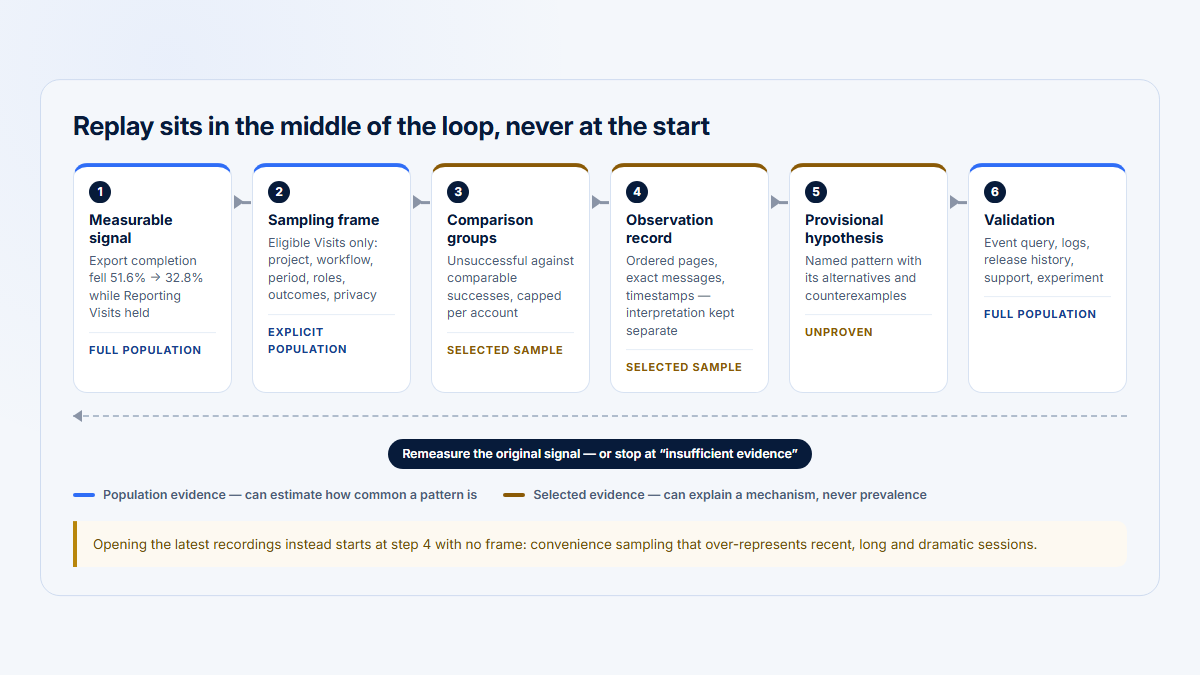
Using replay with event analytics

Replay and event analytics should share an identity and taxonomy rather than compete for ownership of the same question.

A practical architecture is:

Event analytics identifies the population
→ Account or user context prioritizes who matters
→ Replay shows representative evidence
→ Console and network data support diagnosis
→ A product hypothesis is written
→ Structured metrics validate or reject it
A workflow from metric change to affected company, user and visit, console or network evidence, a product hypothesis, and quantitative validation, with a feedback loop.
Replay contributes evidence to a diagnosis. Structured account, user, event, and outcome data are still needed to estimate prevalence and validate the hypothesis.

Teams already using Mixpanel, Amplitude, a warehouse model, or another event-analytics platform do not need to replace it merely to add replay. Preserve the mature quantitative layer and integrate the replay URL or session identifier where possible.

Conversely, a small team may use Fullstory, LogRocket, or OpenReplay’s native funnels and paths without a second product. The decision should depend on analytical complexity, event governance, retention, experimentation, warehouse needs, and account modeling—not the assumption that more tools are always better.

For more detail, see the broader product analytics tools comparison.

Migration considerations

A migration should preserve analytical meaning, not merely reinstall a recorder.

Before migration

Export or document:

  • user identity rules;
  • anonymous-to-identified merge behavior;
  • account/company metadata;
  • event names and schemas;
  • segments;
  • dashboards;
  • funnels;
  • alerts;
  • source-map and release workflows;
  • privacy selectors;
  • network sanitizers and allowlists;
  • role mappings;
  • SSO configuration;
  • retention;
  • saved replays or evidence required for active incidents;
  • integrations;
  • data-export jobs;
  • support links embedded in tickets.

During migration

Run a controlled overlap period where legally and operationally acceptable. Compare:

  • total eligible sessions;
  • recorded sessions;
  • identified users;
  • account metadata completeness;
  • event counts;
  • failed requests;
  • errors;
  • replay fidelity;
  • page performance impact;
  • masked-content tests;
  • mobile parity;
  • source-map resolution;
  • alert delivery.

Avoid recording the same sensitive fields twice without updating consent and privacy documentation.

Product-specific qualifications

OpenReplay’s current pricing FAQ says direct migration between Open-Source and Dedicated is not yet generally supported and advises contacting the vendor for transition help. Verify this before choosing an edition with the assumption that data can later move freely. (openreplay.com)

A migration to or from a self-hosted product should also include object-storage lifecycle, backups, deletion, DNS, TLS, observability, restore testing, and a decommission plan for the old recorder.

Final recommendation by team

Frontend engineering

Start with LogRocket when the primary outcome is faster reproduction and resolution of frontend failures. Compare OpenReplay closely when source availability or self-hosting is a firm requirement.

Platform, security, or infrastructure

Start with OpenReplay when an open-source deployment is required. Include LogRocket Enterprise when commercial self-hosting with a proprietary vendor-supported stack is acceptable. Do not approve either solely because “data stays inside our cloud”; review every support, telemetry, access, backup and egress boundary.

Product management

Start with Fullstory when behavioral analytics, Journeys, funnels, segmentation and broad cross-functional use are the center of the evaluation. Compare LogRocket where engineering and product need one shared problem-resolution environment.

UX research and design

Start with Fullstory for the most mature replay-led research workflow. OpenReplay and LogRocket remain relevant when UX evidence must stay close to technical context or interactive support.

Customer support

Choose OpenReplay when active co-browsing is essential. Choose LogRocket when support tickets frequently escalate into engineering investigations. Choose Fullstory when support evidence should connect to a wider behavioral-research program.

Mobile team

Run a platform-specific proof of concept. Do not choose based on web capability lists. Verify SDK maturity, visual fidelity, networking, crash evidence, masking, performance overhead, framework support, retention, and live-session workflow for the exact mobile stack.

B2B customer success

None of the three is primarily an account-centric B2B product-intelligence system. Use explicit account metadata and consider pairing replay with Hymetry or another account-oriented layer.

Where Hymetry fits

Hymetry is positioned as account-centric product intelligence for B2B SaaS. Its analytical model connects:

  • product areas;
  • grouped pages or features;
  • Companies;
  • Users;
  • account-level attributes and signals;
  • Visits;
  • session evidence.

The useful distinction is the starting point.

A replay-first workflow asks:

Which session should I watch?

An account-centric workflow asks:

Which product area or Company changed?
→ Which Users contributed?
→ Which Visits contain relevant evidence?

That makes Hymetry relevant when product, customer-success, and growth teams need to begin with adoption or decline at the company and product-area level, then open the Visit evidence that may help explain the pattern.

For example:

  1. Reporting adoption declines for three Companies.
  2. One Company’s usage is concentrated in a single User.
  3. The team opens that Company, then the relevant User and Visits.
  4. Session evidence shows repeated Export attempts.
  5. Developer diagnostics from LogRocket or OpenReplay provide the console and network detail.
  6. Structured export events verify whether the pattern is widespread.

Explore Hymetry Visits, Companies, and Users.

Hymetry should not be presented as a replacement for:

  • LogRocket’s detailed frontend diagnostics;
  • OpenReplay’s infrastructure-control proposition;
  • Fullstory’s broader mature experience-analytics platform;
  • a dedicated mobile-replay product.

State the current limitations candidly:

  • Hymetry is a newer product;
  • it has a smaller ecosystem;
  • it has fewer integrations;
  • it provides less developer observability;
  • it has no established independent customer-rating sample;
  • its replay feature surface is narrower.

FAQ

Is OpenReplay a LogRocket alternative?

Yes, especially when the requirement is session replay with console, network, errors, source maps, performance evidence, and self-hosting. It is not a drop-in equivalent. LogRocket has a more mature engineering issue workflow and a larger independent review sample, while OpenReplay offers a free open-source deployment and more infrastructure choice.

Is OpenReplay a Fullstory alternative?

It can replace Fullstory for some replay, heatmap, funnel, Journey, debugging, and support workflows, particularly when self-hosting matters. Fullstory remains stronger for mature, cross-functional product and UX analysis. OpenReplay’s current mobile analytics also exclude Trends, Funnels, and Journeys.

Is LogRocket better than Fullstory?

LogRocket is generally the better starting point for frontend debugging. Fullstory is generally the better starting point for product, UX, Journey, and behavioral analysis. Neither is universally better.

Which product can be self-hosted?

OpenReplay has a free open-source self-hosted edition and a commercial Enterprise self-hosted offering. LogRocket offers commercial Enterprise self-hosting. Fullstory self-hosting is not publicly documented; verify with the vendor.

Which is best for frontend debugging?

LogRocket has the clearest overall advantage because it tightly connects replay to JavaScript errors, network and GraphQL failures, console logs, stack traces, source maps, releases, performance and grouped issues. OpenReplay is a strong alternative when self-hosting or source availability matters.

Which is best for UX research?

Fullstory is the strongest default for UX research because replay is embedded in a broad workflow involving search, segments, notes, heatmaps, funnels, Journeys, metrics and quantitative comparison. A researcher must still use a sampling plan and avoid inferring intent from replay alone.

Which captures network and console data?

All three capture console and network evidence. OpenReplay payload collection is configurable and requires sanitization. LogRocket exposes rich request and response evidence subject to privacy and access configuration. Fullstory requires explicit network capture and allowlisting for request or response bodies.

Which supports mobile?

All three have mobile offerings. OpenReplay supports iOS, Android, and React Native but does not yet provide mobile Trends, Funnels, or Journeys. LogRocket supports iOS, Android, React Native, and Flutter with platform differences. Fullstory provides mobile through a paid add-on, with Flutter generally available alongside its native and other cross-platform SDK paths. Reverify the exact matrix before purchasing.

Which is easiest to operate?

A managed service is usually easier to operate than a self-hosted replay stack. Fullstory and LogRocket SaaS, or OpenReplay Dedicated/Serverless, remove much of the infrastructure burden. Implementation, privacy, identity, retention and access work remain.

Does self-hosting guarantee privacy?

No. Self-hosting changes the infrastructure boundary. Privacy still depends on masking, consent, payload sanitization, access control, retention, deletion, backups, monitoring, incident response and legal governance.

Can these tools replace product analytics?

They can replace a separate event-analytics tool for some teams because all three provide analytical capabilities around replay. They may not replace deep cohort analysis, experimentation, warehouse modeling, account-centric B2B analysis, or specialized attribution.

Can replay prove why a user struggled?

No. Replay can show observable behavior and technical evidence. It can support a hypothesis about struggle, but it does not directly reveal intent, understanding, emotion, or causality.

Which is best for B2B account analytics?

None of these three is primarily an account-first B2B product-intelligence platform. Send account metadata into the selected replay tool, and use Hymetry or another account-centric layer when Company, product-area, User, and Visit relationships are the starting point.

Where does Hymetry fit?

Hymetry helps B2B SaaS teams start with account and product adoption, move from Companies to Users and Visits, and then inspect relevant session evidence. It complements rather than replaces detailed frontend observability, infrastructure-controlled replay, mature experience analytics, or specialist mobile replay.

Disclosure

Hymetry publishes this comparison and is mentioned only where account-centric B2B analytics and session evidence are relevant. Product capabilities, prices, ratings, licensing, deployment options, and videos are verified against linked sources and may change after publication.

Methodology

This is a document-based comparison, not a hands-on laboratory test.

The research process prioritized:

  1. official product and pricing pages;
  2. official implementation and architecture documentation;
  3. official replay, console, network, error, performance, mobile, privacy, retention, deletion, access, and data-residency documentation;
  4. the OpenReplay repository and license;
  5. G2 as the shared independent rating and review-theme source;
  6. current product videos and vendor demonstrations;
  7. current release notes where a product is changing.

No synthetic performance benchmark was run. No product was scored for replay fidelity using a shared test application. No private procurement quote, DPA, support agreement, security exhibit, or self-host implementation guide was reviewed.

“Supported” means a current first-party source was located. “Conditional” means support is optional, plan-dependent, platform-dependent, configurable, or narrower than the row label. “Not documented” means the public sources reviewed did not establish the capability; it does not mean the vendor cannot provide it.

Pricing was verified on August 6, 2026. Ratings were checked that day, but G2’s live product pages were bot-blocked; the latest accessible rating snapshot was dated April 22, 2026.

Sources

OpenReplay official sources

LogRocket official sources

Fullstory official sources

Ratings and review sources

Selected videos

About Hymetry

Hymetry is account-centric product intelligence for B2B SaaS. It helps teams understand how customer companies and the users inside them adopt and use their product.