Key differences
OpenReplay is an open-core replay and frontend-observability platform organized around deployment choice. Its public repository covers replay, DevTools, analytics, privacy controls, Spot, Assist, and plugins. Managed hosting, enterprise scale, Dedicated-only canvas capture, and Serverless-only AI create important edition boundaries.
LogRocket is a commercial, managed-first product-experience platform. Core bundles replay, analytics, logs, errors, and performance; Pro adds Galileo AI; Enterprise adds scale controls, export, support, and optional self-hosting.
| Scenario | Start with | Why | Validate |
|---|---|---|---|
| Open-source, customer-operated replay is mandatory | OpenReplay | It provides the direct public source and self-managed Community path | License obligations, staffing, scale, backups, upgrades, and support |
| Managed SaaS is the default | LogRocket, or OpenReplay Serverless/Dedicated | LogRocket centers the managed workflow; OpenReplay also has managed options | Data boundary, plan gates, retention, support, and annual cost |
| Native mobile or Flutter is material | LogRocket | It documents iOS, Android, React Native, and Flutter SDK paths | Platform-specific replay, analytics, privacy, and issue differences |
| Consented remote-control support is required | OpenReplay | Co-browsing includes remote control, annotations, and audio/video | Consent, roles, auditability, browser support, and recording policy |
| Packaged AI issue triage is central | LogRocket Pro+ | Galileo connects summaries, issue detection, analytics insights, and coding workflows | Accuracy, sampling, beta status, self-host limits, and human review |
| Pinia or Zustand replay context is required | OpenReplay | Its public plugin matrix documents both; LogRocket documentation reviewed did not | Framework versions, payload redaction, overhead, and playback usefulness |
| Customer infrastructure is required, but open source is not | Shortlist both | OpenReplay offers customer-run/BYOC paths; LogRocket offers Enterprise self-hosting | Written RACI, code rights, topology, data path, upgrades, and feature gaps |
| Offering | What it means | Important boundary |
|---|---|---|
| OpenReplay Community / Open-Source | Free, self-managed | Core defaults to AGPLv3 outside named MIT and third-party areas; ee/ is excluded; the customer owns operations and retention |
| OpenReplay Dedicated | Managed dedicated VM on AWS, GCP, Azure, or BYOC; from $199/month | Custom retention, 50 regions, and up to 4 TB; capacity depends on workload |
| OpenReplay Serverless | Hosted, usage-based | Current AI is Serverless-only; no universal per-session rate appears on the static pricing page |
| OpenReplay Enterprise | Commercial self-hosting | ee/ requires Enterprise terms; SAML/SCIM, audit logs, support, and scale are commercial boundaries; AI Agents are listed as coming soon |
| LogRocket Core | Commercial SaaS | Replay, analytics, error/log events, performance, paths, funnels, heatmaps, surveys, SSO, and integrations |
| LogRocket Pro | Core plus Galileo AI | AI summaries, issue detection, analytics insights, Ask Galileo, feedback analysis, RBAC, and audit logging |
| LogRocket Enterprise | Pro plus scale and deployment controls | Unlimited seats, Streaming Export, enterprise support, and self-hosting; Severe Issues are unavailable self-hosted |
Replay, DevTools, and AI
Both products reconstruct sessions from DOM or view changes and captured events rather than recording ordinary screen video. Fidelity depends on assets, browser APIs, framework behavior, privacy rules, and SDK configuration. Test the interfaces that are hardest to reconstruct instead of treating a “session replay” checkbox as proof of complete capture.
| Surface | OpenReplay | LogRocket | Pilot test |
|---|---|---|---|
| Clicks, scroll, input, navigation | Captured and searchable; custom events | Captured and filterable; custom events | Rapid navigation, validation, route changes, and ignored input |
| Iframes | Same- and cross-domain capture requires explicit configuration | Same-, root-, and cross-origin merging requires SDK configuration and iframe access | Authentication, cross-origin boundaries, and nested frames |
| Shadow DOM | A previously reported style-loss bug was fixed; validate current custom components and styles | Open mode is documented; closed mode is unsupported | Every component library and encapsulation mode in production |
| Canvas and WebGL | Dedicated Cloud only; WebGL needs configuration; canvas content cannot be selectively sanitized | No broad official web guarantee found in the current documentation reviewed | Rendering, bandwidth, storage, masking, and playback accuracy |
| Native and hybrid | Native SDKs remain beta | Broader SDK matrix, including WebViews with platform-specific limits | Offline use, crashes, privacy, performance, and framework versions |
Also test media, embeds, custom fonts, closed components, virtualized lists, tab changes, and fast-changing interfaces. Marketing labels do not establish universal replay fidelity.
LogRocket packages technical signals into grouped Issues, with some network, frustration, and mobile behavior varying by plan or platform. OpenReplay exposes substantial evidence through DevTools, monitors, search, filters, and replay drill-down.
| Capability | OpenReplay | LogRocket | Buyer note |
|---|---|---|---|
| Errors and stacks | Native JavaScript errors, stack traces, and source maps | Native Errors, stacks, source maps, and release context | Publish maps before the affected release and test handled errors |
| Console logs | Native | Native | Console data may contain secrets or personal data |
| Network metadata | Native SDK and plugin configuration | Native Web support; mobile capture varies | Keep timing and status while minimizing payload data |
| Request and response bodies | Native Configurable sanitization | Native Web sanitizers; platform differences on mobile | Review headers, tokens, identifiers, bodies, and errors independently |
| GraphQL | Native Plugin-based | Native Supported web capture | Test operation names, variables, responses, Apollo or Relay, and redaction |
| Application state | Broad Redux, Vuex, MobX, NgRx, Pinia, and Zustand plugins | Broad Redux, Vuex, NgRx, MobX, and MobX State Tree are documented | Capture only state that is necessary and safe; verify framework-version support |
| Performance | Native Page, request, CPU, memory, and related evidence | Native Page load, long tasks, CPU, memory, crashes, and network speed | Browser and operating-system support changes metric availability |
| Issue grouping | Limited Relative to LogRocket’s current Issues workflow | Plan-dependent Several issue types require Pro or Enterprise | Compare grouping noise, affected users, recurrence, and retention |
| Alerts | Native Channels include email, Slack, in-app, and webhooks | Native Listed in Core | Test thresholds, ownership, destinations, and noise |
| Issue-tracker handoff | Native Integrations | Native Integrations | Verify permissions, payloads, and replay-link retention |
| Replay-to-error loop | Native Error, matching sessions, trend, replay | Native Issue, affected sessions, technical evidence | LogRocket offers the more packaged default grouped-Issue workflow |
Four evidence layers behind “debugging”
| Evidence layer | What either platform provides |
|---|---|
| 1. Visual evidence | Shows the workflow, interaction sequence, and visible result in a selected session. |
| 2. Browser or frontend evidence | Console, network, JavaScript errors, state, and performance within product and platform limits. |
| 3. Backend or infrastructure evidence | Requires APM, logs, or traces. Both products link to external observability tools; neither records the full service topology. |
| 4. Proof a business operation succeeded | Requires a semantic event, backend record, audit log, warehouse row, or transaction system. A click does not prove completion. |
AI-assisted issue investigation
OpenReplay AI provides session summaries, similar-session discovery, error explanations, natural-language search, and clips. The current documentation limits the suite to Serverless and describes private-cloud compute for self-hosted and Dedicated customers as future work.
LogRocket Galileo is broader and more operationalized. Pro includes session summaries, issue detection, funnel and heatmap insights, Ask Galileo, and feedback analysis. The 2026 Issues workflow can add impact, reproduction steps, next steps, sample sessions, source-mapped stacks, tickets, agents, and pull-request context.
| Question | OpenReplay | LogRocket | Interpretation |
|---|---|---|---|
| Summarize a session | Included on Serverless | Pro+ | A summary accelerates review; it does not replace the replay or underlying evidence. |
| Detect and organize issues | Similar sessions, explanations, search, monitors, and error views | Galileo detection plus the 2026 Issues lifecycle | Compare false positives, grouping, affected populations, and retention. |
| Connect to coding work | Ticket and developer integrations | Issue tickets and coding-agent workflows, some still beta | Generated reproduction steps or code changes require engineer review. |
| Self-hosted availability | Current AI suite is not available to self-hosted or Dedicated customers | Severe Issues are unavailable self-hosted; verify the rest of Galileo contractually | Do not infer one feature restriction applies to every AI capability. |
Deployment and operating responsibility
The self-hosted-versus-SaaS shorthand is incomplete. OpenReplay offers customer-operated Open-Source, managed Dedicated or BYOC, hosted Serverless, and commercial self-hosted Enterprise paths. LogRocket offers managed SaaS and proprietary Enterprise self-hosting.
Compare license rights, code access, infrastructure location, operating model, contract, and responsibility boundary separately. Deployment location alone does not identify who patches the platform, tests restores, verifies deletion, or responds to incidents.
| Responsibility | OpenReplay Open-Source | OpenReplay Dedicated or BYOC | LogRocket SaaS | LogRocket self-hosted Enterprise |
|---|---|---|---|---|
| Deployment | Customer provisions a documented cloud, Kubernetes, Docker, Ubuntu, or source path | OpenReplay provisions and manages the supported region, cloud, or BYOC arrangement | LogRocket runs the service | Vendor-assisted deployment into customer infrastructure; handoff is contractual |
| Ingestion and processing | Customer operates services, queues, capacity, and session assembly | OpenReplay operates the platform layer | LogRocket operates the platform | Contract-specific Require a written RACI |
| Database and search | Customer secures, backs up, scales, and upgrades required stores | OpenReplay-managed | LogRocket-managed | Contract-specific |
| Object storage | Customer owns capacity, lifecycle, access, and recovery | Managed within deployment terms | LogRocket-managed | Contract-specific |
| Backups | Customer defines scope, frequency, encryption, and restore tests | Managed within plan terms; verify recovery objectives | Managed within SaaS terms | Contract-specific Confirm ownership and restore tests |
| Upgrades | Customer tests, deploys, monitors, and rolls back | OpenReplay-managed | LogRocket-managed | Contract-specific Confirm prerequisites and cadence |
| Monitoring and scale | Customer monitors ingestion, queues, stores, playback, capacity, and failures | OpenReplay-managed with customer oversight | LogRocket-managed with customer oversight | Contract-specific Shared responsibility |
| Security patches | Customer patches operating systems, clusters, stores, dependencies, and releases | Vendor manages platform; customer owns its app and surrounding environment | Vendor manages SaaS; customer owns capture policy and identity | Contract-specific Separate platform, cluster, OS, and dependency owners |
| Retention and deletion | Customer operates lifecycle rules across files, metadata, indexes, and backups | Shared workflow under product and contract | Customer selects policy; vendor operates supported workflow | Contract-specific Test every storage layer |
| Incident response | Customer owns detection, triage, recovery, evidence, and communication | Vendor owns platform incidents; customer owns application and policy incidents | Vendor owns SaaS incidents; customer owns application and capture-policy incidents | Contract-specific Document notice, evidence, containment, and escalation |
| Support | Community unless a paid agreement is added | Vendor support according to plan | Vendor support according to plan | Enterprise support according to contract |
Annual replay total cost
software or subscription
+ infrastructure and storage
+ monitoring, security, and maintenance
+ privacy operations and incident response
A no-subscription open-source path does not remove compute, queues, databases, backups, upgrades, monitoring, deletion, privacy review, on-call work, or incident cost. A managed subscription packages much of that work into a vendor relationship. Measure actual session duration, recording size, mutation rate, concurrency, technical payloads, retention, replay reads, mobile volume, region, and staffing.
Four deployment positions, two axes
OpenReplay Open-Source
Most code control, most operational work
OpenReplay Dedicated or BYOC
Your infrastructure, vendor assistance
LogRocket self-hosted Enterprise
Your infrastructure, vendor product
LogRocket SaaS
Least operational work
Infrastructure location is not a privacy or compliance score. What you collect and how long you keep it matters more than where the servers are — and those stay your decisions in all four positions.
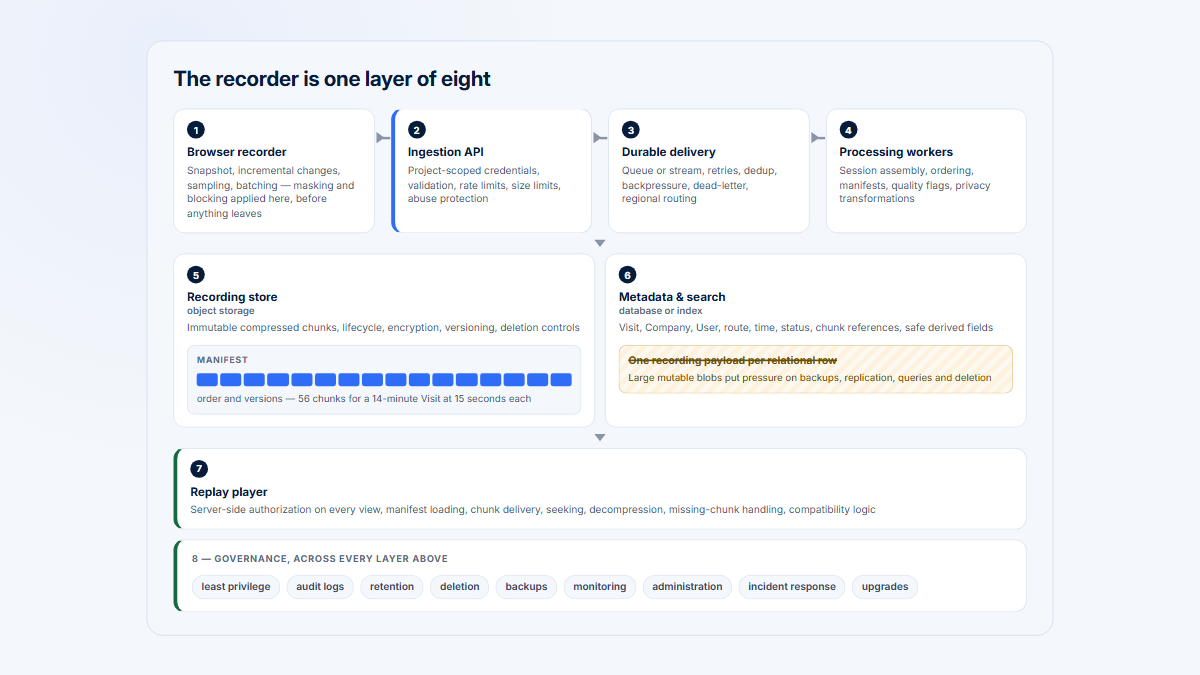
Installing a recorder is one step of eight
Self-hosted
Vendor-operated
Recorder and masking rules
Yours
Yours — this never transfers
Ingestion pipeline
Durable delivery is your problem
Vendor
Processing and databases
You run and tune them
Vendor
Object storage and capacity
Replay payloads grow fast
Vendor
Search and retention lifecycle
Including deletion that actually deletes
Vendor operates it; you set the policy
Access control and administration
Who may watch whom
Yours to configure either way
Monitoring and incident response
Someone is paged when replay breaks
Vendor
Security posture
Patching and hardening the whole stack
Shared: their stack, your configuration
Filled means your team carries it. A production replay service needs every row, not just the recorder — and the rows that stay yours in both columns are the ones that determine privacy.
Privacy, security, and data control
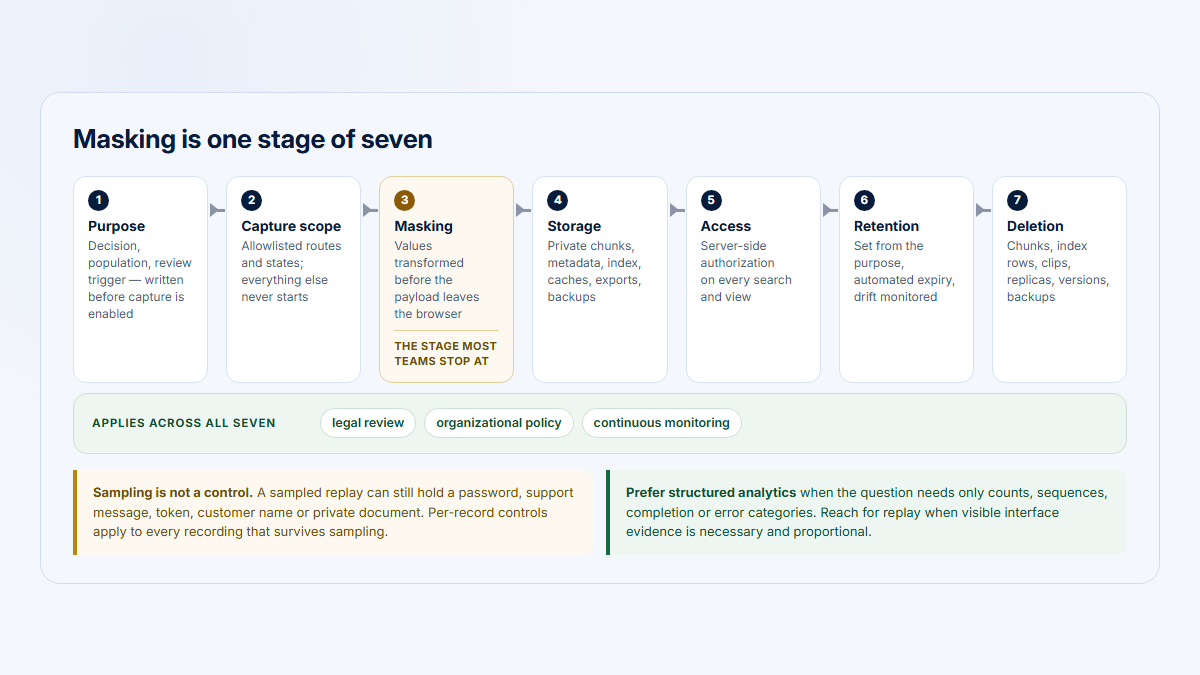
Self-hosting can increase infrastructure and location control, but it does not automatically minimize collection, configure masking, restrict administrators, prove deletion, or satisfy law. Privacy spans the complete data lifecycle, from the recorder and request payloads through indexes, exports, backups, and support access.
OpenReplay Private Mode blocks visible text, network data, and console logs at the source, with granular SDK controls available outside that mode. LogRocket privacy controls cover DOM, inputs, URLs, network data, Redux, blocklists, whitelist-only capture, and exclusions, with platform-specific differences.
| Control | OpenReplay | LogRocket |
|---|---|---|
| Data location | Customer-selected with self-hosting; supported regional choice and BYOC on Dedicated | Vendor or contract-defined in SaaS; customer infrastructure with self-hosted Enterprise |
| Masking | Source-side text, input, selector, state, sanitizer, and Private Mode controls | DOM, input, selector, component, URL, and platform-specific redaction controls |
| Excluded routes | Tracker gating or stop/start logic; test SPA transitions | SDK gating and recording settings; test SPA and mobile navigation |
| Console and network | Private Mode can suppress both; granular controls are also available | Review separately; headers and bodies can be removed while timing and failures remain |
| Encryption | Customer implements the complete control on Open-Source; managed terms apply elsewhere | Vendor-managed in SaaS; responsibilities are contractual when self-hosted |
| Access control | Project and team access; advanced roles vary by plan | Built-in roles; custom RBAC is listed with Pro |
| SSO | Higher tier Dedicated and Enterprise; not free Open-Source | Included Listed in Core |
| Audit logs | Higher tier Enterprise; verify exact contract | Higher tier Pro and Enterprise packaging |
| Retention | Customer-operated on Open-Source; custom on Dedicated and Enterprise | Plan-specific; qualifying watched Pro and Enterprise SaaS sessions can receive extended retention |
| Deletion | Customer operates CLI, API, lifecycle, and manual processes on Open-Source | Admin workflows, support processes, and self-hosted contract terms |
| Infrastructure ownership | Customer on Open-Source; vendor or BYOC arrangement on Dedicated | Vendor on SaaS; customer infrastructure on self-hosted Enterprise |
Product analytics, account context, and support
OpenReplay Product Analytics includes Trends, Funnels, Journeys, Heatmaps, Dashboards, Web Analytics, Monitors, autocaptured interactions, and custom events. A dedicated retention-analysis module was not present in the current Product Analytics navigation reviewed.
LogRocket Product Analytics includes timeseries, tables, paths, funnels, heatmaps, replay drill-down, and surveys; it also documents a dedicated retention analysis. Autocapture reduces initial event setup in both products, but an authoritative conversion still needs a semantic or backend outcome such as report_export_succeeded.
| Question | OpenReplay | LogRocket | B2B interpretation |
|---|---|---|---|
| Explore behavior | Trends, funnels, journeys, heatmaps, dashboards, web analytics | Timeseries, tables, paths, funnels, heatmaps, surveys | Define the qualifying behavior and time window before comparing counts. |
| Retention | No dedicated module found in the current navigation reviewed | Dedicated retention analysis | Specify the returning entity, starting cohort, return behavior, and interval. |
| User identity | Identified users plus metadata such as company, plan, release, and environment | Identified users plus arbitrary traits, segments, events, releases, and environment | Keep one stable user key across authentication changes and devices. |
| Company context | Pass a stable company_id or equivalent metadata | Pass company_id as a user trait or event property | Test account switches and users who belong to multiple companies. |
| Company-level adoption | No native multi-user Company rollup found in reviewed public docs | No native multi-user Company rollup found in reviewed public docs | A warehouse, CRM/CDP, export, or account-centric layer may still be needed. |
Co-browsing, APIs, and support workflows
OpenReplay has the clearer co-browsing advantage. Its current documentation covers live observation, consented remote control, annotations, audio/video, recording, and monitoring up to four live sessions. LogRocket Live follows an active session with new timeline, log, and network evidence, but comparable remote control or annotation was not found in the reviewed public documentation.
Both products send evidence into engineering and support systems. OpenReplay documents Jira, Zendesk, GitHub, Slack, Teams, a v2 API for users, sessions, events, and deletion jobs, an MCP app, and Enterprise data connectors. LogRocket documents Jira, Linear, Azure DevOps, GitHub, Zendesk, Intercom, observability integrations, API/MCP access, Enterprise Streaming Export, and issue alerts or digests through webhooks.
Worked example: a report-export incident
After a frontend release, exports intermittently fail for some enterprise Companies, especially in one browser. Some Users see no error; the cause may be application state, a failed request, or a backend timeout. Visits stay stable while confirmed successful exports fall.
| Investigation step | OpenReplay | LogRocket | Outside system still needed? |
|---|---|---|---|
| 1. Locate affected Companies | Search sessions using identified Users and company_id metadata | Filter identified Users or traits such as company_id | CRM or CDP may supply the affected account list |
| 2. Filter browser, version, release | Browser, metadata, URL, and revID | Browser, release, URL, traits, and events | No, if the dimensions were instrumented |
| 3. Replay the workflow | Watch navigation, clicks, form actions, and visible result | Same, with session timeline and evidence tabs | No |
| 4. Inspect technical context | Console, failed request or body, error, state, CPU, and memory | Console, network or GraphQL, mapped error, state, and performance | A backend timeout needs APM, logs, or traces |
| 5. Measure Users and Companies | Count matching sessions and Users; export for a Company rollup | Count sessions and Users; export for a Company rollup | Often a warehouse or account-analytics layer |
| 6. Link a ticket | Jira, Zendesk, GitHub, Slack, or Teams | Jira, Linear, Azure DevOps, GitHub, Zendesk, or Intercom | The ticket system remains the system of work |
| 7. Reproduce | Use timing, payload, state, browser, and revision | Use replay, Network, Logs, state, issue sample, and source map | Staging and a backend trace may be needed |
| 8. Release a fix | Tag the new revision and compare matching sessions | Tag the release and link the Issue, ticket, or pull request | CI/CD and feature-flag systems |
| 9. Verify decline | Trend success and failure events by revision | Timeseries or funnel by event, release, browser, and account trait | The backend job or audit table is authoritative |
OpenReplay supplies more deployment control and the clearest Pinia/Zustand and remote-support paths; LogRocket supplies a more managed, AI-assisted issue workflow. Neither can infer a completed export from unchanged Visit volume.
Production pilot checklist
- Replay fidelity: test SPA navigation, account switches, tabs, embeds, custom rendering, browsers, and mobile screens; document missing evidence.
- Technical diagnosis: publish source maps, reproduce handled and unhandled errors, test request failures, and confirm state and log capture.
- Identity and B2B context: send stable User and Company IDs; test anonymous transitions, impersonation, account switches, and multi-company Users.
- Privacy: inspect outgoing text, URLs, credentials, tokens, bodies, state, console messages, errors, admin routes, and uploads.
- Retention and deletion: delete test identities and inspect recordings, metadata, indexes, analytics, exports, caches, backups, and shared links.
- Operations: monitor failed or partial sessions; test storage pressure, recovery, compatibility, rollback, alerts, and escalation ownership.
Pricing and customer feedback
Pricing comparisons are dated signals, not quotes. Confirm currency, taxes, commitment, session definition, sampling, seats, retention, storage, overages, add-ons, support, export, self-hosting, and termination terms.
Dedicated snapshot
OpenReplay
From $199/month
Open-Source has no software subscription, but customer infrastructure and operations remain additional. Serverless is usage-based; Enterprise is custom.
Calculator snapshot
LogRocket
From $176/month
Final price depends on seats, retention, and add-ons. The public page advertises a 14-day trial; Enterprise and self-hosting require a quote.
Independent review evidence
OpenReplay reviews
Missing review evidence is not a zero score and does not support a sentiment summary.
G2 snapshot
LogRocket reviews
| Evidence point | OpenReplay | LogRocket |
|---|---|---|
| Entry model | Customer-hosted Open-Source software under applicable repository licenses | The current pricing page advertises a 14-day trial and does not list a general free replay tier; other current documentation still references a Free plan, so confirm its scope |
| Cloud price signal | Dedicated displayed from $199/month; Serverless usage-based | 25,000 captured-session setting displayed from $176/month |
| Billing unit | Dedicated instance hours, Serverless usage, or custom Enterprise contract | Captured sessions; seats, retention, and add-ons affect final price |
| Retention | Self-managed on Open-Source; custom on Dedicated and Enterprise | Plan-specific; qualifying watched Pro and Enterprise SaaS sessions can reach 12 months, capped at 5% of monthly quota |
| Infrastructure cost | Additional on Open-Source; included or contract-defined on managed paths | Included in SaaS; customer or contract-specific when self-hosted |
| Engineering maintenance | High and variable on Open-Source; lower on Dedicated | Lower on SaaS; contract-specific when self-hosted |
| Enterprise model | Custom scale, identity, audit, support, and volume terms | Custom price, seats, export, support, and proprietary self-hosting |
| Review evidence | No comparable score found for this comparison | 4.6/5 from 2,403 G2 reviews in the dated snapshot |
License cost is not total cost
OpenReplay’s monorepo is not one uniform license. Its root license says the enterprise directory has separate terms, third-party components retain their licenses, some directories use MIT, and content outside named exceptions defaults to AGPLv3. Buyers should review the current repository and obtain legal advice for their deployment and modifications.
LogRocket’s hosted and self-hosted platform is proprietary; the company separately publishes some SDK and integration code as open source. For either vendor, model 12 months of software or subscription, infrastructure, storage, engineering operations, privacy work, support, and incident response—not only the displayed entry price.
Which should you choose?
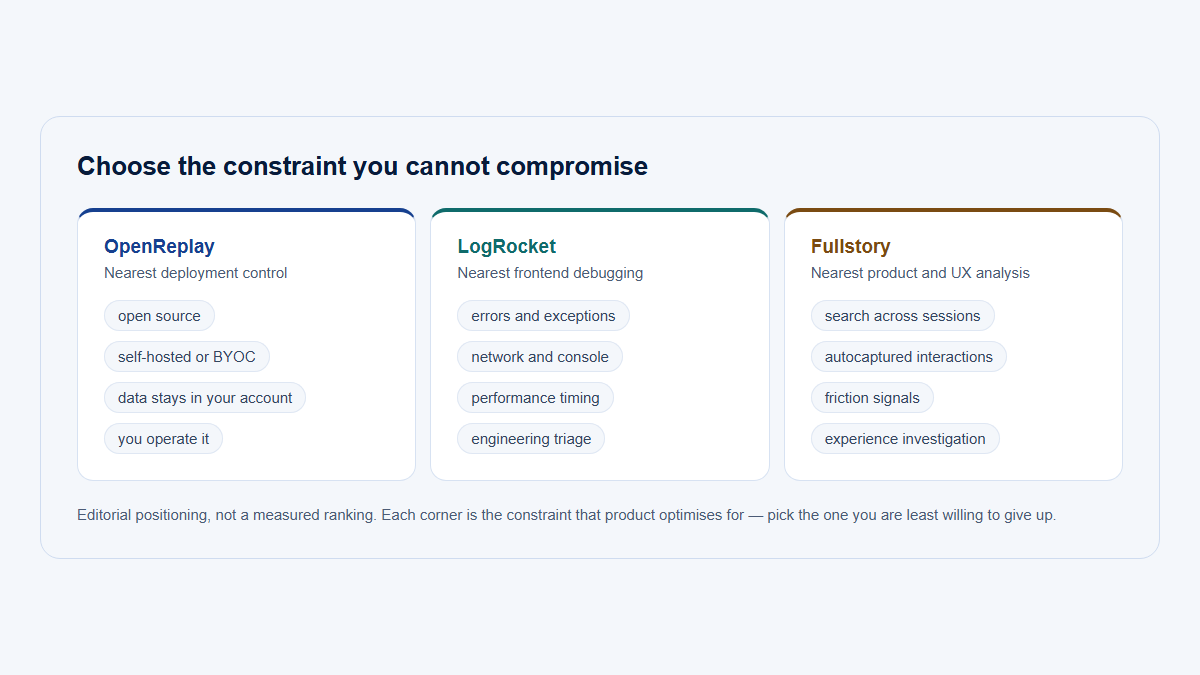
Start with the scenario that creates the hardest constraint, then run a production pilot. Do not let a long shared-feature checklist override the ownership model.
| Scenario | Start with | Why | Validate before committing |
|---|---|---|---|
| Startup without infrastructure staff | LogRocket SaaS, or OpenReplay Dedicated | Both avoid operating the full stack; LogRocket packages Issues more tightly | Session cost, seats, retention, privacy, source maps, support, and analytics |
| Engineering requires open self-hosting | OpenReplay Open-Source | Clearest open-source and customer-operated path | Licenses, staffing, scale, storage, backups, upgrades, monitoring, and support |
| Customer infrastructure required | OpenReplay Open-Source or BYOC; LogRocket self-hosted Enterprise | Both can place the platform in customer-selected infrastructure through different models | Data path, keys, access, logs, deletion, backups, incident duties, and legal terms |
| Support team | OpenReplay for remote assistance; LogRocket for near-live diagnostics | The workflows have different centers of gravity | Consent, control scope, auditability, access, browser support, and integrations |
| Frontend engineering | LogRocket by default; OpenReplay when open deployment dominates | LogRocket packages Issues, source context, replay, alerts, and affected-session, user-count, and frequency context tightly | Framework coverage, source maps, network safety, noise, alerts, and cost |
| Product team | LogRocket for managed breadth; OpenReplay when control dominates | Both include analytics, but LogRocket offers the more mature managed workflow | Metric definitions, sampling, retention, dashboards, export, and account context |
| AI-assisted triage is central | LogRocket Pro+ | Galileo connects more of the issue lifecycle, analytics insights, and coding workflow | Accuracy, sample selection, beta features, self-host limits, and human approval |
| Mobile team | LogRocket | It documents iOS, Android, React Native, and Flutter; OpenReplay labels mobile beta | Versions, fidelity, network capture, performance, crashes, masking, and offline behavior |
| Native co-browsing required | OpenReplay | Assist includes live monitoring and consent-based remote control | Consent, roles, call needs, recording, browser support, and privacy policy |
| B2B customer-success team | Specialist replay plus account-centric context | Neither product is primarily a multi-user account-adoption model | Company IDs, membership, account switches, product hierarchy, and signal-to-session links |
Migration or coexistence
A staged dual run can validate replay fidelity, masking, discovery, and cost before a migration. Longer coexistence may suit a regulated web workload in OpenReplay and a mobile or centrally managed team in LogRocket, but two replay SDKs duplicate capture, performance review, privacy governance, retention, and spend. Give each platform an explicit population, purpose, and sunset rule.
Where Hymetry fits
Hymetry is narrower account-centric product intelligence for B2B SaaS. It connects Companies, Users, product areas, grouped Pages, adoption, penetration, usage concentration, and inspectable Visits.
That changes the starting question from “Which recording should I watch?” to “Which customer Companies are affected, which Users inside them hit the workflow, is usage broad or concentrated in one champion, and which Visits contain evidence?” Prevalence still needs an eligible population, qualifying behavior, and defined time window.
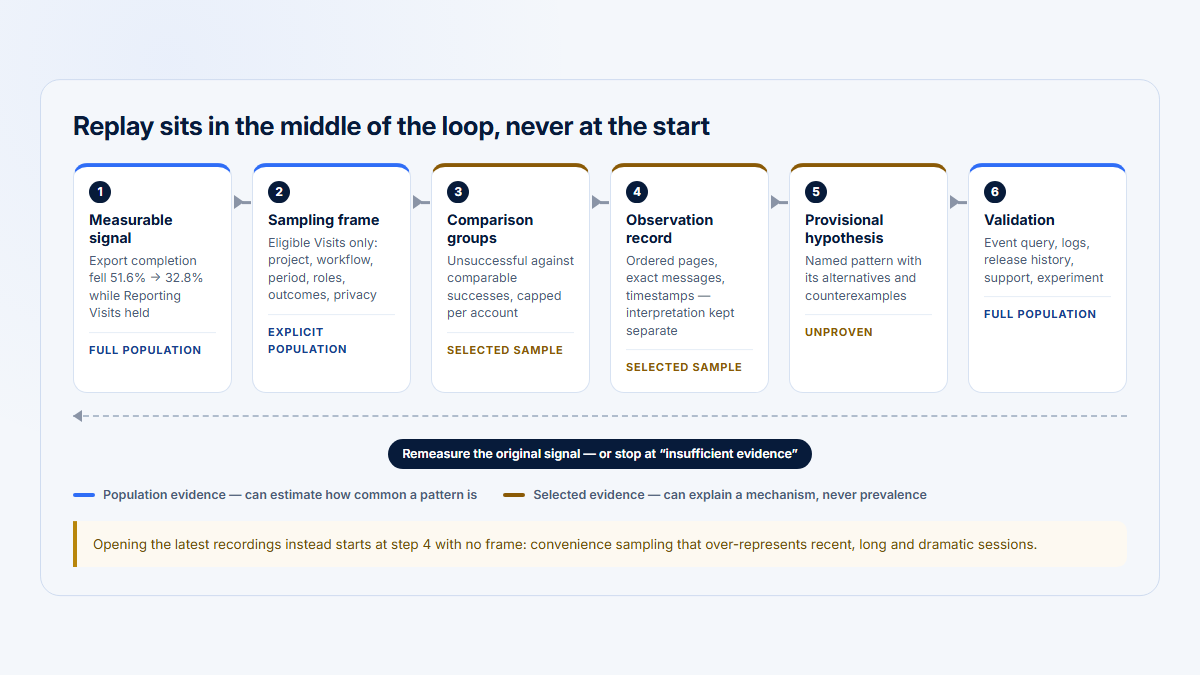
Replay explains; only analytics establishes prevalence
1
Signal
A product, account or technical measure moved
2
Session selection
Which sessions are worth opening, chosen by account, user, area or route
3
Replay and technical evidence
What the person saw, and what the application did
4
Hypothesis
A stated explanation that could be wrong
Still unproven at this point
5
Prevalence, then decide
How many, how often — measured, not inferred from recordings
OpenReplay and LogRocket are strongest at step 3. Structured analytics is what closes step 5, and no quantity of recordings substitutes for it.
A practical division of labor is: Hymetry identifies affected accounts, Users, workflows, concentration, and Visits; OpenReplay or LogRocket supplies deeper frontend evidence; APM and backend events confirm infrastructure cause and business outcome. Read how to measure product usage by Company, then review replays without watching random sessions.
FAQ, methodology, and sources
Is OpenReplay fully open source?
No. The public monorepo uses multiple licenses. Core content outside named MIT and third-party areas defaults to GNU AGPLv3, while source-visible ee/ code uses separate OpenReplay Enterprise terms.
Can OpenReplay be self-hosted?
Yes. Community and Enterprise paths are self-hosted. OpenReplay also offers a managed Dedicated option that can run in a supported vendor cloud or a bring-your-own-cloud arrangement.
Which has stronger developer tools?
Both connect replay to console, network, errors, state, source maps, and performance. OpenReplay documents the broader state-store matrix, including Pinia and Zustand. LogRocket packages replay, releases, grouped Issues, mobile evidence, alerts, and Galileo workflows more tightly.
Which has stronger AI issue detection?
LogRocket currently has the broader packaged system through Galileo and the 2026 Issues workflow. OpenReplay AI adds summaries, similar sessions, explanations, search, and clips, but the current suite is Serverless-only.
Which supports mobile apps better?
LogRocket documents iOS, Android, React Native, and Flutter SDKs with platform-specific feature differences. OpenReplay documents iOS, Android, and React Native SDKs as beta, and no first-party Flutter SDK was found in the materials reviewed.
Can either replace Sentry or an APM platform?
No. They explain frontend sessions and connect to browser or mobile evidence. Backend traces, services, queues, databases, infrastructure, and authoritative transaction outcomes still need observability and system-of-record data.
Which is cheaper at scale?
There is no universal winner. OpenReplay can exchange vendor fees for infrastructure and engineering labor; LogRocket can exchange operating work for captured-session, seat, retention, and add-on spend. Compare a 12-month total-cost model using your actual volume and staffing.
Where does Hymetry fit?
Hymetry starts with B2B Companies, Users, adoption, usage concentration, grouped Pages, and Visits. It narrows the account-level investigation before deeper frontend and backend debugging; it does not replace either vendor’s specialist replay workflow.
Disclosure
Hymetry publishes this comparison and is itself an analytics product. Product capabilities, prices, packaging, ratings, review counts, license terms, and deployment claims can change after publication.
The evaluation used public documentation, repositories, legal materials, pricing pages, and G2—not authenticated hands-on testing. Vendor documentation establishes what a vendor says it supports; it does not prove replay fidelity, resource overhead, implementation quality, AI accuracy, or compliance in every application. G2 is self-selected customer-review evidence.
Methodology
Research was completed on August 14, 2026. It prioritized current official pricing, product documentation, SDK guides, release notes, deployment and security material, terms, the OpenReplay repository and licenses, and then dated G2 ratings and themes. OpenReplay documentation was v1.27.0 at verification. No video added stronger evidence than the written sources, so none is recommended here.
“Not found” means absent from the reviewed current public materials, not proof that a capability does not exist. Negative claims were limited to the documented search scope. Volatile prices, plan boundaries, review counts, beta features, and AI behavior should be rechecked during procurement.
- Native: directly documented as a product capability.
- Plan-dependent or Higher tier: available only on specified or qualifying packages.
- Limited: documented, but narrower or less central than the competing workflow.
- Not found: absent from the official public material reviewed on the verification date.
- No comparable score: no direct product-review profile with a usable independent sample was found.
The comparison avoids synthetic scores because feature availability, operating ownership, privacy risk, and total cost cannot be combined honestly into one universal number.
Sources
OpenReplay official product, repository, and deployment sources
- OpenReplay pricing and deployment plans
- OpenReplay monorepo
- OpenReplay monorepo license
- OpenReplay Enterprise license
- OpenReplay documentation home
- OpenReplay deployment overview
- OpenReplay Kubernetes deployment
- OpenReplay Docker Compose deployment
- OpenReplay administration and service responsibilities
- OpenReplay cleanup and retention controls
- OpenReplay SSO and SCIM
- OpenReplay enterprise security and scale
- OpenReplay terms
OpenReplay workflow, privacy, and diagnostics sources
- OpenReplay AI suite and deployment boundary
- OpenReplay Product Analytics
- OpenReplay plugin matrix
- OpenReplay co-browsing
- OpenReplay canvas and WebGL capture
- OpenReplay Private Mode
- OpenReplay session-data sanitization
- OpenReplay API and deletion jobs
- OpenReplay MCP app
- OpenReplay JavaScript SDK configuration
- OpenReplay Monitors
- OpenReplay request capture and sanitization
- OpenReplay integrations
- OpenReplay user identification
LogRocket official product and documentation sources
- LogRocket pricing calculator and packages
- LogRocket SaaS and self-hosted deployments
- LogRocket terms and platform license
- LogRocket Session Replay
- LogRocket Galileo AI
- LogRocket Issues 2026 beta
- LogRocket Severe Issues and self-host restriction
- LogRocket JavaScript source maps and stack traces
- LogRocket state-management integrations
- LogRocket network sanitization
- LogRocket DOM sanitization
- LogRocket data collected
- LogRocket privacy controls
- LogRocket user-data deletion workflow
- LogRocket GraphQL capture
- LogRocket performance monitoring
- LogRocket Shadow DOM support
- LogRocket iframe merging
- LogRocket Live
- LogRocket Product Analytics
- LogRocket retention analysis
- LogRocket extended session retention
- LogRocket role-based access control
- LogRocket mobile SDK introduction
- LogRocket mobile feature support