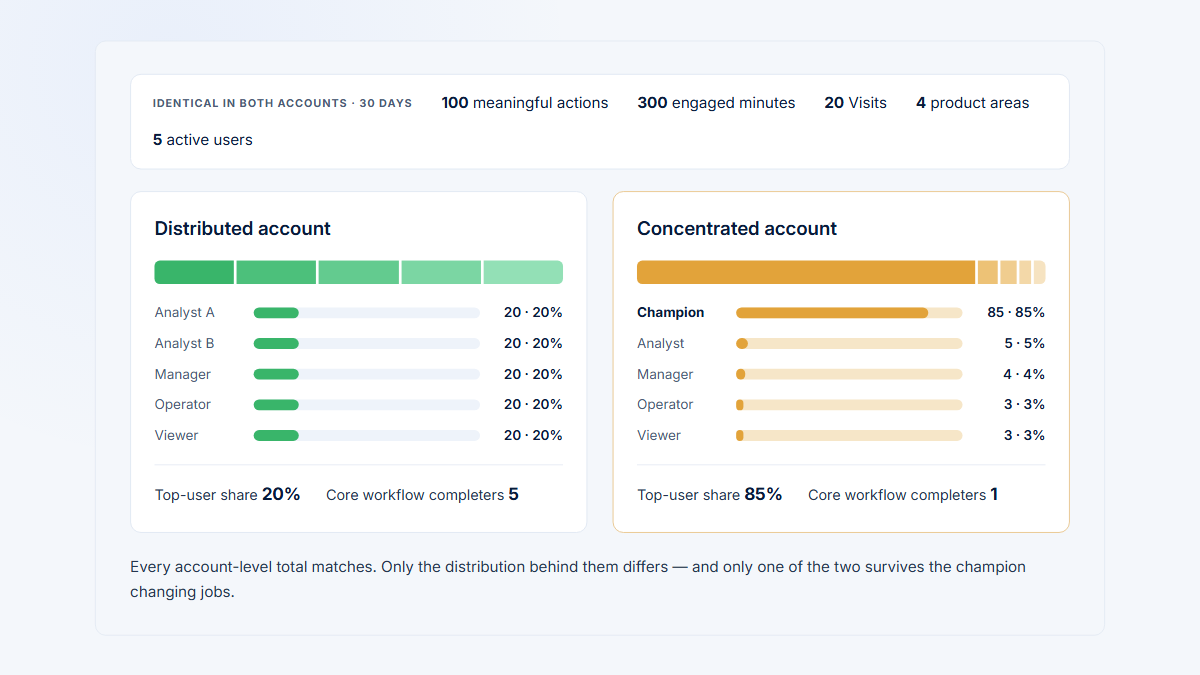
If one person already drives most account activity, first use the champion concentration guide to diagnose the dependency. This guide focuses on finding workflow-specific secondary owners.
Which account roles should you distinguish?
| Role | Practical definition | Behavioral evidence | Still needs confirmation |
|---|---|---|---|
| Product champion | Connects the product to goals, promotes it, and helps colleagues adopt. | Repeated strategic use, sharing, invitations, reviews, and team workflows. | Influence, credibility, authority, and advocacy. |
| Power user | Uses the product frequently, broadly, deeply, or at an advanced level. | Recurrence, breadth, depth, completion, and efficiency. | Desire or authority to enable others. |
| Administrator | Manages setup, permissions, integrations, or security. | Configuration and maintenance actions. | Business ownership or adoption leadership. |
| Executive sponsor | Connects the product to priorities and supplies authority or budget support. | Sometimes reviews, approvals, or dashboard consumption; sometimes little usage. | Budget authority and sponsorship quality. |
| Backup champion | Can preserve knowledge, workflow continuity, access, and internal adoption. | Role fit, recurring completion, coverage, collaboration, momentum, and continuity. | Willingness, trust, influence, and formal responsibility. |
One person can hold several roles, but a resilient account may instead need a reporting owner, technical administrator, and sponsor. Do not infer those jobs from event volume. Read account and user adoption together to separate company activity from the people carrying it.
Which signals suggest backup capability?
Evaluate each candidate against a named workflow. Someone can back up Reporting without being able to administer Integrations or Billing.
| Evidence | What to inspect | Limitation |
|---|---|---|
| Role and permission fit | A plausible job, required access, and a safe route to missing permissions. | Admin access is not adoption leadership. |
| Meaningful recurring use | Outputs or completions across several Visits or expected periods. | Logins and page views show presence, not ownership. |
| Critical-area coverage | The grouped pages and capabilities required for the workflow. | Unrelated breadth can look impressive but add no continuity. |
| Independent completion | Candidate finishes work during a period without related champion activity. | Outside coaching, templates, and automation remain invisible. |
| Collaboration | Sharing, approval, comments, assignments, invitations, and handoffs. | Required collaboration does not prove influence. |
| Momentum | Equal-period changes in active days, outputs, recurrence, breadth, and account share. | Onboarding and short projects can create temporary spikes. |
| Continuity | Important outputs continue when the primary user has no activity. | Inactivity does not reveal absence or departure plans. |
A Hymetry Visit belongs to one user. To approximate independent completion, inspect the candidate's completed Visit and then check nearby account activity for setup, correction, or finishing work by the primary user. Treat the result as evidence for review, not proof that the person worked unaided.
| Apparent signal | Possible false positive | Check |
|---|---|---|
| High activity behind the champion | The candidate repeatedly fixes one narrow problem or generates noisy retries. | Completed outputs, failed steps, and the exact workflow covered |
| Rapidly growing use | A new hire is onboarding, a short project is peaking, or a migration is underway. | Tenure, expected cadence, prior role, and sustained periods |
| Broad page coverage | Navigation, support work, dynamic URLs, or permissions expose many pages. | Normalized grouped pages and meaningful area thresholds |
| Work while the champion is inactive | The champion prepared templates, automation, or instructions outside the observed Visit. | Adjacent activity, saved objects, schedules, and customer confirmation |
| Administrator access | The person can configure the product but does not own the business workflow. | Responsibility, knowledge, use case, and willingness |
| Many collaboration events | Notifications or required approvals create volume without leadership. | Recipients, outputs, handoffs, and confirmed influence |
Also watch for false negatives. A credible secondary owner may work at a monthly cadence, consume delivered outputs outside the main interface, use an API, or have correct permissions without a recent opportunity. Absence of observed activity should become unknown when the measurement window contained no relevant task.
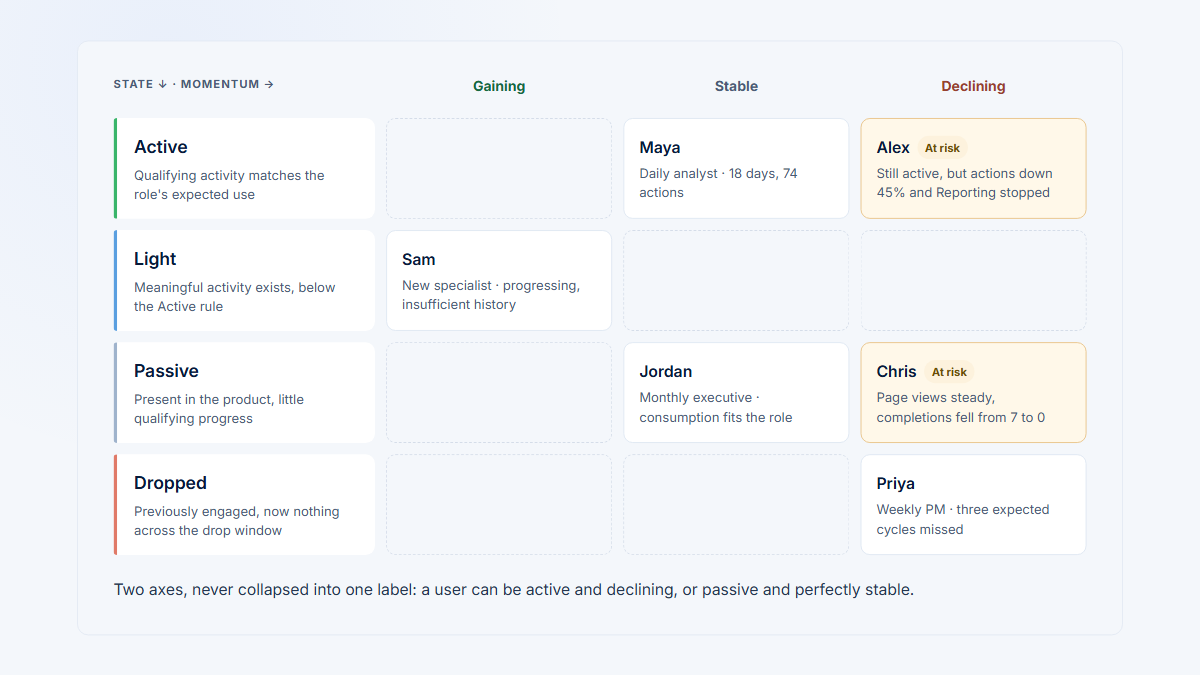
The user-engagement status guide explains why active, light, dropped, and gaining-momentum labels should remain tied to observable behavior and product cadence.
Candidate-evidence framework
Backup capability is multi-dimensional
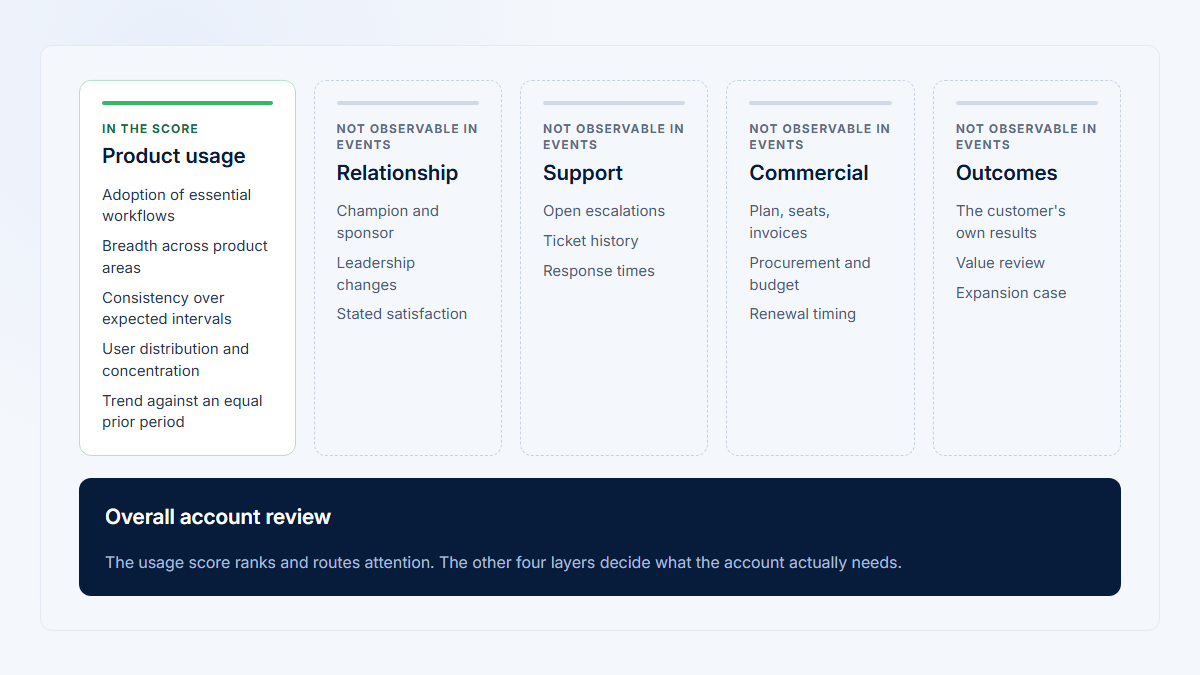
Keep observable product evidence separate from the customer context needed to confirm ownership.
Candidate evidence, not proof of influence or willingness.
Product data
Five inspectable evidence dimensions
1Role fit
Plausible responsibility for the critical workflow.
2Meaningful use
Outputs or progress-bearing actions, not presence alone.
3Recurrence
Repeated across expected Visits or operating periods.
Permissions gate
Can the user actually execute the workflow? Role fit without access stays a hypothesis.
4Workflow coverage
The critical responsibility the user can actually perform.
5Momentum
Stable or rising evidence across comparable periods.
Inspect together
No single event or activity score establishes backup ownership.
6Customer confirmation
Customer validation
- Responsibility and influence
- Credibility and willingness
- Explicit continuity ownership
Customer context
Restrained outcome
Potential backup owner
For a specific continuity responsibility — not a champion detected by an algorithm.
Candidate evidence, not proof of influence or willingness. Validate the role with the customer and keep each workflow signal inspectable.
Which backup-coverage metrics are useful?
First define a recently qualified user per workflow: plausible role fit, required permission or readiness, meaningful completion, recurrence matched to cadence, and enough history to distinguish established use from a one-off action.
| Workflow | Illustrative qualification rule |
|---|---|
| Reporting | Editor or scheduler permission plus report output in two expected reporting periods. |
| Integration administration | Admin permission plus a successful review, test, or change at the maintenance cadence; confirm ownership when no opportunity occurred. |
| User management | Relevant role plus a correct invite, role change, deactivation, or access review when needed. |
| Billing | Billing access plus the expected billing task or direct role confirmation when events are sparse. |
| Executive review | Repeated review, comment, approval, or receipt of the decision output plus stakeholder confirmation. |
| Operational analysis | Repeated creation or refresh of analysis and a produced or shared team output. |
A weekly and quarterly workflow cannot share one recurrence rule. If the lookback contained no opportunity, record unknown rather than failed.
Critical-workflow backup coverage
workflows with at least two recently qualified users / all critical workflows x 100
Three covered workflows out of six produce 3 / 6 x 100 = 50%. This identifies gaps; it does not mean “50% healthy.”
Secondary-user participation
meaningful activity from the second-most-active relevant user / total meaningful account activity x 100
For 72 of 225 meaningful actions, 72 / 225 x 100 = 32%. Calculate this per workflow when an account-wide value mixes unrelated responsibilities.
Continuity rate
periods with meaningful account activity while the main champion was inactive / eligible champion-inactive periods x 100
Three of four eligible weekly periods produce 3 / 4 x 100 = 75%. A 100% result based on one period is weak evidence, and “some activity” can hide a stopped critical output.
| Cadence | Illustrative observation rule | Do not conclude |
|---|---|---|
| Daily operations | Several complete workdays with real opportunities, including at least one champion-inactive day | One busy shift proves durable coverage. |
| Weekly reporting | Two or more eligible weekly cycles with a completed output | Activity outside reporting week is equivalent. |
| Monthly close | Several completed closes, with exceptions and approvals visible | A 30-day lookback always contains enough evidence. |
| Quarterly review | Multiple review cycles or direct responsibility confirmation | No recent event means the owner is unqualified. |
| Event-driven administration | Completed tasks when real access, incident, or change opportunities occurred | Quiet periods are failures. |
For every rate, expose the eligible periods and their opportunity state. A denominator of four should mean four genuine chances to perform the workflow, not four arbitrary calendar buckets.
How should you build a candidate profile?
Keep role suitability, permission readiness, completion, recurrence, relevant breadth, workflow coverage, independent activity, collaboration, momentum, and customer confirmation separate. A single score can hide a candidate who is active but blocked from the critical workflow.
- Use evidence states such as not observed, emerging, repeated, customer-confirmed, and not applicable.
- Preserve raw counts, periods, permissions, exclusions, and links to relevant Visits.
- Show the workflow coverage matrix beside user-level evidence.
- Do not rank bots, service accounts, test users, or vanity activity as candidates.
| Evidence state | Definition | Permitted use |
|---|---|---|
| Not observed | An eligible opportunity occurred, but no qualifying evidence appeared. | Investigate the gap; do not infer inability. |
| Emerging | One or two plausible examples exist, but recurrence or independence is weak. | Offer workflow-specific enablement and monitor. |
| Repeated | The candidate completed the workflow across enough expected periods. | Prioritize a customer validation conversation. |
| Customer-confirmed | The account confirms knowledge, responsibility, access, influence, and willingness. | Treat as an agreed ownership role while keeping it current. |
| Not applicable | The workflow, role, or permission does not apply to the person. | Exclude it from qualification rather than score it as failure. |
| Unknown opportunity | Instrumentation or cadence cannot establish whether a qualifying task occurred. | Collect better context; withhold a status. |
A candidate profile should show why someone qualifies and why someone does not. For example, repeated Reporting completion plus editor access can support a Reporting hypothesis, while missing Integration permission should remain an explicit gap rather than being averaged away by a high overall score.
Top-two users may collectively cover many pages but still lack Integration or User Management permission. Coverage of the responsibility matters more than combined volume.
What does the Harborline example show?
All roles, names, and numbers are fictional. Harborline uses a reporting product over a current 30-day period compared with the prior 30 days. Maya is the main champion and Reporting owner.
| User | Role and access | Active days current / prior | Meaningful actions current / prior | Interpretation |
|---|---|---|---|---|
| Maya | Operations lead; Reporting, Dashboard, Billing | 17 / 18 | 96 / 101 | Stable main champion with broad business ownership. |
| Alex | Systems admin; Integrations and User Management | 7 / 7 | 24 / 22 | Stable technical owner, not automatically an adoption champion. |
| Jordan | Analyst; Reporting and Dashboard editor | 14 / 8 | 72 / 41 | Rising recurrence and output completion. |
| Priya | Operations director; review and approval | 9 / 10 | 19 / 21 | Stable sponsor or decision consumer; role needs confirmation. |
| Sam | New associate; limited Reporting editor | 5 / 0 | 14 / 0 | Promising onboarding activity with insufficient history. |
Meaningful actions include creating, editing, scheduling, sharing, approving, or reviewing reports; integration maintenance; role changes; and billing work. Logins and passive views are excluded.
The current period contains 225 meaningful account actions. Maya contributes 96, Jordan 72, Alex 24, Priya 19, and Sam 14. The top user therefore contributes 96 / 225 = 42.7%; the second user contributes 72 / 225 = 32.0%; and the top two together contribute 74.7%. Those account-wide shares still do not show which responsibilities they can cover.
| Candidate | Strong evidence | Blocking or missing evidence | Next validation |
|---|---|---|---|
| Jordan | Reporting access, rising recurrence, repeated output, and work during Maya-inactive periods | Influence, willingness, and formal responsibility | Confirm Reporting co-ownership and exception handling |
| Alex | Stable technical activity and required admin access | No secondary technical administrator | Name and train a backup for Integrations and User Management |
| Priya | Repeated review and approval behavior | Sponsor authority and continuity are not observable | Confirm decision and escalation responsibility |
| Sam | Role fit and promising recent completion | Only one current period of history | Keep emerging until more eligible cycles occur |
| Critical responsibility | Primary | Secondary | Status |
|---|---|---|---|
| Reporting creation and scheduling | Maya | Jordan | Two recurring qualified users |
| Operational analysis | Maya | Jordan | Two recurring qualified users |
| Executive dashboard review | Priya | Maya | Behaviorally covered; sponsor role partly unconfirmed |
| Integration administration | Alex | None | Gap |
| User management | Alex | None | Gap |
| Billing | Maya | None | Gap |
Illustrative workflow coverage
Harborline Systems needs several backup owners
All roles, names, and numbers are fictional.
3 of 6critical workflows have at least two recently qualified users
| CriticalWorkflow | Operations leadMaya | Systems adminAlex | Business analystJordan | Operations directorPriya | New associateSam | Coverage status |
|---|---|---|---|---|---|---|
| Reporting Creation and scheduling | PPrimary owner | ·Not applicable | 2Qualified secondary | VViewer / consumer | EEmerging | Two recurring qualified users |
| Operational analysis Recurring analysis outputs | PPrimary owner | ·Not applicable | 2Qualified secondary | ·Not applicable | ·Not applicable | Two recurring qualified users |
| Executive review Decision-output review | 2Qualified secondary | ·Not applicable | ·Not applicable | PPrimary owner | ·Not applicable | Behaviorally covered; sponsor role partly unconfirmed |
| IntegrationsSec. gap Administration | −No coverage | PPrimary owner | −No coverage | −No coverage | −No coverage | No qualified secondary |
| User managementSec. gap Roles and access | −No coverage | PPrimary owner | −No coverage | −No coverage | −No coverage | No qualified secondary |
| BillingSec. gap Plan administration | PPrimary owner | −No coverage | −No coverage | −No coverage | −No coverage | No qualified secondary |
ReportingCreation and scheduling
- PMayaPrimary owner
- ·AlexNot applicable
- 2JordanQualified secondary
- VPriyaViewer / consumer
- ESamEmerging
Two recurring qualified users
Operational analysisRecurring analysis outputs
- PMayaPrimary owner
- ·AlexNot applicable
- 2JordanQualified secondary
- ·PriyaNot applicable
- ·SamNot applicable
Two recurring qualified users
Executive reviewDecision-output review
- 2MayaQualified secondary
- ·AlexNot applicable
- ·JordanNot applicable
- PPriyaPrimary owner
- ·SamNot applicable
Behaviorally covered; sponsor role partly unconfirmed
IntegrationsSec. gapAdministration
- −MayaNo coverage
- PAlexPrimary owner
- −JordanNo coverage
- −PriyaNo coverage
- −SamNo coverage
No qualified secondary
User managementSec. gapRoles and access
- −MayaNo coverage
- PAlexPrimary owner
- −JordanNo coverage
- −PriyaNo coverage
- −SamNo coverage
No qualified secondary
BillingSec. gapPlan administration
- PMayaPrimary owner
- −AlexNo coverage
- −JordanNo coverage
- −PriyaNo coverage
- −SamNo coverage
No qualified secondary
Status key
PPrimary 2Qualified secondary EEmerging VViewer / consumer −No coverage ·Not applicableAmber rows mark the three uncovered secondary-owner gaps. Statuses are illustrative and workflow-specific; they are not champion predictions.
Jordan is the strongest Reporting backup because role, access, recurrence, output during Maya-inactive periods, collaboration, and momentum align. That does not prove influence or willingness. Alex preserves technical workflows but needs his own secondary admin. Priya may preserve sponsorship, while Sam needs more time. The account needs several explicit owners, not one universal successor.
How should you handle trends and data limits?
Compare equal periods that match expected cadence. A champion-inactive period should be long enough to contain a real workflow opportunity. Distinguish no opportunity, no observed completion, instrumentation gaps, and a genuine coverage gap.
- Product data cannot reveal internal credibility, stakeholder influence, willingness, employment plans, or work completed elsewhere.
- Scheduled jobs can keep outputs running while configuration knowledge remains concentrated.
- One person may prepare templates or advise colleagues outside the product.
- Permissions can show technical access without proving competence or responsibility.
- A customer-confirmed ownership map can become stale after role or team changes.
What should you confirm with the customer?
- Ask who can run the workflow without the current owner, who holds the required permission, who understands exceptions, who colleagues trust for help, and who is willing to own the responsibility. Compare those answers with observed evidence rather than presenting an algorithmic nomination.
- Record who confirmed the role, when it was confirmed, the workflow it covers, missing access, and the next review date. A confirmation without scope becomes stale; behavior without confirmation remains a hypothesis.
Use the evidence to form questions. Never tell a user that an algorithm has labeled them a champion, and do not automate outreach without account-team review.
How do you build backup coverage?
- List the outputs, administration tasks, and decisions that must continue.
- Confirm current owners and expected roles with the customer.
- Measure meaningful user distribution and workflow-specific gaps.
- Identify candidates with role fit, access, recurring completion, and relevant momentum.
- Review relevant Visits for completed outputs, blocked paths, and permission errors.
- Confirm influence, willingness, and responsibility with the customer.
- Add the smallest appropriate permission, onboarding, documentation, or secondary ownership.
- Remeasure at the workflow's operating cadence.
| Coverage gap | Smallest useful action | Evidence of progress |
|---|---|---|
| Only one administrator has access | Add a role-appropriate second administrator through the customer's approval process. | Permissions verified and one real maintenance task completed. |
| Knowledge exists only with the champion | Document setup, recurring steps, exceptions, and escalation contacts. | A secondary owner completes the workflow using the documentation. |
| Candidate can view but not complete | Provide the minimum permission and workflow-specific enablement. | Successful completion in an eligible period without corrective work. |
| Sponsor or approver has no alternate | Name an alternate decision path and clarify authority. | A real approval or review cycle completes through that path. |
| Automated output depends on one personal identity | Move to a supported shared or role-owned configuration. | Output continues after the personal credential is removed or rotated. |
Which backup actions are practical?
- Co-own report schedules and document exception handling.
- Add a second integration or user-management administrator.
- Name an alternate approver for decision workflows.
- Replace unnecessary reliance on personal accounts with supported shared or role-owned exports and integrations.
- Follow the customer's security and approval process for every access change.
Recheck coverage only after the next genuine opportunity. A newly granted permission is readiness evidence, not completion; one observed completion is practice evidence, not durable recurrence. Move the candidate state forward only when the workflow-specific rule is met and the customer still confirms the responsibility.
For customer-success teams, backup planning complements stakeholder maps, account plans, and the broader evidence in a customer health score.
How does Hymetry support the investigation?
Start with concentration and user distribution in Companies, isolate the critical workflow in Pages, compare candidates in Users, and inspect their Visits. Keep the company period, workflow, people, raw counts, permissions, and sessions connected before using the evidence in a customer conversation.
This can support a customer-success workflow and a review of product usage by company. It does not automatically determine influence, authority, advocacy, or willingness, and it does not predict a departure.
Frequently asked questions
What is a backup product champion?
A user who can help preserve relevant knowledge, access, workflow continuity, and adoption when the primary champion is unavailable.
Is the second-most-active user automatically the backup?
No. The person may cover the wrong workflow, lack permission, act only as a viewer, or have no interest in the role.
Is a power user the same as a champion?
No. A power user is defined by behavior; a champion also connects the product to goals and helps others adopt.
How many backups should an account have?
There is no universal number. Give each critical responsibility suitable primary and secondary coverage.
Can analytics predict when a champion will leave?
No. Inactivity has many causes. Build resilience during normal operations instead of inferring employment plans.
What if concentrated usage is normal?
Keep specialist ownership, but verify continuity, permissions, knowledge, and role-appropriate backup.
What if no candidate exists?
Confirm the gap with the customer, then nominate and enable an appropriate secondary owner without using an automated label.
Sources
Methodology and limitations
The workflow definitions, Harborline example, calculations, and visual frameworks are original and illustrative. Sources inform distinctions among champion, sponsor, role, permission, account, and stakeholder concepts. No universal benchmark or departure prediction is claimed.
Source directory
- Hymetry demo Companies view
- Hymetry demo Users view
- Microsoft Adoption champion guidance
- Microsoft guidance on champions and user training
- Prosci guidance on the primary sponsor role
- Miech et al. review of implementation champions
- Bunce et al. study of champion operationalization
- CFIR guidance on implementation leads
- Mixpanel group analytics documentation
- Mixpanel user-engagement guide
- NIST role-based access control reference
- Project Management Institute responsibility guidance
- Salesforce stakeholder-mapping guidance
- Gainsight relationship multi-threading guidance