Menu
Feature and product adoption

Pendo vs Userpilot vs Gainsight Product Experience: Which Product-Adoption Platform Fits Your Team?

Compare Pendo, Userpilot, and Gainsight Product Experience across analytics, onboarding, surveys, account adoption, customer success, replay, mobile support, pricing, and ratings.

Choose Pendo if

Choose Pendo when you need the broadest product-experience and product-management footprint in this comparison. It is the strongest default for an established product organization that wants product analytics, guides, resource-center experiences, mobile support, native session replay, sentiment collection, orchestration, roadmaps, feedback workflows, and data movement under one vendor.

Pendo is especially relevant when:

  • several product teams need shared governance;
  • web and mobile products must be analyzed together;
  • a dedicated product operations or digital-adoption owner can administer the platform;
  • replay needs to be native rather than supplied through a separate vendor;
  • product discovery, roadmap, or feedback-management capabilities matter alongside onboarding;
  • a public free option for a small MAU base is useful during evaluation.

The trade-off is breadth. Durable taxonomy, tagging, guide governance, privacy configuration, and reporting usually require more operational ownership than a lightweight onboarding tool. Paid pricing is quote-based and depends on MAUs and functionality. Pendo’s current public packaging places analytics and guides in Base, native Session Replay in Core, and capabilities such as Sentiment, Orchestrate, Listen, and Data Sync in Ultimate, as verified on August 6, 2026. (Pendo.io)

Choose Userpilot if

Choose Userpilot when a web SaaS product team primarily needs to onboard users, introduce features, run contextual experiences, collect feedback, and connect those interventions with usable product analytics without adopting a broader product-management suite.

Userpilot is especially relevant when:

  • product growth or onboarding owns implementation;
  • no-code web flows, checklists, tooltips, banners, spotlights, and surveys are the central requirement;
  • the team wants public entry pricing rather than an entirely quote-led process;
  • company properties and user roles need to drive onboarding;
  • engineering can implement identity and event data but should not build every experience;
  • mobile is useful as a plan-specific capability rather than the primary replay environment.

The important packaging caveat is that Starter is not the whole product. Its public $299-per-month entry tier covers up to 2,000 MAUs and includes core engagement, segmentation, Trends, and NPS, while funnels, retention, paths, autocapture, broader surveys, Resource Center, experimentation, and other advanced capabilities sit in Growth or Enterprise. The current pricing page does not state the billing commitment, so confirm contract term and renewal details with Userpilot. Session Replay is an additional Growth or Enterprise capability rather than part of the Starter price. (Userpilot)

Choose Gainsight Product Experience if

Choose Gainsight Product Experience—usually shortened to Gainsight PX—when product usage must be organized around customer accounts and made operational inside a Gainsight customer-success workflow.

Gainsight PX is especially relevant when:

  • the company already uses Gainsight Customer Success;
  • account-level product usage is an input to customer health, CSM preparation, risk review, or expansion investigation;
  • Active User Coverage, Core Feature Usage, stickiness, account attributes, and survey results need to contribute to an account-level product score;
  • product engagements and surveys should share account and user context with the success organization;
  • the implementation can support product mapping, account identity, integration administration, and cross-functional governance;
  • mobile or custom desktop analytics SDKs are needed and runtime-specific parity can be validated.

Gainsight PX is not the whole Gainsight customer-success platform. Playbooks, renewal workflows, stakeholder management, Journey Orchestrator processes, and broader success operations depend on Gainsight Customer Success and its licensing. PX also did not have a verified native replay product at the research cutoff; its official documentation instead describes a FullStory integration for opening session recordings from PX profiles. (Gainsight Software)

Choose a different category if

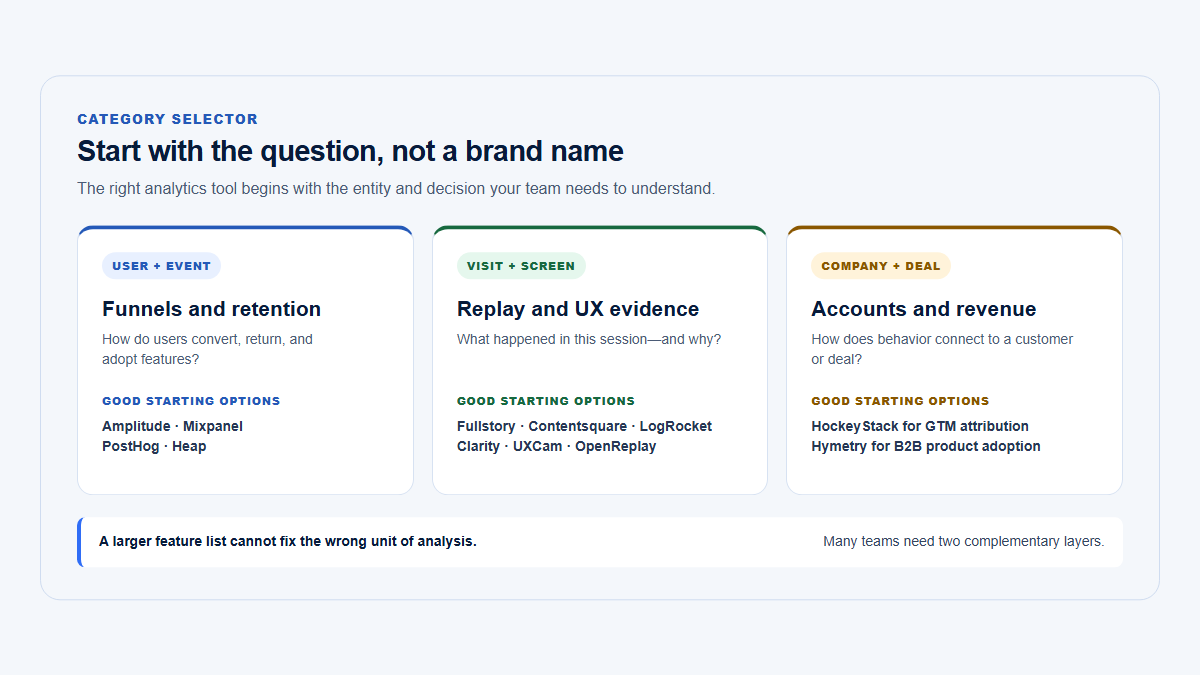
These products overlap, but they do not cover every analytics or adoption job equally well.

Choose a different category when you primarily need:

  • Deep behavioral analytics: consider a dedicated event-analytics platform when highly flexible event schemas, exploratory analysis, advanced cohort work, or experimentation analysis matter more than in-app guides.
  • Account-centric usage without in-app guides: consider an account-centric product-intelligence product when the job is to understand companies, users, workflow breadth, concentration, and source sessions rather than build no-code onboarding.
  • Frontend debugging: use an observability or debugging-oriented replay product when console output, network diagnostics, errors, performance traces, and developer triage are the primary job.
  • Marketing attribution: use marketing, web, or attribution analytics when campaigns, acquisition channels, anonymous visitors, and conversion attribution matter more than authenticated product adoption.
  • Mobile-first replay: verify a dedicated mobile replay platform when native gesture playback, crash context, and mobile debugging are central.
  • Lightweight website analytics: use a simpler website-analytics category when page views, referrers, and basic conversion measurement are sufficient.

For a broader category view, see the product analytics tools comparison.

At-a-glance decision

The table below reflects current public documentation and packaging as of the verification date. A check mark does not mean equal depth, equal plan availability, or equal runtime coverage. Pendo documentation supports its current analytics, guides, replay, mobile, export, and suite packaging; Userpilot documentation supports its tiered engagement, analytics, company model, experimentation, replay, and mobile packaging; Gainsight documentation supports PX analytics, engagements, account scoring, In-App Hub, mobile/desktop SDKs, and the separate PX-to-CS connection. (Pendo.io)

At-a-glance decision comparison
Decision factorPendoUserpilotGainsight Product Experience
Primary categoryBroad product-experience, product-intelligence, digital-adoption, and product-management suiteProduct-growth, SaaS onboarding, in-app adoption, surveys, and product analyticsProduct analytics and in-app engagement with a strong Gainsight customer-success connection
Best fitOrganizations consolidating analytics, guidance, replay, sentiment, and product-management workflowsWeb SaaS teams prioritizing fast no-code onboarding and adoption workB2B organizations that want account usage connected to Gainsight CS
Typical organizationScale-up or enterprise with product operations, digital adoption, or several product teamsEarly-stage through mid-market SaaS; larger teams on Growth or EnterpriseMid-market or enterprise B2B, particularly an existing Gainsight customer
Product analyticsBroad native analytics across pages, features, events, funnels, retention, paths, accounts, and visitorsPractical analytics; Starter has Trends, while funnels, retention, paths, and autocapture require Growth or EnterpriseStrong product and account analytics, including adoption, funnels, retention, paths, usage, and Product Score inputs
Account analyticsNative accounts plus account metadata, segments, reports, and account-level usageNative Companies model, company profiles, company properties, and segmentsA central strength through Accounts Explorer, Active User Coverage, Core Feature Usage, stickiness, and Product Score
User analyticsNative visitor profiles, segments, behavior, journeys, and replay linkageNative user profiles, user properties, behavior, segments, and session activityNative user drill-downs within accounts, features, modules, sessions, and zero-use analysis
FunnelsYesGrowth and EnterpriseYes
RetentionYesGrowth and EnterpriseYes
Paths or journeysYesPaths on Growth and EnterpriseYes
In-app guidesOverlay guides are included; embedded guides require Guides ProYes: Flows, driven actions, tooltips, modals, slideouts, spotlights, banners, and embedsYes: Guide, Dialog, Slider, Survey, and other engagement types
ChecklistsResource Center modules are available; task lists require Guides ProNative Checklists; Resource Center on Growth and EnterpriseIn-App Hub task lists
TooltipsYesYesYes within Guide engagements and supported mobile guide patterns
AnnouncementsBanners, lightboxes, guides, and Resource Center contentBanners, modals, slideouts, spotlights, embeds, and email on higher plansDialogs, sliders, email engagements, and In-App Hub content
Resource centerGuides includes one limited Resource Center in total; Guides Pro includes one per app with full accessGrowth and EnterpriseIn-App Hub, formerly Knowledge Center Bot
SurveysPolls and sentiment capabilities; broader Sentiment packaging is plan-specificNPS on all paid plans; broader surveys on Growth and EnterpriseNPS, CES, CSAT, rating, boolean, and other supported survey engagements
NPSBranded or plan-specific on lower tiers; included more broadly in Sentiment packaging on UltimateIncluded in Starter, Growth, and EnterpriseNative NPS survey support
FeedbackSurveys plus Pendo Listen and roadmap/discovery workflows, depending on planIn-app surveys and NPS; not a full roadmap-management productSurveys and account-linked feedback; not a Pendo Listen/Roadmaps equivalent inside PX
Session replayNative web and mobile replay; Base add-on and included in Core and Ultimate in the current matrixNative web replay as a Growth or Enterprise add-on; mobile replay listed as coming soon at verificationNo verified native PX replay; official FullStory integration provides external recordings
ExperimentsGuide A/B experiments require Guides ProA/B and multivariate testing on Growth and EnterpriseEngagement sampling and comparative control analysis; not documented as an equally broad experimentation workspace
PersonalizationVisitor/account metadata, segments, behavior, page, event, and guide logicUser/company properties, product behavior, segments, role data, event triggers, and page targetingUser, account, product-map, survey, URL, device, platform, language, custom-event, and global-context rules
Customer-success integrationCRM and Gainsight-related integration paths; not a complete CS operating environmentCRM integrations and outbound data; not a complete CS operating environmentStrongest of the three when paired with separately licensed Gainsight CS
Roadmap and feedback managementStrongest here through Roadmaps, Listen, and product-discovery packagingNo equivalent full roadmap suiteNo verified equivalent inside PX itself
Web supportYesYesYes
Mobile supportNative mobile analytics, guides, and replay capabilitiesMobile analytics and engagement are plan-specific. Growth is an add-on; official pages conflict on Enterprise packaging. Mobile replay is still listed as coming soonNative mobile SDKs and supported mobile engagements; check SDK and engagement parity
Desktop supportConditional: web-based desktop surfaces may use web support; native non-web products can send Track Events but lack full web auto-capture and guide parityNo publicly documented native desktop product; validate browser-wrapper or Electron requirements separatelyDocumented desktop/custom SDK routes, including C# and Java analytics; verify in-app engagement parity
No-code editingYes after installation and identity setup; complex tagging, styling, and governance can require technical supportA central strength for web experiences after installation and identity setupYes after SDK installation and Product Mapper setup; administration can be substantial
Free option or trialFree plan up to 500 MAUs plus a time-limited full-product trialNo free plan; 14-day no-card trial at verificationPX trial available; duration and any current free-tier terms are not clearly published
Paid pricing modelCustom, primarily influenced by MAUs and functionalityStarter is $299/month for up to 2,000 MAUs; Growth starts at $849/month; Enterprise custom. Confirm billing term and renewal detailsCustom pricing
Independent rating4.4/5 · approximately 1,800 G2 reviews4.6/5 · approximately 1,000 G2 reviews4.4/5 · approximately 240 G2 reviews
Main strengthBreadth across product intelligence, intervention, mobile, replay, sentiment, and product-management workflowsFocused no-code SaaS onboarding tied to usable analytics and relatively transparent entry pricingAccount-level usage and in-app engagement connected to the Gainsight CS ecosystem
Main limitationComplexity, administration, and opaque paid pricingAdvanced capabilities and replay require higher plans or add-ons; narrower enterprise suite breadthOpaque pricing, heavier administration, reliance on a separate CS license for full workflows, and no verified native replay
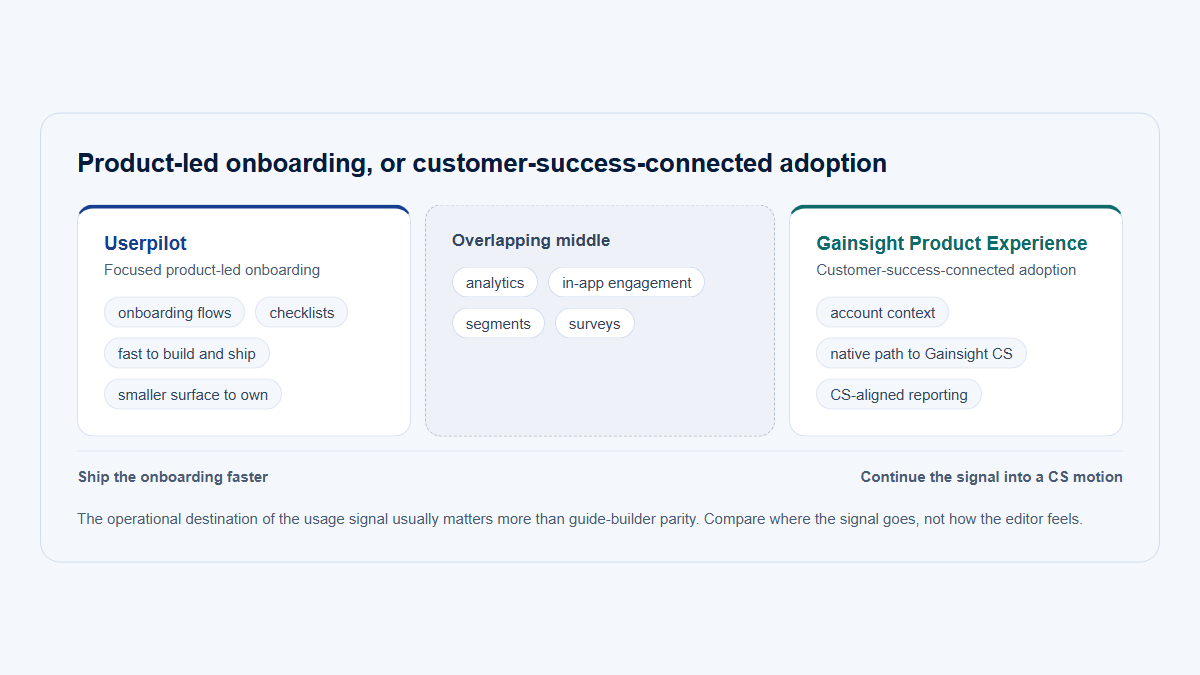
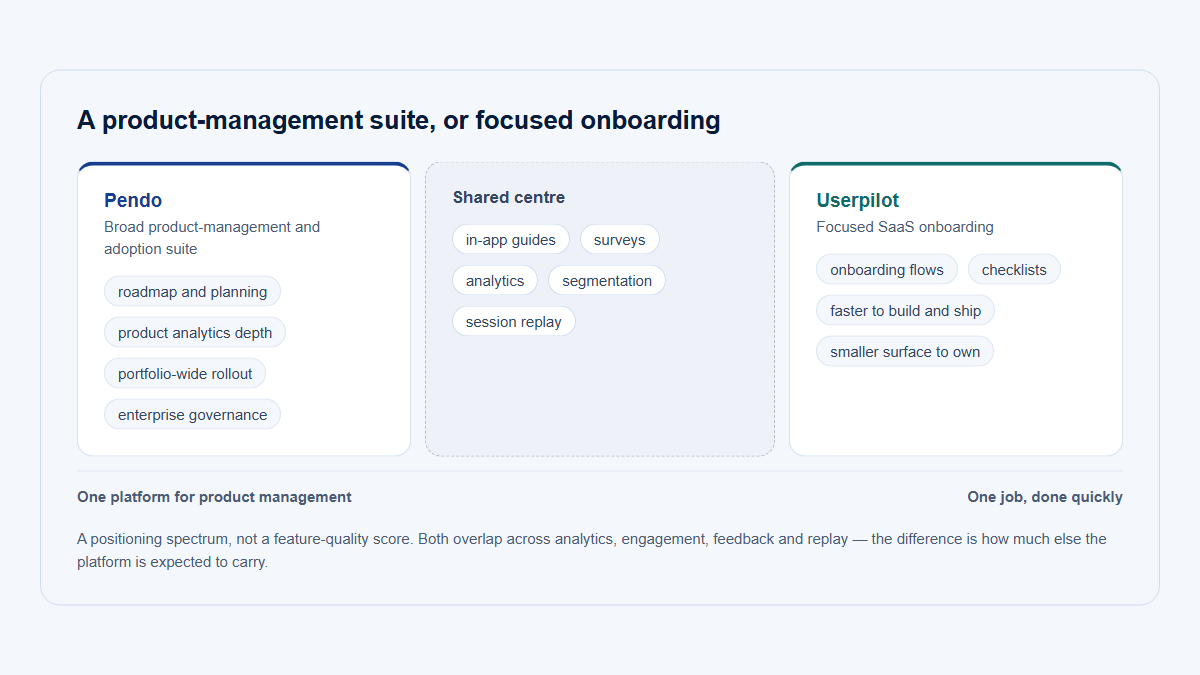
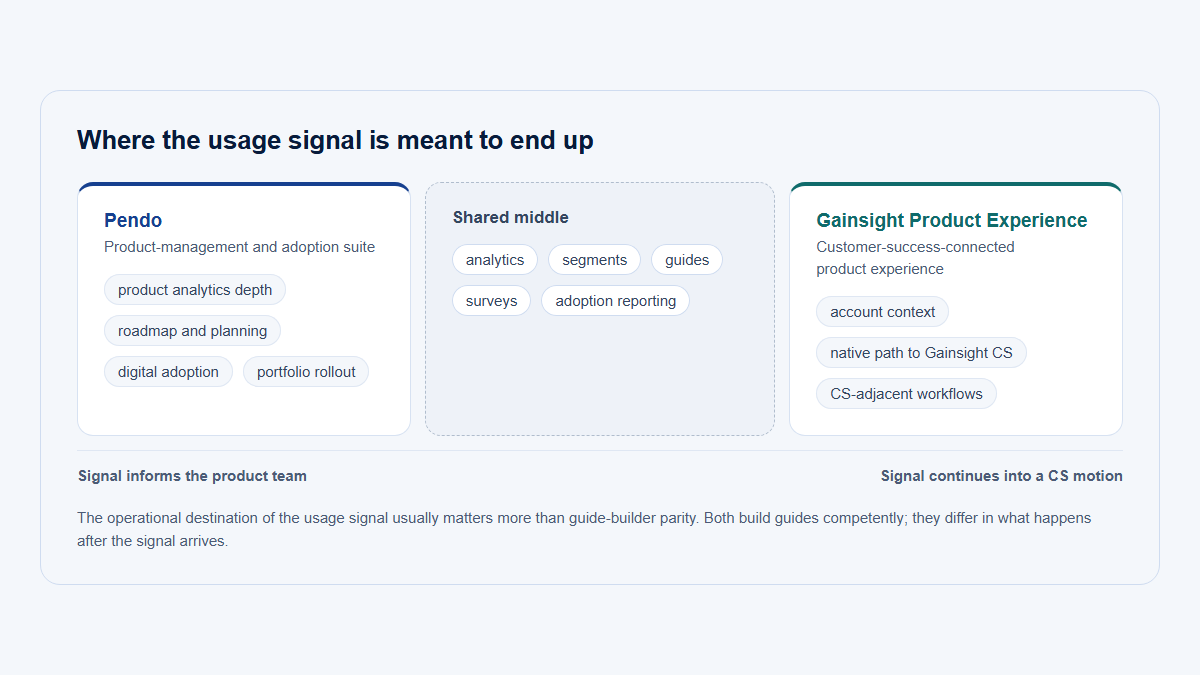
Triangle positioning Pendo near a broad product-management suite, Userpilot near focused SaaS onboarding and adoption, and Gainsight Product Experience near customer-success-connected product experience.
The products overlap, but they begin from different operating philosophies. Position indicates product emphasis, not quality or market rank.

Why Pendo, Userpilot, and Gainsight PX are compared

All three products sit between measurement and intervention. They collect product behavior, organize users or accounts, target segments, and let a team act inside the product. That overlap makes them candidates for searches such as “best product adoption platform,” “product analytics with in-app guides,” and “B2B SaaS onboarding tools.”

Their starting points are different:

  • Pendo begins with broad product intelligence and product management. Analytics, guidance, replay, mobile, sentiment, orchestration, roadmaps, and product discovery can sit in one suite.
  • Userpilot begins with adoption experiences. It is organized around creating contextual web experiences and then measuring whether users and companies respond.
  • Gainsight PX begins with product behavior in customer-account context. Its strongest differentiation appears when that behavior is connected to Gainsight Customer Success.

That philosophical difference matters more than a feature-count contest. A product-growth manager may value how quickly an experience can be launched. A product operations team may value taxonomy and governance. A customer-success organization may value whether product usage appears in the same account workflow used before a renewal conversation.

Best WhatFix Alternatives: 6 Digital Adoption Platforms ComparedThe Digital Merchant · December 17, 2025 · Independent editorial category comparison · 11:24It illustrates how onboarding and digital-adoption products are assessed in practice and helps distinguish an experience builder from a broader platform.Disclosure: The publisher uses affiliate links and may earn commissions. The video is useful for category context, is not a neutral laboratory test, and does not cover Gainsight PX comprehensively. Open the video on YouTube.

Primary buyer and product philosophy

Pendo: a platform buyer

Pendo makes the most sense when the buyer is selecting infrastructure for several product jobs rather than one onboarding campaign. The platform can serve product management, product operations, digital adoption, UX, growth, and parts of customer success.

That breadth creates organizational value when teams want shared account and visitor definitions, common feature tagging, consistent guide governance, replay connected to analytics, and product-feedback workflows under the same vendor. It also creates implementation obligations. Someone must own the application taxonomy, metadata quality, guide conflicts, privacy rules, reports, and permissions.

Pendo is therefore not merely a tooltip builder. Treating it as one can leave much of the platform unused while preserving the cost and governance burden of a larger suite.

Userpilot: an adoption and product-growth buyer

Userpilot is organized more directly around the work of a product-growth, lifecycle, or onboarding team. Its web experience model includes Flows, Spotlights, Banners, Embeds, Checklists, and—on higher plans—a Resource Center, email, advanced analytics, experimentation, and replay.

The product still requires instrumentation. User and company identity, account properties, events, domains, and page rules determine whether targeting and reporting are dependable. The difference is that ongoing experience creation is designed to stay primarily with a non-engineering product or growth owner.

Userpilot is not only an onboarding overlay. Its current higher tiers include funnels, retention, paths, autocapture, session replay, exports, and mobile support. However, teams comparing a $299 Starter price with a full Pendo or Gainsight deployment must account for the Userpilot features that require Growth, Enterprise, or an add-on.

Gainsight PX: a product-and-customer-success buyer

Gainsight PX is most distinctive when the company already thinks in customer accounts, product adoption, success managers, health inputs, and renewal preparation.

Accounts Explorer and Product Score can combine product-use dimensions such as Active User Coverage, Core Feature Usage, stickiness, session duration, NPS, and selected account attributes. The PX-to-CS integration can map PX accounts and users to Gainsight CS companies and people and pass product and engagement data into success workflows. (Gainsight Inc.)

That does not make PX a complete customer-success platform by itself. A company that does not own Gainsight CS should evaluate PX as a product analytics and engagement platform first. Playbooks, success plans, renewal workflows, stakeholder records, and broader Journey Orchestrator operations belong to the larger Gainsight environment and may require separate contracts, implementation, and administration.

Product analytics depth

Pendo has the broadest analytics footprint of the three when its page, feature, event, account, visitor, funnel, path, retention, Product Area, Data Explorer, replay, and data-sync capabilities are considered together. Its retroactive tagging model can be helpful when the SDK has already captured behavior but the team has not yet decided which page or feature definition it needs.

Userpilot’s analytics are practical for a product-growth workflow, but plan boundaries matter. Starter includes Trends rather than the full Funnels, Retention, and Paths set. Growth and Enterprise add advanced analytics, visual and custom events, autocapture, and other capabilities that make a more direct comparison with Pendo or Gainsight possible.

Gainsight PX provides substantial product analytics, including path, funnel, retention, adoption, account, and user views. Its differentiator is not necessarily a deeper pure event-analysis interface than every dedicated analytics tool. It is the way usage can be summarized as account-level product evidence and passed into Gainsight CS.

Teams whose central requirement is unrestricted exploratory behavioral analysis should still compare a dedicated event-analytics category. The presence of funnels and retention does not make every platform equivalent in query flexibility, governance, experimentation analysis, or warehouse workflows.

Analytics and data model

The table distinguishes native capability from what is merely derivable. It also identifies the conceptual starting point of each product. Pendo’s official documentation covers feature/page tagging, custom Track Events, account and visitor analytics, exports, and Data Sync. Userpilot documents users and companies, advanced analytics, autocapture, paths, exports, and warehouse sync by plan. Gainsight documents account analytics, user analysis, custom events, Product Mapper, retention, paths, exports, and CS integration. (Pendo Help Center)

Analytics and data model comparison
Analytics or data capabilityPendoUserpilotGainsight Product Experience
Conceptual starting pointProduct behavior and product-management contextAdoption experiences connected to user and company behaviorProduct behavior organized around customer accounts and CS context
Page and feature trackingNative page and feature tagging with retroactive analysis after supported captureNative page and event tracking; visual events and broader autocapture are higher-plan capabilitiesNative web tracking and Product Mapper-based feature/module mapping
Custom eventsTrack Events through supported APIs and SDK routesCustom events and event-based analysis on applicable plansCustom events can support analysis, segmentation, and engagement targeting
AutocaptureBehavior capture and retroactive tagging for supported environmentsGrowth and EnterpriseAutomatic web collection after instrumentation, with Product Mapper used to create meaningful hierarchy; validate runtime coverage
Account or company entitiesNative AccountsNative CompaniesNative Accounts are central to the product model
User profilesNative Visitors and profile drill-downsNative Users and profilesNative Users, including drill-down within account views
Account adoptionAccount reports, segments, feature/page usage, and account behaviorCompany profiles, company properties, segments, and company activity; no equivalent full CS health environmentFirst-class through Accounts Explorer, Product Score, Active User Coverage, Core Feature Usage, and stickiness
User penetrationCan be analyzed through visitors within accounts, though the exact ratio may require report designDerivable through company and user analysis rather than a prominently named standard metricActive User Coverage is a first-class account measure
FunnelsNativeGrowth and EnterpriseNative
RetentionNativeGrowth and EnterpriseNative
PathsNative path and journey analysisGrowth and EnterpriseNative path analysis
Cohorts and segmentsVisitor/account metadata and behavioral segmentsUser/company property and behavioral segmentsAccount/user segments based on behavior, attributes, survey responses, and product-map context
ReplayNative web and mobile replay by packageNative web replay as a Growth or Enterprise add-onNo verified native PX replay; FullStory integration
Data exportSeveral export methods, including reports and supported API/data routesCSV/JSON bulk export on Enterprise or as a Growth add-onSupported exports, including cloud-storage integration
Warehouse integrationData Sync to supported warehouse or cloud-storage destinations on applicable packagingWarehouse/data sync is included on Enterprise and available as a Growth add-onExport to AWS S3 or Google Cloud Storage; broader warehouse work may require downstream modeling
Customer-success data integrationCRM and Gainsight-related paths are available; full workflow remains externalSalesforce, HubSpot, webhooks, and other integration paths; full CS workflow remains externalNative strategic advantage when paired with Gainsight CS
Replay-to-account connectionNative account/visitor/replay investigationReplay can be filtered through identified user/company contextPX profile can link to FullStory when the integration is installed
Main analytical compromiseBreadth adds governance and administrative complexityThe fullest analytics package is not included at Starter pricingStrong account context, but replay requires another product and full CS operations require Gainsight CS

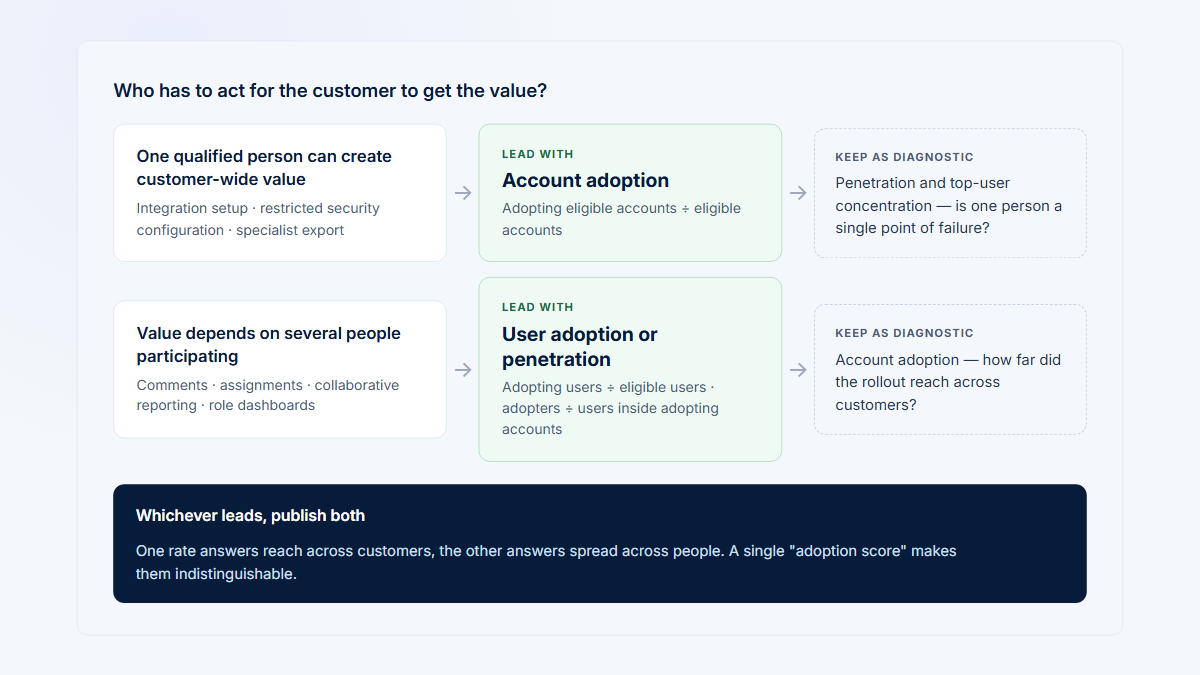
Account analytics and user analytics are different questions

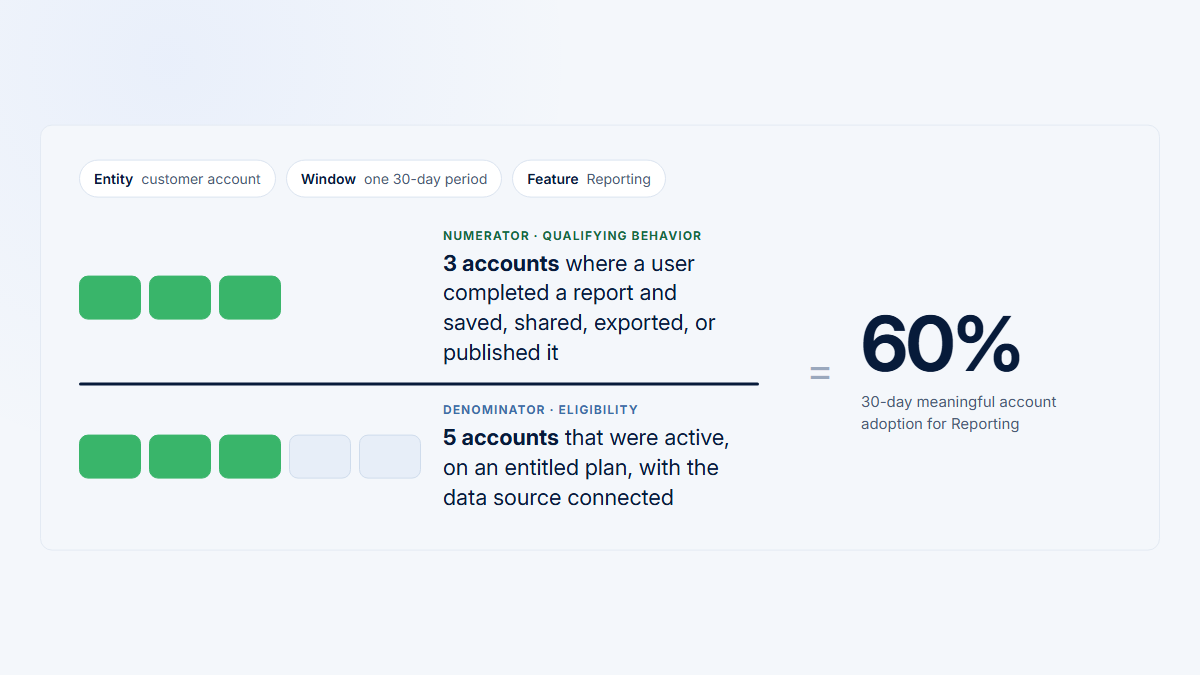
A B2B product can appear active because one administrator logs in daily while analysts and managers never adopt the workflows they bought. That is why a company count, a user count, and a user-within-company distribution should not be treated as interchangeable.

Useful account questions include:

  • Did the company complete setup?
  • How many relevant product areas has it adopted?
  • Is usage broad across roles or concentrated in one champion?
  • Are invitations turning into active users?
  • Did Reporting or Integrations become recurring workflows?
  • Which accounts resemble successfully onboarded peers?
  • Which exact users and sessions explain the aggregate pattern?

Pendo, Userpilot, and Gainsight PX can all connect users to accounts, but they emphasize different outputs. Pendo offers broad account and visitor analysis inside a product suite. Userpilot uses company context to target and evaluate adoption experiences. Gainsight PX presents account adoption in a form designed to move into customer-success operations.

For a fuller explanation of the B2B distinction, link to account versus user adoption, B2B product analytics, and product usage by company.

In-app onboarding and guidance

Pendo and Userpilot both support rich no-code web experiences after installation. Gainsight PX also supports no-code engagements, but its terminology and operational model are more account- and ecosystem-oriented.

Pendo’s documented guide patterns include overlay lightboxes, banners, tooltips, polls, multi-step walkthroughs, embedded guides, and Resource Center modules. Embedded guides, task lists, experiments, and localization require Guides Pro. Userpilot’s current product matrix includes Flows, Spotlights, Banners, Embeds, and Checklists on all paid plans, with Resource Center and broader workflow capabilities on Growth and Enterprise. Gainsight PX documents Dialog, Slider, Guide, Survey, and Email engagement types, plus the In-App Hub and task lists. (Pendo Help Center; Guides plan comparison)

In-app onboarding and guidance comparison
In-app engagement capabilityPendoUserpilotGainsight Product Experience
Guide typesOverlay guides, lightboxes, banners, tooltips, polls, multi-step walkthroughs, and plan-specific embedded guidesFlows composed of tooltips, driven actions, modals, and slideouts; also Spotlights, Banners, and EmbedsDialog, Slider, Guide, Survey, and Email engagements
Onboarding checklistsResource Center modules are available; task lists require Guides ProNative ChecklistsIn-App Hub task lists
Contextual tooltipsYesYesYes in Guide engagements and supported mobile patterns
Banners and announcementsBanners, lightboxes, Resource Center, and guide patternsBanners, modals, slideouts, spotlights, embeds, and higher-plan emailDialogs, sliders, email, and In-App Hub content
Resource centersGuides includes one limited Resource Center in total; Guides Pro includes one per app with full accessGrowth and EnterpriseIn-App Hub
LocalizationInternationalization and localization require Guides ProGrowth supports a limited language allowance in the current matrix; Enterprise supports broader localizationEngagement and In-App Hub localization are documented
TargetingPage, visitor metadata, account metadata, segment, behavior, and supported activation logicPage, user property, company property, segment, role, event, and product-behavior targetingUser, account, Product Mapper, survey, URL, device, platform, language, custom-event, global-context, and segment rules
Account-level targetingYes through account metadata and account segmentsYes through company properties and company segmentsYes; a core strength
Role-based targetingYes when role is supplied as metadata or represented in a segmentYes when role is supplied as a user/company propertyYes when role or equivalent context is supplied in account/user attributes
Event-based triggersSupported activation and event logic; validate exact guide configurationGrowth and Enterprise in the current matrixCustom events and product-map behavior can be used in audience rules
Frequency controlsOrdering, throttling, scheduling, expiration, and activation controlsThrottling, ordering, page alignment, and higher-plan event triggersConfigurable gaps and maximum engagement frequency per period
ExperimentationGuide A/B experiments require Guides ProA/B and multivariate experiments on Growth and EnterpriseSampling and comparative control analysis are documented; not positioned as a full experimentation suite
Guide-performance analyticsViews, visitors, completion, polls, steps, and guide metricsCompletion, drop-off, user/company activity, and goal analysisEngagement analytics and CSV export for supported engagement types
Mobile supportNative mobile guides and related capabilities; verify SDK feature parityMobile analytics and engagement are plan-specific; Growth is an add-on and Enterprise packaging should be confirmedMobile SDK supports dialogs, sliders, guides, and selected surveys; verify SDK/version parity
Versioning and governanceDraft, staging, public states, scheduling, expiration, permissions, and enterprise governance optionsPublishing and environment workflows; advanced roles, SSO, and logs are Enterprise featuresAdmin and engagement-management workflows; confirm role, environment, and approval requirements in the selected contract
Likely ownerProduct operations, digital adoption, product growth, or a shared product platform teamProduct growth, onboarding, lifecycle, or product marketingProduct operations working with customer-success operations
Pendo AI Guide Builder: Create In-App Guides From a Single Prompt (Full Demo)Pendo · July 15, 2026 · Official product walkthrough · 3:02A current visual example of drafting an in-app guide from a prompt. The conversational AI guide builder is documented as beta and requires Guides Pro plus the AI guide-creation subscription setting; availability is not universal across Pendo contracts.Disclosure: Vendor-produced. It demonstrates a Pendo authoring workflow but is not neutral evidence about comparative quality, implementation effort, or business outcomes. See the current beta requirements or open the video on YouTube.
Workflow from account onboarding through administrator setup, user invitations, role-based workflow adoption, and customer-success action, with annotations showing where Pendo, Userpilot, Gainsight PX, and Hymetry are strongest.
A B2B adoption workflow crosses user onboarding, account participation, product analytics, and customer-success action. No single capability replaces the whole operating process.

Worked B2B scenario: onboarding and adoption across a customer account

Illustrative scenario: The company, roles, workflow, and implementation below are fictional. They explain how the three product models differ and are not customer evidence or a claim about implementation time.

A B2B SaaS company sells an operations product to customer accounts. Each account contains:

  • a company administrator;
  • analysts;
  • managers.

The product includes:

  • an initial setup workflow;
  • team invitations;
  • Reporting;
  • Integrations;
  • product announcements;
  • user surveys.

The vendor wants to:

  1. Onboard the first administrator.
  2. Guide the administrator through setup.
  3. Encourage the administrator to invite colleagues.
  4. Introduce Reporting.
  5. Target analysts, managers, and administrators differently.
  6. Measure account adoption.
  7. Measure participation across users inside each account.
  8. Survey users.
  9. Identify accounts that may need support.
  10. Review session evidence when aggregate metrics are ambiguous.
  11. Share usage context with customer success before account conversations.

How Pendo would naturally implement the scenario

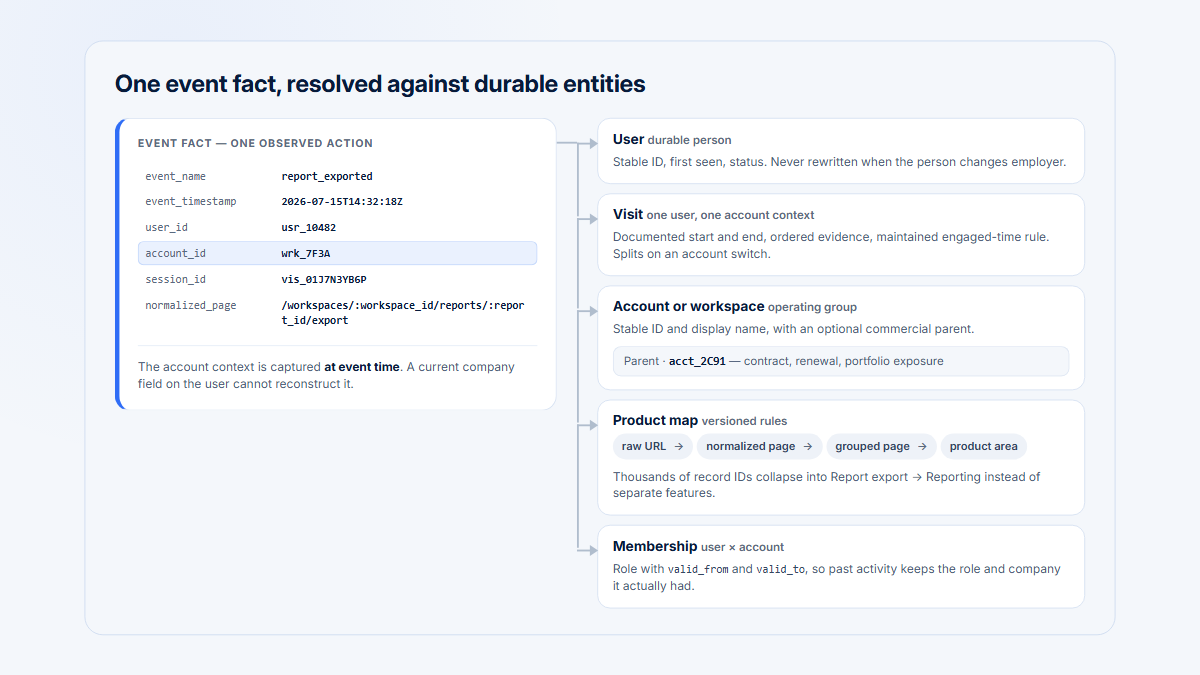
The team would install Pendo in the supported applications, identify each visitor and account, and provide role, plan, lifecycle, owner, and other useful metadata. It would define or tag the setup workflow, invitation controls, Reporting, and Integrations as pages, features, or Track Events.

A likely onboarding sequence would be:

  1. Show a welcome guide to a newly identified administrator.
  2. Use a multi-step overlay walkthrough—or, with Guides Pro, an embedded guide—for setup.
  3. Add an invitation step through a Resource Center module or, with Guides Pro, a task list.
  4. Trigger a Reporting announcement after setup or another qualifying behavior.
  5. Target analysts, managers, and administrators through visitor metadata and account segments.
  6. Analyze feature use, paths, funnels, retention, account participation, and guide completion.
  7. Use NPS, polls, or broader Sentiment capabilities according to the licensed plan.
  8. Filter account and visitor reports for companies with low setup completion, narrow adoption, or falling participation.
  9. Open native replay for an affected account or user when the selected replay package is available.
  10. Export or integrate relevant data into an external CRM or customer-success workflow.

First-class strengths: Broad analytics, native guides, account and visitor models, cross-platform coverage, native replay, Resource Center, sentiment, and product-management capabilities.

Plan and add-on dependencies: Free is capped at 500 MAUs and excludes several advanced capabilities. Base centers on analytics and guides; Session Replay is currently an add-on to Base and included in Core and Ultimate; broader Sentiment, Listen, Orchestrate, and Data Sync capabilities are associated with higher packaging.

Account model: Accounts and visitors are native entities. The team can segment and report on account metadata and the visitors inside an account, although a specific “adoption breadth” or “user penetration” formula may need to be modeled in reports rather than appearing under the exact terminology used by the SaaS company.

Analytical depth: Strongest overall breadth in this comparison, though a specialized event-analytics tool can still be preferable for highly flexible behavioral exploration.

Customer-success workflow: Pendo can supply product-use evidence to external systems and supports CRM or Gainsight-related integration paths. It does not replace a full success platform’s playbooks, renewal process, stakeholder management, or CSM workspace.

Engineering and operational effort: Initial SDK and identity work is required. Reliable results also depend on taxonomy, metadata, event or feature definitions, privacy rules, guide quality, and continued governance. A dedicated owner is advisable.

Likely compromises: Quote-based cost, administrative breadth, potential tagging complexity, and the need to coordinate product, analytics, and guide governance.

How Userpilot would naturally implement the scenario

The team would install Userpilot in the web application, identify each user and company, and pass role, account, plan, lifecycle stage, and other targetable properties. It would define relevant pages, custom events, or autocaptured events according to plan.

A likely onboarding sequence would be:

  1. Launch a welcome Flow for the first administrator.
  2. Use tooltips, driven actions, modals, and a Checklist to guide setup.
  3. Add a task for inviting teammates and complete it when the corresponding behavior occurs.
  4. Trigger a Reporting Flow, Banner, Spotlight, or Embed after setup.
  5. Create role-based segments for administrators, analysts, and managers.
  6. Use company profiles and company segments to identify which accounts have completed setup, invited users, or adopted Reporting.
  7. Use user profiles and behavioral segments to inspect participation within the account.
  8. Run NPS on Starter or broader surveys on Growth and Enterprise.
  9. Create an audience of companies with weak adoption and use an in-app experience, email on higher plans, CRM sync, or manual success outreach.
  10. Use Session Replay when the Growth or Enterprise replay add-on is licensed.
  11. Send selected usage and property data to Salesforce, HubSpot, or another connected system.

First-class strengths: No-code web onboarding, contextual targeting, checklists, practical company segmentation, and a direct connection between experience creation and product-growth analytics.

Plan and add-on dependencies: Starter includes core engagement, company/user context, Trends, and NPS. Growth or Enterprise is required for funnels, retention, paths, broader autocapture, Resource Center, advanced surveys, experimentation, and several workflow capabilities. Replay is an additional Growth or Enterprise capability.

Account model: Companies and Users are native. Company properties can drive targeting and company profiles can show account activity. User participation or concentration can be calculated through company and user analysis, but Userpilot is not a complete customer-health or renewal platform.

Analytical depth: Suitable for many onboarding and product-growth questions on Growth or Enterprise. Teams needing unrestricted event exploration, extensive warehouse modeling, or the broadest product suite should compare alternatives.

Customer-success workflow: CRM integrations can share product and account context. Success teams can consume those signals, but playbooks, renewals, success plans, and stakeholder workflows remain outside Userpilot.

Engineering and operational effort: The web SDK, user/company identity, properties, and events require engineering. After that, a product-growth owner can create most experiences without release-by-release frontend work. Complex flows still need QA and stable selectors.

Likely compromises: Higher-tier requirements for the full analytics set, replay add-on cost, no publicly documented native desktop product, plan-specific mobile packaging, and no generally available mobile replay at the verification date.

How Gainsight Product Experience would naturally implement the scenario

The team would install the appropriate PX SDKs, map users to accounts, pass role and account attributes, and organize setup, invitations, Reporting, and Integrations in Product Mapper. If Gainsight CS is also used, PX account and user records would be mapped to the corresponding CS Company and Person records.

A likely onboarding sequence would be:

  1. Launch a Dialog, Slider, or Guide for the first administrator.
  2. Walk through setup with a multi-step Guide.
  3. Use an In-App Hub task list to make invitations and setup steps persistently available.
  4. Announce Reporting through an engagement or In-App Hub content.
  5. Target roles through account/user attributes and behavioral segments.
  6. Use Accounts Explorer to review active users, modules or features used, Product Score, Core Feature Usage, and stickiness.
  7. Use Active User Coverage and user drill-downs to examine participation.
  8. Run NPS, CES, CSAT, rating, or other supported survey engagements.
  9. Create segments or score inputs for weak adoption, while describing them as attention signals rather than churn predictions.
  10. Open FullStory recordings from PX profiles when the separate integration and FullStory contract are present.
  11. Send PX usage and engagement data to Gainsight CS so CSMs can include it in account preparation, health analysis, Journey Orchestrator processes, and other licensed workflows.

First-class strengths: Account analytics, Product Score inputs, in-app engagements, surveys, and the strategic connection to Gainsight CS.

Plan and add-on dependencies: Public pricing and packaging are quote-based. The Gainsight CS capabilities needed for playbooks, renewals, success plans, stakeholder management, and broader orchestration are separate from PX. FullStory is a separate product and cost.

Account model: Native and central. PX directly presents account-level product adoption measures and can map accounts and users into Gainsight CS.

Analytical depth: Strong for adoption, account usage, funnels, paths, retention, product hierarchy, and user drill-down. It is particularly useful when analytics must become account action.

Customer-success workflow: Strongest of the three when Gainsight CS is already part of the stack and the integration is correctly mapped.

Engineering and operational effort: SDK installation, identity, Product Mapper hierarchy, account mapping, score design, engagement administration, and PX-to-CS integration can require coordinated product operations, engineering, data, and success operations.

Likely compromises: Opaque pricing, greater setup and administrative effort, a separate Gainsight CS dependency for the full success workflow, and no verified native session replay.

Scenario dependency summary

Scenario dependency summary comparison
Scenario requirementPendoUserpilotGainsight Product Experience
First-admin onboardingNative guidesNative FlowsNative engagements
Guided setupMulti-step overlay guide; embedded guide with Guides ProFlow with tooltips, actions, and modalsMulti-step Guide
Team-invitation checklistResource Center modules; task lists require Guides ProNative ChecklistIn-App Hub task list
Role targetingVisitor metadata and segmentsUser/company properties and segmentsUser/account attributes and segments
Account adoptionNative account analytics and reportsCompany profiles and segmentsFirst-class Accounts Explorer and Product Score
User participation inside accountVisitor/account analysisUser/company analysisActive User Coverage and user drill-down
Survey usersPolls, NPS, and Sentiment by packageNPS all paid plans; broader surveys Growth+NPS, CES, CSAT, ratings, and other survey types
Identify weak adoptionReports and segmentsCompany behavioral segmentsAccount analytics, score inputs, and segments
Review session evidenceNative replay by packageWeb replay add-onFullStory integration
Share with customer successIntegrations and export; external CS workflowCRM integrations and export; external CS workflowNative strategic connection to separately licensed Gainsight CS
Main operational ownerProduct ops or digital adoptionProduct growth or onboardingProduct ops plus CS ops

Surveys, NPS, and feedback

Survey presence should not be reduced to a yes-or-no row. The important questions are what type of feedback can be collected, where it can be targeted, how it is connected to product behavior, and which plan contains it.

Pendo

Pendo supports polls inside guides and broader sentiment workflows. Its current public packaging distinguishes lower-tier branded sentiment or add-on availability from the fuller Sentiment package included in Ultimate. Pendo’s broader suite also differentiates it through Listen, feedback-management, and roadmap capabilities rather than surveys alone.

This breadth is useful when feedback must move from an in-app response to product discovery or roadmap work. It can be unnecessary when the team only needs a simple post-onboarding survey.

Userpilot

Userpilot includes NPS in Starter, Growth, and Enterprise according to the current public matrix. Broader surveys are a Growth and Enterprise capability.

That distinction makes Starter suitable for a team that specifically needs NPS plus onboarding experiences, but not a complete substitute for the higher tiers when contextual microsurveys, advanced reporting, experiments, Resource Center, and full analytics are required together.

Gainsight Product Experience

Gainsight PX supports NPS and several other customer-feedback formats, including CES, CSAT, rating, boolean, and supported multi-question survey patterns. Survey responses can become audience or account context and can contribute to Product Score configuration where supported.

Its advantage appears when product feedback and account usage are consumed by the success organization. It should not be described as proof of account intent: an NPS score, a usage decrease, or a Product Score is evidence for investigation, not a guaranteed renewal outcome.

Segmentation and personalization

All three platforms become more useful when identity and metadata are reliable.

A practical B2B implementation normally passes:

  • a stable user identifier;
  • a stable account or company identifier;
  • role;
  • plan;
  • lifecycle or onboarding stage;
  • account owner;
  • region;
  • company size;
  • selected custom attributes;
  • meaningful product events.

Pendo can target visitors and accounts through metadata, segments, page context, and behavioral activation. Userpilot can target users and companies by properties, product use, segments, pages, and event triggers according to plan. Gainsight PX offers an extensive audience-rule model across users, accounts, Product Mapper context, surveys, URLs, devices, platforms, languages, custom events, and global context. (Pendo Help Center)

The hard part is not the existence of a segment builder. It is deciding what the attributes mean and maintaining them over time.

For example, “administrator” should be an explicit application role rather than inferred from one visit to an admin page. “Onboarding” should have a lifecycle definition. “Weak adoption” should be based on observable workflow use and account participation, not a vague label.

Account-level targeting also needs safeguards. Showing a setup reminder to every user because the company has not completed setup may confuse an analyst who cannot perform the task. Good personalization combines account state with individual role and ability.

Customer-success integration

Product usage can help a customer-success team prioritize review and prepare a conversation. It cannot, by itself, establish why a customer will renew, churn, or expand.

A useful success workflow combines product behavior with contractual context, relationship history, support issues, stakeholder changes, customer goals, commercial data, and human judgment. See customer health scores, product usage before a renewal meeting, and champion-concentration risk for the broader operating context.

Customer-success integration comparison
Customer-success workflow capabilityPendoUserpilotGainsight Product Experience
Account-health inputsProduct-use, account, visitor, sentiment, and guide signals can inform an external health modelCompany activity, user behavior, NPS, surveys, and goals can inform an external modelProduct Score and account metrics are native; broader health operation becomes strongest in Gainsight CS
Product-usage signalsNative and broadNative; depth depends on planNative and central
Account segmentationNative account segmentsNative company segmentsNative account segments
CSM workflow integrationThrough CRM, export, API, or Gainsight-related integration pathsThrough CRM integrations, webhooks, exports, or downstream systemsDirect PX-to-Gainsight-CS mapping and data flow
Renewal contextProduct evidence can be exported or surfaced externally; renewal workflow is not native Pendo CSProduct evidence can be sent externally; renewal workflow is not nativeStrong when PX is paired with Gainsight CS; PX alone is not the renewal system
Risk signalsCan identify falling or narrow use; do not call it deterministic churn predictionCan segment low or declining activity; do not call it deterministic churn predictionProduct Score and usage can support risk review; do not call them deterministic churn prediction
Expansion signalsBroader use or demand can support investigationAdoption patterns can support investigationUsage and account context can support expansion investigation inside the Gainsight ecosystem
PlaybooksNo complete native CS playbook environmentNo complete native CS playbook environmentGainsight CS provides playbooks; PX by itself does not
CRM integrationsSupported through documented integration and data routesSalesforce, HubSpot, and other current integration routesGainsight CS integration plus other documented ecosystem connections
Stakeholder informationAccount and visitor metadata, not a full stakeholder-management systemUser/company properties, not a full stakeholder-management systemDetailed stakeholder operation belongs primarily to Gainsight CS
Customer feedbackPolls, NPS, Sentiment, Listen, and product-feedback workflows by packageNPS and surveys by packageNPS, CES, CSAT, rating, and other engagement feedback
Account-level reportingNativeNative company-level analysisA central strength through Accounts Explorer
Best use by a CSMReview product evidence supplied from Pendo before outreachReview company adoption and feedback supplied from UserpilotConsume PX evidence directly in a Gainsight CS operating model
Main caveatIntegration does not turn Pendo into a full customer-success platformIntegration does not turn Userpilot into a full customer-success platformFull workflow requires Gainsight CS licensing, implementation, and governance
Evidence loop connecting in-app intervention, product behavior, account context, customer feedback, and customer-success action, with product spans indicating native and integrated coverage.
Product-adoption work becomes operational when teams distinguish the in-app experience from the behavioral evidence, account context, feedback, and downstream customer-success action.

Replay and behavioral evidence

Session replay answers a different question from a funnel or account-adoption report.

Analytics can identify:

  • a setup step with high abandonment;
  • an account that repeatedly visits Integrations without completing setup;
  • a role that does not adopt Reporting;
  • an invitation flow with repeated returns;
  • a guide that has views but low completion.

Replay can then show what happened in a selected session. It may reveal confusion, navigation changes, repeated clicks, long pauses, an unexpected path, or a technical problem. A recording is still one observation. It should not be generalized into a product conclusion without checking whether the pattern recurs.

Pendo replay

Pendo has the strongest verified native replay position in this comparison. Current official packaging lists Session Replay as a Base add-on and includes it in Core and Ultimate. Pendo also documents mobile replay, making it the clearest option here when the same platform must connect analytics, in-app guidance, and replay across web and mobile. (Pendo.io)

Userpilot replay

Userpilot provides native web Session Replay on Growth and Enterprise as an add-on. Its current public matrix lists 30-day replay retention for Growth and custom retention for Enterprise, with an unlimited-capture option available separately. Mobile replay was listed as coming soon at the verification date.

That packaging means a team should not evaluate Userpilot’s $299 Starter price as though it includes replay. Compare the full Growth quote, the replay add-on, desired retention, MAU scale, and mobile packaging.

Gainsight PX replay

No current official Gainsight source reviewed for this article established a native PX replay product. Gainsight documents a FullStory integration that allows a PX user to access FullStory recordings from profile context. (Gainsight Inc.)

Treat this as an integration, not an included replay feature. The buyer must consider:

  • a separate FullStory contract;
  • identity and account matching;
  • privacy configuration in both systems;
  • data retention in both systems;
  • the operational cost of managing two products;
  • whether the integration exposes enough account and session context for the intended workflow.

Mobile and desktop support

Pendo

Pendo provides the broadest verified cross-platform combination here, with official mobile analytics and guidance support plus native mobile replay. Exact feature parity depends on SDK, operating system, app version, and plan.

Desktop requires more precise language. A web application running in a desktop browser can use normal web support. A browser-wrapper or Electron product needs implementation validation. Pendo documents server-side Track Events for non-web environments, but those events do not provide the same automatic capture, retroactive analysis, guides, or replay experience as a fully supported web or mobile SDK. (Pendo.io)

Userpilot

Userpilot’s core product is web-oriented. Its mobile offering supports native iOS, Android, and documented cross-platform frameworks, with mobile analytics, engagement, push, feedback, server-side events, and supported autocapture capabilities. Growth lists mobile as an add-on, while current first-party pages conflict on whether Enterprise includes mobile or requires a separate annual purchase. Confirm Enterprise packaging and term with Userpilot. Mobile replay remains listed as coming soon. (Userpilot Knowledge Base)

No current official source reviewed for this article advertised a native desktop product. A team using Electron, a browser wrapper, or another desktop architecture should obtain a written compatibility answer and test identity, targeting, selectors, updates, and replay before contracting.

Gainsight Product Experience

Gainsight’s current Product Experience page and documentation describe web, mobile, and desktop/custom runtime options, including native mobile SDKs and C# or Java routes for desktop or custom products. Mobile guide support has expanded, but engagement types and analytics parity can differ by SDK and version. (Gainsight Software)

Do not translate “desktop SDK exists” into “every no-code engagement and replay capability works exactly like the web product.” Verify the precise runtime, SDK, analytics events, in-app engagement types, upgrade process, and testing workflow.

Implementation and ongoing ownership

A product-adoption platform is not finished when its script loads.

Pendo ownership

Pendo benefits from a named product-operations or digital-adoption owner who maintains:

  • application and environment setup;
  • account and visitor identity;
  • page, feature, and event taxonomy;
  • metadata definitions;
  • guide hierarchy and conflicts;
  • Resource Center content;
  • privacy and replay controls;
  • reporting standards;
  • permissions and publishing governance;
  • mobile SDK coordination;
  • integrations and data exports.

Without ownership, broad capability can become an inconsistent collection of tags, guides, dashboards, and segments.

Userpilot ownership

Userpilot is generally easier to center inside a product-growth or onboarding team. Ongoing work includes:

  • stable user and company identity;
  • page and event definitions;
  • role and lifecycle attributes;
  • Flow and Checklist QA;
  • selector stability;
  • audience exclusions;
  • localization;
  • experiment design;
  • survey cadence;
  • replay privacy;
  • CRM and export maintenance.

A no-code editor reduces frontend implementation for each experience, but it does not eliminate product logic, quality assurance, accessibility review, or analytics design.

Gainsight PX ownership

Gainsight PX usually requires cooperation among product operations, engineering, data, and customer-success operations. The organization must maintain:

  • SDKs and environments;
  • Product Mapper structure;
  • account and user identity;
  • PX-to-CS record mapping;
  • account attributes and segments;
  • Product Score definitions;
  • engagement hierarchy and throttling;
  • survey programs;
  • In-App Hub content;
  • FullStory integration where replay is required;
  • ownership of downstream CS actions.

The implementation can produce strong account-to-CS continuity, but only when the operating model is deliberately designed.

Minimum pre-purchase implementation test

Before signing a long contract, ask each vendor to demonstrate the same controlled workflow:

  1. Identify one test account with three roles.
  2. Trigger an administrator-only onboarding experience.
  3. Complete a checklist item from a real application event.
  4. Analyze the same event by user and account.
  5. Build a funnel from setup to invitation to Reporting.
  6. Show what is available retroactively.
  7. target accounts where setup is complete but Reporting is unused.
  8. collect and export a survey response.
  9. open session evidence for a selected account.
  10. send the account signal to the intended customer-success or CRM workflow.
  11. show mobile or desktop behavior in the actual runtime.
  12. show permissions, staging, versioning, and rollback.

This test exposes plan gaps, identity assumptions, unsupported runtimes, selector fragility, and integration work before they become migration problems.

Privacy and access

All three products process behavioral and identity data. A buyer should decide what data is necessary before enabling broad capture or replay.

At minimum:

  • avoid collecting secrets, credentials, payment fields, health data, or other unnecessary sensitive content;
  • mask or block sensitive selectors and routes;
  • validate masking in the actual application, including modals and dynamically rendered components;
  • restrict who can open replay;
  • separate production and test environments;
  • define retention by data type;
  • document which user and account attributes are sent;
  • audit third-party integrations;
  • review subprocessors, regions, contracts, and security documentation;
  • test deletion and access workflows;
  • repeat privacy QA after major frontend changes.

Pendo documents replay privacy controls, but configuration remains the customer’s responsibility. Userpilot’s Enterprise packaging publicly lists capabilities such as custom roles, SSO, logs, and broader compliance or SLA options; exact controls should be verified in the contract. Gainsight access and governance depend on the PX environment and, where connected, Gainsight CS. If FullStory supplies replay, its privacy, retention, access, and contractual configuration must be reviewed separately. (Pendo Help Center)

Do not describe any platform as automatically compliant in every configuration. Technical controls support a legal and security review; they do not replace it.

Pricing and total cost

Public entry price is only one part of product-adoption cost. The contract can also vary with:

  • monthly active users;
  • tracked applications or environments;
  • web, mobile, and desktop packages;
  • guides or engagement features;
  • surveys and sentiment modules;
  • replay capture and retention;
  • integrations;
  • warehouse or bulk export;
  • seats and permissions;
  • implementation services;
  • customer-success platform dependencies;
  • internal administration.

The pricing table uses only public vendor information. Quote-based contract values are labeled Custom pricing; no third-party contract estimates are used. Pendo’s pricing page lists Free, Base, Core, and Ultimate and states that paid pricing is based on MAUs and functionality. Userpilot publicly lists Starter at $299 per month and Growth from $849 per month. Its current pricing page does not state the billing commitment, so confirm term and renewal details with Userpilot. Gainsight does not publish a current numeric PX entry price. (Pendo.io)

Pricing and total cost comparison
Pricing factorPendoUserpilotGainsight Product Experience
Free plan or trialFree plan up to 500 MAUs; current pricing also advertises a 30-day full trialNo free plan; 14-day trial with no card requiredPX trial is advertised; public duration not stated. Older/current support material may mention a limited free version, but terms are not clearly advertised on the current pricing page
Public entry priceFree at 500 MAUs; no public paid entry priceStarter at $299/month for up to 2,000 MAUs; the current pricing page does not state the billing commitmentCustom pricing
Billing unitPaid pricing is primarily based on MAUs and selected functionalityPrimarily MAU-based, with plan, add-on, seat, and service qualificationsNot publicly specified; obtain a written quote and metric definition
MAU limitsFree: 500 MAUs; paid limits are customStarter: up to 2,000 MAUs. Growth starts at $849/month and the current public selector supports larger MAU bands; Enterprise is customNot publicly stated
Guide limitsFree and paid entitlements vary by package; no single public numeric guide cap suitable for all plansCore engagement patterns are included in paid plans; no clear universal numeric guide cap is published in the current matrixNot publicly stated
Survey limitsPoll and Sentiment packaging varies; no universal public response limitNPS on all paid plans; broader surveys on Growth and Enterprise; numeric response limits are not clearly publishedNot publicly stated
Replay packagingNot in Free; Base add-on; included in Core and Ultimate in the current matrixGrowth and Enterprise add-on; Growth lists 30-day retention, Enterprise custom retention, and an unlimited-capture optionNo verified native PX replay; FullStory integration requires a separate product and likely separate cost
Mobile packagingWeb and mobile are supported; exact SDK and capability packaging variesMobile is plan-specific: Growth is an add-on, Enterprise packaging conflicts across current first-party pages, and mobile replay is listed as coming soonMobile supported; pricing and exact runtime packaging are custom
Desktop packagingConditional support; native non-web Track Events do not provide full web parityNo current native desktop package publicly advertisedDesktop/custom SDK support is documented; pricing and engagement parity are custom
Analytics packagingBase includes analytics and guides; Core adds native replay; Ultimate adds broader Sentiment, Orchestrate, Listen, and Data Sync according to the current pageStarter has Trends; Growth and Enterprise add funnels, retention, paths, autocapture, and other advanced analysisCustom package; analytics are central to PX, but public feature-by-plan detail is limited
Data export or warehouseExport options vary; Data Sync is associated with higher packagingBulk export is Enterprise or a Growth add-on; data warehouse sync is included on Enterprise and available as a Growth add-onAWS S3 and Google Cloud Storage export are documented; confirm contract and limits
Enterprise modelCustom MAU and functionality quoteEnterprise custom pricingCustom pricing; Gainsight CS is separately relevant when full success operations are required
Implementation or servicesPublic fixed implementation fee not found; services and support should be quotedServices are available as higher-plan add-ons; public fixed fee not listedPublic fixed implementation fee not found; quote PX, CS integration, services, and any partner work separately
Primary total-cost riskBuying suite breadth without assigning an owner or using the included capabilitiesComparing Starter to competitors while requiring Growth, replay, mobile, export, or servicesUnderestimating Gainsight CS dependency, data mapping, administration, and separate FullStory cost
Official pricing linkhttps://www.pendo.io/pricing/https://userpilot.com/pricing/https://www.gainsight.com/pricing/ and https://www.gainsight.com/resource/trial-px/
VerifiedAugust 6, 2026August 6, 2026August 6, 2026

How to compare quotes fairly

Ask every vendor to quote the same deployment assumptions:

  • production MAUs now and at the next two growth thresholds;
  • number of web, mobile, and desktop applications;
  • production, staging, and test environments;
  • number of guide or content authors;
  • account and user analysis;
  • funnels, retention, paths, and autocapture;
  • survey types and response volume;
  • replay capture percentage and retention;
  • mobile replay;
  • Resource Center or In-App Hub;
  • experiments;
  • CRM and customer-success integrations;
  • bulk export and warehouse sync;
  • SSO, roles, audit logs, and governance;
  • onboarding and professional services;
  • renewal uplift, overage policy, and contract term.

Compare the three-year operating model, not only the first-year discount.

Ratings and customer-review themes

G2 is used as the common independent rating source because all three products have current review pages there. Review counts and decimal ratings change continuously, so display them as a dated snapshot and use approximately for counts.

Current G2 snapshot

Current G2 snapshot comparison
ProductRating
Pendo4.4/5 · approximately 1,800 reviews
G2 · verified 6 August 2026
Userpilot4.6/5 · approximately 1,000 reviews
G2 · verified 6 August 2026
Gainsight Product Experience4.4/5 · approximately 240 reviews
G2 · verified 6 August 2026

Rating pages:

The rating snapshot is supported by current G2 result pages. Do not declare a winner from the decimal because the products have different review counts, buyers, contract sizes, use cases, and implementation contexts. (G2)

Pendo review themes

Commonly praised

Recent positive review themes commonly mention:

  • combining analytics and in-app guidance;
  • visibility into feature and page adoption;
  • dashboards and reports that make product behavior accessible;
  • retroactive tagging after behavior has been captured;
  • the value of connecting replay, feedback, or guides with product data;
  • usefulness across product management and product operations.

Commonly criticized

Critical themes commonly include:

  • a learning curve created by the platform’s breadth;
  • administrative work around tagging, rules, metadata, and guide management;
  • uncertainty about data quality when definitions are not governed;
  • quote-based pricing and cost at higher scale;
  • guide-builder or styling limitations in complex interfaces;
  • occasional support or response-quality variation.

Implementation themes

The base SDK can be straightforward, but dependable use requires more than installation. Teams repeatedly describe the importance of clean tagging, stable selectors, account identity, metadata, taxonomy, and internal ownership. Some guide or application edge cases still require HTML, CSS, engineering, or vendor support.

Pricing themes

Reviewers frequently treat Pendo as a substantial platform purchase rather than a low-cost onboarding widget. Perceived value depends heavily on whether the organization uses analytics, guides, replay, sentiment, roadmaps, and other licensed modules together.

Support themes

Support feedback is mixed and can depend on plan, implementation partner, account team, and issue complexity. Do not generalize one reviewer’s experience to every customer.

Pendo review themes were cross-checked against G2 summaries and a recent independent review synthesis. (G2)

Userpilot review themes

Commonly praised

Positive reviews commonly mention:

  • an intuitive no-code experience builder;
  • useful onboarding patterns and contextual targeting;
  • the ability to connect analytics with an immediate in-app action;
  • responsive support and customer-success help;
  • faster iteration by product or growth teams;
  • company and user segmentation without building every UI in the application.

Commonly criticized

Critical themes commonly include:

  • analytics or reporting that can feel less flexible than a dedicated analytics tool;
  • information being distributed across several areas of the interface;
  • complex Flows requiring careful testing;
  • styling or selector constraints in unusual frontends;
  • mobile maturity compared with the established web product;
  • advanced analytics, Resource Center, replay, mobile, export, or services requiring higher plans or add-ons;
  • an entry price that may still be high for a very small startup.

Implementation themes

Userpilot is often perceived as fast to operate once identity, company data, events, and selectors are dependable. The no-code layer does not eliminate technical setup or QA, but it can reduce the engineering work required for each onboarding change.

Pricing themes

The public Starter price is easier to evaluate than an entirely custom quote. Reviews and packaging still show that buyers must price the exact Growth, replay, mobile, service, export, and MAU combination they need.

Support themes

Support and customer-success assistance are frequently praised. As with every review source, this does not establish a guaranteed support level for every contract.

Userpilot themes were cross-checked against G2 and a recent independent synthesis. (G2)

Gainsight Product Experience review themes

Commonly praised

Positive themes commonly include:

  • account-oriented product-usage visibility;
  • combining analytics with in-app engagements;
  • segmentation by customer and user context;
  • alignment with customer-success teams;
  • helpful support during implementation or analysis;
  • value for organizations already working in the Gainsight ecosystem.

Commonly criticized

Critical themes commonly include:

  • a learning curve;
  • administration around Product Mapper and account hierarchy;
  • setup complexity when several systems must be mapped;
  • engagement creation or testing inconsistencies in some application contexts;
  • quote-based pricing;
  • dependence on broader Gainsight processes for the complete customer-success use case.

Implementation themes

Review data reinforces that PX is not only a script installation. Product mapping, account identity, score design, and PX-to-CS integration need deliberate ownership.

Pricing themes

Public information is limited, making procurement and quote normalization important. Buyers should separate PX cost, Gainsight CS cost, services, integrations, and FullStory or another replay cost.

Support themes

Positive support comments appear regularly, but review volume is much smaller than Pendo’s or Userpilot’s. Treat the sample accordingly.

Gainsight PX themes were grounded primarily in its G2 review page. Any vendor-authored or vendor-adjacent commentary must be clearly labeled and must not be presented as neutral evidence. (G2)

What review data cannot prove

Customer reviews can help identify repeated usability, implementation, support, and pricing themes. They cannot prove:

  • that one platform causes higher retention;
  • that a platform predicts churn accurately;
  • that a reviewer used the same plan or modules being evaluated;
  • that implementation quality was equivalent;
  • that a reported problem still exists in the current release;
  • that the rating sample represents every customer;
  • that a higher decimal offsets a missing required capability;
  • that the lowest-rated product is a worse fit for a specific organization.

Use reviews to create questions for a trial and reference call, not as a substitute for technical validation.

Migration considerations

Moving among these platforms is not equivalent to changing an analytics dashboard. The migration can affect SDKs, identity, page and feature taxonomy, guides, surveys, historical reports, replay, customer-success workflows, and user-facing content.

1. Inventory the current implementation

Document:

  • SDKs and environments;
  • user and account identifiers;
  • attributes and metadata;
  • custom events;
  • pages, features, modules, and product areas;
  • segments;
  • guides, checklists, and resource-center content;
  • surveys and historical responses;
  • funnels, retention reports, and dashboards;
  • replay retention and privacy rules;
  • CRM, warehouse, and customer-success integrations;
  • permissions and publishing workflow.

2. Separate taxonomy from vendor configuration

Define the business concepts independently:

  • what counts as setup complete;
  • what counts as an invitation;
  • what Reporting adoption means;
  • what an active account means;
  • which roles matter;
  • which account attributes are authoritative;
  • what constitutes weak, narrow, or broad adoption.

Then map those concepts to the new platform. Do not copy old tags mechanically when they encoded obsolete assumptions.

3. Preserve stable identity

Changing user or account identifiers can break historical continuity, targeting, account rollups, and integration mapping. Decide how anonymous-to-known users, merged accounts, subsidiaries, internal users, test users, and deleted identities will be treated before dual-running SDKs.

4. Expect historical-data boundaries

Retroactive tagging does not mean every vendor can reconstruct every historical report from another vendor’s raw data. Ask what can be imported, what remains accessible after cancellation, how long exports take, and whether replay files or survey history are portable.

5. Rebuild user-facing experiences deliberately

Guides and checklists are application UI. Re-test:

  • accessibility;
  • responsive behavior;
  • localization;
  • selector stability;
  • account and role targeting;
  • event completion;
  • throttling;
  • conflicts with application modals;
  • staged environments;
  • mobile and desktop behavior.

6. Dual-run a controlled period

For a limited, privacy-reviewed period, compare:

  • active users and accounts;
  • key event counts;
  • funnel conversion;
  • account adoption;
  • guide eligibility;
  • survey targeting;
  • replay availability;
  • data arriving in the CRM or CS system.

Expect some differences because sessionization, identity, event definitions, bot filtering, time zones, and retention rules vary.

7. Migrate operating ownership

A successful migration has a named owner, documentation, release process, privacy checklist, measurement plan, and decommission date. Replacing the SDK without replacing the operating model usually reproduces the same data-quality problems in a new interface.

Decision by scenario

Decision by scenario comparison
ScenarioBest starting pointWhyImportant caveat
Early-stage SaaS onboarding its first usersUserpilot when the budget supports Starter; Pendo Free when the 500-MAU cap and included capabilities fitUserpilot focuses the team on web onboarding; Pendo Free provides a genuine low-volume evaluation pathUserpilot’s full analytics, surveys, Resource Center, replay, and experiments require higher packaging
Scale-up with a product-growth teamUserpilot or PendoUserpilot favors fast experience iteration; Pendo favors broader analytics and suite consolidationCompare the exact Growth/add-on quote with the exact Pendo modules, not list prices alone
Enterprise with a dedicated digital-adoption teamPendoBroad governance, multiple products, analytics, mobile, replay, sentiment, orchestration, and product-management breadthRequires disciplined ownership and a contract aligned with actual module use
Customer-success organization already using GainsightGainsight Product ExperiencePX product-use data can flow naturally into the existing CS account modelConfirm mapping, licensing, implementation work, and whether FullStory is required
Mobile applicationPendo for the broadest verified analytics/guidance/replay combination; Gainsight PX when Gainsight alignment mattersPendo has native mobile replay; Gainsight documents native mobile SDK and engagementsUserpilot mobile is plan-specific: Growth is an add-on, current first-party sources conflict on Enterprise packaging, and mobile replay was listed as coming soon
Desktop productGainsight PX for the most explicit desktop/custom SDK documentationGainsight publicly documents desktop/custom runtime supportValidate whether required in-app engagements—not only analytics—work in the exact runtime
B2B SaaS with several roles inside each accountGainsight PX or Pendo; Userpilot when onboarding is the priorityAll can model users and accounts, but Gainsight emphasizes account adoption and Pendo provides broad account/visitor analysisGood results depend on stable account IDs and explicit role metadata
Product manager needing deep funnels and retentionPendo among these three; Userpilot Growth may be sufficientPendo has broad native analytics; Userpilot’s advanced analytics begin on GrowthCompare a dedicated behavioral analytics category when unrestricted event exploration is central
Team needing replayPendo for native web/mobile; Userpilot for web with the add-onBoth provide native replay in applicable packagingGainsight PX relied on a FullStory integration at the August 6, 2026 verification date
Company needing a public free planPendoFree plan up to 500 MAUsConfirm current limits and exclusions; Free is not equivalent to paid Core or Ultimate
Team primarily trying to reduce support ticketsUserpilot for focused contextual onboarding; Pendo for broader suite use; Gainsight PX when In-App Hub is already strategicGuides, checklists, and contextual help can address repeated questionsDo not promise ticket reduction without measuring ticket reasons, eligibility, exposure, and outcomes
Company needing account-level adoption evidence before renewalGainsight PX with Gainsight CS; Pendo for broad account product evidence; Hymetry when guides are not the primary needAccount and user participation can improve renewal preparationProduct usage is one input and does not prove renewal intent
Company needing product roadmaps and feedback management in the same suitePendoRoadmaps, Listen, sentiment, analytics, and guides provide the broadest combination hereVerify the selected plan and whether a specialized feedback product is still needed
Small team with no platform administratorUserpilot, provided required capabilities fit one planThe operating model is more focused around onboarding and growthComplex identity, targeting, analytics, and QA still need ownership
Team that mainly needs frontend debuggingA different categoryDeveloper-oriented replay and observability are designed for errors, network calls, performance, and code triageProduct-adoption platforms can complement but should not replace engineering observability
Team that mainly needs account analytics without guidesHymetry or another account-centric analytics categoryAvoid paying for an in-app experience suite that is not neededConfirm analytics depth, integrations, replay, maturity, and operational requirements independently

Which product fits which team?

Pendo fits best when breadth and governance justify the platform

Pendo is the most defensible choice when the organization wants one strategic product platform across analytics, guides, native replay, mobile, sentiment, orchestration, feedback, and product-management work.

The buyer should have:

  • multiple teams or products;
  • enough MAU scale or strategic need to justify a custom contract;
  • an owner for taxonomy and governance;
  • a requirement for native replay;
  • a need for mobile;
  • willingness to test the exact paid package rather than evaluate only Pendo Free.

Pendo is less attractive when the team only wants to launch a few web onboarding flows and does not need the broader suite.

Userpilot fits best when onboarding and adoption are the operating center

Userpilot is the clearest choice when a SaaS product-growth team wants to own onboarding, announcements, checklists, targeting, surveys, and related analytics without buying a roadmap or complete customer-success platform.

The buyer should:

  • be primarily web-based;
  • value no-code iteration;
  • have reliable user and company identity;
  • compare Starter with Growth requirements honestly;
  • price replay, mobile, exports, and services explicitly;
  • be comfortable keeping full customer-success workflows elsewhere.

Userpilot is less attractive when native desktop is required, mobile replay is mandatory, or several enterprise teams need the breadth and governance of a larger suite.

Gainsight Product Experience fits best when product evidence must enter Gainsight CS

Gainsight PX is the strongest default when an existing Gainsight customer wants product usage, engagements, surveys, account scores, and customer-success action connected in the same ecosystem.

The buyer should:

  • already use or intend to use Gainsight CS;
  • have a B2B account model;
  • want Active User Coverage, Core Feature Usage, stickiness, and related account evidence;
  • assign product and CS operations ownership;
  • validate desktop or mobile parity where relevant;
  • budget separately for Gainsight CS, implementation, and FullStory if replay is needed.

Gainsight PX is less differentiated when the company does not use Gainsight CS and its primary need is a fast, focused onboarding builder or native replay.

Where Hymetry fits

Hymetry is relevant when the organization needs account-centric product analysis for B2B SaaS but does not primarily need to build no-code in-app guides.

It organizes behavior through:

  • product areas;
  • grouped pages or features;
  • Companies;
  • Users;
  • account adoption;
  • adoption breadth;
  • user distribution and concentration;
  • Visits and session evidence.

That model is useful when the question is not merely “Did the account log in?” but:

  • Which workflows did the company adopt?
  • Is usage broad across the account?
  • Does one champion account for most activity?
  • Which roles are missing?
  • Which users gained or lost momentum?
  • Which sessions explain the signal?
  • What evidence should product or customer success review next?

Explore the underlying model through:

Hymetry should not be presented as a fourth equivalent onboarding platform:

  • It is narrower than Pendo and does not provide the same broad product-management suite.
  • It does not attempt to replace Userpilot’s no-code onboarding and in-app engagement.
  • It can provide account and session evidence that may complement a Gainsight customer-success workflow, but it does not replace a full customer-success platform.

Current limitations should remain explicit:

  • Hymetry is a newer product.
  • It has a smaller integration ecosystem.
  • It does not yet have a mature independent review score comparable with the three established vendors.
  • It does not provide a comparable no-code guide builder.
  • It does not provide a full customer-success playbook environment.

A team that needs guides, checklists, announcements, and surveys inside the product should evaluate Pendo, Userpilot, or Gainsight PX on those requirements. A team that primarily needs account adoption, user distribution, grouped product usage, and prioritized session evidence may prefer a narrower account-centric model.

Frequently asked questions

Is Pendo better than Userpilot?

Pendo is better when the organization needs a broader product platform: deeper suite breadth, native web and mobile replay, mobile support, sentiment, orchestration, roadmaps, feedback management, and enterprise governance.

Userpilot can be the better fit when a web SaaS product-growth team primarily needs no-code onboarding, contextual adoption experiences, company targeting, surveys, and practical analytics with a publicly listed entry price.

The choice is about operating scope, not one universal quality ranking.

Is Gainsight Product Experience an alternative to Pendo?

Yes, especially for B2B organizations that want product analytics and engagements connected to Gainsight Customer Success. Both can analyze product use, segment users and accounts, and deliver in-app experiences.

They are not equivalent. Pendo has the broader verified product-management and native-replay suite. Gainsight PX is more differentiated by account-level success context and its integration with Gainsight CS.

Which product is easiest for a small SaaS team?

Userpilot is usually the most focused starting point for a small web SaaS team that can afford the relevant plan and wants to launch onboarding without adopting a broad suite.

Pendo Free may be the most accessible financial entry when the product remains within the 500-MAU limit. The team must still confirm whether Free includes the analytics, surveys, integrations, or replay it needs.

Gainsight PX is usually a heavier choice unless the company already operates in the Gainsight ecosystem.

Which has the strongest product analytics?

Pendo has the broadest overall product-analytics footprint among these three. Gainsight PX is particularly strong in account-oriented product usage. Userpilot’s Growth and Enterprise tiers provide useful funnels, retention, paths, autocapture, and company analysis for product-growth work.

A dedicated behavioral analytics platform may still be stronger when highly flexible event exploration is the primary requirement.

Which has the strongest in-app onboarding?

Userpilot is the most focused on no-code SaaS onboarding and product-growth experiences. Pendo is stronger when onboarding must sit inside a broader analytics, replay, mobile, sentiment, and product-management suite. Gainsight PX is compelling when onboarding experiences must connect to account and customer-success context.

The best implementation depends on the application framework, role model, localization, mobile or desktop requirements, and plan.

Which integrates best with customer success?

Gainsight Product Experience has the strongest direct customer-success position when paired with Gainsight Customer Success.

Pendo and Userpilot can send account and product-use evidence to CRM or success systems, but neither becomes a complete CS platform merely through an integration.

Which supports account-level targeting?

All three support account or company targeting when the application sends reliable account identity and attributes.

Gainsight PX makes account context most central. Pendo supports account metadata and account segments. Userpilot supports Companies, company properties, and company segments.

Which supports mobile apps?

Pendo supports mobile analytics, guides, and native mobile replay. Gainsight PX supports native mobile SDKs and selected mobile engagement types. Userpilot’s mobile analytics and engagement are plan-specific. Growth is an add-on; current first-party pages conflict on whether Enterprise includes mobile or requires a separate annual purchase. Confirm Enterprise packaging and term with Userpilot. Mobile replay was listed as coming soon at the verification date.

Always validate the exact native framework, SDK version, interaction types, and parity required by the application.

Which includes session replay?

Pendo includes native replay in Core and Ultimate and offers it as a Base add-on in the current pricing matrix. Userpilot offers native web replay as a Growth or Enterprise add-on. Gainsight PX did not have verified native replay at the research cutoff; it documents a FullStory integration instead.

Which has the most transparent pricing?

Userpilot has the clearest public paid entry point: Starter at $299 per month for up to 2,000 MAUs. The current pricing page does not state the billing commitment, so confirm term and renewal details. Pendo publishes a free plan and plan structure but uses custom pricing for paid tiers. Gainsight PX uses custom pricing and provides limited public packaging detail.

Transparent entry pricing does not guarantee the lowest final cost. Price the exact analytics, replay, mobile, export, service, and MAU combination.

Can these tools predict churn?

Product usage can contribute to a risk assessment, but product usage alone does not prove or reliably explain churn in every account.

A meaningful assessment also considers customer goals, contract status, support history, stakeholder changes, commercial context, satisfaction, implementation progress, and human judgment. Use phrases such as “risk signal,” “usage softened,” or “account needs review,” not “will churn.”

Can these tools replace Mixpanel or Amplitude?

Sometimes, but not for every team.

Pendo, Userpilot, and Gainsight PX all provide product analytics. A team whose main need is onboarding, account adoption, in-app engagement, or CS integration may not need a separate behavioral analytics product.

A team that relies on highly flexible event analysis, complex cohort work, broad experimentation analysis, or warehouse-centric modeling should compare the dedicated analytics category directly before consolidating.

Which is best for B2B SaaS?

There is no single B2B winner:

  • Choose Pendo for broad product intelligence, guidance, replay, mobile, and product-management scope.
  • Choose Userpilot for focused web onboarding and product-growth execution.
  • Choose Gainsight PX when account usage must connect to Gainsight customer-success workflows.
  • Consider Hymetry when account-centric adoption and session evidence matter but no-code in-app guides are not the main requirement.

Where does Hymetry fit?

Hymetry is account-centric product intelligence for B2B SaaS. It connects product areas, grouped pages, Companies, Users, account adoption, user distribution, and Visits so teams can investigate adoption and session evidence.

It is narrower than Pendo, does not replace Userpilot’s no-code engagement builder, and does not replace Gainsight CS. It may fit a team that wants account and session analysis without purchasing a broad in-app adoption suite.

Disclosure

Hymetry publishes this comparison and is mentioned only where its account-centric B2B product model is relevant. Product capabilities, prices, ratings, plan packaging, and videos are verified against linked sources and may change after publication.

Methodology

This comparison was researched from:

  1. Current official product and pricing pages.
  2. Official analytics, guide, engagement, survey, replay, mobile, desktop, export, integration, and customer-success documentation.
  3. G2 as the common ratings source.
  4. Recent independent reviews used only to identify recurring review themes.
  5. Current video pages used for visual context.

The analysis did not assume that old Gainsight PX packaging remained current. It checked the current Product Experience naming, the March 2026 In-App Hub rename, current account analytics, current CS integration, and the available replay documentation.

The article does not claim hands-on production use. It does not use vendor competitor pages as neutral evidence. It does not infer private contract prices. It distinguishes:

  • product analytics from in-app intervention;
  • account evidence from a complete customer-success workflow;
  • native replay from an external replay integration;
  • a documented capability from its plan or add-on availability;
  • product-use signals from deterministic churn or renewal predictions.

Ratings and review counts are a dated snapshot. Prices, packaging, SDK support, release status, integrations, and video availability should be checked again before purchase.

Sources

Pendo official sources

Userpilot official sources

Gainsight official sources

Ratings

Independent review and video context

About Hymetry

Hymetry is account-centric product intelligence for B2B SaaS. It helps teams understand how customer companies and the users inside them adopt and use their product.