Product information, pricing, ratings, and video availability verified: .
Choose Mixpanel if
Choose Mixpanel when the team already has—or is prepared to maintain—a clear event taxonomy and needs deep analysis of activation, feature adoption, conversion, retention, cohorts, and product experiments.
Choose Heap if
Choose Heap when incomplete historical instrumentation is the recurring problem and the team wants broad web or mobile interaction capture, retrospective event definition, and self-service journey analysis.
Choose Matomo if
Choose Matomo when the primary surface is a public website or ecommerce property and data ownership, hosting location, conventional traffic analysis, or On-Premise deployment matters more than native B2B account analytics.
Use more than one if
Use more than one when the public marketing journey and the authenticated product journey are genuinely separate analytical systems. A common division is Matomo for acquisition and public-site behavior, with Mixpanel or Heap for authenticated product use. Avoid forcing one schema, consent model, or reporting interface to serve every question merely to reduce the tool count.
Direct verdict
There is no universal winner:
- Mixpanel wins for carefully defined product behavior.
- Heap wins for broad capture and retrospective interface questions.
- Matomo wins for private web analytics and self-hosting.
- A combined stack wins when public-site analytics and authenticated-product analytics require different data models.
The practical decision is not “Which dashboard has the longest feature list?” It is “Which collection model produces trustworthy evidence for the decisions this team repeatedly makes?”
Mixpanel vs Heap vs Matomo at a glance
| Criterion | Mixpanel | Heap by Contentsquare | Matomo |
|---|---|---|---|
| Primary category | Product analytics and product intelligence | Autocapture-led product and experience analytics | Privacy-oriented web analytics |
| Best for | Funnels, retention, cohorts, semantic product behavior, and experiments | Broad capture, retrospective event definition, and interface exploration | Website, acquisition, ecommerce, data-control, and self-hosted analytics |
| Primary analytical unit | Event connected to a person; optional group/account entity | Event or interaction organized into account, user, session, and pageview hierarchy | Hit or action organized into visits and visitors |
| Semantic custom events | Yes; central to trustworthy product KPIs | Yes; custom client and server events supplement autocapture | Yes; Event Tracking and Tracking API |
| Autocapture | Optional web autocapture on all plans for page views, clicks, forms, and related frontend interactions | Core differentiator; broad web and mobile autocapture | Standard page, link, download, and campaign tracking, but not Heap-style broad interface autocapture |
| Retroactive event definition | Limited to data that was already captured or imported; not Heap’s capture-first model | Strong: define events later from previously autocaptured data | No equivalent to Heap’s retrospective interface definition |
| Page analytics | Strong when page or screen events and properties are modeled well | Strong automatic page and interface data | Strongest conventional web-page, referrer, campaign, and content orientation |
| Funnels | Strong | Strong, including session, user, and account funnels where packaged | Available in Cloud; premium capability in On-Premise packaging |
| Retention | Strong behavioral retention | Strong | Returning-visitor reporting in core; Cohorts is a Cloud or premium capability |
| Cohorts | Strong behavioral cohorts | Segments and retention cohorts | Included in Cloud; premium in relevant On-Premise packaging |
| Paths or journeys | Flows | Journeys | Transitions in core; Users Flow is included in Cloud or premium On-Premise packaging |
| Account or Group Analytics | Paid Group Analytics add-on for company, account, device, or another group key | Account Analytics on Pro and Premier | No comparable native B2B account object; use User ID, custom dimensions, segments, or external modeling |
| Session replay | Included usage allowances; web and supported mobile SDKs | Add-on for Pro and Premier | Included in Cloud allowances; paid plugin or bundle for On-Premise |
| Heatmaps | Replay-powered heatmaps for web sessions | Experience Analytics add-on | Included in Cloud allowances; paid plugin or bundle for On-Premise |
| Experiments | Experiment analysis through a separately priced Enterprise add-on; Feature Flags is another separately priced Enterprise add-on | Can analyze experiment exposure and outcomes, but experiment delivery is not Heap’s central product | A/B Testing in Cloud and paid On-Premise packaging |
| Ecommerce and acquisition | Can model revenue and attribution with events, but not its original center of gravity | Can analyze campaign and ecommerce journeys, but remains product/experience-led | Natural strength: campaigns, referrers, goals, ecommerce, content, and site search |
| Raw-data export | Raw Event Export API; exports and Data Pipelines | CSV on Growth; Heap Connect or warehouse capabilities in higher packaging | Reporting HTTP API, including Live.getLastVisitsDetails; Data Warehouse Connector in Cloud; direct database access when self-hosted |
| Self-hosting | No | No | Yes |
| Cloud option | Yes | Yes | Yes |
| Mobile support | Broad analytics SDK support and supported mobile replay implementations | Native and cross-platform autocapture SDKs | iOS and Android tracking SDKs; Heatmaps and Session Recordings are unavailable for native mobile-app tracking |
| Privacy controls | Opt-out, deletion and retrieval APIs, regional projects, replay masking, configurable capture | Capture controls, redaction, target-text controls, governance, and region-specific storage in relevant packaging | Deployment choice, configurable identifiers/cookies, anonymization and deletion controls, and capture rules |
| Free plan or free core | 1 million monthly events and 10,000 monthly replays | Up to 10,000 monthly sessions and six months of history | Free open-source On-Premise core; infrastructure and premium features remain separate costs |
| Pricing model | Event based; add-ons can add percentage or custom charges | Session based; most paid prices are quote based | Cloud pricing by hits; On-Premise infrastructure, support, and premium plugin or bundle costs |
| G2 customer rating | 4.5/5 · approximately 1,371 reviews | 4.4/5 · approximately 1,097 reviews | 4.2/5 · approximately 96 reviews; low review volume |
| Main strength | Depth and precision of behavioral product analysis | Ability to explore a broadly captured interaction history | Web analytics plus genuine Cloud/On-Premise deployment choice |
| Main limitation | Durable answers still depend on taxonomy, identity, and add-on choices | Broad capture can create governance work, and important capabilities have custom packaging | Less natural for semantic B2B product adoption; self-hosting transfers operations to the customer |
Mixpanel’s current public pricing lists 1 million monthly events and 10,000 monthly replays on Free, while Growth includes the first 1 million events and 20,000 monthly replays before event overages. Web autocapture is available on all plans. Replays are stored for 30 days by default; Enterprise customers with the paid Session Replay add-on can configure retention from 7 to 360 days. (Mixpanel pricing; autocapture; Session Replay)
Heap’s public pricing lists a 10,000-session Free allowance, six months of history on Free, 12 months on Growth, Account Analytics on Pro and Premier, and replay plus heatmaps as add-ons on Pro and Premier. Contentsquare completed its acquisition of Heap on 7 December 2023, so this article refers to the current product as Heap by Contentsquare rather than presenting it as an unchanged independent vendor. (Heap pricing; Contentsquare acquisition)
Matomo currently offers managed Cloud and free-to-download On-Premise core. Cloud includes hosting, updates, monitoring, backups, and access to Matomo features subject to plan allowances. On-Premise customers operate the service and buy premium plugins or bundles when they need capabilities not included in the free core. (Analytics Platform - Matomo)
Why these different products are compared
Buyers compare Mixpanel, Heap, and Matomo because all three can receive behavioral data and produce funnels, segments, or journey reports. That surface overlap hides three different starting assumptions.
Mixpanel assumes the team wants to describe meaningful behavior in a reusable product vocabulary. A report should be based on concepts such as Report Saved, Workspace Invited, or Subscription Upgraded, not merely on a button selector.
Heap assumes the team cannot anticipate every useful question. Its collection model records a broad set of interface interactions first and lets analysts create named definitions later.
Matomo assumes the initial problem is understanding websites, visits, acquisition sources, pages, campaigns, goals, ecommerce, and visitor behavior while controlling how and where analytics is deployed.
Those assumptions affect implementation, governance, costs, and the kinds of mistakes each product makes likely. Comparing the tools is therefore useful, but treating them as interchangeable product-analytics licenses is not.
Recommended independent video
The independent comparison below places Mixpanel and Heap in the wider product-analytics landscape. Treat it as practitioner perspective rather than a current feature source: the verified documentation and pricing in this article take precedence.
Semantic events versus autocapture
A semantic event states what happened in the product’s language:
Report Saved
properties:
report_type: "monthly-board-pack"
company_id: "company_482"
template_id: "executive-summary"
save_source: "editor"An autocaptured interaction states what the interface exposed:
Click
properties:
element_text: "Save report"
element_type: "button"
path: "/reports/new"
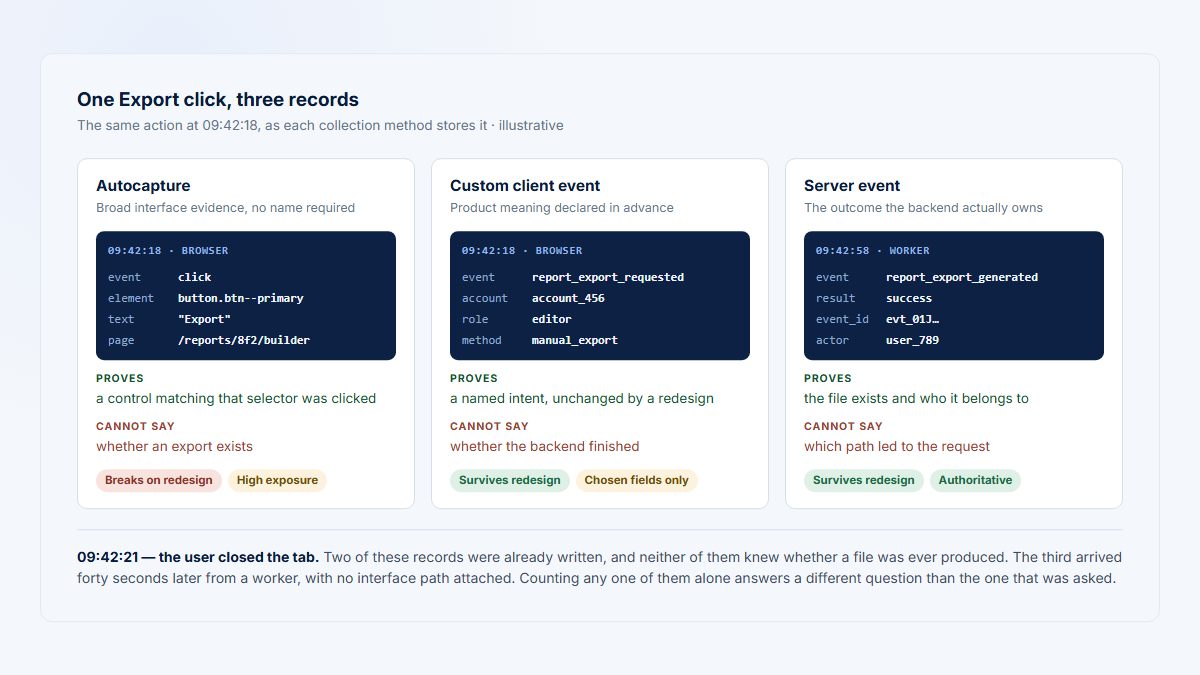
selector: "button[data-action='save']"The click may be useful, but it is not proof that a report was saved. The request could fail, validation could reject it, the user could lack permission, or the server could return an error after the click.
This distinction is the heart of the comparison.
Mixpanel’s model
Mixpanel is strongest when important outcomes are deliberately tracked as events with stable properties. Its current web SDK also supports autocapture on all plans, so it is no longer accurate to describe Mixpanel as manual instrumentation only. The best Mixpanel implementation often combines autocapture for discovery with explicit client or server events for product KPIs. (Mixpanel)
Heap’s model
Heap autocaptures a broad set of web and mobile interactions, organizes them into an account-to-event hierarchy, and lets teams turn captured patterns into named events later. Custom events remain important when the outcome occurs outside the visible interface or requires business context that autocapture cannot observe. (Heap Help Center)
Matomo’s model
Matomo automatically handles conventional web measurements such as page views and configured link or campaign behavior. Teams can add custom events through the JavaScript client, Tag Manager, mobile SDKs, or Tracking HTTP API. It is configurable, but it is not designed around Heap’s capture-first, define-later workflow. (JavaScript tracking; Tag Manager; Tracking HTTP API; tracking clients)
For a deeper implementation framework, read Autocapture vs Custom Events for B2B SaaS.
Retroactive analysis and its limitations
“Retroactive” does not mean that a tool can reconstruct everything that happened before installation or infer every business outcome from the browser.
Heap can define an event later when the required interaction and properties were actually captured. That creates substantial value when a team forgot to name a navigation click, tab open, form interaction, or page state. It does not eliminate five boundaries:
- The installation boundary. No product can analyze interface activity from before its collector was installed unless historical data is imported from another source.
- The capture boundary. Masked text, ignored elements, unsupported components, changing selectors, canvas content, and events outside the tracked application may not be available.
- The semantic boundary. A click can suggest intent but cannot confirm a successful backend transaction.
- The identity boundary. Historical behavior is less useful when users, devices, anonymous sessions, and companies were not connected correctly.
- The governance boundary. A new definition can reinterpret captured data, but the team must still document what the definition means and how UI changes affect it.
Mixpanel’s autocaptured events can also be queried after collection, but Mixpanel’s primary advantage remains the depth of analysis available when product outcomes have stable names and properties. Matomo can recalculate reports from collected web data, but it does not provide the same virtual-event workflow for arbitrary historical interface interactions.
The safe principle is:
Use autocapture to preserve optionality and discover questions. Use semantic client or server events to establish business truth.
Data-collection model
| Observed behavior | Mixpanel | Heap by Contentsquare | Matomo | Recommended source of truth |
|---|---|---|---|---|
| Page opened | Web autocapture or explicit page/screen event | Autocaptured pageview or screen | Standard pageview or app tracking call | Client-side page/screen event is usually sufficient |
| Button clicked | Web autocapture or explicit click event | Usually autocaptured | Configure an event, tag, link, or relevant interaction | Autocapture is useful for exploration; explicit event for durable KPI use |
| Report configuration started | Prefer semantic Report Configuration Started; autocapture can support discovery | Can be defined from captured interaction history if the UI signal exists | Configure a custom event | Semantic event if this is an agreed funnel milestone |
| Report successfully saved | Send Report Saved after confirmed success, ideally from the server | Custom server or confirmed client event; do not infer solely from the Save click | Tracking API or confirmed client event | Server-side confirmation |
| Report exported by the server | Server event | Server event | Tracking HTTP API call | Server-side confirmation |
| User associated with a company | Set a stable company_id; Group Analytics add-on for native group analysis | Identify the user and account; Account Analytics packaging for account reports | User ID plus custom dimension or external account model | Identity service or backend account record |
| Repeated use next month | Retention report on the confirmed outcome | Retention or account analysis on the confirmed outcome | Cohort/returning behavior where packaged; custom B2B modeling may be needed | Deduplicated confirmed events with stable identity |
| Anonymous marketing-site visit | Supported, but must be reconciled with later identity if needed | Supported through anonymous sessions and later identity | Native web-analytics use case | Web tracker under the site’s consent and privacy design |
Heap documents web sessions as ending after 30 minutes of pageview inactivity and mobile sessions after five minutes of inactivity. It also states that server-side events are not sessionized with client-side events, so a backend outcome may not appear in the same replay or session chronology. (autocaptured data; server events)
Worked B2B example: an illustrative Reporting workflow
All company names, event names, workflow details, and formulas in this example are illustrative. They are not customer claims or a demonstration of a real company’s implementation.
Assume a fictional B2B SaaS product has a Reporting area. Several users belong to the same customer company. The workflow is:
- A user reaches Reporting.
- The user opens a report template.
- The user starts configuring a report.
- The server successfully saves the report.
- The user exports or shares it.
- The user returns and uses Reporting in a later month.
- Several users from the same company participate over time.
A defensible account-adoption metric could be:
Reporting adoption =
eligible active companies with at least one server-confirmed Report Saved event
÷
eligible active companies in the selected periodA repeated-adoption measure could be:
repeat Reporting adoption =
companies with a confirmed Report Saved event in the current month
and at least one confirmed Report Saved event in an earlier month
÷
companies that saved a report before the current monthThe denominator must be defined deliberately. For example, an account without access to Reporting should not be treated as a non-adopter.
How Mixpanel would observe the workflow
Mixpanel web autocapture could record the Reporting page view, template click, and visible configuration interactions. The implementation should still create stable semantic events such as:
Reporting Viewed
Report Template Opened
Report Configuration Started
Report Saved
Report Exported
Report SharedReport Saved, Report Exported, and Report Shared should come from the server or from a client callback that confirms success. These events should carry a stable company_id, report type, template identifier, plan, user role, and other approved properties.
With Group Analytics, the team can analyze companies or accounts directly rather than approximating an account through user-level filters. Group Analytics is a paid add-on available with Growth or Enterprise packaging. (Mixpanel)
Adoption is calculated by counting distinct eligible company groups that performed the confirmed event. Retention can show whether the same users or groups return to the behavior in later periods. Replay can explain sessions where users entered Reporting but did not complete the workflow, subject to sampling, retention, masking, and supported platform coverage.
The public marketing journey can also be tracked in Mixpanel, but campaign, content, and acquisition reporting must be modeled intentionally. A team whose public site has a separate owner and measurement model may still prefer a dedicated web-analytics layer.
Additional work required:
- event and property taxonomy;
- identity merge rules;
- Group Analytics purchase and configuration for native company analysis;
- server instrumentation for outcomes;
- replay sampling and masking policy;
- governance for both semantic and autocaptured events.
How Heap would observe the workflow
Heap can automatically capture the page views, clicks, form interactions, and other supported interface behavior after its SDK is installed. An analyst may later define events for “Template Opened” or “Configuration Started” without waiting for a new release, provided the necessary elements and properties were captured.
The server-confirmed save, export, or share should still be sent as a custom event. A visible click is not a substitute for transaction success. Heap’s documentation explicitly supports custom client-side and server-side events alongside autocapture. (Heap custom client and server events)
Heap organizes autocaptured data into an account, user, session, pageview, and event hierarchy. On Pro and Premier, an account funnel can count a sequence completed by different users in the same account, which is useful when one person configures a report and another later exports it. (Heap data hierarchy; account funnels; pricing)
Adoption can be measured as accounts performing the confirmed Report Saved event. Replay can help inspect failed or abandoned sessions when the Experience Analytics add-on is purchased and the relevant session was recorded. The public marketing site can be measured in Heap, but conventional acquisition reporting is not as central to its model as it is in Matomo.
Additional work required:
- event-definition governance for autocaptured data;
- stable identity and account properties;
- custom server events for successful outcomes;
- Pro or Premier packaging for account analysis;
- replay/heatmap add-on when needed;
- monitoring of UI changes that could invalidate visual definitions.
How Matomo would observe the workflow
Matomo naturally records page views in Reporting and can track the public website, referrers, campaigns, goals, and ecommerce activity in the same broad web-analytics system.
Opening a template or starting configuration would normally require custom events, Tag Manager rules, or another configured tracking call. The successful save, export, or share should use the Tracking HTTP API or a confirmed client event after the backend operation succeeds. (Matomo Developer Docs)
Matomo supports User ID, custom dimensions, segments, and APIs, but it does not provide a native B2B company object equivalent to Mixpanel Group Analytics or Heap Account Analytics. A team can send a company identifier as an approved dimension and create account-level reports externally, but that is custom analytical modeling rather than a first-class account workflow.
Reporting adoption therefore requires one of the following:
- a custom report that deduplicates the company dimension;
- a data warehouse or BI model;
- a Matomo extension;
- a separate account-centric product analytics system.
Session Recording can explain selected web sessions in Matomo Cloud or through the paid On-Premise plugin. Matomo’s current mobile analytics documentation says Heatmaps and Session Recordings are unavailable for native mobile-app tracking, even though iOS and Android tracking SDKs exist. (Matomo pricing; Heatmap and Session Recording; Matomo mobile feature support; tracking clients)
Matomo is the most natural of the three for the anonymous public-site journey. It needs more configuration or external modeling for authenticated B2B adoption across several users in one company.
Additional work required:
- custom event configuration for product milestones;
- company-level dimension and deduplication logic;
- Cloud allowance or paid On-Premise plugin for replay;
- infrastructure and upgrades for On-Premise;
- careful separation of anonymous website analytics from authenticated account analytics.
Product analytics depth
Mixpanel
Mixpanel is the strongest fit when the team’s recurring questions are:
- Which behavior predicts activation?
- Where do users or accounts leave a multi-step flow?
- Which cohorts return to a feature?
- Did retention change after a release?
- Which segments respond differently?
- Did an experiment improve a primary metric without damaging guardrail metrics?
Its analytical depth depends on a usable event model. A report can be technically valid and still misleading when Report Saved sometimes means a click, sometimes a successful API response, and sometimes an imported warehouse row.
Mixpanel’s current platform includes session replay. The Experiment Report and Feature Flags are separate, separately priced Enterprise add-ons; purchasing Feature Flags does not include Experiments. Projects without the Experiments add-on can create up to three experiments, and teams can analyze external experiments by sending exposure events. (Session Replay; Mixpanel Experiments; Feature Flags)
Heap
Heap also supports funnels, retention, journeys, influence analysis, segments, and account-level analysis. Its distinctive advantage is not an absence of structure; it is the ability to begin from an extensive captured interaction history and add business-friendly definitions later.
That advantage is strongest when:
- the team repeatedly discovers missing frontend instrumentation;
- product managers need to investigate without waiting for a release;
- the interface changes faster than the tracking plan;
- the question concerns a past click, page state, or navigation path.
It is weaker when the decisive fact exists only in the backend, when the UI signal is ambiguous, or when teams assume that capturing more data automatically creates a shared vocabulary.
Matomo
Matomo can support event reports, goals, funnels, cohorts, user flows, A/B tests, and app tracking. The critical packaging distinction is that the free On-Premise core does not include every premium capability promoted across the overall Matomo product. Cloud includes the wider feature set subject to allowances; On-Premise customers may need paid plugins or a bundle for Funnels, Cohorts, Users Flow, A/B Testing, Heatmap and Session Recording, and related capabilities. (Analytics Platform - Matomo)
Matomo is best understood as a web-analytics platform that can be extended into product questions, not as a direct substitute for every semantic product-analysis or B2B account workflow.
For broader category context, see Product Analytics Tools Compared and B2B Product Analytics.
Public website and acquisition analytics
Matomo begins with the concepts a website, marketing, content, and ecommerce team expects:
- traffic sources;
- campaigns;
- landing and exit pages;
- goals and conversions;
- ecommerce transactions;
- content interactions;
- site search;
- geography and devices;
- returning visitors;
- page performance;
- configurable attribution and advertising exports.
Mixpanel and Heap can ingest campaign parameters, anonymous activity, landing pages, and conversion events. They may be entirely sufficient when the product and public website share one identity and analytical team. They are less natural when marketing needs a conventional website-analytics workspace with content, acquisition, ecommerce, and deployment-control requirements.
A two-tool architecture is justified when it creates a clean boundary:
Matomo:
anonymous public-site visits, content, campaigns, acquisition, ecommerce
Mixpanel or Heap:
authenticated product usage, activation, workflows, retention, accountsThe cost of this split is identity and attribution reconciliation. Define which system owns first-touch, last-touch, signup, account creation, activation, and revenue reporting. Do not report conflicting conversion numbers without explaining their event definitions and lookback windows.
Account and Group Analytics
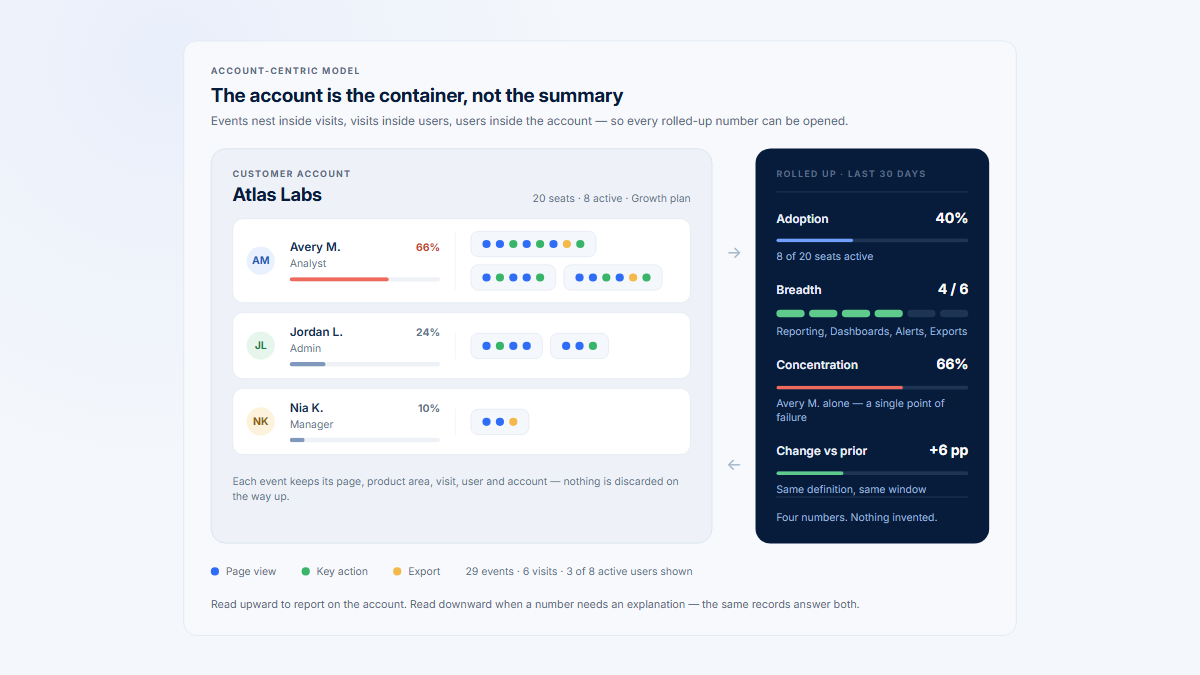
A B2B customer is usually not one user. It is a company containing several users, roles, teams, and workflows. Account analysis must answer questions that user-level charts conceal:
- Did several people adopt the feature, or only one champion?
- Can different users complete different funnel steps?
- Is activity broad across the account?
- Which accounts have stopped using a valuable workflow?
- Which users explain an account-level change?
Mixpanel Group Analytics
Mixpanel Group Analytics lets events be analyzed by a group key such as company_id, account_id, project_id, or billing_id. It is a paid add-on for Growth and Enterprise. Current billing documentation describes a 40% add-on charge based on relevant additional event data; exact contract pricing should still be checked against expected volume. (Group Analytics; billing)
Heap Account Analytics
Heap’s Account Analytics is packaged in Pro and Premier. Its account funnel can count a sequence completed by different users in the same account. Heap’s Account Health documentation still labels some account-based Journey and Funnel analysis as beta, so buyers should confirm current rollout and access. The model aligns naturally with collaborative B2B workflows, but it still depends on a stable account property and a correctly defined eligible population. (Heap pricing; account funnels; Account Health Analysis)
Matomo account modeling
Matomo can carry a company identifier through custom dimensions or another approved field. A warehouse query can then calculate account adoption. This is possible, but it should not be described as a native account-analytics product. Teams must implement deduplication, eligibility, company history, and multi-user attribution themselves.
For a deeper account-measurement explanation, read How to Measure Product Usage by Company.
Session replay and heatmaps
Replay answers a different question from a funnel.
A funnel shows that 38% of eligible users reached Report Saved. Replay may show that a particular user repeatedly changed a date range, opened a validation message, returned to the template, and then left. One indicates scale; the other provides session-level evidence.
Mixpanel replay
Mixpanel Free currently includes 10,000 monthly replays and Growth includes 20,000. Replays are stored for 30 days by default; Enterprise customers with a paid Session Replay add-on can configure retention from 7 to 360 days. Mixpanel documents Session Replay for Web, iOS, Android, React Native, and Electron, while replay-powered heatmaps are a web capability. (Mixpanel pricing; Session Replay; heatmaps)
Heap replay
Heap lists Session Replay, heatmaps, and error analysis as add-ons on Pro and Premier, not as part of the Free or Growth base plan. Current setup documentation covers native replay for iOS, Android, React Native, and Flutter; React Native and Flutter require separate iOS and Android replay configuration. (Heap pricing; Experience Analytics setup)
Matomo replay
Matomo Cloud includes Heatmap and Session Recording subject to plan allowances. On-Premise customers need the premium plugin or a qualifying bundle. The plugin can replay clicks, mouse movement, scrolling, window changes, page changes, and configured form interactions on websites. (Matomo pricing; Heatmap and Session Recording; Session Recordings guide)
No replay implementation should be judged only by whether the feature exists. Compare:
- capture and sampling rules;
- default masking;
- route and selector exclusions;
- text and input handling;
- supported frameworks;
- replay retention;
- mobile versus web coverage;
- whether events link directly to a recording;
- storage or usage costs;
- the operational process for deciding which sessions deserve review.
For a practical division of labor, read Session Replay vs Product Analytics.
Self-hosting and operational responsibility
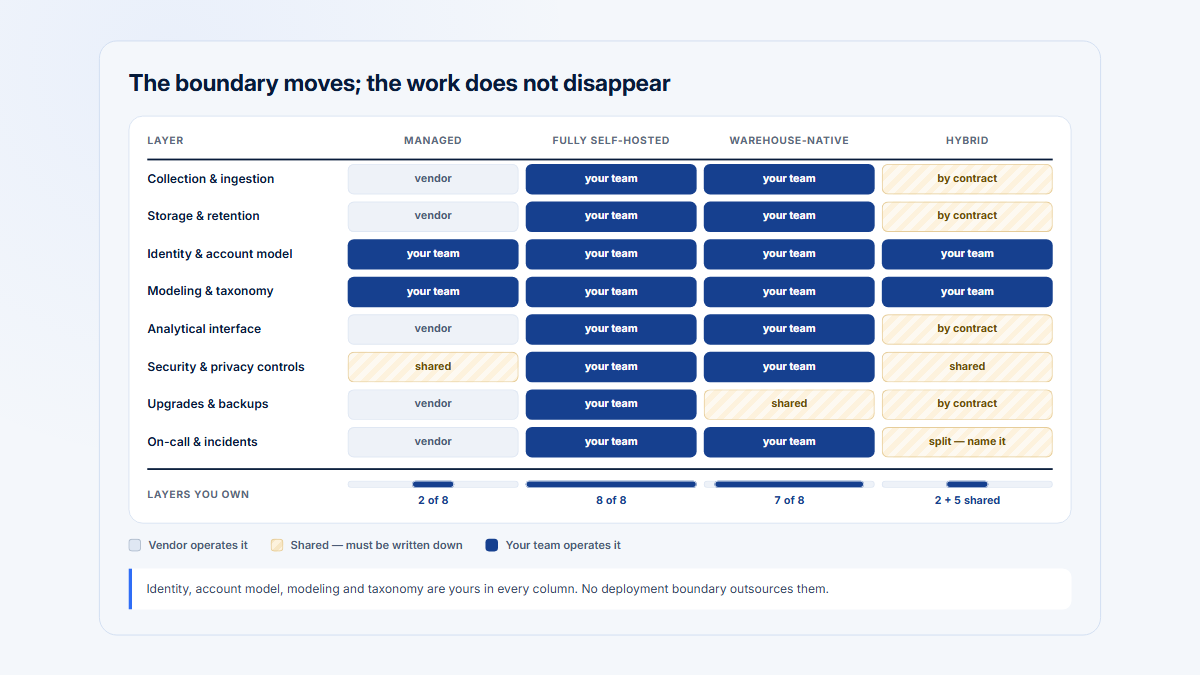
Matomo is the only product in this comparison with a genuine self-hosted edition.
That distinction affects more than where a database resides. On-Premise deployment gives the customer greater control over:
- infrastructure location;
- database access;
- retention;
- network controls;
- backups;
- extensions;
- upgrade timing;
- raw data;
- operational logs.
It also makes the customer responsible for:
- capacity planning;
- application and database security;
- patches and version upgrades;
- high availability;
- backup testing;
- archiving jobs;
- performance tuning;
- monitoring;
- incident response;
- plugin compatibility;
- support escalation.
Matomo’s own installation guidance says On-Premise requires a server, regular updates, and technical knowledge. The free core therefore has a zero software-license price, not a zero total cost. (Analytics Platform - Matomo)
Mixpanel and Heap are managed SaaS services. This reduces application operations but transfers more platform dependency to the vendor. The buying team should examine regional hosting, contractual terms, export paths, deletion workflows, retention, and switching costs.
For the operating-model decision, read Self-Hosted Product Analytics.
Privacy, data control, and retention
Do not reduce this comparison to “compliant” and “not compliant.” Legal outcomes depend on the organization, purpose, data, jurisdiction, consent or other lawful basis, contracts, configuration, and operational behavior.
| Criterion | Mixpanel | Heap by Contentsquare | Matomo |
|---|---|---|---|
| SaaS availability | Yes | Yes | Yes |
| Self-hosting | No | No | Yes, with free core |
| Data ownership and access | Customer controls submitted data under SaaS terms; export APIs and pipelines available | Customer access through product, exports, and warehouse packaging | Matomo states customer data ownership; On-Premise also provides direct infrastructure and database control |
| Data-residency options | Current docs describe US default plus EU and India project endpoints; correct SDK endpoint is required | Region-specific storage appears in Premier pricing; verify exact regions and contract | Cloud data in Frankfurt, with backups documented in Dublin; On-Premise location is customer selected |
| First-party collection | Can use first-party identifiers and configurable SDK behavior | Web and app SDK collection under customer configuration | Standard first-party web-analytics model; cookies can be configured or disabled where appropriate |
| Cookies and identification | Anonymous and identified profiles; opt-out and identity configuration affect continuity | Anonymous users can later be identified; account and cross-platform identity require governance | User ID, visitor identifiers, configurable cookies, and cookieless configurations |
| Analytics retention | Depends on plan and contract; replay is 30 days by default | Six months on Free, 12 months on Growth, one year on Pro/Premier before relevant add-ons | Cloud Business: 24 months of raw data; Cloud Enterprise: custom raw-data retention; Cloud reports: retained forever; On-Premise: customer-configured (Matomo pricing; retention guidance) |
| Deletion and access requests | Retrieval/deletion APIs and project data-deletion controls | Product privacy and deletion workflows; verify contract and implementation | Privacy Manager and configurable deletion/anonymization; direct control On-Premise |
| Masking | Replay masks text and inputs by default, with configurable controls and permanently masked sensitive input types | Redaction, target-text capture controls, and related privacy settings | Heatmap/replay plugin includes masking and recording controls |
| Session-recording controls | Sampling, masking, opt-out, and retention settings | Add-on controls and redaction configuration | Select pages, sampling, time thresholds, input handling, and deletion controls |
| Infrastructure responsibility | Mixpanel | Contentsquare/Heap | Matomo for Cloud; customer for On-Premise |
| Upgrade responsibility | Mixpanel | Contentsquare/Heap | Matomo for Cloud; customer for On-Premise |
| Legal conclusion | Must be assessed for the actual implementation | Must be assessed for the actual implementation | Must be assessed for the actual Cloud or On-Premise implementation |
Mixpanel documents a US default plus EU and India project endpoints; EU and India projects require the correct regional endpoint. It also documents opt-out, deletion and retrieval APIs, and replay masking controls. (privacy overview; EU residency; India residency; replay privacy controls)
Matomo’s current Cloud pricing states that data is stored in Frankfurt, Germany. Its current DPA states that AWS backups are in Dublin. On-Premise customers choose their own infrastructure location. (Matomo pricing; Cloud DPA)
Privacy controls reduce risk; they do not replace a legal and compliance review.
Mobile and cross-platform support
Mixpanel
Mixpanel provides SDKs for web, server, native mobile, React Native, Flutter, Unity, and other environments. Current Session Replay documentation lists Web, iOS, Android, React Native, and Electron; it does not list Flutter replay. Web autocapture remains a JavaScript SDK capability, so the same autocapture behavior should not be assumed for every SDK. (Mixpanel SDKs; Session Replay; autocapture)
Heap
Heap documents mobile autocapture libraries for iOS, Android, React Native, and Flutter. Cross-platform analysis still needs stable event names, identity, accessibility labels, and combo-event or governance work when equivalent controls have different platform implementations. (Heap Help Center)
Matomo
Matomo provides iOS and Android clients plus server-side tracking libraries. Its mobile feature documentation states that Heatmaps and Session Recordings are unavailable for native mobile-app tracking, so buyers should verify each required feature rather than rely on a generic mobile-support label. (Matomo tracking clients; native mobile feature support)
Implementation effort
The easiest tool to install is not necessarily the easiest tool to trust six months later.
Fastest route to broad frontend visibility
Heap usually provides the fastest route to a large body of frontend interaction data. That is valuable when engineering capacity is limited or historical questions are unpredictable.
Fastest route to basic website analytics
Matomo Cloud can provide conventional web reports after adding its tracker. On-Premise takes more operational work even when the initial tracking snippet is straightforward.
Fastest route to durable product KPIs
Mixpanel can produce trustworthy product KPIs quickly when the team already knows its activation, conversion, and retention events. Without that agreement, installation is fast but metric governance remains unresolved.
Work that none of the products removes
Every implementation still needs decisions about:
- user and account identity;
- anonymous-to-known transitions;
- test and internal traffic;
- environments;
- event naming;
- successful versus attempted outcomes;
- eligible denominators;
- sensitive properties;
- data retention;
- event QA;
- ownership of definitions;
- release-change monitoring.
Use the Product Analytics Instrumentation Plan for the detailed planning process.
Event governance and taxonomy
Autocapture and semantic events solve different governance problems.
A semantic taxonomy can become bloated, inconsistent, or expensive when teams track every visible interaction as a named business event. An autocapture dataset can become noisy and fragile when analysts create many overlapping definitions tied to selectors, text, or page structures.
A durable governance system should define:
- Business outcome events
Stable events such as Report Saved, Invite Accepted, or Subscription Upgraded.
- Workflow milestones
Events such as Report Configuration Started that are meaningful but may be client observed.
- Exploratory interactions
Autocaptured clicks, pages, fields, and UI state used for investigation.
- Context properties
Company, plan, role, product area, source, template, environment, and experiment exposure.
- Ownership
The person or team responsible for definition, QA, and deprecation.
- Versioning
What happens when a page, selector, workflow, or event meaning changes.
- Evidence level
Whether the event means attempted, displayed, submitted, accepted, or successfully completed.
Dynamic SaaS URLs should also be normalized into meaningful pages or features. A path such as:
/workspaces/827/reports/128/editshould not create a separate analytical feature for every workspace and report identifier. See How to Group Dynamic SaaS URLs for a normalization framework.
Pricing and total cost
Pricing comparisons are difficult because the three products bill different units and package features differently.
| Product | Free allowance or core | Entry paid or Cloud model | Primary usage unit | Replay cost or dependency | Relevant add-ons or premium costs | Enterprise model | Self-host infrastructure responsibility | Official pricing | Verified |
|---|---|---|---|---|---|---|---|---|---|
| Mixpanel | Free: up to 1M monthly events, up to five saved reports, 10K monthly replays, unlimited seats | Growth starts at $0: first 1M monthly events free, then $0.28 per 1,000 events at the published base rate; 20K monthly replays | Events | Free and Growth include replay allowances; extended/custom retention and volumes can be paid | Group Analytics currently adds 40% to relevant additional event charges; Data Pipelines adds 20%; Experiments and Feature Flags are separately priced Enterprise add-ons | Custom; MTU-based Enterprise option currently starts at $20,000/year and is not sold online | Not applicable | https://mixpanel.com/pricing/ | 5 Aug 2026 |
| Heap by Contentsquare | Free: up to 10K monthly sessions, six months of history | Growth requires installing the snippet to receive an estimate; includes 12 months of history, unlimited users/reports, customization, and CSV | Sessions | Session Replay, heatmaps, and error analysis are add-ons on Pro and Premier | Account Analytics begins on Pro; Heap Connect/warehouse and permissions vary by tier | Pro and Premier use custom session pricing | Not applicable | https://www.heap.io/pricing | 5 Aug 2026 |
| Matomo Cloud | Free trial, not a permanent free Cloud tier | Business currently starts at $26/month for 50K hits; pricing rises by hit tier | Hits, including page views, events, downloads, outlinks, site searches, content interactions, crashes, and other supported tracking requests | Heatmap and Session Recording included subject to plan allowances | Cloud includes Matomo features under plan allowances; Data Warehouse Connector and enterprise requirements may add cost | Custom Enterprise allowances and support | Matomo operates infrastructure | https://matomo.org/pricing/ | 5 Aug 2026 |
| Matomo On-Premise | Free open-source core with unlimited users and hits at the software-license layer | Customer supplies infrastructure; current paid bundles start with Team from €230/month billed annually (€275 month-to-month) and include named plugins plus support, while individual plugin and support purchases remain available | Infrastructure, stored hits, users, support, and selected licenses | Heatmap and Session Recording is paid; current public pricing starts at €219/year for 1–4 users and up to 5 million hits | Funnels, Cohorts, Users Flow, A/B Testing, Forms, SAML, and other advanced capabilities may require plugins or bundles | Paid bundles, support, and custom arrangements | Customer owns servers, database, security, updates, backups, monitoring, and scaling | https://matomo.org/pricing/ and https://plugins.matomo.org/HeatmapSessionRecording | 5 Aug 2026 |
Mixpanel’s billing documentation confirms the first 1 million events are free, the published base overage is $0.00028 per event on the 1-million-event plan, Group Analytics adds 40% to the relevant event charge, Data Pipelines adds 20%, and its MTU Enterprise option starts at $20,000 annually. (Mixpanel)
Heap publishes plan entitlements but not a numeric Growth, Pro, or Premier price. Do not replace “custom” with an unsupported estimate from a review or sales discussion. (Heap)
At verification, Matomo’s current structured USD offer data included the following Cloud Business tiers through 10 million hits per month:
| Monthly hits | Published monthly price |
|---|---|
| 50,000 | $26 |
| 100,000 | $42 |
| 300,000 | $85 |
| 600,000 | $139 |
| 1 million | $204 |
| 2 million | $399 |
| 5 million | $975 |
| 10 million | $1,900 |
| Visible calculator above 10 million | Contact sales |
These tiers are a time-stamped USD snapshot. Matomo’s visible calculator directs volumes above 10 million hits per month to sales, while page metadata also publishes some higher-volume offers. Currency, regional presentation, taxes, annual discounts, allowances, and bundle structure can change. (Analytics Platform - Matomo)
Cost drivers buyers often miss
Events or sessions. A verbose taxonomy can make event-priced analytics expensive. Long or fragmented sessions can change the economics of session-priced tools.
Retention. Six, 12, 24, or more months of raw history can materially affect migration and year-over-year analysis.
Replay. Compare recordings captured, recordings retained, sampling, mobile coverage, and the plan required—not merely whether replay appears on a feature page.
Premium plugins. Matomo On-Premise core is free, but some features shown in Matomo’s broader product marketing are paid extensions.
Storage and infrastructure. Self-hosting adds databases, object storage, backups, monitoring, upgrades, and engineering time.
Governance. Autocapture reduces some instrumentation work but can increase event-definition and QA work.
Support. Community support, email support, a dedicated customer-success manager, implementation help, and response-time commitments are different cost layers.
Data movement. Warehouse export, historical import, pipelines, and regional migrations may require higher plans or additional engineering.
Customer ratings and review themes
Ratings are a useful signal about the review population, not a controlled product test.
Mixpanel customer rating
4.5/5 · approximately 1,371 reviews G2 · verified 5 August 2026 (G2)
Recurring praise includes flexible event analysis, funnels and cohorts, dashboards, and an interface that lets product teams answer many questions without writing SQL.
Recurring complaints include the learning curve for advanced analysis, the effort required to maintain a clean taxonomy, confusion when event definitions are inconsistent, and costs that grow with event volume or add-ons.
Implementation themes center on identity management, event QA, and deciding when autocapture is sufficient. Support is praised in some reviews, but review evidence cannot establish a consistent service level for every plan or region.
Heap by Contentsquare customer rating
4.4/5 · approximately 1,097 reviews G2 · verified 5 August 2026 (G2)
Recurring praise includes automatic event tracking, rapid exploratory analysis, ease of building funnels, and the ability for non-engineering users to investigate behavior.
Recurring complaints include data volume and definition complexity, the learning curve for more advanced questions, maintaining event governance as the product changes, and limited public visibility into paid pricing.
Implementation themes include identity, account mapping, cross-platform consistency, and distinguishing a captured interaction from a successful business outcome. Higher-tier customer-success support is often discussed positively, but those reports do not prove the same experience on every contract.
Matomo customer rating
4.2/5 · approximately 96 reviews G2 · verified 5 August 2026 Low review volume relative to Mixpanel and Heap. (G2)
Recurring praise includes data ownership, self-hosting, privacy-oriented controls, web-analytics depth, customization, and the option to move between managed Cloud and self-managed deployment.
Recurring complaints include the technical work of On-Premise setup and maintenance, server-resource requirements, a less intuitive experience in some advanced areas, and the need to pay for premium plugins or Cloud when advanced capabilities are required.
Support experiences differ between community users, Cloud customers, paid-support customers, and implementation partners. With only about 96 G2 reviews, isolated opinions should carry less weight than they would in a substantially larger sample.
What the review sample cannot prove
Customer reviews cannot prove:
- that an implementation will satisfy a law or internal policy;
- that event counts are inherently more accurate;
- that the product will generate a financial return;
- that support quality is identical across plans;
- that a feature is still packaged as it was when the review was written;
- that one product is universally easier;
- that a reviewer’s event model resembles yours.
Do not combine ratings from G2, Capterra, Software Advice, or another site into a homemade average.
Migration considerations
Changing analytics products is a data-model migration, not merely a script replacement.
Before choosing a destination
Document:
- the business questions that must survive;
- active events and their definitions;
- account and identity rules;
- required raw history;
- retention requirements;
- current replay dependencies;
- dashboards used in decisions;
- privacy exclusions and consent behavior;
- warehouse and downstream integrations;
- which metrics are contractual or executive KPIs.
Moving from Mixpanel to Heap
Export the semantic event dictionary before assuming autocapture can replace it. Preserve server-confirmed outcomes as custom Heap events. Decide which historical Mixpanel events should be imported or modeled in Heap Connect and which new interface questions begin only after Heap installation.
Expect metric changes where Mixpanel reports use event definitions that do not match Heap virtual events exactly.
Moving from Heap to Mixpanel
Identify which Heap events are based on selectors or retrospective definitions. Convert only durable product concepts into Mixpanel semantic events. Instrument server outcomes before the cutover. Keep Heap running during a comparison period because past replay and autocaptured history may not be reproducible in Mixpanel.
Moving from Mixpanel or Heap to Matomo
Separate public-site analytics from authenticated-product requirements. Matomo can receive custom events, but native account reporting, semantic retention, and replay coverage may not map one-to-one. Model company-level metrics in the warehouse when necessary.
Moving from Matomo to Mixpanel or Heap
Preserve campaign, referrer, ecommerce, and page data that the product team still needs. Decide whether the new product tool will replace public-site reporting or whether Matomo remains as a dedicated marketing layer.
Moving between Matomo Cloud and On-Premise
Plan the infrastructure, database, storage, backups, archiving, monitoring, and plugin licenses before migration. Matomo states that it can import On-Premise data into Cloud and export Cloud data for use On-Premise. Operational readiness remains the customer’s responsibility when self-hosting. (Matomo pricing; On-Premise installation; self-hosting overview)
Run both systems during validation
A dual-run period should compare definitions rather than expect identical totals. Differences may come from:
- session boundaries;
- bot filtering;
- consent;
- identity merging;
- time zones;
- ingestion delay;
- retries;
- blocked scripts;
- server events;
- page definitions;
- deduplication;
- event timestamps.
Record the accepted new baseline before retiring the old system.
Decision by scenario
| Scenario | Best starting choice | Why | Important qualification |
|---|---|---|---|
| B2B SaaS with a carefully maintained event taxonomy | Mixpanel | Deep funnels, retention, cohorts, semantic events, and optional Group Analytics | Add Group Analytics for native company analysis and keep server outcomes authoritative |
| Product team that missed historical instrumentation | Heap | Broad autocapture and retrospective event definition | History begins at installation and cannot infer unobserved backend outcomes |
| Public marketing website | Matomo | Natural traffic, content, campaign, goal, and deployment model | Mixpanel or Heap may still be used after signup for product behavior |
| Organization requiring On-Premise analytics | Matomo | Only product here with a genuine self-hosted edition | Customer assumes infrastructure, security, maintenance, and upgrade work |
| Ecommerce website | Matomo | Native ecommerce and acquisition orientation | A separate product tool may be better for authenticated post-purchase workflows |
| SaaS requiring company-level feature adoption | Mixpanel or Heap | Mixpanel Group Analytics supports structured account behavior; Heap Account Analytics supports account funnels and adoption | Both are paid capabilities; Hymetry may be relevant when account context is the primary operating model |
| Mobile application | Mixpanel or Heap | Both have broad mobile analytics support; Mixpanel also documents mobile replay SDKs | Verify each required SDK and replay capability rather than accepting a generic mobile checkmark |
| Small team with no analytics engineer | Heap for broad product discovery; Matomo Cloud for a website | Faster initial capture or managed website setup | The team still needs an owner for definitions, identity, and privacy |
| Privacy-sensitive European organization | Matomo or a regionally configured SaaS product | Matomo provides Cloud and self-host choices; Mixpanel provides EU projects; Heap offers region-specific storage in relevant packaging | No product choice automatically determines legal compliance |
| Product and UX team requiring replay | Mixpanel, Heap add-on, or Matomo Cloud/plugin | All can provide replay in the right packaging | Compare sampling, retention, mobile coverage, masking, linking to analytics, and cost |
Which tool wins for which team?
Mixpanel wins for a product organization with a stable behavioral model
Choose it when the team has named activation and adoption events, wants sophisticated retention and segmentation, and expects analytics to support experiments and product decisions over time.
Heap wins for a discovery-oriented product or UX team
Choose it when the most expensive recurring failure is “We did not track that interaction when it happened.” Heap’s advantage is preserving more frontend optionality, not eliminating the need for semantic outcomes.
Matomo wins for web analytics and deployment control
Choose it when the primary object is a website or ecommerce property and the organization values Cloud-versus-On-Premise choice, conventional traffic reporting, access to raw data, and control over infrastructure.
Mixpanel or Heap wins for native product analytics
Mixpanel usually wins when precision, taxonomy, and behavioral depth dominate. Heap usually wins when historical interface visibility and low-code event definition dominate.
Matomo wins when self-hosting is non-negotiable
Neither Mixpanel nor Heap offers a comparable self-hosted deployment.
A combined stack wins when the jobs are separate
Use Matomo for the anonymous public journey and Mixpanel or Heap for authenticated product behavior when that produces clearer ownership, cleaner schemas, and better privacy boundaries.
Where Hymetry fits
Hymetry is account-centric product intelligence for B2B SaaS. It is relevant when the customer is a company containing several users and product analysis should connect:
- product areas;
- grouped pages or features;
- Companies;
- Users;
- account adoption;
- user distribution inside each account;
- Visits and session evidence.
Hymetry’s model connects Pages, Companies, Users, and Visits so a team can begin with an account or feature signal and inspect the users and sessions behind it.
Hymetry compared with Mixpanel
Mixpanel offers a broader behavioral analytics, experimentation, and product-intelligence platform. Hymetry is narrower and account-centric by default. It emphasizes how multi-user customer companies adopt product areas and grouped pages, then connects those patterns to users and session evidence.
Hymetry should not be presented as a replacement for Mixpanel’s full experiment, feature-flag, or general-purpose event-analysis surface.
Hymetry compared with Heap
Heap’s core differentiator is broad autocapture and retrospective definition. Hymetry emphasizes structured B2B account context: companies, users within those companies, grouped product pages, account adoption, user distribution, and visits worth reviewing.
Hymetry does not claim to capture every possible interface action automatically.
Hymetry compared with Matomo
Matomo begins with public-site web analytics, acquisition, ecommerce, deployment control, and self-hosting. Hymetry begins with authenticated B2B product usage and company-level adoption.
Hymetry is not intended to replace a public-site marketing-attribution or conventional web-analytics platform.
Hymetry’s current limitations
Hymetry is:
- a newer product;
- supported by a smaller ecosystem;
- integrated with fewer external systems;
- not yet represented by a mature independent customer-review score;
- not intended as a marketing-attribution platform.
Those limitations should remain visible. Do not manufacture customer logos, review scores, implementation benchmarks, certifications, integrations, or outcomes.
For further context, read B2B Product Analytics and How to Measure Product Usage by Company.
Video recommendations
The two embedded recommendations use accessible, privacy-enhanced facades. No YouTube iframe, tracker, or third-party cookie is requested before you activate a player; after activation, the page uses youtube-nocookie.com. Each recommendation also keeps a descriptive title and direct text-link fallback.
Video 1: Independent product-analytics comparison
- Title:
Best Product Analytics Tools (2026) - My Honest Review - Channel: Vision Labs
- Date: 23 October 2025; the current YouTube title displays “2026”
- URL: https://www.youtube.com/watch?v=0PtM76cSX6k
- Classification: Independent agency/practitioner comparison covering Heap and Mixpanel among a wider tool set
- Disclosure: Vendor-independent opinion, but not a controlled benchmark. Some feature statements are now outdated; in particular, current Mixpanel includes session replay and web autocapture. The article’s verified product documentation and pricing must supersede the video.
- Where it appears: After “Why these different products are compared”
- Why it helps: It gives readers a concise view of the broader product-analytics category and illustrates why buying by feature checklist or headline price can be misleading.
- Embed status: The public YouTube page and privacy-enhanced embed were rechecked on 5 August 2026 and were available. (YouTube)
Video 2: Official Matomo self-hosting walkthrough
- Title:
Matomo On-Premise installation overview - Channel: Matomo
- Date: 17 February 2020
- YouTube URL: https://www.youtube.com/watch?v=Ffq-gAvlwE0
- Official transcript/page: https://matomo.org/faq/videos/video-how-to-install-matomo-analytics-using-self-hosted/
- Classification: Official vendor-produced installation walkthrough
- Disclosure: Vendor-produced and based on an older interface and installation flow. Use it to explain the categories of self-hosting responsibility, not as the sole source for current requirements, security practices, or version-specific steps.
- Where it appears: In “Self-hosting and operational responsibility”
- Why it helps: It makes the difference between a managed analytics subscription and operating the application, database, files, and tracking installation tangible.
- Embed status: The video remains linked and transcribed on Matomo’s official site; its privacy-enhanced embed was rechecked on 5 August 2026 and was available. (YouTube)
Optional Video 3: Official Matomo replay walkthrough
- Title:
9 - Heatmaps & Session Recordings - Matomo Analytics Training - Channel: Matomo
- Date: 7 May 2020
- URL: https://www.youtube.com/watch?v=WyDygNx0t4w
- Classification: Official vendor training
- Disclosure: Useful for understanding the qualitative-analysis workflow, but the current article and pricing page control all packaging claims.
- Where it appears: In “Session replay and heatmaps”
- Why it helps: It demonstrates what Matomo means by heatmaps and session recordings rather than leaving readers to infer the feature from a table.
- Embed status: The video remained public and embeddable when rechecked on 5 August 2026. (YouTube)
The optional third video remains a linked recommendation rather than a third embed, keeping the page lighter while preserving the official training reference.
FAQ
Is Heap better than Mixpanel?
Heap is better when the team’s recurring problem is missing frontend instrumentation and it values broad autocapture plus retrospective event definition. Mixpanel is better when the team prioritizes structured product behavior, semantic events, retention, cohorts, and experiments. Neither is universally better.
Can Matomo replace Mixpanel?
Matomo can replace Mixpanel for teams whose actual need is website, acquisition, ecommerce, or self-hosted analytics. It is less direct as a replacement for deep semantic product retention, experiment workflows, or native B2B group analysis.
Is Heap product analytics or web analytics?
Heap is primarily an autocapture-led product and experience analytics platform. It can analyze websites and acquisition journeys, but its differentiator is capturing and analyzing digital product interactions rather than acting only as a conventional traffic-reporting tool.
Does Matomo support product analytics?
Yes. Matomo supports custom events, goals, funnels, cohorts, mobile SDKs, APIs, and other product-oriented analysis. Some advanced capabilities are included in Cloud but require paid plugins or bundles On-Premise. Its starting model remains more web-oriented than Mixpanel’s or Heap’s.
Which product supports self-hosting?
Matomo. Mixpanel and Heap are managed SaaS products. Matomo On-Premise gives the customer deployment and database control while transferring infrastructure, upgrades, security, backups, and performance responsibility to that customer.
Which has the strongest autocapture?
Heap. Mixpanel now offers useful web autocapture on all plans, but Heap’s broader capture-first and retrospective-definition model remains its central differentiator. Matomo is not a direct equivalent to either model.
Which has the best funnels and retention?
Mixpanel is the strongest default choice for carefully defined product funnels and behavioral retention. Heap is also strong and adds account funnels plus retrospective definitions. Matomo can provide funnels and cohorts in the appropriate Cloud or premium On-Premise packaging, but product-retention depth is not its clearest advantage.
Which supports B2B account analytics?
Mixpanel offers Group Analytics as a paid add-on. Heap offers Account Analytics on Pro and Premier. Matomo can carry a company identifier and support custom reporting, but it lacks an equivalent native account object. Hymetry is specifically account-centric by default.
Which includes session replay?
Mixpanel includes replay allowances on Free and Growth. Heap provides replay as an add-on on Pro and Premier. Matomo Cloud includes replay subject to allowances, while Matomo On-Premise requires the relevant paid plugin or bundle.
Can Mixpanel and Matomo be used together?
Yes. Matomo can own anonymous marketing-site, acquisition, content, and ecommerce reporting, while Mixpanel owns authenticated product behavior, activation, feature use, and retention. Define the handoff at signup and document which system owns each conversion metric.
Is self-hosting cheaper?
Not automatically. Matomo On-Premise core has no software-license fee, but the organization pays for infrastructure, storage, backups, monitoring, security, upgrades, engineering time, support, and any premium plugins. Self-hosting is an operating model, not a synonym for zero cost.
Where does Hymetry fit?
Hymetry fits B2B SaaS teams that want product analysis organized around customer companies, users within those companies, grouped pages or product areas, account adoption, and visits or replay evidence. It is narrower than a general-purpose product-intelligence platform and is not a public-site attribution product.
Disclosure
Hymetry publishes this comparison and is mentioned only where account-centric B2B product analytics is relevant. Product capabilities, prices, ratings, ownership, and videos are verified against linked sources and may change after publication.
Methodology
This comparison is based on desk research completed on 5 August 2026. No claim of hands-on production use is made.
The research process prioritized:
- official pricing pages;
- official product pages;
- official implementation and feature documentation;
- official acquisition and ownership announcements;
- G2 as the shared customer-rating source;
- current independent reviews for additional context;
- current or still-relevant videos whose provenance could be identified.
The comparison does not assign a universal numerical score. The products begin from different categories, so the verdict is based on job fit:
- semantic product analysis;
- automatic historical capture;
- public-site and acquisition analysis;
- account-level modeling;
- qualitative replay;
- deployment control;
- implementation and operational responsibility.
Pricing is a public-list snapshot, not a contract quote. Taxes, annual discounts, volume commitments, regional currencies, overages, add-ons, support, and negotiated terms may change the total.
Review themes summarize recurring patterns rather than selecting one favorable or unfavorable review. Review-site scores are not combined into a custom average.
Privacy sections compare technical and deployment choices. They do not give legal advice or declare an implementation automatically compliant with a law.
Sources
Mixpanel official sources
- Pricing: https://mixpanel.com/pricing/
- Billing and pricing model: https://docs.mixpanel.com/docs/pricing
- Autocapture: https://docs.mixpanel.com/docs/tracking-methods/autocapture
- SDK overview: https://docs.mixpanel.com/docs/tracking-methods/sdks
- Session Replay: https://docs.mixpanel.com/docs/session-replay
- Session Replay privacy controls: https://docs.mixpanel.com/docs/session-replay/session-replay-privacy-controls
- Heatmaps: https://docs.mixpanel.com/docs/session-replay/heatmaps
- Group Analytics: https://docs.mixpanel.com/docs/data-structure/group-analytics
- Experiments: https://docs.mixpanel.com/docs/experiments
- Feature Flags: https://docs.mixpanel.com/docs/featureflags
- Raw Event Export API: https://docs.mixpanel.com/reference/raw-event-export
- Export methods: https://docs.mixpanel.com/docs/export-methods
- Privacy overview: https://docs.mixpanel.com/docs/privacy
- EU residency: https://docs.mixpanel.com/docs/privacy/eu-residency
- India residency: https://docs.mixpanel.com/docs/privacy/in-residency
Heap and Contentsquare official sources
- Pricing: https://www.heap.io/pricing
- Autocapture platform page: https://www.heap.io/platform/autocapture
- Autocaptured data: https://help.heap.io/hc/en-us/articles/37271985221137-Autocaptured-Data
- Experience Analytics Extension setup: https://help.heap.io/hc/en-us/articles/37271885924369-Experience-Analytics-Extension-setup-guide
- Custom client and server events: https://help.heap.io/hc/en-us/articles/37271959816465-Tracking-Web-Custom-Events-Client-side-vs-Server-side
- Funnel analysis: https://help.heap.io/hc/en-us/articles/37271972717073-Funnel-analysis-overview
- Account Health Analysis: https://help.heap.io/hc/en-us/articles/37271942935825-Account-Health-Analysis
- Privacy features: https://help.heap.io/hc/en-us/articles/37271887185041-Heap-Privacy-Features
- Data warehouses: https://help.heap.io/hc/en-us/articles/37271903218705-Data-Warehouses-Overview
- Contentsquare acquisition announcement: https://contentsquare.com/press/contentsquare-completes-acquisition-heap/
Matomo official sources
- Pricing: https://matomo.org/pricing/
- Heatmap and Session Recording plugin: https://plugins.matomo.org/HeatmapSessionRecording
- Session Recordings guide: https://matomo.org/guide/reports/session-recordings/
- JavaScript tracking guide: https://developer.matomo.org/guides/tracking-javascript-guide
- Tracking HTTP API: https://developer.matomo.org/api-reference/tracking-api
- Tracking API clients and mobile SDKs: https://developer.matomo.org/guides/tracking-api-clients
- Native mobile feature support: https://matomo.org/faq/general/what-features-of-matomo-analytics-are-supported-when-tracking-mobile-app-analytics-using-android-or-ios-sdk/
- Cloud raw-data export: https://matomo.org/faq/how-to/faq_24536/
- Cloud data processing agreement: https://matomo.org/matomo-cloud-dpa/
- What counts as a hit: https://matomo.org/faq/general/what-is-a-hit/
- Tag Manager: https://matomo.org/guide/tag-manager/
- Reporting API: https://developer.matomo.org/api-reference/reporting-api
- Database schema and raw access: https://developer.matomo.org/guides/database-schema
- Retention configuration: https://matomo.org/faq/general/configure-data-retention/
- On-Premise installation: https://matomo.org/faq/on-premise/installing-matomo/
- On-Premise overview: https://matomo.org/guide/installation-maintenance/matomo-on-premise-self-hosted/
- Official self-hosting video transcript: https://matomo.org/faq/videos/video-how-to-install-matomo-analytics-using-self-hosted/
Customer ratings
- Mixpanel on G2: https://www.g2.com/products/mixpanel/reviews
- Heap by Contentsquare on G2: https://www.g2.com/products/heap-by-contentsquare/reviews
- Matomo on G2: https://www.g2.com/products/matomo-formerly-piwik/reviews
Independent context
- Vision Labs product-analytics comparison: https://visionlabs.com/blog/best-product-analytics-tools/
- Capterra Heap versus Mixpanel comparison: https://www.capterra.com/compare/147216-158740/Heap-vs-Mixpanel
- Software Advice Matomo versus Mixpanel comparison: https://www.softwareadvice.com/bi/matomo-profile/vs/mixpanel/
Videos
- Independent comparison: https://www.youtube.com/watch?v=0PtM76cSX6k
- Official Matomo On-Premise walkthrough: https://www.youtube.com/watch?v=Ffq-gAvlwE0
- Official Matomo Heatmaps and Session Recordings training: https://www.youtube.com/watch?v=WyDygNx0t4w