Menu
Instrumentation and self-hosting

Autocapture vs Custom Events for B2B SaaS: What Should You Track?

Compare autocaptured interactions, page analytics, custom semantic events, and server-side outcomes—and build a maintainable B2B SaaS tracking strategy.

Autocapture, custom events, and server events answer different questions

The choice is not primarily technical. It begins with the analytical question.

A page view can tell you that a company reached Reporting. An autocaptured click can show that someone interacted with the Export control. A custom client event can represent that the user began configuring an export. A server event can confirm that the export file was generated. Product state can show that an export configuration still exists. Session replay can help explain what happened around a failed attempt.

Those signals overlap, but they are not interchangeable.

A useful tracking plan therefore separates:

  • Reach: Did the user or account arrive at the relevant part of the product?
  • Interaction: What did the person do in the interface?
  • Intent: Did the person begin a recognizable workflow?
  • Outcome: Did the application complete and persist the result?
  • State: Is the product now in the expected condition?
  • Context: Which user, company, role, page, and Visit were involved?
  • Evidence: What path or session helps explain the result?

This separation prevents a common analytics mistake: counting the easiest observable interaction as though it were the product outcome that matters.

What is autocapture?

Autocapture is the automatic collection of selected browser interactions without adding one explicit tracking call for every interface element.

Depending on the analytics tool, SDK, and configuration, autocaptured data may include:

  • page views or route changes;
  • clicks and element changes;
  • form interactions;
  • selected element text;
  • CSS classes and attributes;
  • DOM hierarchy or parent-element context;
  • URLs and referrers;
  • input-change signals;
  • browser, device, and viewport metadata.

The exact behavior varies significantly. Some tools treat page views as a separate default event. Some capture element text but mask input values. Some collect detailed DOM context, while others require allowlists or explicit selectors. “Autocapture enabled” is therefore not a complete tracking specification.

Strengths of autocapture

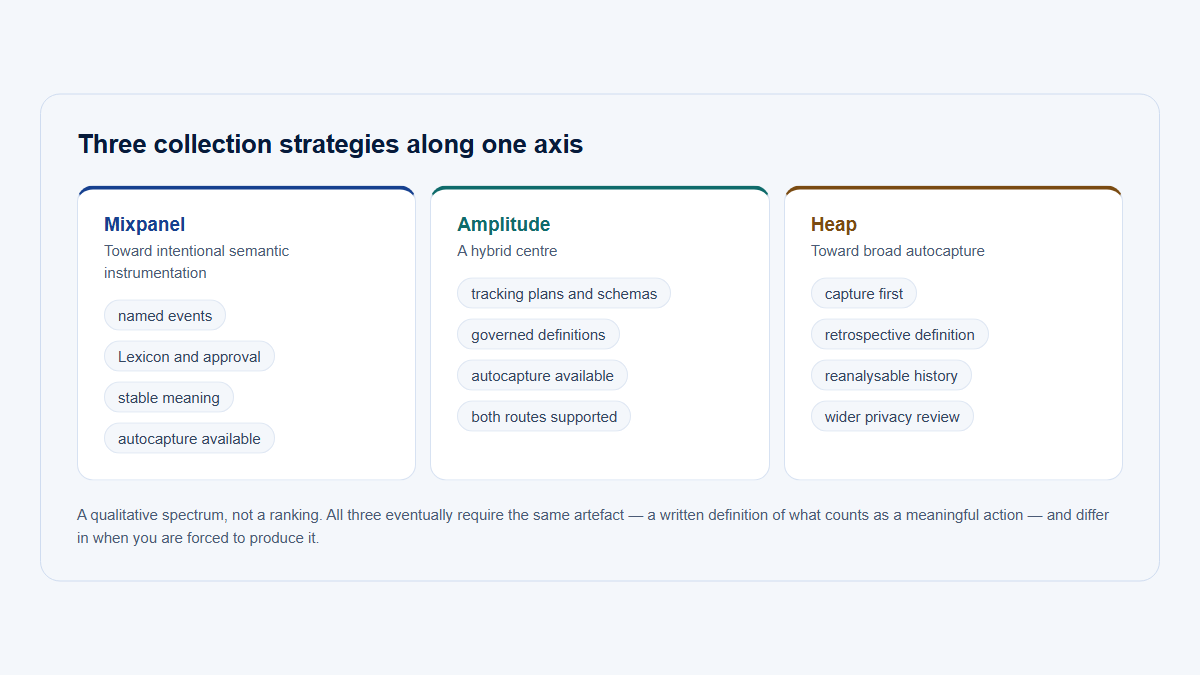
Autocapture can provide fast baseline coverage. A team does not need to predict every future question or add code for every control before seeing any interaction evidence.

It is particularly useful when a team needs to:

  • understand which parts of a new interface receive attention;
  • investigate a question that was not anticipated during implementation;
  • compare broad navigation and interaction patterns;
  • locate Visits that contain a particular interface action;
  • inspect page use before a complete semantic event taxonomy exists;
  • reduce the need to instrument every low-level control manually.

This makes product analytics autocapture valuable during early exploration and UX investigation. It can reveal that users repeatedly open an advanced filter, switch tabs, return to the same panel, or interact with a control the product team had not considered important.

Limitations of autocapture

Autocaptured data usually describes the interface implementation more directly than the product concept.

A rule based on a CSS selector, button label, generated component ID, or DOM path may stop matching after a redesign. Two visually similar controls may produce ambiguous records. The same user action may be captured more than once through overlapping listeners or rules. Large volumes of low-value interactions can make governance and analysis harder.

Autocapture also cannot, by itself, prove a server-side result. A click on Save shows an attempt. It does not prove that validation passed, the database write succeeded, an asynchronous job completed, or the user still had permission when the operation ran.

The main autocapture limitations are therefore:

  • selector and interface fragility;
  • ambiguous semantic meaning;
  • potentially high event volume;
  • duplicate or overlapping interaction records;
  • event properties tied to implementation details;
  • elevated privacy risk from text, URLs, attributes, and form context;
  • difficult long-term ownership and documentation;
  • inability to confirm backend persistence;
  • conditional rather than unlimited retroactive usefulness.

Autocapture is broad evidence. It is not an automatic product taxonomy.

What are custom semantic events?

A custom semantic event is an explicitly named product behavior with a defined trigger and agreed meaning.

Examples include:

report_created
report_exported
integration_connected
member_invited
dashboard_shared

These names describe product actions rather than the current appearance of the interface. The same report_exported concept can remain valid if the Export button changes color, moves into a menu, becomes available through a keyboard shortcut, or is initiated from a different page.

A semantic event should have a precise definition. For example:

report_exported fires once when an export has been successfully generated for an eligible account. It does not fire when the user opens the export dialog or clicks the initial Export control.

That definition is more useful than the name alone.

Strengths of custom events

Well-designed custom events provide:

  • a stable product vocabulary;
  • a clear trigger and scope;
  • meaningful workflow context;
  • lower analytical ambiguity;
  • easier documentation;
  • more reliable adoption metrics and funnels;
  • alignment between product, frontend, backend, data, and customer teams;
  • clearer validation and ownership.

They are especially valuable for important workflows such as activation, collaboration, configuration, publishing, saving, sharing, and recurring value-bearing behavior.

Limitations of custom events

Custom events require implementation and maintenance. Teams must decide what matters, define the trigger, add code, validate it, document it, and update it when the product changes.

They can also fail in less obvious ways:

  • important behavior is never instrumented because nobody anticipated the question;
  • two teams use different names for the same concept;
  • the event name remains while its trigger changes;
  • documentation and application code drift apart;
  • both the client and server emit what appears to be the same completion event;
  • an event fires before the operation actually succeeds;
  • a renamed workflow breaks historical comparisons;
  • ownership disappears after the original implementer leaves.

Custom events are not automatically trustworthy merely because they are custom. Without governance, they can become as confusing as raw autocapture.

What are server-side events?

A server-side event is emitted by the application backend, job worker, webhook handler, or another trusted system when it observes a product action or outcome.

Some events are better emitted by the backend because the backend owns the authoritative result. Examples include:

  • payment completed;
  • integration successfully connected;
  • export generated;
  • data import completed;
  • scheduled report delivered;
  • user invitation accepted;
  • permission update persisted;
  • workflow run completed;
  • background synchronization failed.

A browser event can show that a person attempted an action. A server event can show whether the system accepted, persisted, or completed it.

Server-side events still need design

Server tracking is not automatically clean. Retries can produce duplicates. An asynchronous task may complete minutes after the initiating Visit ends. A background job may have an account but no human actor. A webhook may be delivered more than once. A batch process may affect several workspaces.

Useful server-side design considerations include:

  • a stable event ID or deduplication key;
  • an operation or correlation ID;
  • an idempotent business operation where appropriate;
  • the account affected by the outcome;
  • the initiating user when one exists;
  • the originating Visit when it can be retained accurately;
  • an actor_type for users, service accounts, integrations, or system jobs;
  • explicit success and failure results;
  • the time the outcome occurred, not merely the time analytics received it;
  • a defined rule for delayed or retried processing.

An analytics event ID can help detect duplicate records, but it is not a substitute for making the underlying business operation safe to retry.

Page views belong in their own tracking layer

Page views answer a simpler but important question: where did users and accounts go?

For a B2B SaaS application, useful page analytics normally require a hierarchy:

Product area
→ Grouped page or feature
→ Normalized raw page
→ Interaction or event

A route such as:

/workspaces/827/reports/431/edit

might be normalized to:

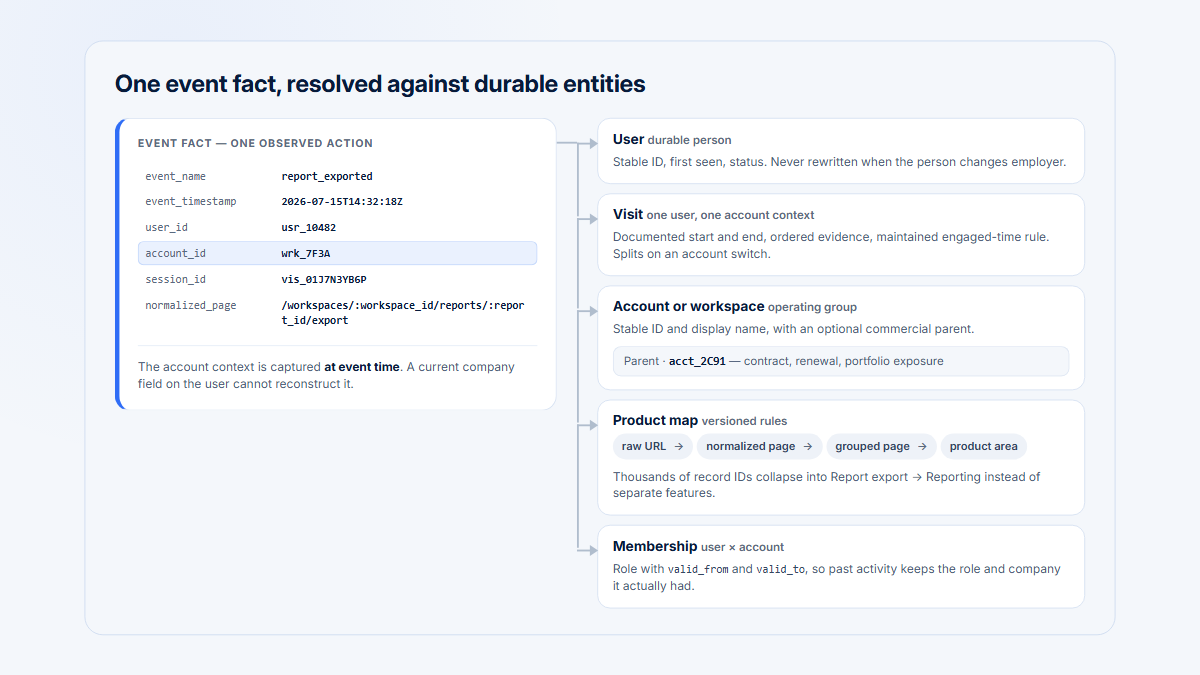
/workspaces/:workspace_id/reports/:report_id/edit

That normalized page could belong to the grouped page Report builder, which in turn belongs to the product area Reporting.

This structure prevents every object identifier from becoming a different analytical page. Group dynamic SaaS URLs so record identifiers do not fragment one product concept into thousands of apparent pages.

A page view can help answer:

  • Which companies reached Reporting?
  • Which grouped pages are used?
  • Where do Visits begin?
  • Which product areas are explored?
  • Which users entered a workflow?
  • Which pages should be investigated further?

It does not automatically prove that a workflow was completed or that value was delivered. Opening Billing is not the same as updating a payment method. Opening Reporting is not the same as saving or sharing a report.

The distinctions between a page view, a page visit, a session, and observed engaged time also matter. Keep those concepts explicit when interpreting the evidence.

A layered tracking model for B2B SaaS

A maintainable SaaS event instrumentation strategy can be organized into four layers.

Layer 1: Identity and account context

Establish the entities needed to interpret the behavior:

  • project ID;
  • user ID;
  • company or workspace ID;
  • Visit ID;
  • active membership or role where relevant;
  • environment;
  • eligibility or plan context where needed.

Identity is foundational. An otherwise perfect event becomes misleading if it is assigned to the wrong workspace.

Layer 2: Pages and product structure

Create a stable product map:

  • normalized raw pages;
  • grouped pages or features;
  • product areas;
  • route metadata;
  • page-to-product-area ownership.

This layer answers questions about reach, navigation, discovery, and where behavior occurs.

Layer 3: Broad behavioral evidence

Collect the evidence useful for exploration:

  • selected autocaptured interactions;
  • Visits;
  • session replay;
  • observed engaged behavior;
  • page transitions;
  • interface-level activity.

This layer helps a team investigate what people did, including actions that were not promoted to durable product events.

Layer 4: Meaningful semantic outcomes

Define the product concepts that should remain stable:

  • custom client events;
  • custom server events;
  • persisted product states;
  • completed workflows;
  • recurring value-bearing behavior;
  • observable business outcomes.

This layer supports activation, adoption, completion, collaboration, and outcome metrics.

Each layer answers a different question. A strong analysis may use all four: identify an eligible account, confirm that it reached a grouped page, observe the interaction path, and verify a backend outcome.

Four-layer B2B product analytics model connecting identity and account context, normalized pages, autocaptured behavioral evidence, and semantic or server-confirmed outcomes.
Each tracking layer answers a different question. Reliable B2B analysis connects identity, product structure, behavioral evidence, and confirmed outcomes.

Detailed comparison: page views, autocapture, custom events, state, and replay

Product analytics tracking methods and their different analytical roles.
MethodBest forTypical sourceSemantic stabilityImplementation effortPrivacy riskTypical volumeConfirms success?Retrospective usefulnessCommon failure mode
Page viewsReach, navigation, discovery, entry points, product-area coverageBrowser router, page SDK, or server request layerMedium to high after routes are normalizedLow to mediumMedium, especially when URLs or query parameters contain sensitive dataMediumNoHigh for questions about where users went, if routes remain interpretableTreating page reach as adoption or value
AutocaptureBroad interface evidence, unexpected questions, exploratory UX analysis, selecting VisitsBrowser SDK observing DOM interactionsLow to medium; depends on selectors and interface stabilityLow initially, potentially high to govern over timeHigh when text, attributes, forms, or detailed DOM context are collectedHighNo; it usually confirms an observed interface interactionMedium and conditional on capture scope, retention, and historical UI contextBrittle selectors, ambiguous clicks, duplicates, and excessive volume
Custom client eventWorkflow starts, client-only state changes, deliberate user intent, stable interface conceptsExplicit frontend tracking callHigh when governedMediumMedium; payloads still require reviewLow to mediumIt can confirm the client-observed action, but not backend persistenceHigh for the semantics tracked after implementation; none before it existedFiring a success event too early or duplicating a server event
Custom server eventPersisted outcomes, background jobs, integrations, payments, completed imports and exportsApplication backend, worker, webhook handler, or serviceHigh when tied to a stable domain outcomeMedium to highMedium; server payloads can still contain sensitive dataLow to mediumYes, for the exact backend outcome in its definitionHigh for recorded outcomes, but weak for explaining the interface pathMissing user, account, Visit, or deduplication context
Product stateCurrent or historical persistent conditions, eligibility, connected integrations, saved configurationApplication database, domain model, warehouse snapshot, or audit logVery high when the domain model is stableHigh modeling effortMediumLowIt confirms the persisted state represented by the modelHigh if historical snapshots or transitions are retained; otherwise limited to current stateAssuming current state explains who changed it, when, or through which workflow
Session replayQualitative evidence, path reconstruction, interface friction investigation, validating hypothesesBrowser recording SDKLow semantic stability but high contextual richnessMedium to highVery high without careful masking and exclusionsHigh storage volumeNo; a visible success message is not necessarily backend truthUseful only for retained, successfully recorded sessionsOverinterpreting one session or collecting more sensitive context than needed
Comparison of autocapture, custom client events, and server-side events across semantic stability, interface detail, effort, privacy exposure, and outcome confirmation.
Autocapture preserves broad interface evidence; custom client events preserve product meaning; server events provide stronger confirmation of backend outcomes.

A practical decision framework

For each analytical question, ask the following in order.

1. Is the question about reach or navigation?

Use normalized page views and product hierarchy.

Example: “Which eligible companies reached the Report builder this month?”

2. Is the question about interface behavior that may not deserve a durable metric?

Use selective autocapture and, when appropriate, session replay.

Example: “Do users open Advanced filters before abandoning the page?”

3. Is the behavior a stable product concept?

Define a custom semantic event.

Example: report_configuration_started is more durable than a selector for the current Configure button.

4. Does success depend on backend persistence or processing?

Emit the canonical outcome from the server.

Example: report_export_generated, not merely export_button_clicked.

5. Is the important fact a persistent condition?

Model product state, and consider recording the transition that created it.

Example: an integration is currently connected. The integration_connected event shows the transition; the current integration record shows the state.

6. Does the team need to understand how or why the result happened?

Use the relevant Visit and replay evidence, while avoiding the assumption that one session proves a general cause.

7. Which user and account did the behavior belong to at that moment?

Attach the event to the active company or workspace, not only to a mutable user profile.

The answer will often involve more than one tracking method. That is expected.

What should you autocapture?

Autocapture is most useful when the interaction itself is valuable evidence but does not yet deserve a permanent product event.

Suitable uses include:

  • broad navigation and interface exploration;
  • page reach;
  • exploratory interaction analysis;
  • unexpected interface questions;
  • selected click patterns;
  • UX investigation;
  • locating Visits with a relevant action;
  • checking whether users discover a control;
  • comparing paths before and after an interface change.

For example, a product team may autocapture interactions with report templates to learn which options attract attention. If one template later becomes central to activation or recurring adoption, the team can define a stable semantic event around the product behavior rather than relying indefinitely on the original selector.

Handle these areas carefully

Exclude, block, mask, or explicitly allowlist interactions involving:

  • sensitive input fields;
  • confidential customer text;
  • tokens, access keys, or invitation codes;
  • payment and billing workflows;
  • raw URLs containing secrets or sensitive query parameters;
  • third-party widgets whose content and structure the team does not control;
  • unstable text-based selectors;
  • internal administration surfaces;
  • automated tests, staging environments, and employee traffic;
  • high-volume mouse movement or other noisy signals that are not actively analyzed.

Autocapture should be selective even when an SDK makes broad capture easy. The question is not “Can this interaction be collected?” It is “Who will use it, for which decision, under what retention and privacy rules?”

What should be a custom event?

Use a custom semantic event when the product action should remain understandable across redesigns and support a durable metric.

Strong candidates include:

  • activation milestones;
  • meaningful workflow completion;
  • account adoption;
  • feature adoption;
  • saved outputs;
  • successful configuration;
  • collaboration;
  • published or shared results;
  • important errors with controlled values;
  • irreversible actions;
  • recurring value-bearing behaviors;
  • transitions that matter to customer or product teams.

The event should describe what happened in the product, not the current appearance of the control.

Prefer:

report_exported

over:

blue_export_button_clicked

The second event may be appropriate when the analytical question is specifically about that interface control, but it is a poor durable definition of report export.

A semantic event should also avoid hiding several different concepts under one vague name. report_action with a free-text action property may be harder to govern than a small set of clearly defined events, unless the property has a deliberate schema and controlled values.

There is no universal event-naming convention. Past tense, present tense, object-action order, casing, and separators differ across organizations and analytics systems. Choose a convention, document it, and keep the event trigger more important than stylistic preference.

A wider product analytics instrumentation plan should cover the full planning process. This article focuses on choosing the correct layer for each question rather than designing an entire taxonomy.

Event, state, sequence, or recurrence?

Not every meaningful product concept should be represented by one event count.

Four ways to represent meaningful product behavior.
ConceptWhat it representsExampleMain analytical use
EventA specific action or transition at a point in timereport_savedCount completions, identify actors, build a sequence
StateA persistent product conditionA reporting integration is connectedDetermine current eligibility, configuration, or adoption state
SequenceSeveral steps that form a workflowOpen Reporting → configure → save → exportMeasure progression, completion, and drop-off
RecurrenceBehavior repeated in distinct Visits or periodsA report is generated in two monthly periodsDistinguish one-time trial from repeated use

An event records that something happened. It does not necessarily prove that the condition remains true.

For example, integration_connected records a transition. A later disconnection may make the current state false. Conversely, an integration may already be connected before event tracking begins, so current state can be true without a historical event in the analytics dataset.

A sequence combines several signals. It may include a page view, client event, server event, and state check. Recurrence adds time: the same action in three seconds is different from value repeated in three monthly reporting cycles.

This is why meaningful feature use should be defined around the product concept, eligibility, completion, and cadence—not whichever interaction is easiest to count.

Client-side intent versus server-side confirmation

Consider an integration workflow:

User clicks “Connect integration”
→ client event: integration_connect_started
→ server attempts authorization
→ server event: integration_connected

or

→ server event: integration_connect_failed

The first event is useful. It shows intent and provides interface context even when the process fails.

The successful server event answers a different question. It confirms that the backend reached the defined connected state. The failure event can support a completion-rate analysis without pretending every failure has the same cause.

For asynchronous work, the server outcome may arrive after the initiating Visit has ended. Preserve a correlation or operation ID and, when accurate, the originating user, account, and Visit. Do not fabricate a current Visit association merely because the analytics schema expects one.

If both the client and server send events, give them distinct meanings:

report_export_requested
report_export_generated
report_export_failed

Alternatively, emit only one canonical completion event from the server. Do not send the same report_exported event from both places and assume later analysts will know which one to count.

Retries require the same discipline. A worker may attempt delivery three times before succeeding once. Decide whether the analytical model needs attempt events, one final outcome event, or both. Carry stable identifiers so duplicate delivery of the analytics record does not become three successful exports.

Server events are stronger for confirmed outcomes. They are not a replacement for client behavior, page context, or replay evidence.

Preserve the B2B account context at event time

B2B SaaS analytics must identify both the person and the company or workspace in which the action occurred.

This matters because one user may belong to several accounts:

  • a consultant managing multiple clients;
  • an agency employee switching between customer workspaces;
  • a partner with delegated access;
  • a support employee entering a customer account;
  • an administrator managing parent and child workspaces;
  • a user with different roles in different companies.

The event should retain the active account and relevant membership context at the time of the action. Do not rely only on the user’s current profile or “primary company.” Those values may change later and silently rewrite the interpretation of historical activity.

Useful context can include:

  • account or workspace ID;
  • user ID;
  • role at event time;
  • parent account where relevant;
  • plan or feature eligibility at event time;
  • whether access was internal, delegated, or customer-originated;
  • project and environment;
  • Visit or originating Visit.

Plan, role, and eligibility are often mutable. When they materially affect interpretation, store the event-time value or maintain a historical model rather than joining every old event to today’s profile.

Internal and support activity should also be identifiable. A support engineer opening Reporting for troubleshooting should not automatically make the customer account look adopted.

Model Companies and Users as separate entities to address the wider identity problem.

Design event properties that remain usable

Event names should carry the central product meaning. Properties should provide controlled context.

An illustrative server event might look like this:

{
  "event": "report_export_generated",
  "event_id": "evt_01J...",
  "occurred_at": "2026-08-04T09:42:18Z",
  "project_id": "project_123",
  "account_id": "account_456",
  "user_id": "user_789",
  "originating_visit_id": "visit_abc",
  "product_area": "reporting",
  "grouped_page": "report_builder",
  "role_at_event": "editor",
  "eligibility_at_event": "enabled",
  "object_type": "report",
  "result": "success",
  "method": "manual_export",
  "source": "report_builder",
  "application_version": "2026.08.0",
  "environment": "production"
}

Potentially useful properties include:

  • account ID;
  • user ID;
  • Visit or originating Visit ID;
  • project ID;
  • product area;
  • grouped page;
  • role;
  • plan or eligibility;
  • object type;
  • result;
  • method;
  • source;
  • application version;
  • environment;
  • event ID;
  • operation or correlation ID.

Avoid sending:

  • unrestricted payloads;
  • entire application objects;
  • email addresses as primary identifiers;
  • raw URLs containing secrets;
  • customer-entered report names or other sensitive free text;
  • access tokens;
  • stack traces containing user data;
  • mutable display labels as property keys;
  • arbitrary error messages when a controlled error code is sufficient;
  • high-cardinality text with no defined analytical use.

Some identifiers are necessarily high-cardinality. That does not make them wrong. An account ID or operation ID may be essential for joins and deduplication. The problem is uncontrolled cardinality that enters the dataset without an owner or purpose.

Expect selector and interface fragility

Autocaptured interactions are often tied to one or more of the following:

  • CSS classes;
  • button text;
  • DOM hierarchy;
  • generated component IDs;
  • element position;
  • parent and sibling relationships;
  • framework-generated markup.

All of those can change during an interface redesign without changing the underlying product behavior.

A rule for:

.modal > div:nth-child(3) button.primary

may stop matching when a confirmation message is added above the button. A rule based on Export report may split after the label becomes Download, Export CSV, or a localized translation.

Ways to reduce fragility include:

  • semantic route metadata;
  • stable, deliberately named data attributes;
  • semantic element identifiers;
  • previews showing which elements a rule will match;
  • automated tests for critical tracking;
  • production validation after releases;
  • an interface-version property when interpretation changes materially;
  • ownership for selectors and capture rules.

A stable attribute such as:

<button data-analytics-action="report-export">

can be more robust than a generated class name. It is still an instrumentation contract. Do not add tracking attributes to every element without naming rules, privacy review, ownership, and tests.

Also distinguish a stable selector from a semantic event. A stable selector makes an interface interaction easier to collect. It does not turn a click into a confirmed product outcome.

What “retroactive analysis” really means

Autocapture can make some later analysis possible. If a tool stored interactions before the team asked a question, analysts may be able to define a rule or filter over that historical evidence.

That usefulness has limits.

The historical interaction must actually have been captured. The relevant element or context may have been blocked. The selector must still be interpretable. The team must know which interface version was live. The raw data must still be retained. A click may remain semantically ambiguous, and a backend outcome may never have been collected.

Before claiming an answer is available retroactively, check:

  1. Was the interaction type collected at the time?
  2. Were the necessary element, route, and account properties retained?
  3. Were sensitive values intentionally omitted?
  4. Can the historical DOM or selector be mapped to a stable product concept?
  5. Did the interface change during the period?
  6. Is the server-side outcome available from another source?
  7. Has the raw event or replay retention period expired?

Autocapture can support questions that were not anticipated. It does not provide unlimited retroactive analytics, recreate data that was never captured, or convert old clicks into backend truth.

Custom events have the opposite trade-off. Their meaning is usually clearer, but they cannot answer a pre-instrumentation question unless the behavior can be reconstructed from application state, logs, audit records, or previously captured evidence.

Privacy applies to every tracking layer

Autocapture and session replay create obvious privacy concerns because they can observe detailed interface context. Custom events and server events also require review. A carefully named event can still include an email address, confidential document title, customer-entered error message, or unrestricted object payload.

Potentially sensitive sources include:

  • visible element text;
  • input values;
  • form labels;
  • DOM attributes;
  • URLs and query parameters;
  • account-specific page content;
  • file names;
  • tokens and identifiers embedded in routes;
  • error details;
  • third-party widgets;
  • large payloads copied from application objects.

A privacy-conscious implementation should use:

  • explicit allowlisting where feasible;
  • input masking;
  • selector and route blocking;
  • sensitive-field exclusions;
  • query-parameter removal;
  • property-level review;
  • capture rules for internal and test environments;
  • appropriate retention;
  • data minimization;
  • periodic inspection of real production payloads.

Apply controls before storage where the architecture supports it. Removing a property from a dashboard does not undo its collection.

The same principle applies to page analytics. A page path may look harmless until an invitation token, email address, customer name, or document title appears in the URL.

Use Hymetry’s Privacy Controls page and the published session-replay privacy checklist as implementation references.

Privacy controls are technical safeguards, not a substitute for the organization’s legal, security, and compliance review.

Control data volume and cost

Autocapture can produce many events that are cheap to collect individually but expensive to retain and govern collectively.

Common consequences include:

  • many low-value events;
  • high-cardinality properties;
  • increased ingestion;
  • larger storage requirements;
  • more expensive managed usage tiers;
  • slower or more complex queries;
  • harder schema discovery;
  • more privacy review;
  • more difficult debugging;
  • longer retention decisions.

There is no universal events-per-user benchmark that tells every B2B SaaS team how much autocapture is appropriate. A workflow-heavy application and a focused administrative tool have different interaction patterns and analytical needs.

Instead, maintain a collection inventory:

  • Which event or rule collects the data?
  • Who owns it?
  • Which questions or reports use it?
  • How often is it queried?
  • Which properties are necessary?
  • What retention does it need?
  • Could a normalized page, aggregate, or semantic event answer the question more directly?
  • What would break if collection stopped?

Remove or narrow low-value collection. Sample high-frequency evidence when sampling does not compromise the question. Avoid preserving every raw interaction indefinitely merely because it may become useful later.

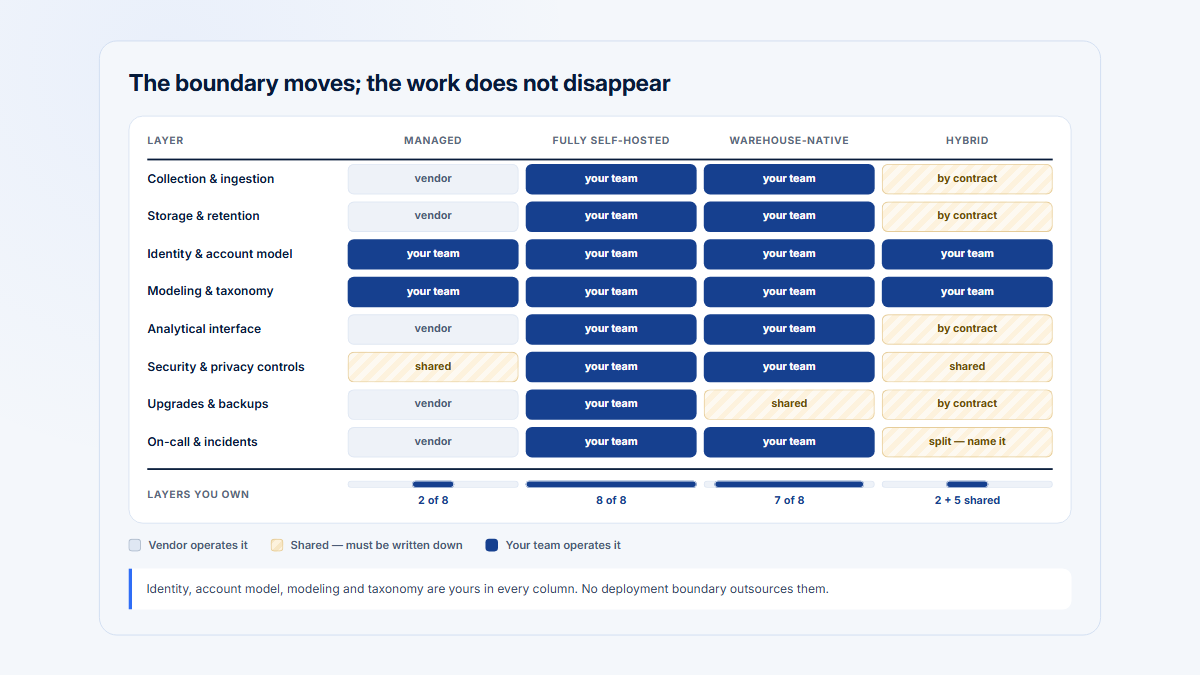
Self-hosting changes who manages infrastructure and storage; it does not make volume free.

Worked B2B example: instrumenting a Reporting workflow

A B2B Reporting workflow has these steps:

  1. A user opens Reporting.
  2. The user selects a template.
  3. The user configures filters.
  4. The user saves the report.
  5. The user exports or shares it.
  6. The account returns to the workflow next month.

Define the measurement before choosing events

For this example:

  • An eligible account has Reporting enabled and at least one member with permission to create reports.
  • Reporting reached means an eligible account produced a page view on the normalized Report builder page.
  • Configuration started means the client emitted report_configuration_started after the user made the first deliberate configuration change.
  • Report saved means the backend persisted a valid report and emitted report_saved.
  • Manual output completed means the backend emitted report_export_generated or a verified share outcome.
  • Repeat interactive adoption means the account completed the save-and-output workflow in two distinct monthly periods.
  • Automated reporting value is measured separately through successful scheduled-delivery outcomes.

These definitions deliberately separate discovery, intent, persistence, output, and recurrence.

Map each step to the correct tracking layer

Illustrative workflow—not a Hymetry SDK contract

Each Reporting workflow step needs the signal that matches the analytical question.
Workflow stepTracking layerIllustrative signalWhat it tells the teamWhat it does not prove
Open ReportingNormalized page viewReport builder page viewedThe user and account reached the workflowThat configuration began or value was delivered
Select a templateAutocaptured interactionTemplate card selectedWhich interface option received interactionThat the template produced a saved report
Change the first filterCustom client eventreport_configuration_startedDeliberate configuration intent beganThat the configuration was valid or saved
Save the reportCustom server eventreport_savedThe backend persisted the reportThat anyone exported, shared, or reused it
Click ExportAutocaptured interaction or client intent eventreport_export_requestedThe user attempted an exportThat generation succeeded
Generate exportServer-side outcomereport_export_generatedThe export process completed under its defined success ruleThat the recipient used the file
Share dashboardServer-side semantic outcomedashboard_sharedA share record or permission was persistedThat collaborators opened it
Return next monthRecurrence queryCompletion in another monthly periodThe behavior recurred at the expected cadenceThat usage is broad across the account
Reporting workflow showing page views, autocapture, client events, server events, success and failure outcomes, recurrence, and account context.
One Reporting workflow can require page evidence, interface interaction, semantic intent, backend confirmation, and recurrence.

Compare five fictional accounts

Fictional examples—not customer data or benchmark results

Five fictional accounts show why the tracking layers cannot be collapsed into one metric.
AccountObserved evidenceCorrect interpretationWhat a naive metric would get wrong
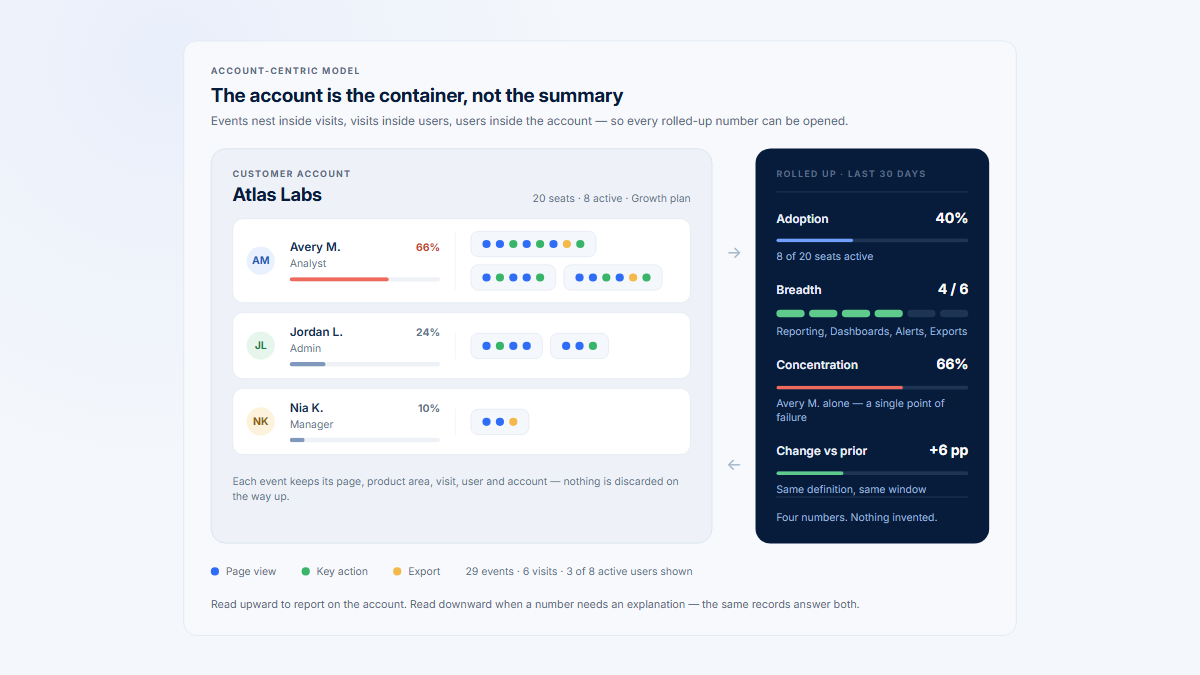
Atlas LabsThree users reached Reporting. Two configured reports. The backend recorded saves and a generated export. One report was shared. The account completed the workflow again the following month.Atlas Labs meets the illustrative repeat interactive-adoption rule. However, completion is still concentrated in two users, so account adoption and user penetration should remain separate measures.One account-level completion flag could hide that most active users have not used Reporting.
Northstar WorksTwo users reached Reporting. Autocapture recorded repeated Export clicks. The client emitted export requests, but no report_export_generated event occurred. Several controlled failure outcomes were recorded.The account attempted the workflow but did not complete the backend outcome. Review the failure categories and relevant Visits before concluding why.Counting Export clicks would rank Northstar Works as a heavy exporter even though no export succeeded.
Beacon SystemsOne user opened the Report builder several times. No configuration-start, save, export, or share outcome occurred.Reporting was discovered or revisited, but the evidence does not support meaningful adoption. Page reach remains useful for identifying where investigation should begin.A page-view-based adoption metric would classify Beacon Systems as an adopter.
Meridian GroupLittle interactive Reporting activity occurred during the month, but scheduled reports were successfully generated and delivered by backend jobs.Meridian Group may receive recurring automated value. Measure scheduled delivery separately from the interactive report-building workflow and associate the jobs with the correct account and actor type.A UI-only dashboard would label the account inactive in Reporting. Combining automated and interactive use into one event would hide how value is delivered.
Harbor AnalyticsReporting activity occurs almost entirely on the final business day of each month. Saves and generated exports recur across three monthly periods.The workflow appears consistent with a month-end cadence. Weekly inactivity should not be treated as abandonment when the product use case is monthly.A weekly-active threshold would repeatedly mark a healthy recurring workflow as inactive.

What the layers reveal

The page view tells the team that Beacon Systems reached Reporting. It cannot say whether the account found the feature useful.

Autocapture shows that Northstar Works repeatedly interacted with Export. It cannot say that an export succeeded.

The custom client event identifies users who moved beyond passive page reach and began configuring a report.

The server event distinguishes saved reports from attempted saves and generated exports from clicks.

The scheduled-delivery outcome prevents Meridian Group’s automated use from disappearing merely because no human opened the interface.

The recurrence rule prevents Atlas Labs’ one successful Visit from being treated as durable adoption before the behavior repeats.

The user count prevents an account-level success flag from hiding champion concentration.

No single event answers all of those questions.

A practical instrumentation process

Use the following sequence for a maintainable product analytics tracking plan.

1. Define the decision or product question

Start with what someone will decide.

Examples:

  • Which eligible accounts adopted Reporting?
  • Where do users fail to connect an integration?
  • Is a workflow used broadly or only by one champion?
  • Which Visits should a researcher inspect?

Avoid starting with a list of every clickable element.

2. Define the user and account entities

Specify:

  • the stable user identifier;
  • the stable company or workspace identifier;
  • how multi-account membership works;
  • how active workspace context is determined;
  • how support and internal access is marked;
  • how parent and child accounts are represented;
  • which event-time membership attributes matter.

3. Normalize pages and product areas

Map dynamic routes into normalized pages, grouped pages, and product areas. Define who owns the mapping and how releases are validated.

4. Establish privacy-safe baseline page tracking

Capture the minimum route, identity, timing, and environment context needed for reach and navigation analysis. Remove sensitive query parameters and path values before storage where possible.

5. Enable autocapture selectively

Choose interaction categories, routes, selectors, and retention according to real analytical questions. Block sensitive surfaces and internal traffic. Validate actual payloads rather than relying only on default settings.

6. Identify the most important workflows

Select the small number of workflows tied to activation, adoption, collaboration, recurring value, or critical failure. Define their eligibility and expected cadence.

7. Add semantic client events

Use client events for deliberate intent, client-only state, and workflow transitions the browser can observe reliably.

8. Use server confirmation for persisted outcomes

Emit canonical completion events from the system that owns the result. Define retries, operation IDs, deduplication, delayed completion, and failure states.

9. Include product state where an event is insufficient

Determine whether the analysis needs current state, historical snapshots, an audit trail, or a transition event.

10. Define account-level and user-level measures separately

An account may adopt a feature through one user. That is different from broad penetration across eligible members. Keep both measures visible.

11. Define recurrence and time windows

Match the rule to the workflow. Daily, weekly, monthly, quarterly, and event-triggered products require different definitions. Do not use a generic weekly-active rule for a monthly reporting process.

12. Validate events and Visits in production-like conditions

Test successful, failed, retried, cancelled, permission-denied, asynchronous, multi-account, internal-user, and background-job paths. Confirm timestamps, account context, event counts, required properties, and replay links where applicable.

13. Document ownership and schema

Record the event definition, trigger, emitter, owner, required properties, allowed values, consumers, privacy classification, tests, version, and deprecation plan.

14. Monitor usage and remove low-value collection

Review which events and autocapture rules are queried, which dashboards depend on them, and whether their cost and privacy exposure remain justified.

15. Preserve historical comparability

When a definition changes, document the effective date. Version the schema or metric where the meaning is materially different. Do not silently reuse an old event name for a new trigger.

Event governance keeps semantic tracking trustworthy

A custom-event contract should answer more than “What is the event called?”

At minimum, document:

  • Name: The stable event identifier.
  • Meaning: The product concept represented.
  • Exact trigger: The condition that causes one event to fire.
  • Emitter: Client, API, backend service, worker, or webhook handler.
  • Owner: The team responsible for correctness.
  • Required properties: Fields without which the event is invalid.
  • Allowed values: Controlled enums and validation rules.
  • Identity context: User, account, project, Visit, and actor rules.
  • Timing: Whether the timestamp represents intent, persistence, or completion.
  • Deduplication: Event IDs, operation IDs, and retry behavior.
  • Privacy classification: Sensitive fields, exclusions, and retention.
  • Tests: Expected paths, failure cases, and prohibited properties.
  • Consumers: Metrics, reports, models, and teams that use it.
  • Version: How material semantic changes are represented.
  • Deprecation: When emission stops and how downstream users migrate.

Production QA should verify the actual stream rather than only the source code. A tracking call can exist in code but fire twice, miss one route, carry the wrong account, or disappear behind a failed request.

Data-quality monitoring should look for:

  • sudden volume changes;
  • missing required properties;
  • new property values;
  • duplicate event IDs;
  • client and server count divergence;
  • internal or staging activity entering production analysis;
  • events arriving without a valid company;
  • old event versions continuing after deprecation;
  • completion events with no plausible initiating context.

Governance is not bureaucracy added after instrumentation. It is what makes semantic events more dependable than unstructured interaction data.

Common mistakes

1. Treating every autocaptured click as meaningful

A click is evidence of interaction, not automatic proof of activation, adoption, success, or value.

2. Instrumenting only page views

Page reach is useful, but it cannot confirm workflow completion or backend outcomes.

3. Using button labels as durable event names

Interface copy changes. Name the product behavior unless the interface element itself is the analytical subject.

4. Firing a success event before server confirmation

A browser request can fail after the tracking call. Distinguish intent from persistence and completion.

5. Sending duplicate client and server completion events

Use distinct names or designate one canonical emitter. Do not count two records as two outcomes.

6. Losing account context

A user-level event without the active workspace can misattribute multi-account activity.

7. Joining historical events to the user’s current company

Memberships, roles, plans, and account assignments change. Preserve event-time context where it matters.

8. Collecting sensitive DOM text

Element text, form context, attributes, and URLs can expose customer data even when input values are masked.

9. Claiming unlimited retroactive analysis

Historical analysis is limited by what was captured, retained, interpretable, and connected to outcome data.

10. Keeping every autocaptured event indefinitely

Potential future usefulness is not a sufficient retention policy.

11. Building dashboards before validating triggers

A polished funnel does not make an incorrect or duplicated event reliable.

12. Changing event semantics without versioning

Reusing the same name for a different trigger makes historical comparisons misleading.

13. Using one tracking method for every question

Page views, autocapture, semantic events, server outcomes, state, and replay serve different purposes.

14. Ignoring automated workflows

Scheduled jobs, service accounts, integrations, and API activity can deliver value without visible UI interaction.

15. Counting internal or test activity

Support sessions, employee use, automation, staging, and end-to-end tests can distort both user and account metrics.

16. Assuming custom events eliminate the need for session evidence

A clean completion event tells you what happened. It may not explain the path, confusion, delays, or alternatives the user encountered.

17. Assuming server events explain user intent

Backend truth can confirm an outcome without showing which interface path or decision led to it.

18. Treating current state as a complete history

A connected integration does not, by itself, show who connected it, when it happened, or whether several failed attempts came first.

19. Using unrestricted event properties

Entire objects, free text, dynamic labels, and raw errors create privacy, cardinality, and governance problems.

20. Ignoring workflow cadence

A monthly workflow can be healthy despite long gaps that would look alarming under a weekly activity rule.

How Hymetry combines product structure with behavioral evidence

Hymetry is account-centric product intelligence for B2B SaaS. Its product model connects product structure and observed behavior across Pages, Companies, Users, and Visits.

Within Pages, raw URLs can be normalized and organized into grouped pages and product areas. That structure makes page evidence more useful than a list of dynamic paths. Teams can investigate which companies and users reached a workflow, how Visits moved through the product, which observed interactions occurred, and how engaged behavior changed.

Companies and Users preserve the B2B context behind the aggregate pattern. A page used by one champion has a different account meaning from the same page used across several eligible members.

Visits provide the session-level evidence behind a signal. They help a team inspect the path, timing, actions, and replay context associated with a company, user, or page pattern rather than watching sessions at random.

This page-and-Visit evidence is a useful baseline, especially before every important workflow has a complete semantic taxonomy. It still should not be treated as automatic knowledge of every meaningful product action.

A Reporting page view does not prove that a report was saved. An observed Export click does not prove that the backend generated a file. Depending on the current integration and the product’s source of truth, those outcomes may require an explicit semantic event, a backend-confirmed event, a persisted product-state definition, or another maintained data source.

Frequently asked questions

Should I use autocapture or custom events?

Use both selectively. Autocapture is useful for broad evidence and unanticipated interface questions. Custom events are better for stable product concepts. Add server-side outcomes when success depends on backend persistence or processing.

Can autocapture replace an instrumentation plan?

No. It can provide baseline coverage and support later investigation, but it does not define business meaning, account eligibility, success, recurrence, ownership, or governance.

Are server-side events always better?

No. They are generally stronger for confirmed backend outcomes. Client events are better for browser-only state, deliberate intent, and interface behavior. Page views and replay provide context the server may not see.

Is a page view an event?

Technically, many analytics systems represent a page view as an event record. Analytically, it should remain a distinct concept: a page view shows reach and navigation, not automatic workflow completion.

Can I create a custom event retroactively from autocaptured data?

Sometimes. The relevant interaction must have been captured and retained, and its historical selector and context must remain interpretable. A reconstructed click still cannot confirm a backend result that was never recorded.

How should multi-account users be tracked?

Associate each relevant event with the active company or workspace at event time. Retain membership, role, eligibility, and internal-access context when those values affect interpretation.

How do I avoid duplicate client and server events?

Give intent and outcome distinct names, or designate one canonical source for completion. Use event and operation IDs, test retries, and monitor duplicate counts.

When should I use product state instead of an event?

Use state when the question is whether a persistent condition is currently true, such as an integration being connected. Use events to record transitions and actors. Use both when the analysis needs current truth and historical change.

What should a small team instrument first?

Start with identity, account context, normalized pages, privacy-safe baseline behavior, and a small number of important workflows. Add semantic client events and server-confirmed outcomes where they materially improve a decision.

Does every meaningful event need session replay?

No. Replay is most useful when a team needs direct interface evidence or wants to investigate a surprising pattern. It should be prioritized by analytical signals, not treated as a mandatory review step for every event.

Explore the layers in Hymetry

See how Hymetry connects Pages, Companies, Users, and Visits so B2B SaaS teams can move from product structure to account context and session evidence.

Sources

Terminology and defaults differ by vendor. Use these sources for the principles they directly document rather than presenting one vendor’s implementation as universal.

About Hymetry

Hymetry is account-centric product intelligence for B2B SaaS. It helps teams understand how customer companies and the users inside them adopt and use their product.