Menu
B2B product analytics

Amplitude vs Mixpanel vs PostHog: Which Product Analytics Platform Fits Your Team?

Compare Amplitude, Mixpanel, and PostHog across product analytics, account analysis, replay, experimentation, feature flags, data infrastructure, pricing, ratings, and implementation effort.

Product information, pricing, ratings, and video availability verified: .

Choose Amplitude if

Choose Amplitude when your organization has product analysts or a mature product-data practice, wants deep behavioral exploration, needs strong taxonomy and metric governance, or expects analytics, replay, experimentation, activation, guides, surveys, and account reporting to operate as parts of a larger product-intelligence suite.

Amplitude is especially compelling when the analytical questions are likely to become more sophisticated over time and when governance, permissions, data quality, and portfolio-level consistency matter as much as the first dashboard.

Choose Mixpanel if

Choose Mixpanel when product managers, growth teams, and analysts need to answer behavioral questions quickly without making the analytics platform itself a large engineering program.

Mixpanel is the most concentrated option in this comparison. Its core reports—Insights, Funnels, Retention, and Flows—give teams a direct route from an event question to a chart. It can extend into replay, account analytics, experiments, feature flags, warehouse data, and pipelines, but several of those capabilities are add-ons or plan-dependent.

Choose PostHog if

Choose PostHog when engineering will own implementation and the team wants one ecosystem for product analytics, web analytics, replay, feature flags, experiments, surveys, error tracking, warehouse queries, data pipelines, and related developer workflows.

PostHog is often the most natural choice when analytics is part of the product-building toolchain rather than a separate reporting destination. Its breadth is a strength, but it also means the product can feel busier and requires deliberate choices about identity, event volume, billing meters, and operational ownership.

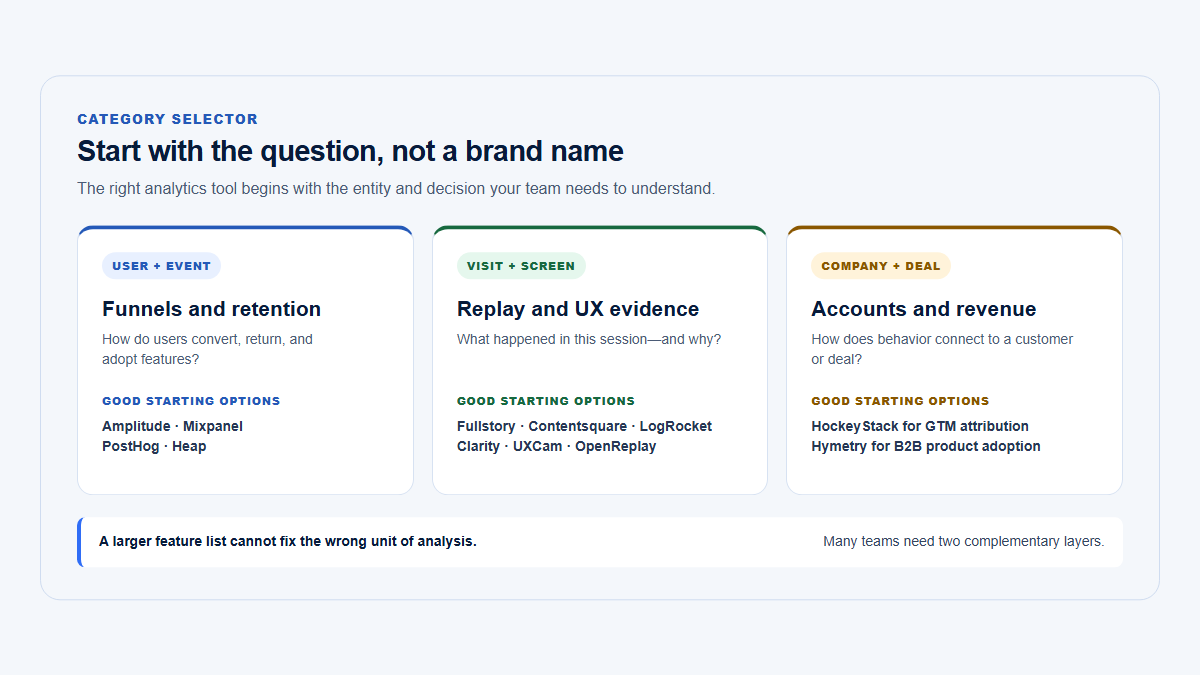
Consider another category if

Consider a different category when the dominant requirement is:

  • dedicated in-app onboarding, checklists, and lifecycle messaging;
  • anonymous public-site acquisition and marketing attribution;
  • account-centric B2B usage that should begin with Companies rather than events or individual users;
  • replay-first frontend debugging and error investigation;
  • or simple aggregate web analytics with minimal instrumentation.

For those jobs, compare dedicated adoption platforms, marketing analytics, replay and observability products, account-centric B2B tools, or lightweight web analytics before assuming a broad product-analytics platform is necessary.

Decision triangle placing Amplitude at analytical depth and governance, Mixpanel at focused self-service analysis, and PostHog at engineering-oriented product tooling, with no universal winner in the center.
Center of gravity matters more than a feature count: analytical governance, focused self-service, and engineering ownership pull teams toward different platforms.

At-a-glance decision

At-a-glance decision
Criterion Amplitude Mixpanel PostHog
Primary positioning Broad analytics and product-intelligence suite Focused self-service behavioral and product analytics Engineering-oriented platform for analytics and product tooling
Best fit Organizations with analytical maturity, governance requirements, and a broad product-data program Product and growth teams prioritizing fast, accessible analysis Engineering-led teams that want analytics and shipping tools together
Typical buyer Head of product analytics, data leader, mature product organization Product manager, growth lead, product analyst Engineering, product engineering, technical founder
Learning curve Medium to high; the connected surface and advanced analysis take time to master Low to medium for core reports; advanced data and add-ons add complexity Medium to high; straightforward installation can lead into a very broad surface
Event analytics Deep event segmentation, behavioral analysis, formulas, cohorts, data tables, monitoring Strong event/property exploration through a concentrated report model Strong UI analytics plus HogQL/SQL for technical analysis
Funnels Advanced sequences, segmentation, conversion windows, exclusions, account analysis with package Flexible self-service funnels with reusable behaviors and multiple counting methods Flexible funnels, repeated events, exclusions, property and SQL filters
Retention Deep retention and behavioral-cohort workflows Accessible retention reports and reusable retention behaviors Retention insights plus SQL and experiment retention metrics
Cohorts Strong behavioral cohorts and activation/sync workflows Visual behavioral and property cohorts Cohorts across analytics, replay, flags, experiments, and surveys
Paths and journeys Journey and path analysis within a broad analytics suite Flows calculated by unique users, totals, or sessions User paths and related insights; group types are not supported in user paths
Account or group analytics Accounts package for Growth and Enterprise; account reports and group experimentation Paid Group Analytics add-on using group keys and IDs Paid Group Analytics add-on; up to five group types per project
Autocapture Web and supported mobile autocapture; combine with planned custom events Web autocapture plus explicit event tracking Web autocapture by default; mobile support varies by SDK and event type
Semantic event governance Tracking plans, schema controls, custom events, validation, ownership, access controls Lexicon, custom events, saved metrics and behaviors, verification and data-quality tools Retroactive Actions, event definitions, data management, SQL, and infrastructure-as-code options
Session replay Web and mobile replay linked to user/event analysis; account-level reporting has replay limitations Web and mobile replay linked with analytics Web and mobile replay connected to users, events, errors, logs, and product workflows
Heatmaps Web heatmaps; plan and replay packaging apply Replay-powered web heatmaps Web heatmaps based on autocapture and toolbar data
Experiments Native feature and web experimentation; free limits and expanded packages vary Experimentation 2.0; currently positioned as an Enterprise add-on Native experiments integrated with flags and analytics
Feature flags Native feature management; limits and expanded packaging vary Native feature flags launched in 2026; Enterprise add-on Native feature flags with usage-based request pricing
Guides Native Guides & Surveys product No dedicated first-party guide builder documented in reviewed official materials No broad dedicated onboarding-guide builder; surveys and workflows cover narrower jobs
Surveys Native surveys No dedicated first-party survey product documented in reviewed official materials Native surveys for web and supported mobile contexts
Error tracking No first-party error-monitoring product comparable to PostHog documented in reviewed materials No first-party error-monitoring product comparable to PostHog documented in reviewed materials Native error tracking connected to users and recordings
Warehouse and data tools Sources, destinations, raw exports, governance, and a legacy Snowflake warehouse-native mode Warehouse imports, APIs, and paid Data Pipelines exports; packaging needs quote confirmation Managed warehouse, external sources, HogQL/SQL, destinations, and batch exports
Public self-hosting path No public self-hosted application deployment documented No public self-hosted application deployment documented Open-source self-hosting exists but is officially unsupported
Mobile Broad mobile SDK and replay support Broad mobile analytics and replay SDK support Broad mobile SDKs and mobile replay, with platform-specific requirements
Free allowance 2 million events/month and 10,000 monthly replays; limited suite capabilities 1 million events/month and 10,000 monthly replays 1 million analytics events, 5,000 web replays, 2,500 mobile replays, 1 million flag requests, and separate free meters
Paid pricing model Event-based Plus tiers; custom Growth and Enterprise; expanded packages priced relative to platform plan Event-based Growth pricing; Enterprise and separately packaged add-ons Separate usage meters for analytics, replay, flags, surveys, errors, warehouse, pipelines, and AI
G2 snapshot 4.5/5 · approximately 2,958 reviews 4.5/5 · approximately 1,371 reviews 4.5/5 · approximately 1,052 reviews
Main strength Deep analytics, governance, and broad connected product surface Fast, approachable self-service behavioral analysis Integrated engineering and product-building ecosystem
Main limitation Breadth, learning curve, and plan/add-on complexity Important B2B, experimentation, flag, and data capabilities can require add-ons Breadth can become operational complexity; several products have independent billing meters

Amplitude’s pricing page currently presents every plan as including the broader platform with different volume and capability limits; its Accounts and expanded Replay packages are available to Growth and Enterprise customers. Mixpanel’s official pricing table lists account analytics, experimentation, feature flags, Metric Trees, and Data Pipelines as add-ons. PostHog uses separate product meters and explicitly describes Group Analytics as a paid add-on.

The G2 figures are snapshots, not rankings. At the August 4, 2026 check, Amplitude, Mixpanel, and PostHog each showed a 4.5/5 average, while review volumes differed substantially.

How to read this comparison

A checkmark is not enough for this category. “Has account analytics” can mean a first-class account model, an add-on that changes the analysis unit, or a group property that still leaves the team to construct the B2B reporting model. “Has experiments” can mean analysis of externally assigned variants, native assignment and exposure, web-page testing, or a complete feature-flag delivery system.

The useful questions are therefore:

  1. What is the platform’s natural unit of analysis?
  2. Who will own instrumentation and data quality?
  3. Which capabilities are included at the expected volume?
  4. Can the same identity and metric definitions be trusted across analytics, replay, experiments, and the warehouse?
  5. Will product managers actually explore the data, or will every question return to engineering or analytics?
  6. Does the organization need a broad suite, or would a narrower tool produce clearer ownership?

For a broader category map, see the published product analytics tools comparison.

Product and company positioning

Amplitude: the broad analytical suite

Amplitude has expanded beyond a standalone product-analytics interface. Its current platform surface includes product and marketing analytics, session replay, heatmaps, feature and web experimentation, feature management, guides and surveys, activation, data governance, and AI-assisted analysis.

That breadth is most valuable when an organization wants common identity, taxonomy, metrics, permissions, and analysis across several product-data jobs. It also creates the largest evaluation surface of the three. A buyer should evaluate not only whether Amplitude has a capability, but whether the required volume and advanced functions are included in the intended plan or expanded package.

Amplitude is the strongest default in this comparison when the team already thinks in terms of behavioral cohorts, governed metrics, portfolios, account-level reporting, data quality, and repeatable analytical workflows. Its compromise is that a platform built for that maturity can feel excessive to a small team that needs five reliable funnels and a retention view.

Amplitude’s public product and pricing pages describe analytics, replay, experimentation, guides and surveys, activation, AI, and governance as connected platform components, with deeper controls and expanded packages on higher plans. (Amplitude)

Mixpanel: the concentrated self-service option

Mixpanel’s center of gravity remains self-service behavioral analysis. Its core reports—Insights, Funnels, Retention, and Flows—are available across free and paid plans, and its data model makes it relatively direct to select an event, choose a measurement, break it down by properties or cohorts, and continue investigating.

That concentration is why Mixpanel is often a practical fit for product managers and product analysts who need answers without adopting the largest possible suite. It is not as narrow as its older reputation, however. Mixpanel now offers session replay, anomaly and root-cause capabilities, warehouse connectors, experimentation, feature flags, Metric Trees, and account-level analytics.

The qualification is packaging. Several capabilities that make Mixpanel comparable to Amplitude or PostHog—Group Analytics, Experiment reporting, Feature Flags, Metric Trees, and Data Pipelines—appear as add-ons in the current pricing table. The core analytics experience can be simple while procurement and architecture become less simple around the edges.

Mixpanel documents Insights, Funnels, Flows, and Retention as its four core report types. Its June 9, 2026 announcement positions Experimentation 2.0 and native Feature Flagging as Enterprise capabilities, while its product documentation describes Experiment Reports and Feature Flags as separately priced Enterprise add-ons.

PostHog: the engineering and product-building platform

PostHog combines product analytics with tools commonly owned by engineering: session replay, feature flags, experiments, surveys, error tracking, web analytics, a managed warehouse, data pipelines, logs, and AI-oriented products. Installation can begin with one SDK and autocapture, but the platform’s full value appears when identity, events, releases, errors, experiments, and data movement are treated as one operating system for building the product.

This makes PostHog attractive to technical founders and engineering-led teams. It reduces the need to assemble separate analytics, replay, flags, experiments, and error products. It can also shift work toward engineering: flag evaluation, event naming, anonymous-versus-identified billing, group instrumentation, replay privacy, warehouse modeling, and self-host operations all require explicit ownership.

PostHog is not merely “open-source analytics.” Its hosted product is a broad, separately metered commercial platform. Self-hosting remains available, but its own documentation calls self-hosted deployments unsupported and places infrastructure, upgrades, scaling, and operational risk on the customer.

PostHog’s pricing page separately meters analytics, replay, flags, surveys, errors, warehouse rows, pipelines, and other products. Its Group Analytics and self-hosting documentation make the account-model and operational trade-offs explicit. (PostHog)

Event and identity models

All three platforms use event-based behavioral data, but identity decisions affect almost every comparison that follows.

Amplitude identity

Amplitude identifies users through a combination of device ID, a product-supplied user ID, and an internal Amplitude ID. That design supports anonymous-to-identified journeys and cross-device analysis when the implementation uses stable identifiers correctly.

Account analysis is added through group types and group properties. A B2B implementation might identify an individual as user_4821 and associate events with a company group such as company_913. The user ID and company ID should remain stable even when names, email addresses, or account attributes change.

Amplitude’s documentation describes device ID, Amplitude ID, and user ID as the three identity signals and provides a separate instrumentation workflow for account-level reporting. (Amplitude)

Mixpanel identity

Mixpanel attaches events and profile updates to a distinct_id. Its Simplified ID Merge model uses reserved device and user identifiers to join anonymous and authenticated activity.

Group Analytics introduces a separate group_key and group_id. The group key is an event property such as company_id; the group ID identifies the specific company. Events that do not carry the group key cannot be attributed to the group.

This is operationally important. Adding a company property to future events does not automatically make all historical events group-aware. Mixpanel’s pricing documentation explicitly says Group Analytics cannot be implemented retroactively for already ingested events without the necessary data work.

PostHog identity

PostHog distinguishes anonymous events from identified events and person profiles. Its current pricing calculator also distinguishes the economics of anonymous and identified product events. Calling identify, alias, group, or related methods creates or connects person context so behavior can be followed across sessions and products.

Group Analytics links events to entities such as companies, workspaces, channels, or projects. A project can have up to five group types and unlimited individual groups within each type. Once the paid Group Analytics product is enabled, PostHog says all identified events in the project count toward Group Analytics billing, not only events carrying a group property. (PostHog Group Analytics documentation)

The implementation rule that matters more than the vendor

For a B2B product, send these stable fields consistently:

  • a persistent user ID;
  • a persistent company or account ID;
  • the current company relationship when one user can access several companies;
  • environment and product identifiers;
  • role, plan, lifecycle, and other slowly changing dimensions;
  • a server-confirmed event for irreversible or business-critical outcomes.

Autocaptured clicks can show that a person pressed Save report. They cannot prove that the backend persisted the report. That is why the standardized scenario in this comparison uses a client event for report_configuration_started and a server-side report_saved event for successful completion.

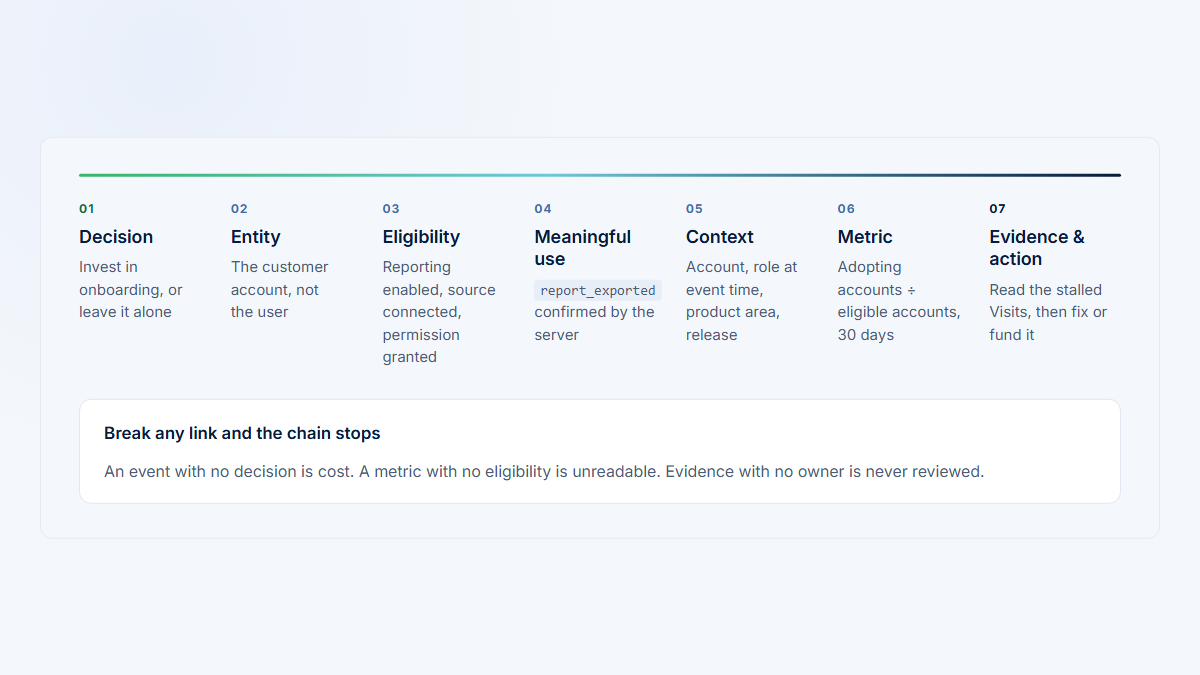
For a reusable implementation framework, see the product analytics instrumentation plan.

Funnels, retention, cohorts, and paths

The three products can all answer the basic questions:

  • How many users started and completed a workflow?
  • Where did they leave?
  • Which behaviors correlate with retention?
  • Which cohort adopted the new feature?
  • What actions happened before or after a target event?

Their differences become clearer when the question requires repeated behavior, account-level aggregation, governed definitions, SQL, or a reusable metric that must mean the same thing across teams.

Analytics depth

Analytics depth across Amplitude, Mixpanel, and PostHog
Capability Amplitude Mixpanel PostHog
Funnel flexibility Advanced sequencing, conversion windows, exclusions, segmentation, historical behavioral analysis, and account mode with Accounts package Strong self-service funnels with unique and total counting, exclusions, breakdowns, saved behaviors, and reusable metrics Sequential and other step-order options, exclusions, repeated same-event steps, property, cohort, group, autocapture, and SQL filters
Repeated events Supports repeated behavior and frequency-oriented analysis across funnels, cohorts, and retention workflows Totals funnels allow repeat entries after completion, timeout, or exclusion; events can be repeated as separate steps Explicitly treats repeated instances of the same event as separate funnel steps
Retention definitions Deep return-event, interval, cohort, and behavioral exploration options Clear retention reports and reusable retention behaviors Retention insights, breakdowns, SQL options, and retention metrics in experiments
Behavioral cohorts Mature behavioral cohort builder and downstream activation Visual cohorts based on properties, events, and event sequences Cohorts reusable across analytics, replay, flags, experiments, and surveys
Account-level analysis Accounts package changes the analysis unit to groups for supported charts and experiments Group Analytics add-on changes supported analyses from users to groups Group Analytics supports trends, funnels, retention, stickiness, flags, experiments, and warehouse queries
Metric governance Tracking plans, schemas, ownership, validation, custom events, access controls, and portfolio consistency Lexicon, event owners, saved metrics and behaviors, verification, custom events, formulas, and data-quality tools Actions, event definitions, property groups, data management, SQL definitions, and infrastructure-as-code; less centered on a formal enterprise taxonomy workflow
Anomaly or AI-assisted analysis Monitoring, alerts, agents, and advanced behavioral exploration depending on plan Anomaly detection, root-cause capabilities, Mixpanel Agent, and plan-dependent monitoring Alerts with anomaly detection, PostHog AI, SQL, and connected product context
Custom formulas Custom events, formulas, computations, and governed definitions Formulas, saved metrics, custom properties, and custom events Formula expressions, SQL expressions, HogQL, and custom queries
Data exploration Broad chart library, data tables, notebooks, journeys, account views, and AI-assisted analysis Fast report-to-report exploration through Insights, Funnels, Retention, Flows, cohorts, and boards UI insights plus direct HogQL/SQL access to events, persons, groups, and warehouse tables
Reporting for non-analysts Powerful but requires more onboarding as the analytical surface expands Usually the most direct core reporting experience for PMs and growth teams Usable by PMs, but advanced value increasingly rewards technical fluency

Amplitude’s documentation emphasizes tracking plans, behavioral cohorts, account reporting, and governed data. Mixpanel documents reusable behaviors, metrics, formulas, cohorts, and its four core report types. PostHog documents repeated funnel events, group-supported analyses, SQL access, and broad cohort reuse. (Amplitude)

Where Amplitude is strongest

Amplitude is usually the strongest analytical choice when the question evolves from a simple funnel into several layers of segmentation, behavioral cohorts, governed metrics, account analysis, anomaly investigation, and cross-team reuse.

The cost is cognitive surface area. A product manager can build useful charts, but the organization gets more value when someone owns taxonomy, instrumentation quality, group structure, and analysis standards.

Where Mixpanel is strongest

Mixpanel is usually the clearest option when the primary job is repeated self-service exploration. Select an event or saved behavior, choose a measurement, add a breakdown, and continue into a funnel, cohort, retention report, or flow without changing analytical systems.

This speed depends on a clean event model. Mixpanel does not remove the need for stable identity or a disciplined taxonomy; it makes well-structured data easier to explore.

Where PostHog is strongest

PostHog provides a productive bridge between predefined charts and technical analysis. A team can use standard funnels and retention views, then move into SQL expressions or HogQL when the UI model is not enough.

That flexibility is especially valuable when product events need to be joined to warehouse tables or connected to flags, errors, replay, and release context. It is less attractive when the target audience expects every metric to be centrally modeled and certified without engineering involvement.

Account and B2B group analytics

“Supports groups” is not the same as “is organized around customer accounts.”

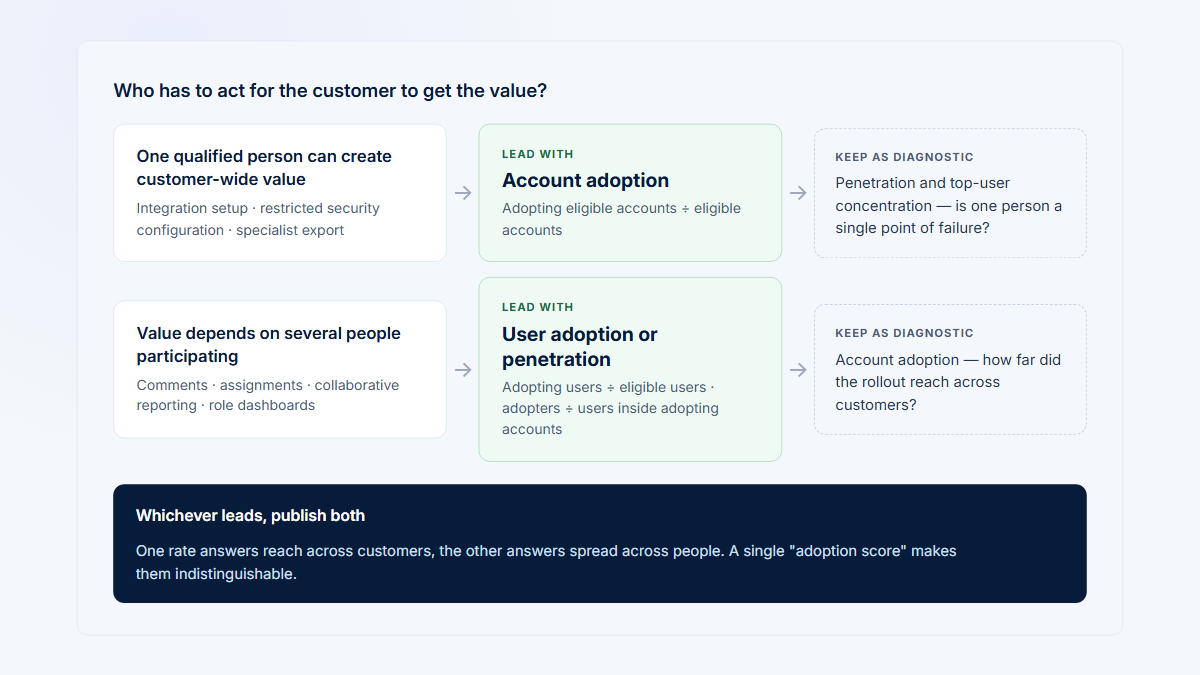
A B2B team usually needs at least three separate measures:

  1. Account adoption: What share of active companies used the feature?
  2. User penetration: Within companies that adopted it, what share of their active users used it?
  3. Concentration: Is the account’s usage spread across several people or dependent on one champion?

A platform can count distinct companies without automatically producing the second and third metrics. Those often require a group-aware cohort, a second user-level analysis, a formula, or a warehouse query.

For the underlying distinction, see account adoption versus user adoption and product usage by company.

Amplitude Accounts

Amplitude’s Accounts package is available to Growth and Enterprise customers. It supports account-level analytics, group-level experimentation, account bucketing, and B2B-focused reporting.

For the Reporting release, a company group could be attached to report_configuration_started and report_saved. The team could then construct a company-level completion funnel and a cohort of companies that saved a report.

The user-penetration question still needs care. The numerator is the distinct users who used Reporting inside adopting companies. The denominator is the relevant active users inside those same companies. Depending on the exact reporting workflow, that may require a second user-level chart, a custom formula, a group cohort, or warehouse analysis.

Amplitude’s replay documentation also states that replay segmentation is user-based and is not available in account-level reporting. In practice, the investigation path can require moving from an account result to affected users and then to their recordings rather than opening a group-aggregated replay view directly. (Amplitude)

Mixpanel Group Analytics

Mixpanel Group Analytics is a paid add-on. A company group is represented by a group key and group ID attached to events. Once implemented, supported reports can analyze behavior by company rather than by individual user.

The main implementation risk is historical coverage. If the group key was not present on previous events, those events do not become attributable to the company merely because the add-on is enabled later. A migration or backfill must preserve the necessary group relationship.

Mixpanel is well suited to a company-level completion funnel once the data is present. User penetration again requires joining the group-level result with users inside the adopting companies, either through carefully filtered reports or downstream analysis. (Mixpanel)

PostHog Group Analytics

PostHog supports up to five group types per project. Groups can be used in trends, funnels, retention, stickiness, feature flags, experiments, and warehouse queries. Group types are not supported in lifecycle insights or user paths.

This creates a strong engineering-oriented B2B model: identify the company, attach the company group to relevant frontend and backend events, aggregate the Reporting funnel by company, target the rollout at the company level, and join company properties in HogQL or warehouse queries.

The trade-off is cost and construction. Group Analytics is a paid add-on, all identified events become part of its billing basis after activation, and a polished user-penetration or champion-concentration metric may require a custom query rather than a default B2B dashboard. (PostHog)

Which is best for B2B account analytics?

Among these three:

  • Amplitude offers the broadest governed account-analysis package.
  • Mixpanel offers understandable group reporting inside a focused analytics interface.
  • PostHog offers the most programmable connection between groups, flags, experiments, and warehouse queries.

None should be assumed to make every B2B account question visible by default. Teams whose primary operating object is the customer company should evaluate how many reports must be constructed before product, customer success, and account teams can answer routine account questions.

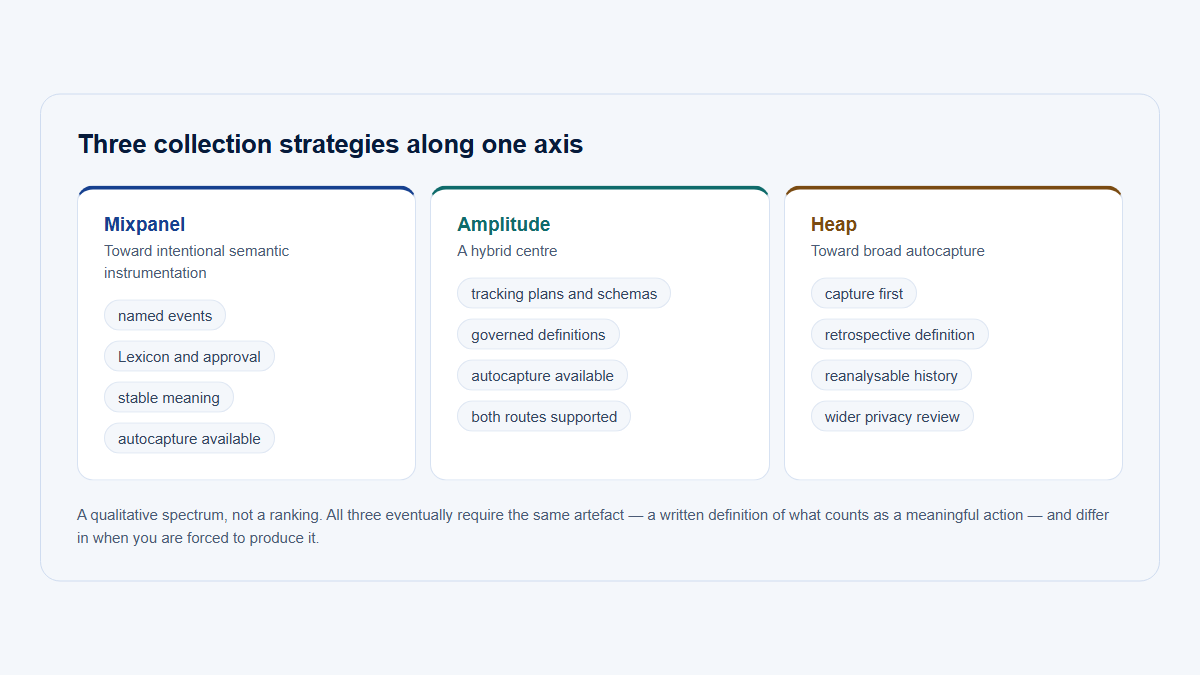
Autocapture and semantic events

Autocapture accelerates discovery, but it does not eliminate event planning.

Amplitude autocapture

Amplitude’s web autocapture can collect sessions, page views, clicks, form interactions, file downloads, attribution, and URL context. Supported iOS and Android SDKs also provide automatic collection for common lifecycle and screen signals.

Amplitude pairs this with strong planning and governance. Teams can create tracking plans, validate incoming events, monitor schemas, and define custom events that turn low-level behavior into stable business concepts. (Amplitude)

Mixpanel autocapture and definitions

Mixpanel supports web autocapture and explicit custom events. Its Lexicon documents raw events, custom events, saved formulas, funnel behaviors, retention behaviors, ownership, and verification.

A semantic event such as Reporting configuration started can therefore be implemented explicitly or defined from a controlled set of lower-level events. Explicit instrumentation remains preferable for business-critical states whose meaning should not change when the interface changes. (Mixpanel)

PostHog autocapture and Actions

PostHog’s web SDK begins with page views and autocaptured interactions. Actions can organize and rename raw or autocaptured events into reusable semantic definitions, and Actions apply retroactively to historical events that match the definition.

This is useful for exploratory analysis: several buttons can become one Homepage CTA action, or a selector-based interaction can become a named product behavior. PostHog still recommends combining autocapture with custom events for important business actions. (PostHog)

What should be custom in the Reporting scenario?

Use autocapture for:

  • page views;
  • navigation;
  • clicks;
  • form interactions;
  • exploratory paths;
  • replay context.

Use explicit custom events for:

  • report_configuration_started;
  • report type and template selection;
  • validation failure;
  • report_saved;
  • report ID;
  • company ID;
  • experiment assignment or exposure;
  • feature-flag variant;
  • server success or failure.

The frontend can say that the user attempted to save. Only the backend can confirm that the report exists.

For a deeper implementation decision, see autocapture versus custom events.

Session replay and heatmaps

All three products now support session replay. The important differences are where replay begins, which platforms it covers, how it connects to analytical context, and how much replay is included.

Amplitude replay

Amplitude connects replay to behavioral analysis so teams can move from an event, funnel, or user to relevant sessions. It supports web and mobile instrumentation and offers targeted capture and extended retention in expanded Replay packaging.

Amplitude also offers web heatmaps. The current pricing page lists Heatmaps on Plus, while the Heatmaps documentation says access requires Session Replay entitlement. Confirm the exact replay and package entitlement; replay volume and advanced capture or retention vary by plan and package.

The important B2B qualification is that account-level reporting does not itself become an account-aggregated replay system. The usual investigation path is account result → affected user → relevant session. (Amplitude)

Mixpanel replay

Mixpanel includes 10,000 monthly replays on Free and 20,000 free monthly replays on Growth before customized volume. Replays can be linked to behavioral analysis, and heatmaps are generated from sessions that were actually recorded.

Mixpanel has web replay and mobile replay documentation for iOS, Android, React Native, and Flutter. Mobile replay requires a client-side replay SDK; sending events only through a server-side CDP does not create recordings. (Mixpanel)

PostHog replay

PostHog offers web and mobile replay, sampling, event and URL triggers, feature-flag-controlled recording, privacy masking, network context, logs, and connections to errors and other products.

Its free tier includes 5,000 web recordings and 2,500 mobile recordings per month. Web and mobile recordings have separate paid rates. This makes the free allowance explicit, but it also adds separate replay meters to the cost model. (PostHog)

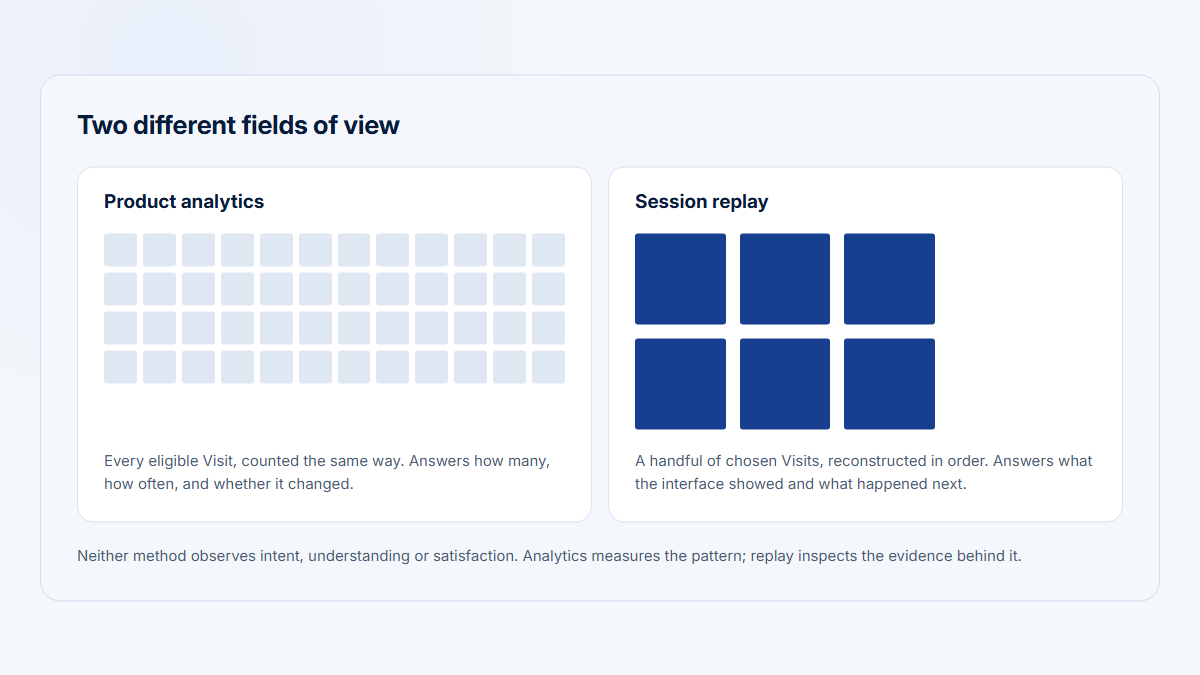
Replay is evidence, not the metric

A recording explains one session. It does not establish that a problem is common.

The stronger workflow is:

  1. find a measurable pattern;
  2. identify affected accounts, users, or cohorts;
  3. select relevant failed or unusual sessions;
  4. inspect several recordings;
  5. separate observed behavior from the inferred cause.

See session replay versus product analytics for a deeper guide to combining quantitative patterns with qualitative evidence.

Experiments and feature flags

This is the comparison area most likely to be outdated by an older article.

Amplitude

Amplitude has native feature experimentation, web experimentation, and feature management. Its platform model lets teams define audiences and metrics using behavioral data, assign variants, analyze outcomes, and connect experiments to broader analytics.

Free and lower plans expose limited experimentation and flag capabilities. Growth and Enterprise customers can purchase expanded packages, with pricing described as a percentage of the platform plan.

Amplitude is the strongest option here when experimentation is operated as part of a governed analytics program with reusable metrics, account bucketing, portfolio controls, and a dedicated experimentation practice. (Amplitude)

Mixpanel

Mixpanel launched Experimentation 2.0 and native Feature Flagging on June 9, 2026. The announcement describes cohort targeting, gradual rollout, rollback, shared metrics, and analysis tied to the same behavioral model.

These capabilities are currently positioned as Enterprise add-ons rather than core functionality for every Mixpanel customer. The pricing table separately labels Experiment reporting and Feature Flags as add-ons.

Mixpanel is therefore a valid analytics-plus-experimentation choice, but a buyer should not compare only the Growth event rate. The experiment-user, flag-request, active-flag, support, and Enterprise packaging need to be included in the quote. Current Feature Flag packages allow up to 50, 200, or 1,000 active flags to be fetched per API request; enabled flags count toward that limit, and the Feature Flag and Experiment add-ons are purchased separately. (Mixpanel)

PostHog

PostHog’s experiments and feature flags are native parts of the platform. Experiments use flag assignment and can evaluate product metrics, including retention-oriented metrics. Flags can target users or groups, support gradual releases, and connect to replay, errors, and product analytics.

Experiments are billed with feature flags. The free tier includes 1 million flag requests per month, after which request-based pricing applies.

PostHog is the strongest default when engineers want the same system to deliver a flag, record exposure, watch errors or replay, and analyze outcomes without integrating a separate flag provider. (PostHog)

Experimentation implementation warning

Whichever product is selected:

  • choose a stable assignment unit;
  • record the exposure event, not merely eligibility;
  • avoid changing the primary metric after reading results;
  • decide whether a company or a user receives the variant;
  • preserve assignment across devices and backend requests;
  • connect guardrail metrics such as errors, latency, and support incidents;
  • plan the migration and kill switch before the experiment launches.

For B2B products, company-level assignment is often necessary. Showing different versions to users inside the same account can contaminate the experience and the analysis.

Guides, surveys, and feedback

Amplitude

Amplitude is the only product in this comparison with a broad, dedicated first-party Guides & Surveys product surface. It can connect behavioral targeting, in-product messages, survey responses, and experimentation inside the same suite.

This can reduce the need for a separate lightweight adoption or feedback tool. It does not automatically make Amplitude the best dedicated onboarding platform; teams whose dominant need is complex checklists, resource centers, lifecycle orchestration, or extensive no-code UI patterns should still compare specialist products.

Mixpanel

No dedicated first-party in-app guide builder or survey product was documented in the reviewed Mixpanel platform, pricing, and product materials.

Mixpanel can analyze events and properties sent by another survey, messaging, or onboarding platform, and its experiments can test product experiences. That is different from supplying the complete authoring and delivery layer.

PostHog

PostHog includes native surveys with web and supported mobile delivery, targeting, response analysis, and connections to cohorts and experiments.

It does not present itself as a broad, specialist onboarding-guide builder. Use it when lightweight feedback and survey workflows fit naturally beside analytics and flags; evaluate a dedicated adoption platform when in-app education is the central job. (Amplitude)

Warehouse, pipelines, and raw data

The phrase “warehouse integration” covers at least four different architectures:

  1. import warehouse data into the analytics platform;
  2. export analytics events to a warehouse;
  3. query the warehouse directly without copying the data;
  4. join analytics events and warehouse tables in a managed analytical layer.

The products do not package these in the same way.

Amplitude data and warehouse options

Amplitude supports data sources, destinations, cohort syncs, raw-event exports, and warehouse destinations such as Snowflake and BigQuery.

Amplitude also documents a warehouse-native mode that sends queries directly to Snowflake. However, the current documentation labels that mode as a legacy feature unavailable to new customers. Do not position it as the default current Amplitude architecture.

For a new evaluation, confirm whether the intended workflow is:

  • SDK or API data sent into Amplitude;
  • warehouse tables imported into Amplitude;
  • Amplitude data exported to the warehouse;
  • cohort activation to downstream tools;
  • or a legacy warehouse-native deployment already present in the organization. (Amplitude)

Mixpanel Warehouse Connectors and Data Pipelines

Mixpanel Warehouse Connectors can sync data from Snowflake, BigQuery, Databricks, Redshift, and Postgres into Mixpanel. Data Pipelines export Mixpanel events and profiles to object storage or supported warehouses.

Packaging requires explicit confirmation. Current official materials are not fully consistent:

  • the Warehouse Connectors documentation says paid event-based organizations receive the connector as a free add-on when they update or renew;
  • the FAQ describes it as an Enterprise add-on;
  • the pricing table currently checkmarks Warehouse Connectors for Growth and Enterprise while marking Data Pipelines as an add-on;
  • Data Pipelines documentation says Growth and Enterprise customers can purchase it as an add-on.

Treat the exact connector package as a quote item, not an assumed inclusion. (Mixpanel)

PostHog warehouse and pipelines

PostHog offers a managed warehouse, external data sources, SQL/HogQL, joins between PostHog and warehouse data, realtime destinations, and batch exports.

This is the most integrated data-engineering surface of the three for a team that wants analytics and warehouse work inside the same developer-oriented product. The cost model is correspondingly granular: managed warehouse rows, realtime trigger events, and batch-export rows have separate allowances and rates. (PostHog)

Raw export should be part of the selection

Before committing, verify:

  • whether raw events can be exported without an add-on;
  • how identity mappings are exported;
  • whether deletes and historical corrections propagate;
  • export cadence;
  • schema evolution;
  • backfill limits;
  • data retention;
  • replay portability;
  • and whether the warehouse can become a neutral migration layer.

Mobile support

All three platforms support mobile product analytics. The practical differences are in SDK maturity for the team’s framework, replay coverage, feature flags, privacy controls, and whether frontend and backend identity remain consistent.

Amplitude mobile

Amplitude has iOS, Android, Flutter, React Native, Unity, and other SDK paths, along with mobile session replay instrumentation. Its appeal is strongest when the organization wants mobile analytics to share the same governed taxonomy, cohorts, experiments, and portfolio structure as web data. (Amplitude)

Mixpanel mobile

Mixpanel has established mobile analytics SDKs and current replay documentation for native iOS and Android, React Native, and Flutter. Mobile replay is installed separately from ordinary tracking in several frameworks and needs direct client-side integration. (Mixpanel)

PostHog mobile

PostHog supports iOS, Android, React Native, Flutter, and additional SDKs. Mobile replay includes screen recordings, touches, logs, and network context, subject to platform requirements and privacy configuration.

PostHog is particularly attractive when the same mobile SDK should also evaluate feature flags and connect sessions to errors and experiments. (PostHog)

Best mobile choice

  • Choose Amplitude when mobile sits inside a mature cross-platform analytics and governance program.
  • Choose Mixpanel when mobile PMs need focused funnels, retention, cohorts, and replay without adopting the broadest platform.
  • Choose PostHog when the mobile engineering team wants analytics, replay, flags, experiments, and debugging context together.

The correct choice still depends on the exact framework and required SDK feature. Build a small compatibility checklist rather than assuming every web capability behaves identically on mobile.

Self-hosting and deployment

Amplitude

No public self-hosted deployment of the Amplitude application was documented in the reviewed official materials. Evaluate Amplitude as a managed service with contractual data, security, residency, and export controls.

Mixpanel

No public self-hosted deployment of the Mixpanel application was documented in the reviewed official materials. Mixpanel supports proxies and regional data options, but a proxy is not a self-hosted Mixpanel application.

PostHog

PostHog is open source and can be self-hosted. Its documentation makes several warnings explicit:

  • self-hosted deployments are officially unsupported;
  • PostHog does not provide paid guarantees for them;
  • changes and security fixes ship continuously rather than through ordinary supported version releases;
  • the customer runs the infrastructure, deployments, upgrades, URLs, storage, and scaling;
  • PostHog Cloud is recommended for most production teams.

Self-hosting is therefore a deployment option, not a free replacement for managed operations. Its total cost includes infrastructure, observability, backups, upgrades, incident response, security review, storage growth, and staff time. (PostHog)

Which can be self-hosted?

PostHog is the only one of these three with a public open-source self-hosting path. Choose it for self-hosting only when the organization accepts the unsupported operating model or has validated a separate support arrangement. Do not choose it merely to avoid a SaaS invoice.

Privacy and governance

Privacy has two layers:

  1. what the SDK captures before data leaves the product;
  2. who can see, export, retain, and use the data after ingestion.

Amplitude

Amplitude provides privacy and consent implementation guidance, tracking plans, schema protection, permissions, access controls, and enterprise governance features. Its strongest governance story is the connection between data planning, validation, taxonomy, and role-based control. (Amplitude)

Mixpanel

Mixpanel provides data residency options, privacy APIs, roles and permissions, Lexicon controls, event blocking, sensitive-data classification, verified definitions, and higher-plan governance features.

Lexicon can block future ingestion of selected events or properties, but blocked data cannot be recovered later. That makes governance an implementation responsibility, not only an administrative setting. (Mixpanel)

PostHog

PostHog provides SDK-level privacy settings, replay masking, capture controls, sampling, and deployment choice. Its engineering orientation makes these controls flexible, but also means teams must test the actual application—including edge cases, mobile screens, DOM changes, console data, and network capture—rather than relying on default settings.

Self-hosting can increase control over infrastructure and storage. It does not automatically create compliance, safe capture, or correct retention. (PostHog)

Governance recommendation

Before launch, define:

  • approved user and company identifiers;
  • forbidden properties;
  • selectors and routes excluded from replay;
  • event owners;
  • development and production separation;
  • retention requirements;
  • deletion workflows;
  • group-model ownership;
  • metric verification;
  • and a recurring data-quality review.

The platform can enforce parts of this plan. It cannot decide the plan for the organization.

Ease of use for product managers

Mixpanel is usually the easiest starting point

For a PM whose main jobs are trends, funnels, retention, cohorts, and paths, Mixpanel usually offers the shortest route from question to analysis. Its report model is concentrated and recurring review praise often emphasizes understandable exploration and easy-to-build reports.

That ease assumes the data is already trustworthy. A PM cannot compensate for duplicate identities, ambiguous events, missing group keys, or frontend events that claim a backend action succeeded.

Amplitude is the most capable analytical workspace

Amplitude can serve PMs well, particularly after the organization standardizes templates, event definitions, cohorts, and dashboards. New users have more concepts and product surfaces to learn, but the ceiling is higher for teams that need complex behavioral analysis and governed reuse.

PostHog is easiest for a technical product team

A technical PM or product engineer may find PostHog easier because analytics, replay, flags, experiments, and errors share one ecosystem. A nontechnical PM may find the number of products, event types, SQL options, billing meters, and engineering concepts less immediately approachable than Mixpanel’s core reports.

A better usability test

Do not ask a vendor to show a polished dashboard. Give the same instrumented dataset to the intended users and ask them to answer:

  1. Which segment’s Reporting completion rate fell?
  2. Did the decline come from new or existing companies?
  3. Which companies are affected?
  4. Which users inside those companies failed?
  5. Can they open useful recordings?
  6. Can they save and explain the metric so another person reproduces it?

The best product is the one the actual team can use without turning routine questions into support tickets.

Engineering effort

No product eliminates instrumentation.

Amplitude engineering effort

Amplitude rewards an upfront tracking plan, stable identity, account instrumentation, schema governance, and coordination between product analytics and engineering. Autocapture can accelerate initial discovery, but mature Amplitude use usually benefits from formal data ownership.

Mixpanel engineering effort

Mixpanel’s initial event integration is straightforward. Complexity increases around identity merge, historical imports, group keys, replay SDKs, warehouse connectors, pipelines, experiments, and flags.

Mixpanel can be analytically self-service after implementation; the implementation itself still needs engineering and data discipline.

PostHog engineering effort

PostHog often has the easiest path to an engineering-led trial because one SDK can begin collecting product events, web behavior, replay, and feature-flag context. The effort shifts from vendor integration to platform ownership:

  • choosing anonymous or identified event behavior;
  • controlling several billing meters;
  • creating Actions and custom events;
  • linking frontend and backend identities;
  • managing groups;
  • evaluating flags safely;
  • testing replay privacy;
  • joining warehouse data;
  • and operating self-hosting where selected.

Product-building capabilities

Product-building capabilities
Capability Amplitude Mixpanel PostHog
Session replay Native web and mobile replay; analytics integration; expanded capture and retention packages Native web and mobile replay with sampling and privacy controls Native web and mobile replay with triggers, flags, logs, network context, and error connections
Experiments Native feature and web experimentation; broad metric and cohort integration Experimentation 2.0; current Enterprise add-on Native experiments using feature-flag assignment and shared analytics
Feature flags Native feature management; plan limits and expanded packages Native flags launched in 2026; Enterprise add-on and separately priced packaging Native flags; separately metered by requests
Surveys Native Guides & Surveys No dedicated first-party survey product documented Native surveys with plan-specific platform support
Guides or in-app messaging Native guide capability No dedicated first-party guide product documented No broad dedicated guide builder; surveys and workflows address narrower use cases
Error monitoring No comparable first-party error product documented No comparable first-party error product documented Native error tracking
Data warehouse Imports, destinations, raw exports; legacy Snowflake warehouse-native mode Warehouse imports plus paid exports through Data Pipelines Managed warehouse, external sources, SQL/HogQL, joins, and exports
CDP or pipelines Activation, destinations, integrations, cohort syncs Integrations, Warehouse Connectors, cohort syncs, Data Pipelines add-on Realtime destinations, batch exports, transformations, and workflows
Developer workflow SDKs, APIs, Ampli, branches, tracking plans, experimentation SDKs SDKs, APIs, replay SDKs, flags, experiments, MCP and headless tools SDKs, APIs, flags, experiments, Terraform, SQL, errors, logs, and infrastructure-as-code
Mobile support Broad analytics and replay SDK coverage Broad analytics and replay SDK coverage Broad analytics, replay, flags, and experiment SDK coverage
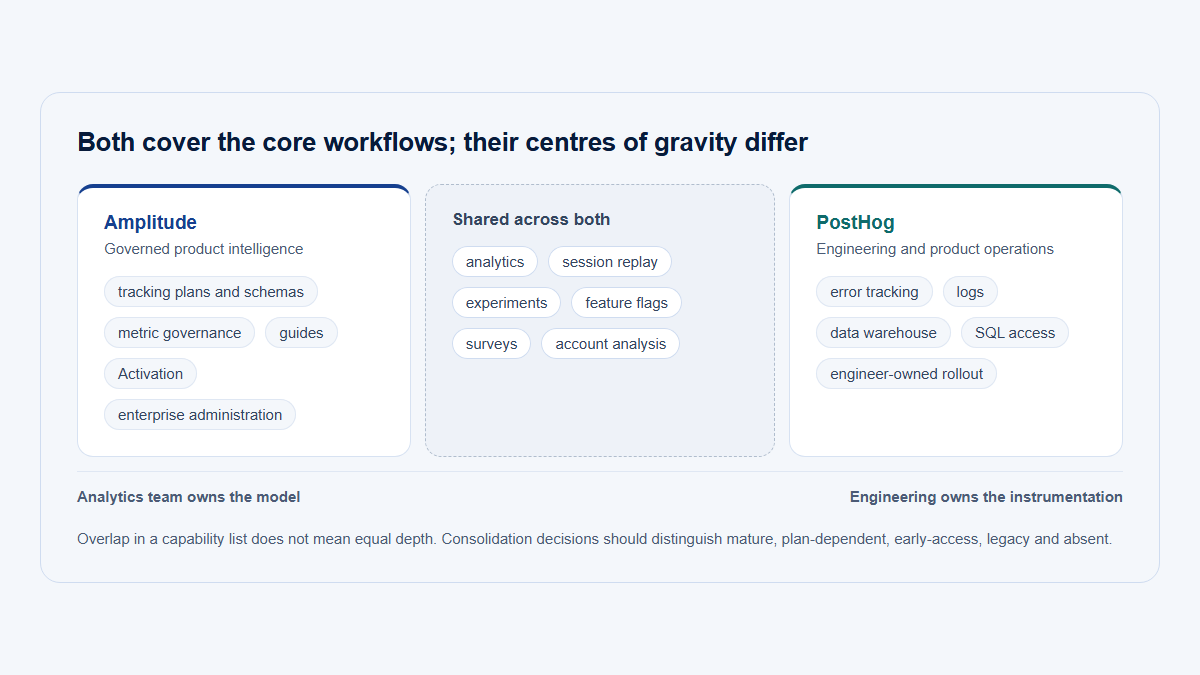
Layered comparison showing Amplitude’s broad analytics and activation suite, Mixpanel’s concentrated analytics surface with add-ons, and PostHog’s broad engineering and data-tool surface.
Availability does not mean identical depth or inclusion. See the pricing and capability sections for plan-specific qualifications.

Sources for this table include the products’ current pricing pages and official documentation for replay, experiments, flags, warehouse tools, and mobile SDKs. (Amplitude)

Implementation and ownership

Implementation and ownership
Implementation question Amplitude Mixpanel PostHog
SDK setup Multiple client, server, and mobile SDKs; implementation can begin quickly Multiple client, server, and mobile SDKs; direct event model Broad client and server SDK coverage; web starts quickly with autocapture
Event-planning requirement High for mature use; formal tracking-plan and schema workflows are strengths Medium to high; simple analysis still depends on clean definitions Medium; fast autocapture benefits from later semantic cleanup and explicit growth events
Autocapture Web and supported mobile signals Web autocapture; mobile instrumentation varies Web on by default; mobile autocapture support varies
Server-side events Supported through server SDKs and APIs Supported through server SDKs, Import API, and warehouse ingestion Supported through backend SDKs and capture API
Identity resolution Device ID, user ID, and Amplitude ID distinct_id and Simplified ID Merge Anonymous and identified events, persons, distinct_id, identify and alias
Account or group setup Define group types and properties; Accounts package required for full analysis Define group key and group ID; attach key to every relevant event Define up to five group types; link relevant events with $groups
Governance Strong tracking-plan, schema, ownership, permission, and portfolio model Lexicon, event owners, saved and verified definitions, quality controls Event definitions, Actions, data management, SQL, and code-based configuration
Privacy controls Consent guidance, SDK controls, data access and governance SDK and replay controls, privacy APIs, roles, blocking and classification SDK capture controls, masking, sampling, triggers, deployment choice
Warehouse integration Imports, destinations, exports; legacy warehouse-native mode needs qualification Warehouse Connectors and Data Pipelines, with packaging confirmation Managed warehouse, sources, SQL/HogQL, joins, realtime and batch exports
Self-hosting burden Not applicable as a documented product deployment option Not applicable as a documented product deployment option High: infrastructure, storage, upgrades, scaling, backups, and incident ownership
Likely internal owner Product analytics or data team with product and engineering partners Product analytics, product operations, or growth, with engineering support Engineering or product engineering, often with product and data partners

Standardized B2B Reporting scenario

Assume a B2B SaaS team releases a new Reporting feature.

The team needs to:

  1. identify users and companies;
  2. track report_configuration_started;
  3. confirm report_saved server-side;
  4. build a completion funnel;
  5. measure account adoption;
  6. measure user penetration inside adopting companies;
  7. measure repeated use after 30 days;
  8. inspect sessions where users failed;
  9. run an experiment;
  10. release through a feature flag;
  11. export data to a warehouse;
  12. share a report with customer success.

This is an illustrative implementation, not a claim that the workflow was executed hands-on.

Three-lane workflow comparing how Amplitude, Mixpanel, and PostHog track a B2B Reporting release from identity and server-confirmed saving through company adoption, replay, experiments, warehouse export, and customer-success reporting.
Account adoption and user penetration are separate calculations. Each platform can support the workflow, but packaging and the natural investigation path differ.

How Amplitude would handle the Reporting release

Natural implementation

  1. Use the Amplitude client SDK for page, interaction, and replay context.
  2. Identify the user with a stable user ID.
  3. Attach the company as an account group using a stable company ID.
  4. Send report_configuration_started from the client with report type and entry-point properties.
  5. Send report_saved from the backend only after persistence succeeds.
  6. Validate both events and properties against the tracking plan.
  7. Create a user-level completion funnel and an account-level funnel through the Accounts package.
  8. Create a behavioral cohort of companies that saved a report.
  9. Build a user-level analysis for users inside those adopting companies.
  10. Define a 30-day return or repeated-use metric.
  11. Investigate failed users and open relevant replays.
  12. Use feature or web experimentation with stable user or account bucketing.
  13. export raw events or send data to the organization’s warehouse destination.
  14. share a governed dashboard, scheduled output, or account-focused report with customer success.

What is first-class

  • advanced funnels, retention, and behavioral cohorts;
  • tracking plans and schema validation;
  • Accounts reporting and group experiments through the Accounts package;
  • replay connected to user and event analytics;
  • native experimentation and feature management;
  • guides and surveys where feedback is needed;
  • data destinations and raw exports.

What needs a package or configuration

  • full account analytics requires the Accounts package on Growth or Enterprise;
  • expanded replay volume, targeted capture, and longer retention require higher packaging;
  • advanced experimentation volume and capabilities can require expanded packages;
  • user penetration within adopting accounts may need a deliberate two-level analysis rather than one default chart;
  • replay is not itself available as account-level reporting, so the path moves through users.

Strength

Amplitude gives the most mature governed analytical workflow. It is well suited to a team that wants the Reporting metric to become a reusable, trusted definition across product, analytics, and customer-facing teams.

Compromise

The workflow has the most concepts and packaging to evaluate. It is easy to buy more surface than a small team can govern or use.

How Mixpanel would handle the Reporting release

Natural implementation

  1. Use the client SDK for user behavior and optional replay.
  2. Apply Simplified ID Merge correctly across anonymous and authenticated states.
  3. Define company_id as the Group Analytics key and attach it to every relevant event.
  4. Track report_configuration_started from the client.
  5. send report_saved from the backend through a server SDK, API, or warehouse sync.
  6. document the events and properties in Lexicon.
  7. create a user completion funnel and save it as a reusable behavior.
  8. create a company-level funnel using Group Analytics.
  9. create a cohort or filtered user report for users inside adopting companies.
  10. measure 30-day repeat use with Retention or a saved behavior.
  11. open replays for failed users or sessions.
  12. use Experimentation 2.0 and native flags if the Enterprise add-ons are purchased.
  13. import or enrich data through Warehouse Connectors and export through Data Pipelines where purchased.
  14. share boards and reports with customer success.

What is first-class

  • fast event exploration;
  • Funnels, Insights, Retention, and Flows;
  • reusable saved behaviors and metrics;
  • cohorts;
  • web and mobile replay;
  • approachable boards for nontechnical users.

What needs an add-on or plan

  • Group Analytics is a paid add-on;
  • Experiment reporting and native flags are currently Enterprise add-ons;
  • Data Pipelines is a Growth or Enterprise add-on;
  • Warehouse Connector packaging should be confirmed because current official sources differ;
  • historical events without the group key do not become group-aware automatically.

Strength

Mixpanel provides the most concentrated analysis workflow. Once events and groups are reliable, PMs can usually move from question to answer with fewer product concepts than in the other two platforms.

Compromise

The platform becomes less simple when the evaluation includes B2B groups, experiments, flags, warehouse ingestion, and exports. The quoted package matters more than the core event price alone.

How PostHog would handle the Reporting release

Natural implementation

  1. Install the relevant frontend and backend SDKs.
  2. identify the person after authentication while preserving anonymous history where required.
  3. create a company group type and set stable group properties.
  4. attach the company group to frontend and backend Reporting events.
  5. track report_configuration_started from the client.
  6. send report_saved from the backend after success.
  7. create a user funnel and a company-group funnel.
  8. use cohorts or HogQL to calculate users inside adopting companies.
  9. use Retention or SQL for 30-day repeated use.
  10. configure replay sampling or event triggers around failed saves.
  11. inspect recordings, network context, logs, and errors.
  12. release through a company-targeted feature flag.
  13. analyze the experiment in the same system.
  14. join warehouse tables through the managed warehouse or export data through batch pipelines.
  15. share dashboards or subscriptions with customer success.

What is first-class

  • analytics, replay, feature flags, experiments, surveys, errors, SQL, and pipelines in one ecosystem;
  • group-targeted flags and experiments;
  • replay triggers and debugging context;
  • HogQL for metrics that exceed standard chart models;
  • warehouse joins and developer workflows.

What needs an add-on or configuration

  • Group Analytics is a paid add-on;
  • all identified events become billable under Group Analytics once enabled;
  • groups are not supported in user paths or lifecycle insights;
  • user penetration may require HogQL or a custom insight;
  • replay, flags, analytics, surveys, errors, warehouse rows, and exports use separate meters;
  • self-hosting transfers operational responsibility to the customer.

Strength

PostHog creates the shortest engineering path from release control to behavioral evidence. The same company group can influence flag assignment, experiment analysis, funnels, warehouse queries, and debugging.

Compromise

The implementation team must govern a large product surface and a granular billing model. A customer-success audience may need purpose-built dashboards before the data feels account-centric.

Pricing and total cost

Prices below were checked on August 4, 2026. Treat them as a time-stamped snapshot because allowances, rates, plan names, and packaging change frequently.

Verified pricing comparison

Verified August 4, 2026

Pricing comparison verified August 4, 2026
Pricing item Amplitude Mixpanel PostHog
Free plan Free forever; no credit card Free forever; no credit card Free; no credit card
Monthly analytics allowance 2 million events 1 million events 1 million product-analytics events
Free web replay allowance 10,000 monthly replays 10,000 monthly replays 5,000 monthly recordings
Free mobile replay allowance Included replay limit is presented as a combined plan allowance; confirm platform allocation Included replay allowance; verify any framework-specific packaging 2,500 mobile recordings
Other notable free allowances Basic analytics, limited experiments, flags, guides and surveys, AI products, unlimited seats Five saved reports per seat, core reports, unlimited seats 1 million flag requests; 100,000 exceptions; 1,500 survey responses; 1 million warehouse rows; 10,000 realtime triggers; 1 million batch-export rows; 100,000 AI Observability events; 500 PostHog AI credits; three Inbox beta pull requests; 10,000 Workflow messages per channel; 10 GB of Logs; and 2,500 Replay Vision credits
Entry paid plan Plus starts at $0; first 2 million events/month free; credit card required Growth starts at $0; first 1 million events/month free Pay-as-you-go starts at $0 while usage remains below free meters
Main paid billing unit Events Events Separate unit for each product
Public entry overage or rate Tiered event pricing through estimator; no single universal public overage rate $0.28 per 1,000 events after the first 1 million at the base rate; volume discounts Product analytics from $0.00005/event after free tier; calculator currently distinguishes anonymous events from $0.00005 and identified events from $0.000248
Public event-volume note Plus card advertises scaling to 70 million events, while the published annual base-tier table stops at 20 million; confirm the self-serve or quote boundary; Growth and Enterprise are custom event-based plans Growth can be purchased online through 20 million monthly events; Enterprise table lists much higher scale Progressive volume discounts apply separately to each meter
Paid replay Growth includes 20,000 monthly replays; Enterprise 50,000; expanded Replay package offers custom volume and 3–12 month retention Growth includes 20,000 monthly replays free before customized volume Web replay starts at $0.005/recording after 5,000; mobile starts at $0.01/recording after 2,500, with volume discounts
Experiments and flags Limited capabilities on Free; expanded packages for Growth and Enterprise priced relative to platform plan Experiment reporting and native Feature Flags shown as Enterprise add-ons Experiments billed with feature flags; flags start at $0.0001/request after 1 million
Account analytics Accounts package for Growth and Enterprise, priced as a percentage of platform plan Group Analytics paid add-on Group Analytics paid add-on; calculator currently shows a starting rate near $0.000071 per identified event
Surveys Limited Guides & Surveys on Free; expanded package on higher plans No dedicated first-party survey product documented First 1,500 responses free, then from $0.10/response
Error tracking No comparable first-party meter documented No comparable first-party meter documented First 100,000 exceptions free, then from $0.00037/exception
Warehouse imports Sources and warehouse integrations; confirm plan and volume Warehouse Connectors; official packaging currently conflicts and needs quote confirmation Managed warehouse and external sources
Warehouse or pipeline exports Raw export APIs and destinations; terms depend on method and plan Data Pipelines paid add-on for Growth and Enterprise; raw APIs also available First 1 million batch-export rows free, then from $0.000015/row
Managed warehouse Legacy Snowflake warehouse-native mode is not available to new customers Warehouse data is synchronized into Mixpanel rather than queried through a broadly marketed warehouse-native mode First 1 million rows free, then from $0.000015/row
Realtime destinations Activation and destinations packaging varies Integrations and pipelines depend on package First 10,000 trigger events free, then from $0.0005/trigger
Enterprise model Custom event-based pricing, security, access controls, user management, support, and expanded packages Custom Enterprise agreement, high event scale, governance, support, and advanced add-ons Enterprise platform package adds contractual and administrative capabilities; usage meters still matter
Seats Unlimited seats on current public plans Unlimited seats Unlimited team members
Self-hosting cost No public self-hosted application No public self-hosted application Software can be self-hosted, but infrastructure and maintenance are customer costs and vendor support is not guaranteed
Official pricing https://amplitude.com/pricing https://mixpanel.com/pricing/ https://posthog.com/pricing
Research verification date August 4, 2026 August 4, 2026 August 4, 2026

Amplitude currently lists 2 million free monthly events, 10,000 free monthly replays, Plus starting at $0, custom Growth and Enterprise plans, and percentage-priced expanded packages. Its Plus card advertises scaling to 70 million events, while the annual base-tier table currently ends at 20 million, so buyers should confirm where self-serve pricing gives way to a quote. (Amplitude)

Mixpanel currently lists 1 million free monthly events, 10,000 Free replays, 20,000 free Growth replays, and a base Growth rate of $0.28 per 1,000 events beyond the free million. Its pricing table marks account analytics, experiments, flags, Metric Trees, and Data Pipelines as add-ons. (Mixpanel)

PostHog’s public pricing page lists separate free allowances and rates for analytics, web and mobile replay, flags, surveys, warehouse rows, pipelines, errors, AI products, logs, workflows, and newer beta products. The calculator currently distinguishes anonymous and identified event pricing. Free currently includes one project and one-year retention; pay-as-you-go lists six projects and seven-year retention. (PostHog)

Why a simple monthly-price comparison is misleading

The products do not bill the same objects.

Total cost can depend on:

  • frontend, backend, and autocaptured event volume;
  • anonymous versus identified event mix;
  • replay sampling and mobile replay volume;
  • replay retention;
  • event retention;
  • saved reports or advanced report limits;
  • company or group analytics;
  • experiment users, active experiments, or flag requests;
  • survey responses;
  • exceptions and error volume;
  • imported warehouse rows;
  • exported rows and realtime pipeline triggers;
  • support and success packages;
  • identity corrections and historical backfills;
  • self-hosted compute, storage, backups, upgrades, and on-call work.

Create an expected-usage worksheet before requesting quotes. Include a low, expected, and high scenario. A platform with the largest free event allowance can still cost more if the required account, replay, experiment, flag, or pipeline capability is separately packaged.

Free-plan verdict

  • Amplitude has the largest simple event allowance and a surprisingly broad limited product surface.
  • Mixpanel has a clear free core-analysis experience and the easiest path to unlimited reports once Growth is activated.
  • PostHog has the broadest collection of independent free product meters.

There is no universal “best free plan.” The answer depends on whether the scarce resource is events, reports, recordings, flags, surveys, errors, or engineering time.

Customer ratings and recurring review themes

G2 is used as the common rating source so that the three numbers are at least drawn from one review platform. Ratings are a confidence signal, not a product-selection formula.

G2 rating snapshot

Verified August 4, 2026

G2 rating snapshot verified August 4, 2026
Product G2 rating and review volume Verified
Amplitude Analytics 4.5/5 · approximately 2,958 reviews August 4, 2026
Mixpanel 4.5/5 · approximately 1,371 reviews August 4, 2026
PostHog 4.5/5 · approximately 1,052 reviews August 4, 2026

The review counts can change daily, so the displayed values are approximate snapshots verified on August 4, 2026. (G2)

Recurring review themes

Recurring themes in the sampled reviews
Product Common praise in the sampled reviews Common criticism in the sampled reviews Best-supported conclusion
Amplitude Powerful event analysis, funnels, cohorts, retention, fast charting, and a broad analytical surface Steeper learning curve, dense advanced interface, implementation discipline, and pricing or packaging complexity Amplitude rewards analytical maturity, but teams should budget for onboarding and governance rather than treating it as a zero-configuration dashboard
Mixpanel Understandable user-behavior analysis, approachable reports, fast funnels and dashboards, accessibility for product teams Initial event setup and taxonomy can still be confusing; pricing needs attention as event volume and add-ons expand Mixpanel’s interface is often easier than its data implementation; its best experience depends on a clean model and a complete quote
PostHog Engineering-friendly setup, all-in-one surface, session replay, feature flags, open-source orientation, and product breadth Complexity for nontechnical users, advanced-documentation gaps, and occasional concerns about the changing or busy surface PostHog is compelling when engineers value consolidation, but breadth and ownership should be treated as costs as well as features

These are recurring themes in a mixed sample of recent positive and critical reviews, not universal customer experiences. Amplitude review summaries repeatedly mention a learning curve for advanced features; Mixpanel reviews combine praise for understandable analytics with setup and pricing caveats; PostHog reviews praise its integrated surface while some reviewers want clearer advanced guidance.

Do ratings identify a winner?

No. All three had the same rounded G2 average at the verification date. Review volume, customer mix, deployment context, and the jobs reviewers attempted differ.

Use reviews to identify questions for a trial:

  • How long did implementation take?
  • Who maintains the taxonomy?
  • Which reports do nontechnical users create themselves?
  • Which add-ons became necessary?
  • What happened to cost after event or replay growth?
  • How responsive are complex queries?
  • How frequently did the organization need vendor support?

Selected video comparisons and walkthroughs

These videos add interface and category context; they are not sources for current pricing or plan inclusion. The two official walkthroughs are vendor-produced, while the independent comparison is an opinionated outside perspective.

Best Product Analytics Tools (2026) - My Honest ReviewVision Labs · October 23, 2025 · Independent multi-tool comparison · 9:34An outside view of how several analytics products differ in emphasis. Current documentation in this article takes precedence over time-sensitive statements in the video.Disclosure: No vendor sponsorship was identified in the reviewed description. Vision Labs promotes its own implementation services, so treat this as a commercially interested opinion rather than neutral documentation.
Meet the Amplitude AI Analytics Platform | Amplitude Quickstart, Ep. 1Amplitude · April 6, 2026 · Official vendor walkthrough · 4:46A concise tour of Amplitude’s current connected platform and interaction model.Disclosure: Vendor-produced. Use it to understand the interface and product framing, not as independent evidence.
What is PostHog? (Official Demo & Tutorial)PostHog · April 23, 2026 · Official vendor walkthrough · 8:50Shows how analytics, replay, feature flags, experiments, and adjacent engineering workflows sit in one product.Disclosure: Vendor-produced. Use it as a demonstration of PostHog’s workflow, not as neutral comparative evidence.

Migration considerations

Switching analytics products is not merely replacing one SDK call.

Identity mapping

Map:

  • anonymous device IDs;
  • authenticated user IDs;
  • merged identities;
  • company or group IDs;
  • users who belong to several companies;
  • deleted or merged companies;
  • environment and project boundaries.

Test known users across old and new systems before comparing totals.

Taxonomy mapping

Translate:

  • raw event names;
  • display names;
  • Amplitude custom events;
  • Mixpanel custom events and saved behaviors;
  • PostHog Actions;
  • event and user properties;
  • group properties;
  • metric formulas;
  • attribution fields;
  • session definitions.

A semantic definition can be recreated without renaming or rewriting all raw historical events, but its result must be validated.

Report migration

Saved charts, dashboards, notebooks, boards, cohorts, alerts, and permissions rarely migrate one-to-one. Rebuild the decision-critical reports first:

  • activation;
  • core feature adoption;
  • retention;
  • account adoption;
  • Reporting completion;
  • repeated use;
  • key customer-success views.

Do not recreate every unused dashboard merely because it exists.

Group data

Group analysis is especially sensitive to historical instrumentation.

Mixpanel explicitly says Group Analytics cannot be made retroactive when historical events lack the group key. PostHog requires $groups on events that should be linked to a group. Amplitude also requires planned group instrumentation.

Before migrating, confirm whether the warehouse contains enough user-company history to backfill the new model. (Mixpanel)

Replay history

Assume replay history is not portable unless a vendor explicitly documents a supported migration. Preserve legally and operationally necessary recordings according to existing retention policies, but do not design the migration around moving old replay libraries.

Experiments and feature flags

Do not move a live experiment casually.

Preserve:

  • assignment unit;
  • variant;
  • exposure timestamp;
  • eligibility;
  • holdouts;
  • feature state;
  • rollout percentage;
  • kill switch;
  • server and client evaluation behavior.

A flag migration can change the user experience even when analytics numbers appear correct.

Parallel validation

A controlled parallel run is often safer than an immediate cutover. Compare:

  • event totals;
  • unique users;
  • unique companies;
  • anonymous-to-identified merges;
  • funnel conversion;
  • retention definitions;
  • group attribution;
  • server-confirmed outcomes;
  • timezone handling;
  • late and duplicate events.

Expect differences when sessionization, identity, or counting rules differ. Investigate them rather than forcing the charts to match cosmetically.

Mixpanel also provides a documented Amplitude migration path, but it does not remove the need to validate identities, definitions, and reports. The official migration documentation is linked in Sources.

Decision by scenario

Decision by scenario
Scenario Recommended starting point Why Main qualification
Startup with two engineers PostHog One engineering-owned ecosystem can cover analytics, replay, flags, experiments, surveys, and errors while usage remains within several free meters Broad product surface and multiple meters need ownership; choose Mixpanel instead when PM self-service matters more than consolidation
Scale-up with product analysts Amplitude Deep behavioral analysis, governance, cohorts, monitoring, and reusable definitions fit an analytical practice More implementation and enablement than a small team may need
Mobile-first consumer product Amplitude or Mixpanel Both provide mature mobile analytics and replay; Amplitude favors analytical depth, Mixpanel focused self-service Validate the exact mobile framework, replay support, experimentation SDK, and privacy requirements
B2B SaaS with company accounts Amplitude for governed account analytics; PostHog for engineering-led groups; evaluate Hymetry for an account-first model All can support company groups, but their natural workflows differ Account add-ons and user-penetration modeling must be tested explicitly
Enterprise with a warehouse Amplitude or Mixpanel when governed self-service is central; PostHog when SQL and product tooling should converge All have warehouse paths, but they import, export, and query data differently Amplitude’s Snowflake warehouse-native mode is legacy; Mixpanel packaging needs quote confirmation
Team needing feature flags PostHog Flags are central to its developer workflow and integrated with experiments, replay, and errors Request volume is a separate billing meter
Team needing governed enterprise experimentation Amplitude Strong metric, cohort, account, portfolio, and experimentation connections Expanded experimentation packaging and plan cost need verification
Existing Mixpanel Enterprise customer needing experiments Mixpanel Native Experimentation 2.0 and flags can keep analysis and delivery in one established system They are add-ons; compare the complete quote with a specialist flag platform
Team needing product guides Amplitude Dedicated first-party Guides & Surveys product Compare specialist adoption products if onboarding is the primary job
Organization requiring self-hosting PostHog Only product here with a public open-source self-hosting path Self-hosting is unsupported and transfers operations and risk to the customer
Customer-success team Amplitude for governed account reports; Hymetry when company usage should be the default operating view Account context and shareable evidence matter more than raw event flexibility Confirm whether the CSM can answer routine account questions without analysts
Engineering team debugging frontend issues PostHog Replay, errors, logs, network context, feature flags, and experiments are connected A replay-first specialist or observability platform may still go deeper
PM team needing straightforward core analytics Mixpanel Concentrated reports usually create the shortest path to funnels, retention, and flows Add-on requirements can change the apparent simplicity
Public marketing website Consider another category Product analytics may be unnecessary for aggregate traffic, campaigns, and lightweight privacy-friendly reporting Use a dedicated web analytics tool unless in-product journeys must be joined
Complex no-code onboarding program Consider another category Dedicated adoption platforms provide richer checklists, resource centers, and messaging workflows Amplitude remains relevant when guides should share analytics and experimentation context

Final recommendations

Choose Amplitude when the organization is building an analytics capability

Amplitude is the best fit when the company wants:

  • advanced behavioral exploration;
  • mature funnels, cohorts, retention, and journeys;
  • formal tracking plans and schema governance;
  • account-level analytics and group experiments;
  • a connected suite spanning replay, experimentation, guides, surveys, activation, and AI;
  • portfolio, permissions, and enterprise controls;
  • an analytics platform that can grow with a dedicated product-data practice.

Do not choose it only because it has the largest free event allowance. Choose it because the organization will use and govern the analytical depth.

Choose Mixpanel when the organization wants focused self-service analysis

Mixpanel is the best fit when the company wants:

  • product managers and analysts to answer questions quickly;
  • a concentrated set of strong behavioral reports;
  • understandable funnels, retention, flows, and cohorts;
  • replay without adopting the broadest developer platform;
  • unlimited seats;
  • a gradual move into account analytics, experiments, flags, or warehouse data where add-on pricing is acceptable.

Do not assume the core event rate represents the complete B2B or experimentation package.

Choose PostHog when engineering wants one product-building ecosystem

PostHog is the best fit when the company wants:

  • analytics, replay, flags, experiments, surveys, errors, and data tools together;
  • an engineering-owned implementation;
  • SQL and warehouse analysis beside standard product charts;
  • group-targeted releases and experiments;
  • an open-source codebase or self-hosting option;
  • several generous free meters rather than one bundled allowance.

Do not treat breadth as free simplicity. Assign owners for identity, privacy, event semantics, product meters, and any self-hosted infrastructure.

Choose none of the three when the category is wrong

Choose another category when the central need is:

  • specialist onboarding and lifecycle messaging;
  • anonymous acquisition analytics;
  • pure frontend observability;
  • a simple page-view dashboard;
  • or an account-first B2B operating view that should not begin with event exploration.

The costliest mistake is not choosing the second-best product. It is buying a broad platform for a narrower job the organization cannot staff or govern.

Where Hymetry fits

Hymetry is not attempting to match the breadth of Amplitude, Mixpanel, or PostHog.

Hymetry is account-centric product intelligence for B2B SaaS. Its relevant distinction is that product behavior is organized around connected B2B objects:

  • product areas;
  • grouped pages or features;
  • Companies;
  • Users;
  • adoption breadth;
  • user distribution and concentration;
  • Visits and session evidence.

Amplitude, Mixpanel, and PostHog begin naturally with events, users, charts, and broad product-data workflows, then add company or group analysis through instrumentation and packaging. Hymetry is narrower: the commercial customer company is intended to remain visible throughout the analysis.

When Hymetry may be preferable

Hymetry may fit better when:

  • the commercial customer is a company rather than an individual;
  • several people use the product inside each account;
  • account-level usage must be visible by default;
  • customer success needs behavioral evidence before a check-in or renewal discussion;
  • the team needs to see whether usage is broadly distributed or dependent on one champion;
  • users and sessions must remain connected to their company context;
  • meaningful workflows are easier to understand as grouped pages and product areas than as a long event list;
  • a narrower account-centric product is preferable to a broad product-intelligence platform;
  • hosted and open-source deployment paths are relevant.

A Hymetry investigation can move from a grouped Reporting page to the companies that adopted it, the users responsible for usage, and the Visits that contain session evidence. The intended advantage is the connected account context, not a claim to have deeper general-purpose funnels or experimentation than the three primary products.

Explore the connected product views:

Related Hymetry guides:

When the compared products are stronger

Amplitude, Mixpanel, or PostHog is usually stronger when the requirement is:

  • advanced experimentation;
  • production feature-flag delivery;
  • complex general-purpose product analytics;
  • large integration ecosystems;
  • mature warehouse ingestion and export workflows;
  • enterprise taxonomy and governance;
  • mobile-first analysis;
  • surveys and guides inside a broader activation program;
  • error monitoring and developer tooling.

No independent rating is shown for Hymetry because a legitimate rating from the same comparison source was not available at verification time.

FAQ

Is Amplitude better than Mixpanel?

Amplitude is better when the organization needs deeper behavioral analysis, formal governance, account reporting, a larger connected product surface, or enterprise portfolio controls. Mixpanel is often better when product managers and analysts value a more concentrated self-service reporting experience.

Neither is universally better. The choice depends on analytical maturity, plan packaging, implementation ownership, and how much of the surrounding suite the team will actually use.

Is PostHog better than Mixpanel?

PostHog is usually better for engineering-led teams that want analytics, replay, feature flags, experiments, surveys, errors, and warehouse tools together. Mixpanel is usually better for teams whose primary job is accessible self-service behavioral analysis.

PostHog offers more product-building breadth. Mixpanel usually presents a more concentrated core analytics workflow.

Which is easiest for product managers?

Mixpanel is usually the easiest starting point for product managers building trends, funnels, retention reports, cohorts, and flows.

Amplitude becomes highly productive after the organization standardizes its taxonomy and workflows. PostHog can be easy for technical PMs but exposes more engineering and data concepts.

Which is best for engineers?

PostHog is the strongest default for engineers because analytics, replay, flags, experiments, errors, SQL, and data pipelines live in one developer-oriented platform.

Amplitude is strong when engineers participate in a governed company-wide analytics program. Mixpanel is strong when engineering wants to supply reliable data and let product teams explore it independently.

Which supports session replay?

All three support session replay.

  • Amplitude supports web and mobile replay connected to analytics.
  • Mixpanel supports web and mobile replay, with separate SDK requirements in several mobile frameworks.
  • PostHog supports web and mobile replay with triggers, sampling, logs, network context, and error connections.

Free allowances and retention differ.

Which supports heatmaps?

All three offer web heatmap capabilities in their current product surfaces.

Heatmaps depend on captured interaction or replay data and should not be treated as a substitute for event semantics, funnels, or user research.

Which supports feature flags?

All three currently support feature flags.

  • Amplitude has native feature management.
  • Mixpanel launched native Feature Flagging in 2026 and currently packages it as an Enterprise add-on.
  • PostHog has native request-metered feature flags that are central to its product-building workflow.

Which is best for experimentation?

Amplitude is strongest for a mature, governed experimentation program. PostHog is strongest when engineering wants experimentation and release control in the same workflow. Mixpanel is a strong option for an existing Enterprise customer that wants experiments to use the same behavioral metrics and cohorts as its analytics.

Packaging, assignment unit, exposure quality, and guardrail metrics matter more than the presence of an experiment screen.

Which is best for mobile apps?

Amplitude and Mixpanel are strong choices for mobile-first product analytics, while PostHog is compelling when mobile analytics must share a workflow with flags, experiments, replay, and debugging.

Validate the exact iOS, Android, React Native, Flutter, or Unity requirements rather than comparing a generic “mobile support” label.

Which supports B2B account analytics?

All three can support company or group analytics through paid packaging:

  • Amplitude Accounts;
  • Mixpanel Group Analytics;
  • PostHog Group Analytics.

Amplitude offers the broadest governed account-reporting package. PostHog offers the strongest programmable connection to group-targeted flags and experiments. Mixpanel offers understandable group reporting inside a focused analysis product.

Which can be self-hosted?

PostHog is the only one of the three with a public open-source self-hosting path.

PostHog’s own documentation describes self-hosting as unsupported. The customer assumes infrastructure, upgrade, scaling, security, backup, and operational responsibility.

Which has the best free plan?

Amplitude has the largest straightforward event allowance at 2 million monthly events. Mixpanel offers a clear free core analysis product with 1 million events and 10,000 replays. PostHog has the broadest set of separate free meters across analytics, replay, flags, surveys, errors, warehouse rows, and pipelines.

The best plan depends on the team’s actual usage mix.

Can a company use two of them?

Yes, but duplicate analytics platforms create costs:

  • two SDKs or duplicated event routing;
  • two identity models;
  • metric disagreements;
  • duplicate privacy reviews;
  • more warehouse and support work.

A defensible combination has clearly separated jobs—for example, one governed product-analytics platform and a specialist flag or replay product. Avoid sending every event to two broad platforms indefinitely without a defined reason.

Which is best for a startup?

PostHog is often the strongest default for a technical startup that wants to consolidate analytics and product-building tools. Mixpanel is often better when a small product team prioritizes self-service analysis. Amplitude is compelling when the startup expects sophisticated analytics early or qualifies for its startup program.

Estimate engineering time and future add-ons, not only the first invoice.

Where does Hymetry fit?

Hymetry fits teams that need a narrower, account-centric B2B product model connecting Companies, Users, product areas, grouped pages, adoption breadth, user concentration, Visits, and session evidence.

It is not positioned as a replacement for the full analytical, experimentation, flag, data, or mobile breadth of Amplitude, Mixpanel, or PostHog.

Methodology

This comparison was researched from:

  1. official product documentation;
  2. official pricing pages;
  3. official product announcements where capabilities changed recently;
  4. G2 as a common rating and review source;
  5. a mixed sample of recent positive and critical reviews;
  6. current official demonstrations and one independent comparison video.

No hands-on product test was conducted. No vendor comparison page was used as neutral evidence.

Capabilities were described only where supported by current official materials. Where a public document and a pricing table conflicted, the conflict was retained as a procurement warning. In particular:

  • Mixpanel’s Warehouse Connector packaging is described differently across official pages;
  • Amplitude’s Snowflake warehouse-native mode is documented but identified as legacy and unavailable to new customers;
  • PostHog’s self-hosting path exists but is explicitly unsupported.

This page’s pricing, free allowances, G2 ratings, review counts, and video availability are a verification snapshot from August 4, 2026.

Review themes summarize recurring patterns in a reasonable mixed sample. They do not imply that every reviewer had the same experience.

Sources

Controlling Hymetry sources

Amplitude official sources

Mixpanel official sources

PostHog official sources

G2 rating and review sources

Video sources

About Hymetry

Hymetry is account-centric product intelligence for B2B SaaS. It helps teams understand how customer companies and the users inside them adopt and use their product.